Introduction
Hello! In our last lesson, we explored the risks of function-like macros and why modern C favors inline functions for creating safe, efficient code. We focused on how the compiler, rather than the preprocessor, can provide performance optimizations without sacrificing type safety or predictable behavior.
Today, we shift our focus from high-level code structuring to the very foundation of how data is represented and manipulated in memory. We'll dive into bitwise operations, a set of operators that allow you to work directly with the individual bits—the 0s and 1s—that make up every piece of data in your program.
This topic is at the heart of your goal to work with embedded systems like Arduino and to write high-performance applications. Understanding bitwise operations is essential for controlling hardware registers, optimizing memory usage, and implementing many low-level algorithms.
By the end of this lesson, you will be able to perform operations using the six fundamental bitwise operators: AND (&), OR (|), XOR (^), NOT (~), left shift (<<), and right shift (>>).
1. From Integers to Bits
Before we can manipulate bits, we need a clear mental model of how a number like an integer is actually stored in the computer. While you've worked with variables in Python and Java, C gives us the tools to interact with their underlying binary representation.
Let's start by reviewing how decimal numbers are represented in binary. This short video provides a clear and concise explanation.
Bitwise Operators | C Programming Tutorial
This first segment of the 'Bitwise Operators' video by Portfolio Courses will quickly refresh your understanding of how an integer is represented as a sequence of bits, where each bit position corresponds to a power of two.
Watch from the beginning until 02:32. Focus on how the number 9 is constructed from 8 + 1 (which is 2^3 + 2^0), and how its binary form 1001 reflects that.
With this binary representation in mind, C provides a specific family of operators, distinct from logical (&&, ||) or arithmetic (+, -) operators, designed to work on these bits.
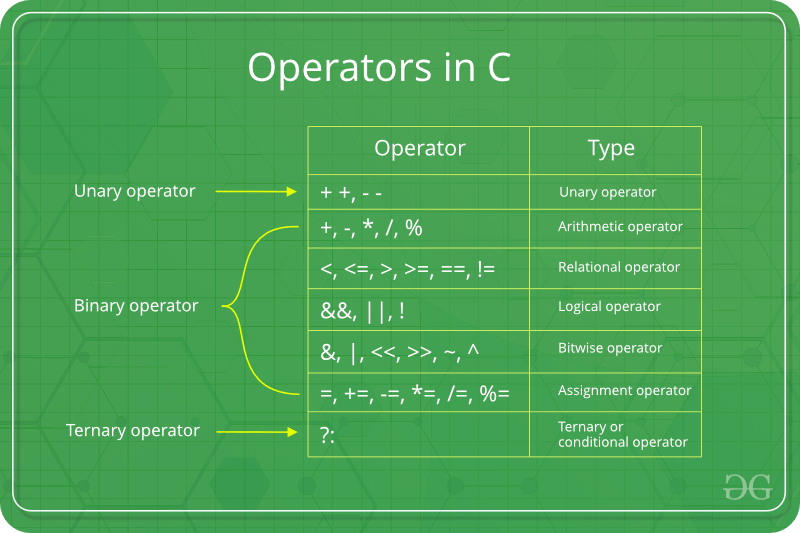
2. The Bitwise Operators
Now, let's explore what each of these operators does. We'll use the same video, as it provides excellent step-by-step examples for each one.
Bitwise Operators | C Programming Tutorial
Continuing with the same video, we'll now walk through each of the six bitwise operators. The video explains their mechanics and shows the result of applying them to sample numbers.
Watch from 02:32 to the end (12:20). As you watch, I recommend having a piece of paper or a text editor open to follow along with the binary calculations. Pay attention to the following: Left Shift (<<) & Right Shift (>>): How shifting bits left or right is equivalent to multiplication or integer division by powers of 2. AND (&): Sets a bit in the result to 1 only if the corresponding bits in both operands are 1. OR (|): Sets a bit to 1 if the corresponding bit in at least one of the operands is 1. XOR (^): Sets a bit to 1 if the corresponding bits in the operands are different. The 'soup or salad' analogy is a great way to remember this 'exclusive' logic. NOT (~): Flips every bit in its single operand (0s become 1s, and 1s become 0s).
Here's a summary table of the logical bitwise operators and a visual for the NOT operator to reinforce what you just saw.
| Operator | Name | C Symbol | Analogy |
|---|---|---|---|
| AND | Bitwise AND | & |
1 & 1 is 1 |
| OR | Bitwise OR | ` | ` |
| XOR | Exclusive OR | ^ |
1 ^ 1 is 0, 1 ^ 0 is 1 |
| NOT | Bitwise NOT | ~ |
~1 is 0, ~0 is 1 |

A quick note on the NOT operator: The video mentioned that applying ~ to the number 9 resulted in -10. This is due to how C represents negative numbers using a system called Two's Complement. While fascinating, we'll focus on bitwise operations with unsigned integers for now to keep the concepts clear. The core mechanic of ~ is simply to flip all the bits.
3. Why This Matters: Safe Hardware Control
You might be wondering, "When would I actually use this?" The answer is central to your goal of working with embedded systems.
Microcontrollers like the ones on Arduino boards are controlled by special memory locations called registers. Each bit within a register often acts as a switch or a setting for a specific hardware feature (e.g., turning a pin on, setting a timer mode, configuring a communication protocol).
Changing one of these features means you need to change a single bit without disturbing the others. Using a simple assignment (=) is extremely dangerous here, because it would overwrite the entire register, potentially disabling other critical hardware functions.
This is where the Read-Modify-Write pattern becomes essential. It's the standard, safe procedure for changing hardware registers:
- Read the current value of the entire register.
- Modify only the specific bit(s) you care about using bitwise operators.
- Write the new, modified value back to the register.
The following resource explains this concept perfectly. It's one of the most important low-level programming patterns you will learn.
Low level programming - Programming for Neanderthals
This article from 'Programming for Neanderthals' clearly explains why simple assignment is the wrong tool for manipulating hardware registers and details the safe 'Read-Modify-Write' alternative.
Please read the section titled 'Why use bitwise operations instead of a simple assignment in C?'. Then, read the section above it titled 'The Read-Modify-Write operation'. Focus on understanding why REG = MASK; is risky, while REG |= MASK; is safer for setting bits.
4. Hands-On Practice
Let's write a small C program to put these operators into practice and verify their behavior.
Task:
- Create a file named
bitwise_test.c. - In your
mainfunction, declare twounsigned charvariables. Anunsigned charis a common 8-bit integer type, perfect for visualizing bits.unsigned char a = 9; // Binary: 00001001 unsigned char b = 12; // Binary: 00001100 - Now, calculate and print the result of each bitwise operation. For
printf, you can use the%dformat specifier to see the decimal result.#include <stdio.h> int main() { unsigned char a = 9; // 00001001 unsigned char b = 12; // 00001100 printf("a = %d, b = %d\n", a, b); printf("a & b = %d\n", a & b); // AND printf("a | b = %d\n", a | b); // OR printf("a ^ b = %d\n", a ^ b); // XOR printf("~a = %d\n", ~a); // NOT printf("b << 1 = %d\n", b << 1); // Left Shift printf("b >> 2 = %d\n", b >> 2); // Right Shift return 0; } - Before you compile and run, try to predict the results yourself on paper!
00001001 & 00001100 = ?00001001 | 00001100 = ?- And so on...
- Compile (
gcc -Wall bitwise_test.c -o bitwise_test) and run the code. Do the results match your predictions?
Click to see the expected output and binary explanation.
Predicted Results (Binary):
a & b:00001000(The 3rd bit from the right is the only position where both are 1) -> Decimal 8a | b:00001101(A 1 appears in the result if it's in a OR b) -> Decimal 13a ^ b:00000101(A 1 appears where the bits are different) -> Decimal 5~a:11110110(All bits of00001001are flipped). The decimal value for this unsigned char would be 246.b << 1:00011000(00001100shifted left by 1) -> Decimal 24 (12 * 2)b >> 2:00000011(00001100shifted right by 2) -> Decimal 3 (12 / 4)
Actual printf Output:
a = 9, b = 12
a & b = 8
a | b = 13
a ^ b = 5
~a = -10       // Wait, why is this negative?
b << 1 = 24
b >> 2 = 3
You probably noticed that ~a printed a negative number. This is because of something called integer promotion. In the expression ~a, the unsigned char a is promoted to a signed int before the ~ operator is applied. The result is a large positive number whose bit pattern, when interpreted as a signed int, represents a negative value. This is a subtle but important detail of how C handles types in expressions. The bit-flipping itself happened exactly as expected.
Conclusion
In this lesson, we pulled back the curtain on how integers are stored and dove into the powerful world of bitwise operations. These operators are your tools for precise, low-level control over data.
Key Takeaways:
- All data is stored in binary, and C provides operators to manipulate these bits directly.
- The six bitwise operators are:
&(AND): For checking or clearing bits.|(OR): For setting bits.^(XOR): For toggling or comparing bits.~(NOT): For inverting all bits.<<(Left Shift): Fast multiplication by powers of 2.>>(Right Shift): Fast integer division by powers of 2.
- When working with hardware registers, a simple assignment (
=) is dangerous. Always use the Read-Modify-Write pattern to safely change specific bits while preserving others.
Next Up
You've now learned the operators—the "verbs" of bit manipulation. In our next lesson, we will learn the "grammar." We will focus on combining these operators with bitmasks to reliably set, clear, and test individual bits in a variable. This technique is the foundation for implementing flag systems, controlling hardware, and writing highly efficient, memory-conscious code.