Hello! Welcome to our next lesson on C programming.
In the last lesson, we worked with fixed-size arrays, learning how they are contiguous blocks of memory and how C provides no safety nets like bounds checking. This "under the hood" perspective is crucial for C programming.
Today, we'll focus on a special and very common type of array: the C-string. In C, a string is simply an array of characters. However, unlike the string objects you're used to in Python, Java, or TypeScript, C-strings are not "smart." They don't have built-in methods. Instead, we manipulate them using a standard set of functions.
This lesson directly builds on your knowledge of arrays and addresses your goal of understanding how systems work at a lower level. We'll cover the three most fundamental string operations: finding a string's length, comparing two strings, and copying a string.
By the end of this lesson, you will be able to perform common string operations using the C-string functions strlen, strcpy, and strcmp.
What Makes a Character Array a "String"?
A C-string isn't just any character array. It follows a specific convention: it's a sequence of characters followed by a special null terminator character, written as \0. This character has an ASCII value of 0 and acts as a sentinel, marking the end of the string.
For example, the string "Hello" is stored in memory as:
| H | e | l | l | o | \0 |
|---|
This \0 is fundamental. Without it, functions that operate on strings wouldn't know where the string ends and would just keep reading through memory, leading to bugs and crashes.
Finding the Length of a String: strlen()
The first thing you might want to do with a string is find its length. The strlen() function does exactly that. It counts the number of characters in a string up to, but not including, the null terminator.
To use strlen() and the other functions in this lesson, you must include the string library header:#include <string.h>
String Functions: Length of the string
This article provides a concise explanation of strlen. Pay close attention to its prototype and the custom implementation example, which perfectly illustrates how these functions work by simply looping until they find the \0 character.
Read the section "10.3.1. Length of the string" and its subsection "Implementation of strlen". Notice how the custom stringLength function is just a while loop that increments a counter until it sees the \0.
A key takeaway is the difference between strlen() and sizeof() on a character array:
strlen(my_string)gives you the number of characters in the content (excluding\0).sizeof(my_string)gives you the total number of bytes the array occupies in memory.
For example:
char greeting[10] = "Hello";

// strlen(greeting) will return 5.
// sizeof(greeting) will return 10 (bytes).
Comparing Strings: strcmp()
In languages like Python or Java, you can often compare strings for equality using the == operator. In C, this is a classic pitfall. Using == on C-strings does not compare their content; it compares their memory addresses. Since two different strings will almost always be in two different memory locations, this comparison will nearly always be false, even if the strings contain the exact same characters.
The correct way to compare string content is with strcmp().
strcmp() function | C Programming Tutorial
This video gives a complete and clear explanation of strcmp(). It starts by demonstrating why == fails and then dives into how strcmp() works.
Watch the entire video (00:00 - 07:00). It covers the three possible outcomes of strcmp() and the logic behind them, which is based on the ASCII values of the characters.
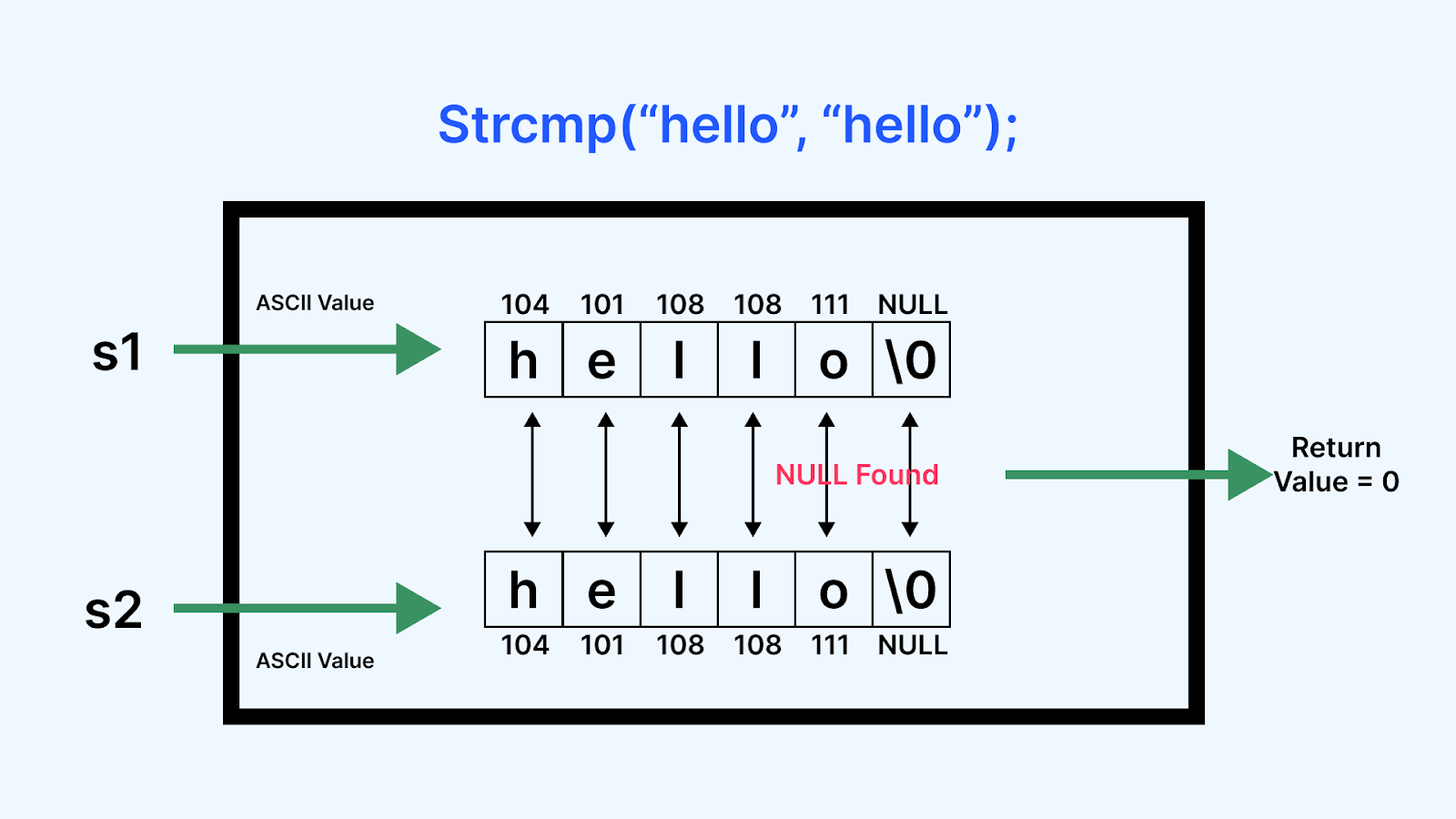
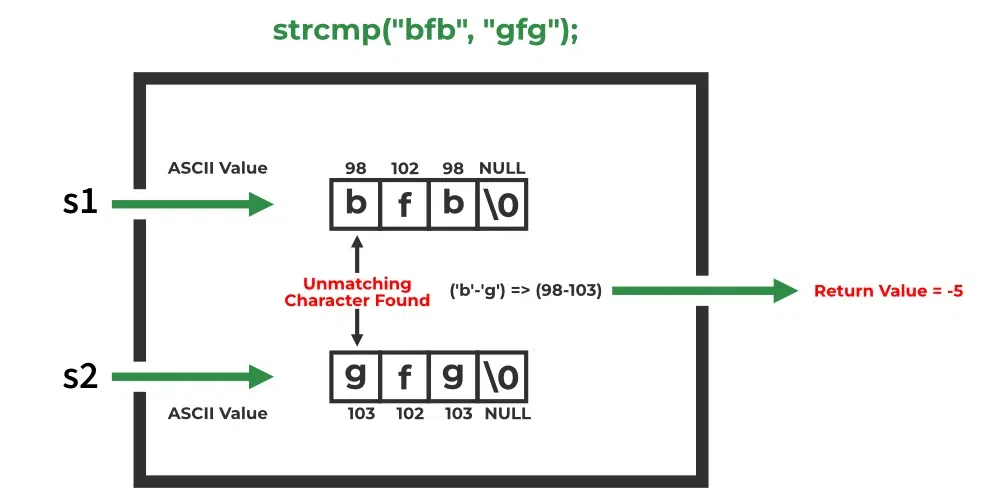
As the video explained, strcmp(s1, s2) returns:
- 0 if
s1ands2are identical. - A negative value (
< 0) ifs1comes befores2alphabetically (lexicographically). - A positive value (
> 0) ifs1comes afters2alphabetically.
Here are two images that visualize what the video described.
Copying Strings: strcpy() and strncpy()
Just as you can't compare strings with ==, you can't copy a string using the assignment operator =. Assigning one array to another is not allowed in C. Even if it were, it would only copy the memory address, not the string content.
To copy the actual characters from one string to another, you must use a function. The classic function for this is strcpy().
However, strcpy() is notoriously dangerous. It has been the source of countless security vulnerabilities. Why? Because, like scanf("%s"), it performs no bounds checking. It will happily copy a large source string into a small destination buffer, writing past the buffer's boundary and corrupting adjacent memory.
This video demonstrates this danger and introduces a safer, but more nuanced, alternative: strncpy().
strcpy() and strncpy() functions | C Programming Tutorial
This is a critical video to watch. It clearly shows the danger of strcpy and how to use strncpy to mitigate it, while also explaining the important caveats of strncpy.
Watch the entire video (00:00 - 08:02). Pay special attention to the buffer overflow crash caused by strcpy (around 01:54) and the section explaining that strncpy may not null-terminate the destination string (starting at 06:04).
Key takeaways on copying:
strcpy(destination, source): Copies the entire source string (including the\0) to the destination. It is fast and simple, but extremely unsafe if the source string might be larger than the destination buffer. Avoid it in modern code unless you are 100% certain the destination is large enough.strncpy(destination, source, n): Copies at mostncharacters from the source to the destination. This prevents buffer overflows.- The Catch: If the source string's length is
nor greater, the null terminator is not copied. This means your destination buffer is not a valid C-string! - The Rule: When using
strncpy, it is best practice to manually null-terminate the destination buffer to be safe.char dest[10]; char src[] = "A very long string"; // Copy at most 9 chars to leave space for '\0' strncpy(dest, src, 9); // MANUALLY add the null terminator dest[9] = '\0'; // Now 'dest' safely contains "A very lo"
- The Catch: If the source string's length is
This level of manual memory management is characteristic of C and a key part of the "under the hood" experience you're looking for.
Practical Exercise
Let's write a small program to put all three functions to use. Create a file named login.c.
Task:
Write a program that simulates a simple username and password check.
- Include the necessary headers:
<stdio.h>and<string.h>. - Declare two character arrays,
password_attemptandsecret_password, both of size 50. - Use
strcpy()to copy the string"automacao_e_vida"intosecret_password. - Prompt the user to enter the password and use
scanf("%s", password_attempt)to read their input. - Use
strcmp()to comparepassword_attemptwithsecret_password.- If they are the same (i.e.,
strcmpreturns 0), print a success message. Then, usestrlen()to find the length of the secret password and print it, like: "Login successful. Password length: 17". - If they are different, print "Access denied."
- If they are the same (i.e.,
Example successful run:
Enter password: automacao_e_vida
Login successful. Password length: 17
Example failed run:
Enter password: programming
Access denied.
This exercise will give you hands-on practice with the core C-string manipulation functions.
Conclusion
Today we took a deep dive into the most common C-string operations, bridging the gap between raw character arrays and functional strings.
Key Takeaways:
- C-strings are arrays of characters ending with a null terminator (
\0). - The
<string.h>library provides functions to manipulate them. strlen()counts characters up to, but not including, the\0.strcmp()is used to compare string content. It returns0for identical strings. The==operator compares memory addresses and should not be used for string content comparison.strcpy()copies strings but is unsafe due to the risk of buffer overflows.strncpy()is a safer alternative for copying that limits the number of bytes, but you must be careful to ensure the destination string is null-terminated.
In our next lesson, we will explore the subtle but important difference between character arrays (like char s[] = "hello";) and string literals (char *s = "hello";), which relates directly to where and how they are stored in memory. This will further enhance your "under the hood" understanding of how C programs work.