Hello! Welcome to the next lesson in our journey through C.
In our last session, we covered printf and scanf for console I/O. We ended on a crucial point: the danger of buffer overflows when using scanf with the %s format specifier. We discussed that scanf doesn't know how big your character buffer is and can write past its boundary, corrupting memory.
Today, we're going to dive deep into what that "buffer" actually is: an array. Arrays are one of the most fundamental and widely used data structures in programming. In C, they provide a way to store a collection of related data items, like a list of numbers or the characters that make up a string.
Your experience with lists in Python or arrays in Java will be helpful, but you'll see that C's approach is much closer to the hardware, revealing how these structures are actually laid out in memory. This aligns perfectly with your goal of understanding what's happening "under the hood."
By the end of this lesson, you will be able to declare, initialize, access, and manipulate fixed-size, single-dimensional arrays in C.
What is an Array?
At its core, an array is a collection of elements of a single data type stored in a contiguous block of memory. This means all the elements are stored one after another, with no gaps.
Let's start with a short, clear video to visualize this concept.
An Overview of Arrays and Memory (Data Structures & Algorithms #2)
This video from CS Dojo provides an excellent high-level introduction to what an array is, how to declare it, and how to access its elements.
Watch from 00:34 to 02:30. Pay attention to the three key characteristics: a collection of items, all of the same type, and accessed by an index starting at 0.
Declaring and Initializing Arrays
As you saw in the video, you declare an array in C by specifying its type, name, and size.
Declaration Syntax:type array_name[size];
For example, to declare an array that can hold 10 integers:int scores[10];
When the compiler sees this, it reserves a contiguous block of memory large enough for 10 integers. On a system where int is 4 bytes, this would be 40 bytes.
Initialization:
You can initialize an array at the time of declaration using curly braces {}.

For a more detailed look at the syntax for declaration and initialization, please review the following article.
This GeeksforGeeks article provides clear syntax rules and examples for declaring, initializing, and accessing arrays.
Read the sections titled "Syntax of One-Dimensional Array in C" and "Example of One Dimensional Array in C". This will show you the basic syntax and a complete program that puts declaration, initialization, and element access into practice.
Important Initialization Rules
C has a few convenient rules for initialization that are worth knowing:
-
Partial Initialization: If you provide fewer initializers than the array size, the remaining elements are automatically initialized to zero. This is a very common and useful feature.
// Initializes scores to {88, 92, 0, 0, 0} int scores[5] = {88, 92}; -
Zero Initialization: A simple way to initialize an entire array to zero is:
// Initializes all 100 elements to 0 int data[100] = {0}; -
Implicit Size: If you initialize an array at declaration, you can omit the size in the square brackets. The compiler will automatically size the array to fit the number of initializers.
// Compiler creates an array of size 4
float temps[] = {19.5, 21.2, 20.8, 18.9};
Arrays and Memory: The "Under the Hood" View
This is where C really shows its nature. Unlike Python lists, a C array is not an object with methods and properties; it's just a block of memory. The name of the array, like scores, essentially acts as a label for the memory address of the very first element.
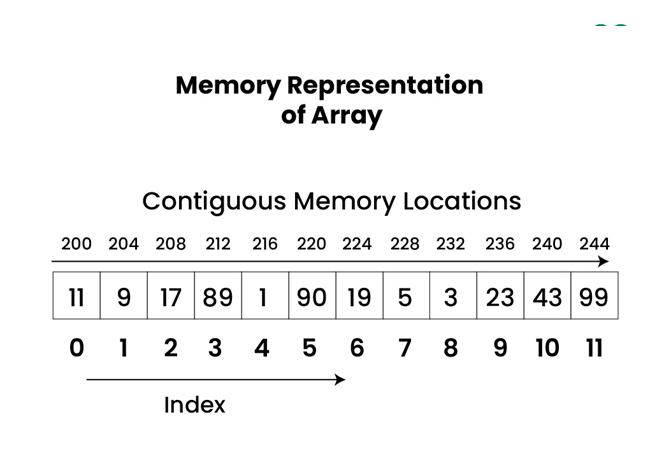
To access scores[2], the computer does some simple math:
- It gets the starting memory address of
scores. - It calculates the offset:
index * sizeof(element_type)->2 * sizeof(int). - It adds the offset to the starting address to find the exact memory location of
scores[2].
This direct address calculation is called random access and is extremely efficient. It's also why all elements must be the same type—otherwise, the sizeof would be different for each element, and this simple calculation wouldn't work.
This video gives a great explanation of why this contiguous memory layout leads to C arrays having a fixed size.
An Overview of Arrays and Memory (Data Structures & Algorithms #2)
Let's return to the CS Dojo video to explore the connection between arrays and memory in more detail. This will clarify why you can't just 'add' an element to a C array.
Watch from 12:09 to 16:37. This section explains how integers and then arrays of integers are laid out in memory as consecutive bytes. It provides a clear, simplified argument for why C arrays have a fixed size.
The Dangers of C Arrays: No Safety Nets
Here are two of the most important things to understand about working with arrays in C.
1. No Bounds Checking
C does not check if the index you are using is valid for the array's size. If you have int arr[5]; and you try to access arr[10], the compiler won't stop you. Your program will attempt to access memory that is outside the array's boundary. This is called a buffer overflow or buffer overrun.
The result is undefined behavior:
- Your program might crash with a "Segmentation fault".
- You might read garbage data from whatever was in that memory location.
- You might overwrite another variable, leading to bizarre and hard-to-find bugs.
This is precisely the security risk we discussed with scanf in the last lesson. When you use scanf("%s", name), if the user input is larger than the name character array, scanf just keeps writing past the end of the array.
2. Arrays Don't Know Their Own Size
Because a C array is just a block of memory, it does not store its own length. As a programmer, you are responsible for tracking the size of your arrays.
This video explains this crucial point very clearly.
Fixed and Variable Length Arrays in C and C++
In this clip, Jacob Sorber explains why you can't just ask an array for its length, and demonstrates the consequences of getting the size wrong.
Watch from 10:43 to 13:12. Focus on the explanation that C arrays don't store a length and the demonstration of what happens when you pass the wrong length to a function (it reads garbage memory).
As the video shows, when passing an array to a function, you must always pass its size as a separate argument.
The sizeof Trick (and its Limitation):
You can calculate the number of elements in an array using the sizeof operator, but only in the same scope where the array was declared.
int grades[] = {90, 85, 95, 100};
int num_grades = sizeof(grades) / sizeof(grades[0]); // 16 bytes / 4 bytes = 4 elements
This works because sizeof(grades) gives the total size of the array in bytes. This trick is extremely useful, but it will not work inside a function to which you've passed the array, because at that point the array has "decayed" into a pointer (a topic for our next module!).
Practical Exercise
Let's put this all together. Write a C program named stats.c that does the following:
- Declare a constant integer
NUM_VALUESand set it to5. - Declare an array of
doubles nameddatawith the sizeNUM_VALUES. - Use a
forloop to prompt the user to enterNUM_VALUESfloating-point numbers and store them in thedataarray usingscanf. Remember to use the&operator and check the return value ofscanffor basic error handling! - After the data is entered, write another
forloop to calculate the sum of all the values in the array. - Calculate and print the average of the numbers.
- (Challenge) Write a third loop to find and print the largest number in the array.
Example execution:
Enter value 1: 15.5
Enter value 2: 20.1
Enter value 3: 12.0
Enter value 4: 18.6
Enter value 5: 22.3

--- Results ---
Average: 17.70
Maximum value: 22.30
This exercise will solidify your understanding of array declaration, looping, and element access.
Conclusion
In this lesson, we demystified C arrays, exploring them from their high-level purpose down to their low-level memory representation.
Key Takeaways:
- An array is a fixed-size collection of elements of the same data type, stored in contiguous memory.
- You declare an array with
type name[size];and can initialize it with{...}. - Elements are accessed via a zero-based index, e.g.,
my_array[0]. - C performs no bounds checking, making you responsible for preventing buffer overflows.
- C arrays do not store their own length; you must track the size manually, especially when passing arrays to functions.
- The
sizeof(array) / sizeof(array[0])pattern can determine an array's length, but only in its declaration scope.
In our next lesson, we will focus on the most common type of array: the array of characters, otherwise known as a C-string. You'll learn how to use the standard library functions to perform common string operations like finding the length, copying, and comparing strings.