Hello! Welcome to your first lesson in our C/C++ course. I'm excited to get started with you.
Given your experience with languages like TypeScript and Java, you're likely familiar with the general idea of turning source code into something a computer can run. C has a very explicit and foundational process for this, and understanding it is key to mastering the language, especially for your goals in automation and application development.
This lesson directly addresses your interest in "under the hood" concepts. We will break down the C compilation pipeline into its four distinct stages. By the end, you will be able to describe the journey of a C program from a simple text file to a fully executable application.
Let's begin.
The C Compilation Pipeline: A Visual Overview
Before we dive into the details, it's helpful to see the entire process at a glance. Think of it as an assembly line for your code. Each stage takes a specific input, performs a transformation, and produces an output for the next stage.
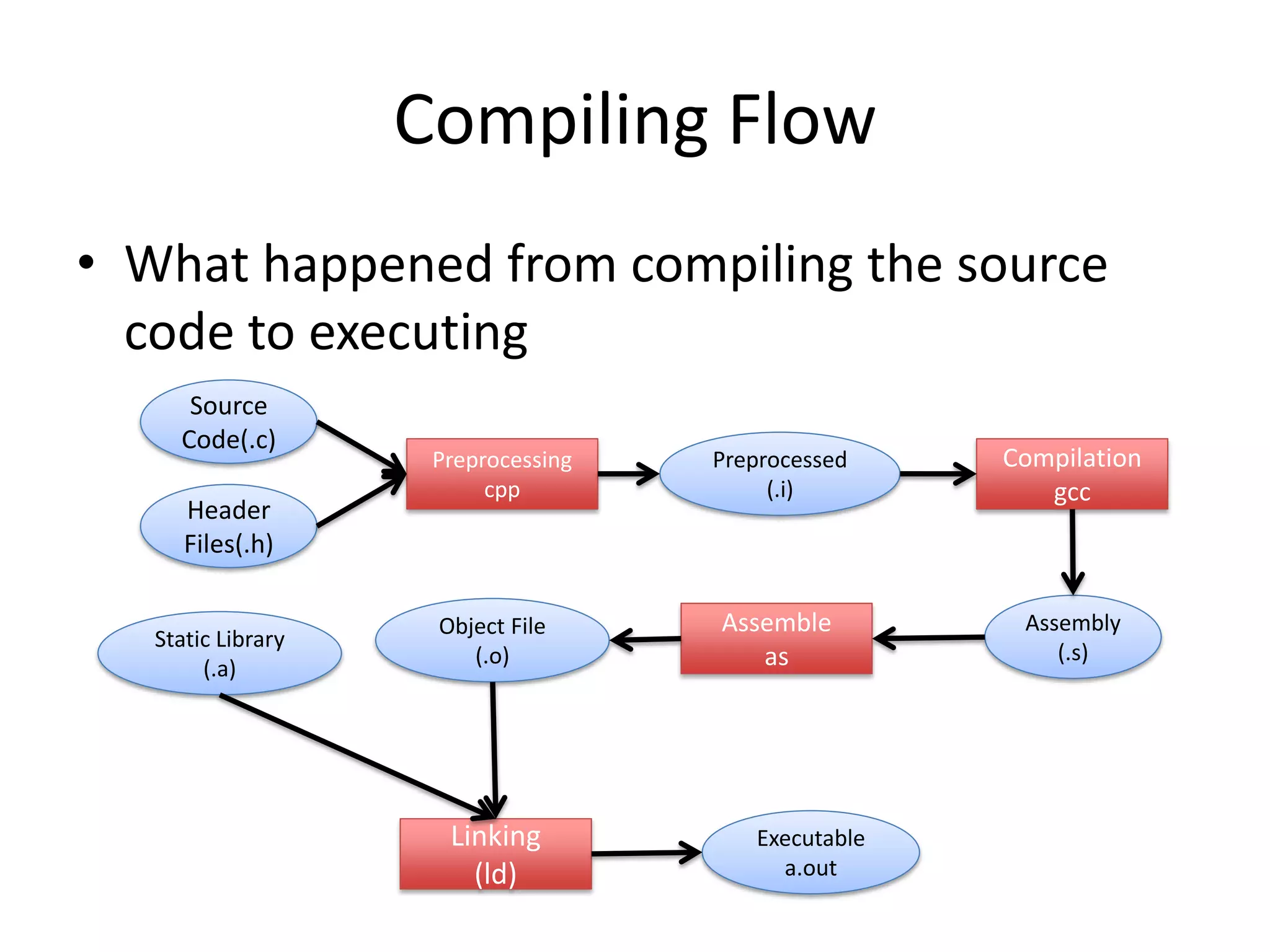
To get a dynamic feel for this process, the following short video provides a great high-level introduction.
In 54 Minutes, Understand the whole C and C++ compilation process
Watch this overview from the video "In 54 Minutes, Understand the whole C and C++ compilation process" by Mike Shah. It introduces the four stages we'll be covering: preprocessor, compiler, assembler, and linker.
Please watch from the beginning until timestamp 06:04. Focus on how each stage contributes to the final executable program.
Now that you have the big picture, let's examine each stage one by one.
Stage 1: Preprocessing
The first stop for your source code is the preprocessor. This is not the compiler itself, but a text-processing tool that modifies your source code based on special instructions called preprocessor directives. These directives all start with a # symbol.
Compilation Process in C - Scaler Topics
The article "Compilation Process in C" from Scaler Topics provides a clear breakdown of the preprocessor's tasks. This will give you a solid understanding of what happens in this initial stage.
Read the section titled "a. Pre-Processing". Pay attention to the four main tasks it describes: comments removal, macros expansion, file inclusion, and conditional compilation.
To summarize, the preprocessor performs these key actions:
- Removes comments: All comments (
// ...and/* ... */) are stripped from the code. - Expands macros: If you use
#defineto create a constant or a macro, the preprocessor replaces every instance of the macro with its defined value. - Includes header files: When it sees an
#include <stdio.h>directive, it literally copies and pastes the entire content of thestdio.hfile into your source code. This is how your program gets the declarations for functions likeprintf(). - Handles conditional compilation: Directives like
#ifdef,#ifndef, and#endifcan be used to include or exclude parts of the code based on certain conditions, which is useful for writing code that needs to run on different systems.
The output of this stage is a single, expanded source file, often with a .i extension. It's still C code, just without any preprocessor directives. On the command line, you can see this output using the -E flag with the gcc compiler, a tool we will use extensively starting in the next lesson.
Stage 2: Compilation
This is the stage where the "compiler" proper does its main job. It takes the preprocessed .i file and translates it into assembly code. Assembly is a low-level, human-readable language that corresponds directly to the processor's machine instructions.
During this stage, the compiler performs several crucial checks:
- Syntax Analysis: It parses your code to ensure it follows the grammatical rules of the C language. If you have a typo, like a missing semicolon, you'll get a compiler error here.
- Semantic Analysis: It checks for logical errors, such as trying to add a number to a string, or using a variable that hasn't been declared.
Compiling, assembling, and linking
The video "Compiling, assembling, and linking" by EngMicroLectures offers a very concise explanation of this stage. It shows how C code is converted to assembly and introduces a key concept for linking.
Watch from 00:33 to 02:17. Notice how the C variables and function calls are translated into assembly instructions. The video also mentions 'relocation information' for the printf function—this is a crucial piece of information the linker will use later.
The output of the compilation stage is an assembly file, which typically has a .s extension. Each file in your project that is compiled will produce its own corresponding assembly file. The command-line flag to stop after this stage is -S.
Stage 3: Assembly
The assembly code generated in the previous step is still human-readable. The computer's processor, however, only understands binary. The job of the assembler is to take the assembly (.s) file and translate it into machine code.
The result of this stage is an object file, which usually has a .o (on Linux/macOS) or .obj (on Windows) extension. This file contains the binary machine code for the functions and variables defined in your original C file.
However, an object file is not yet a complete, runnable program. If your code calls a function that is defined elsewhere (like printf from the standard library, or a function from another .c file in your project), the object file will contain a placeholder or reference for it. It knows the function needs to be called, but it doesn't know where that function's code is located in memory yet.
You can create an object file directly using the -c flag with gcc.
Stage 4: Linking
This is the final and often most complex stage. The linker's job is to take one or more object files and combine them into a single, final executable program.
The linker performs two primary functions:
- Combines Object Files: If your project is split into multiple
.cfiles (e.g.,main.c,utils.c), each will be assembled into its own object file (main.o,utils.o). The linker merges them all together. - Resolves Symbols: It resolves all the placeholders mentioned in the previous stage. When it sees a reference to
printfinmain.o, it finds the actual machine code forprintfinside the C standard library (a pre-compiled collection of object files) and "links" it into your final program. This is why it's called the "linker." If the linker cannot find the definition for a function you've used, it will produce an "undefined reference" error.
Compiling, assembling, and linking
This final clip from "Compiling, assembling, and linking" visually demonstrates how the linker pulls together different object files and libraries.
Watch from 03:38 to 05:51. The animation clearly shows how references to sub and printf in one object file are resolved by finding their definitions in another object file and in the standard library.
The output of the linker is a single executable file (e.g., a.out on Linux/macOS or an .exe file on Windows). This file contains all the necessary machine code from your project and the libraries it depends on, ready to be loaded by the operating system and executed by the CPU.
A Deeper Look: Static vs. Dynamic Linking
A key concept in linking is the distinction between static and dynamic linking.
- Static Linking: The linker copies all the necessary library code directly into your executable file. This makes the executable larger but self-contained. It doesn't need external library files to be present on the system where it runs.
- Dynamic Linking: Instead of copying the library code, the linker places a reference in your executable to a shared library (e.g., a
.sofile on Linux,.dylibon macOS, or a.dllon Windows). When you run the program, the operating system's dynamic linker loads the shared library into memory and connects it to your program. This results in smaller executables and allows libraries to be updated without recompiling the programs that use them.
Conclusion
You've now seen the full journey of a C program from source code to executable. Understanding this process is not just academic; it helps diagnose a wide range of common errors, especially the infamous "undefined reference" linker errors that can be baffling without this context.
Here are the key takeaways:
- Preprocessing: A text-replacement stage that handles directives like
#includeand#define, producing an expanded.ifile. - Compilation: Translates the preprocessed C code into architecture-specific assembly code (
.sfile) and performs syntax/semantic checks. - Assembly: Converts the assembly code into binary machine code, creating an incomplete object file (
.oor.obj). - Linking: Combines multiple object files and links them with necessary library code to resolve all symbol references and create a final, runnable executable.
In our next lesson, we'll put this theory into practice. You'll write your first C program and use the gcc compiler to compile and run it, learning about essential compiler flags along the way.