Hello! Welcome back.
In the last lesson, you successfully wrote, compiled, and ran your first C program. You learned the essential gcc commands and flags (-o, -Wall, -g) that form the foundation of C development. Now that you can create an executable, it's time to look at the fundamental building blocks of data within a C program.
This lesson dives into C's primitive data types. We'll explore the different types available for storing numbers and characters, such as int and char. Crucially, we'll uncover why C's flexibility regarding data type sizes can lead to significant "portability" problems—where code that works on one machine fails on another. This is a key concept, especially given your interest in embedded systems where you might work with many different processor architectures. By the end of this lesson, you will be able to explain C's primitive data types, their sizes, and the common portability issues they can cause.
How Data is Stored: Types and Memory
In any programming language, a variable is a name for a location in memory that stores a value. The variable's data type is a crucial piece of information for the compiler. It specifies two things:
- How much memory to allocate for the variable (e.g., 1 byte, 4 bytes).
- How to interpret the binary data stored in that memory (e.g., is this pattern of bits an integer, a floating-point number, or a character?).
Since you have experience with Java and Python, you're already familiar with this concept. However, C gives you much more direct control over memory, and with that control comes more responsibility.
First, let's establish a foundational understanding of how an integer value is physically stored in memory.
Know your data type: int - C Programming Tutorial 08
This video from mycodeschool provides an excellent explanation of how integer values are represented in memory. It covers the concepts of bits, bytes, calculating value ranges, and the two's complement system for representing negative numbers, which is fundamental to understanding how signed integers work.
Please watch from 09:01 to 17:40. The first part (starting at 09:01) explains how to calculate the range of values an unsigned integer can hold based on its bit width. The second part (starting at 11:27) explains the two's complement system, which is the standard way computers represent signed (positive and negative) integers.
As the video explains, with bits, you can represent:
- Unsigned values: to
- Signed values (Two's Complement): to
This knowledge is the key to understanding the value ranges of C's data types.
C's Primitive Data Types
C provides a set of basic, or "primitive," data types. These can be broadly categorized into integer types and floating-point types. For a comprehensive overview, the Wikipedia page on C data types is an excellent reference.
The following resource provides a detailed table of C's main data types. Focus on the table under the "Main types" section.
Read the section "Main types" and study the main table. Pay attention to the Type, Size (bits), and Range columns for integer types (char, short, int, long, long long) and floating-point types (float, double). Note the use of signed and unsigned modifiers.
Here's a summary of the key integer types you'll encounter, from smallest to largest:
char: The smallest addressable unit of memory, typically 1 byte (8 bits). It's an integer type and can be used to store character codes (like ASCII) or small numbers. By default, it might besignedorunsigneddepending on the compiler.short int(orshort): A short integer.int: The "natural" integer size for the target machine. This is the most common integer type.long int(orlong): A long integer.long long int(orlong long): An even longer integer (introduced in the C99 standard).
For floating-point numbers (numbers with a fractional part), you have:
float: Single-precision floating-point.double: Double-precision floating-point.long double: Extended-precision floating-point.
The Portability Problem: "At Least" is Not "Exactly"
Did you notice the "≥" symbol in the size column of the Wikipedia table? This points to a fundamental and challenging aspect of C: the C standard only guarantees minimum sizes for its data types, not exact sizes.
For example, the standard says an int must be at least 16 bits. On a modern 64-bit desktop computer, it's almost always 32 bits. But on a small 16-bit microcontroller for an Arduino project, it could be 16 bits.
This flexibility was intentional to allow C to run efficiently on a wide variety of hardware. The int type is supposed to be whatever integer size the processor handles most efficiently. But this creates a major portability problem: code that relies on an int being 32 bits wide might fail spectacularly when compiled and run on a machine where it's only 16 bits.
This image perfectly illustrates the issue.
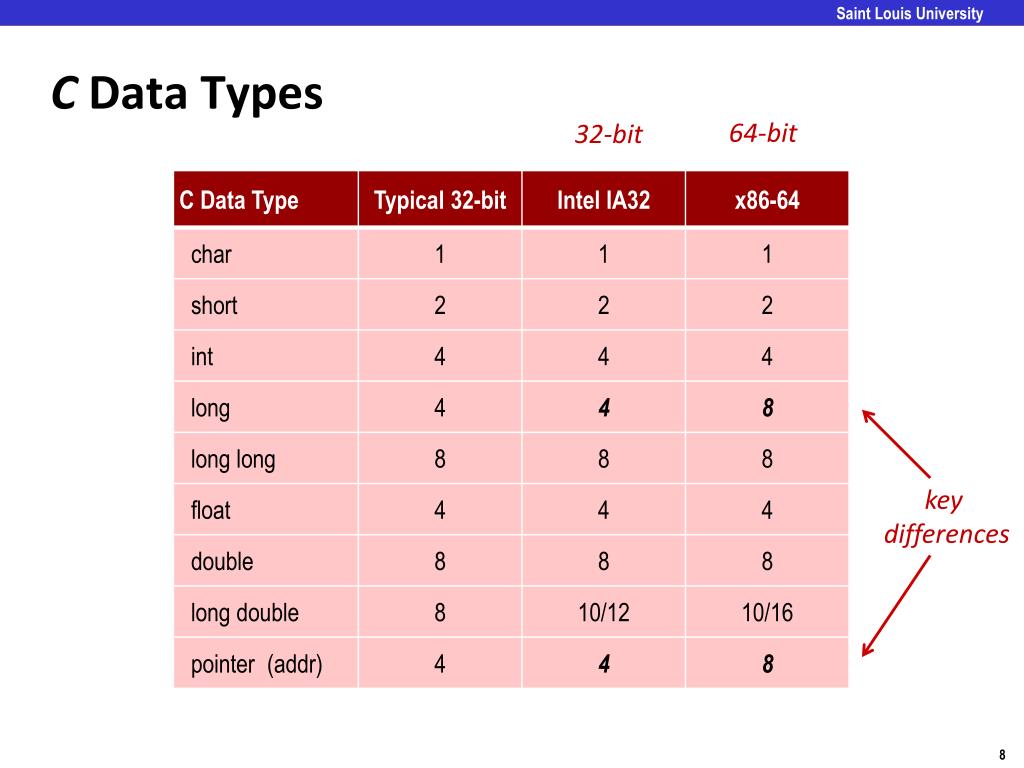
As you can see, a long is 4 bytes on a 32-bit system but 8 bytes on a 64-bit system. If you write code that assumes a long can hold a value larger than what a 4-byte integer can store, it will work on your 64-bit laptop but might fail when deployed to a 32-bit server.
The sizeof Operator
So, how can we know for sure? C provides a built-in operator called sizeof that tells you the size of a data type or a variable in bytes on the machine you're compiling on.
#include <stdio.h>

int main() {
    printf("Size of int: %zu bytes\n", sizeof(int));
    printf("Size of long: %zu bytes\n", sizeof(long));
    printf("Size of double: %zu bytes\n", sizeof(double));
    return 0;
}
(Note: %zu is the correct printf format specifier for the value returned by sizeof)
A Real-World Portability Bug
To see just how subtle and dangerous this can be, let's watch a demonstration.
#11 Standard integers (stdint.h) and mixing integer types
The following video from Quantum Leaps demonstrates a classic portability bug. It shows how simple arithmetic can produce a correct result on a 32-bit processor but an incorrect one on a 16-bit processor due to integer overflow.
First, watch from 00:59 to 02:24, which introduces the problem of implementation-defined sizes. Then, watch the detailed example from 12:55 to 20:23. This is the core of the demonstration, where you'll see the same code fail on one platform (MSP430, where int is 16-bit) and succeed on another (ARM, where int is 32-bit).
The key takeaway from the video is that the precision of a calculation depends on the types of its operands, not on the type of the variable you assign the result to. The addition u16a + u16b was performed using 16-bit arithmetic, which overflowed, and only then was the truncated result assigned to the 32-bit variable.
The Solution: Writing Portable Integer Code
How do we defend against these issues and write code that is reliable across different systems?
1. Explicit Casting
As shown at the end of the video segment (around 18:19), one way to fix the overflow bug is to force the calculation to be performed with higher precision. You can do this by explicitly casting one of the operands to a larger type.
// Unportable code
uint16_t a = 40000;
uint16_t b = 30000;
uint32_t result = a + b; // Potential overflow!

// Portable code
uint32_t portable_result = (uint32_t)a + b; // Correct!
By casting a to uint32_t, you tell the compiler to promote b to uint32_t as well, and the entire addition is performed using 32-bit arithmetic, preventing the overflow.
2. Fixed-Width Integer Types (<stdint.h>)
While casting works, a more modern and robust solution was introduced in the C99 standard: fixed-width integer types. These are defined in the <stdint.h> header file.
These types are designed to solve the portability problem once and for all. When you need an integer of a specific size, you should use them.
#11 Standard integers (stdint.h) and mixing integer types
Let's return to the Quantum Leaps video to see the formal introduction of <stdint.h> as the standard solution to this problem.
Watch from 03:53 to 06:30. This section explains the purpose of stdint.h and lists the most important fixed-width types it provides.
The most common fixed-width types are:
int8_t,int16_t,int32_t,int64_t: Signed integers of exactly 8, 16, 32, or 64 bits.uint8_t,uint16_t,uint32_t,uint64_t: Unsigned integers of exactly 8, 16, 32, or 64 bits.
If you are working with file formats, network protocols, or hardware registers in an embedded system, using these types is essential to ensure your code is portable and correct.
Practical Exercise
Let's put this all together. Write a C program named datatypes.c that does the following:
- Includes the
<stdio.h>,<limits.h>, and<stdint.h>headers. - In
main(), use thesizeof()operator to print the size in bytes ofchar,short,int,long, andlong long. - Use the macros defined in
<limits.h>to print the minimum and maximum values for theinttype (e.g.,INT_MIN,INT_MAX). - Declare a variable of type
uint32_tand assign it the value4000000000. Print its value using the%uformat specifier (or%luif yourintis smaller than 32 bits, a good example of format specifier portability issues we will discuss more later!).
Compile and run your program using the command you learned in the last lesson:gcc -g -Wall -o datatypes datatypes.c
Examine the output. How do the sizes on your machine compare to the values in the image we saw earlier?
Conclusion
In this lesson, we explored the fundamental data types in C and, more importantly, the nuances of their implementation. This "under the hood" knowledge is what separates C from higher-level languages and is critical for writing robust systems-level code.
Here are the key takeaways:
- C's primitive types include
char,int,float,double, and modifiers likeshort,long,signed, andunsigned. - The C standard only defines minimum sizes for these types, leading to their actual sizes varying by compiler and architecture. This is a major source of portability issues.
- The
sizeofoperator is your tool for determining the actual size of a type on any given system. - Integer overflow is a common bug when code is moved to a system with smaller integer sizes.
- For portable code requiring exact integer sizes, you should include
<stdint.h>and use fixed-width types likeint32_tanduint8_t.
In our next lesson, we will take a deeper dive into printf and introduce its counterpart, scanf, to handle formatted input from the user. You'll see how the data types we learned about today are directly linked to the format specifiers used in these essential I/O functions.