Hello! In our last lesson, we successfully configured a CMake project to find and link against an external library, SDL2. This was a major step toward building complex applications.
When your linker connected your code to the SDL2 library, it used a pre-compiled binary file (.lib, .a, .so, or .dll). These library files come in two fundamental types, and the choice between them has significant consequences for your application's size, performance, and distribution.
This lesson directly addresses the learning outcome: Distinguish between a static and a dynamic library and how they are linked. Understanding this distinction is crucial for both of your goals: distributing desktop applications and developing for embedded systems where memory is a premium.
Today, you will learn about:
- Static linking, where library code is copied directly into your executable.
- Dynamic linking, where your executable loads library code at runtime.
- The critical trade-offs between the two regarding file size, memory usage, updates, and deployment.
- How to use command-line tools to see these differences in practice.
1. The Core Concept: A Visual Explanation
At its heart, the difference between static and dynamic linking is about when and how the library code is combined with your own.
A simple analogy can be helpful:
- Static Linking is like writing a research paper and copy-pasting a chapter from a reference book directly into your document. Your paper becomes large and self-contained. Anyone can read it without needing the original reference book.
- Dynamic Linking is like adding a footnote in your paper that says, "For details, see Chapter 5 of 'Reference Book X'." Your paper is small and relies on the reader having access to that external book.
This image provides a great visual summary of the process:
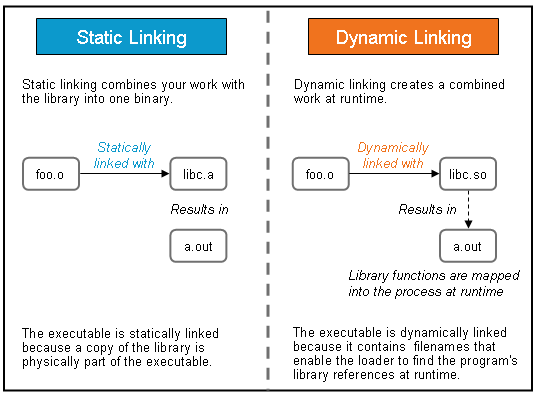
As you can see, the statically linked executable is a single, self-contained unit, while the dynamically linked one has a runtime dependency on an external file.
2. Static Linking: The Self-Contained Approach
In static linking, the linker's job is to find all the library code your program uses and copy it into your final executable file. This happens during the final stage of compilation.
Static and Dynamic Linking Explained
Let's formalize this concept. The following article provides a clear definition of static linking and its implications.
Please read the section titled 'What Is Static Linking?' up to (but not including) the 'Static Linking Example' subsection. The key phrases to focus on are 'combined into a single executable file during compile time' and 'creates a self-contained program'.
This self-contained nature leads to a specific set of pros and cons.
Static and Dynamic Linking Explained
Now let's examine the trade-offs that come with this approach.
Read the two subsections 'Advantages of Static Linking' and 'Disadvantages of Static Linking'. As you read, think about why each point is a direct consequence of copying the code into the executable.
Let's summarize the key trade-offs:
| Advantages (Pros) | Disadvantages (Cons) |
|---|---|
| Portability: The executable is a single file with no external dependencies. You can copy it to another compatible machine, and it will just run. | Larger File Size: Since all library code is duplicated in the executable, the file size can become very large. |
| Performance: Can have slightly faster startup times as the OS doesn't need to locate and load external libraries. | Memory Inefficiency: If you run two different programs that are both statically linked to the same library, that library's code exists in memory twice. |
| Version Control: You are locked into the version of the library you compiled with, which prevents surprise issues from a user updating a shared library on their system. | Maintenance: If a bug is found in the library, every application that uses it must be re-compiled and re-distributed to get the fix. |
3. Dynamic Linking: The Shared Approach
Dynamic linking is the more common approach for large frameworks and system libraries. Instead of copying code, the linker places a reference inside the executable. When you run the program, the operating system's dynamic linker is responsible for finding the required shared library (a .so file on Linux, .dll on Windows, or .dylib on macOS), loading it into memory, and resolving the references.
Static and Dynamic Linking Explained
Now for the alternative. The same article explains the mechanics of dynamic linking, where the final connection is deferred until runtime.
Read the sections 'What Is Dynamic Linking?' and 'What Happens During Dynamic Linking?'. The example using the ldd command to inspect dependencies is particularly important.
As you might expect, the trade-offs are largely the inverse of static linking.
Static and Dynamic Linking Explained
Let's review the pros and cons of dynamic linking.
Read the subsections 'Advantages of Dynamic Linking' and 'Disadvantages of Dynamic Linking'.
Here is a summary of the trade-offs for dynamic linking:
| Advantages (Pros) | Disadvantages (Cons) |
|---|---|
| Smaller File Size: Executables are much smaller as they only contain references, not the full library code. | Deployment Complexity: You must distribute the required .dll/.so files alongside your executable. If they are missing, the program won't run. |
| Memory Efficiency: If multiple programs use the same dynamic library, the OS loads a single copy into memory and shares it among them. | "DLL Hell" / Versioning: Your program might break if a user has an incompatible version of a required library on their system. |
| Easy Updates: To patch a bug in a library, you can often just replace the shared library file. All applications using it will benefit from the fix without needing to be recompiled. | Performance Overhead: There is a small performance cost at startup while the OS locates and links the shared libraries. |
4. Seeing the Difference in Practice
Theory is one thing, but these differences have tangible effects. The following video provides an excellent hands-on demonstration.
Software Development with C++: Dynamic and Static Linking
This video takes a simple 'Hello World' program and compiles it both ways, using standard command-line tools to expose the differences.
Watch from 00:36 to 04:34. The narrator will: Compile the program twice: once with default dynamic linking, and once with a flag to force static linking against the C++ standard library. Use the ldd command on Linux to list the shared library dependencies. Notice that the statically linked version has fewer dependencies. Compare the file sizes with ls -la, showing that the statically linked executable is significantly larger.
Under the Hood: How Dynamic Linking Works
Given your interest in how systems work, it's worth taking a slightly deeper look. You might wonder: if the function's code isn't in the executable, what is there?
The compiler inserts a small "stub" of code for each dynamically-linked function. This stub is part of the Procedure Linkage Table (PLT). The first time you call the function, the PLT stub directs the program to the OS dynamic linker. The linker finds the real function in the shared library, maps it into memory, and then "patches" an address table (the Global Offset Table, or GOT) so that all future calls to that function jump directly to the right place without the linker's help. This clever mechanism is called lazy binding.
This next segment of the video shows you exactly that.
Software Development with C++: Dynamic and Static Linking
For those curious about the low-level mechanics, this part of the video uses a disassembler (objdump) to peer inside the executables. It visualizes the PLT mechanism that makes dynamic linking possible.
Watch from 04:34 to 07:28. You don't need to understand every line of assembly code. The goal is to see the structural difference: the dynamically linked executable has a call to a @plt stub (a placeholder), whereas the statically linked version contains the full, complex implementation of the << operator directly within its code.
5. How to Choose?
Now that you understand the mechanics and trade-offs, which should you use? The decision depends entirely on your project's goals.
Static and Dynamic Linking Explained
The article we've been referencing concludes with some excellent rules of thumb for making this decision.
Read the short section 'How to Choose Between Static and Dynamic Linking' for practical guidelines.
To connect this to your goals:
- Desktop Applications (with Qt): You will almost always use dynamic linking. The Qt framework is very large. Linking it statically would result in enormous executables and defeat the purpose of a shared framework. When you build a Qt app, you will see the necessary Qt
.dllor.sofiles appear in your build folder, and you now know these must be shipped with your application. - Embedded Systems / Arduino: In this context, you are effectively using static linking. All the code, including the Arduino core libraries and any third-party libraries, is compiled and linked into a single firmware binary. This binary is then flashed to the device's memory. There is typically no operating system present to manage dynamic libraries, so everything must be self-contained. This is why firmware size is a critical constraint in embedded development.
Conclusion
You have now grasped one of the most fundamental concepts in compiled languages. The choice between static and dynamic linking is a classic engineering trade-off between portability, efficiency, and maintainability.
Key Takeaways:
- Static Linking: The library code is copied into your executable at compile time. This creates a large, self-contained, and highly portable application.
- Dynamic Linking: The executable only contains references to a shared library. The operating system connects everything at runtime. This results in a smaller executable that shares libraries efficiently but requires distributing those dependency files.
- The choice depends on the application: simple command-line tools often benefit from static linking, while large GUI applications and plugins rely on dynamic linking. Embedded systems are an extreme case of static linking.
This lesson concludes Module 10 on error handling and build systems. You've built a strong foundation in managing code, handling errors, and linking dependencies.
Next Up
You are now ready to start building something tangible. In the next module, "Introduction to Desktop Applications with Qt," we will put everything you've learned into practice. You'll set up your first Qt project, learn about its core event-driven model, and see firsthand how your application dynamically links against the powerful Qt framework to create a graphical user interface.