Introduction
Hello! In our last lesson, we learned how to define and use structs to group related data, creating our own custom data types like the Note struct for your music project. We saw how to define them, access members with the . operator, and initialize them.
Today, we'll connect this to what we've learned about functions and pointers. The central question is: what happens when we pass a complex data type like a struct to a function? This lesson directly addresses the learning outcome: Pass structs to functions by value and by pointer.
We'll explore two fundamental mechanisms for this and their crucial differences:
- Pass-by-value: Sending a complete copy of the data.
- Pass-by-pointer: Sending the memory address of the data.
Understanding the trade-offs between these two methods is vital for writing efficient and correct C code, especially in performance-sensitive areas like automation and game development. This choice impacts performance, memory usage, and whether a function can modify the original data.
1. The Default: Pass-by-Value
In C, when you pass a struct variable to a function, the default behavior is pass-by-value. The function receives a complete, independent copy of the original struct. Any modifications the function makes are to its local copy, leaving the original variable untouched.
Think of it like making a photocopy of a document. If you give someone the photocopy, any notes they write on it won't appear on your original.
CS31: Intro to C Structs and Pointers
This article from Swarthmore College's CS department gives a very clear and direct explanation of this concept.
Read the first section titled 'Passing structs to functions'. Focus on the core idea: the function receives a COPY of the struct, and changes within the function are not reflected in the original.
Let's see this in action. Here is a simple Point struct:
#include <stdio.h>

typedef struct {
    int x;
    int y;
} Point;

// This function receives a COPY of the point.
void modify_and_print(Point p) {
    printf("Inside function (start): p = (%d, %d)\n", p.x, p.y);
    // Modify the local copy
    p.x = 100;
    p.y = 200;
    printf("Inside function (end):   p = (%d, %d)\n", p.x, p.y);
}

int main() {
    Point my_point = {10, 20};
    printf("Before function call: my_point = (%d, %d)\n", my_point.x, my_point.y);

    modify_and_print(my_point);

    printf("After function call:  my_point = (%d, %d)\n", my_point.x, my_point.y);
    return 0;
}
When you compile and run this, you'll see that my_point in main remains unchanged.
Pros and Cons of Pass-by-Value:
- Pro: It's safe. The function cannot accidentally change your original data.
- Con: It can be inefficient. If the
structis large (e.g., containing large arrays or many fields), copying all that data onto the function's stack frame takes time and memory.
2. The Efficient Alternative: Pass-by-Pointer
To avoid the cost of copying, we can pass a pointer to the struct instead. This is C's way of simulating pass-by-reference. Instead of sending the whole data structure, we only send its memory address—a small, fixed-size value (usually 8 bytes on a 64-bit system).
When a function has a pointer to the original struct, it can read from and—crucially—write to the original data.
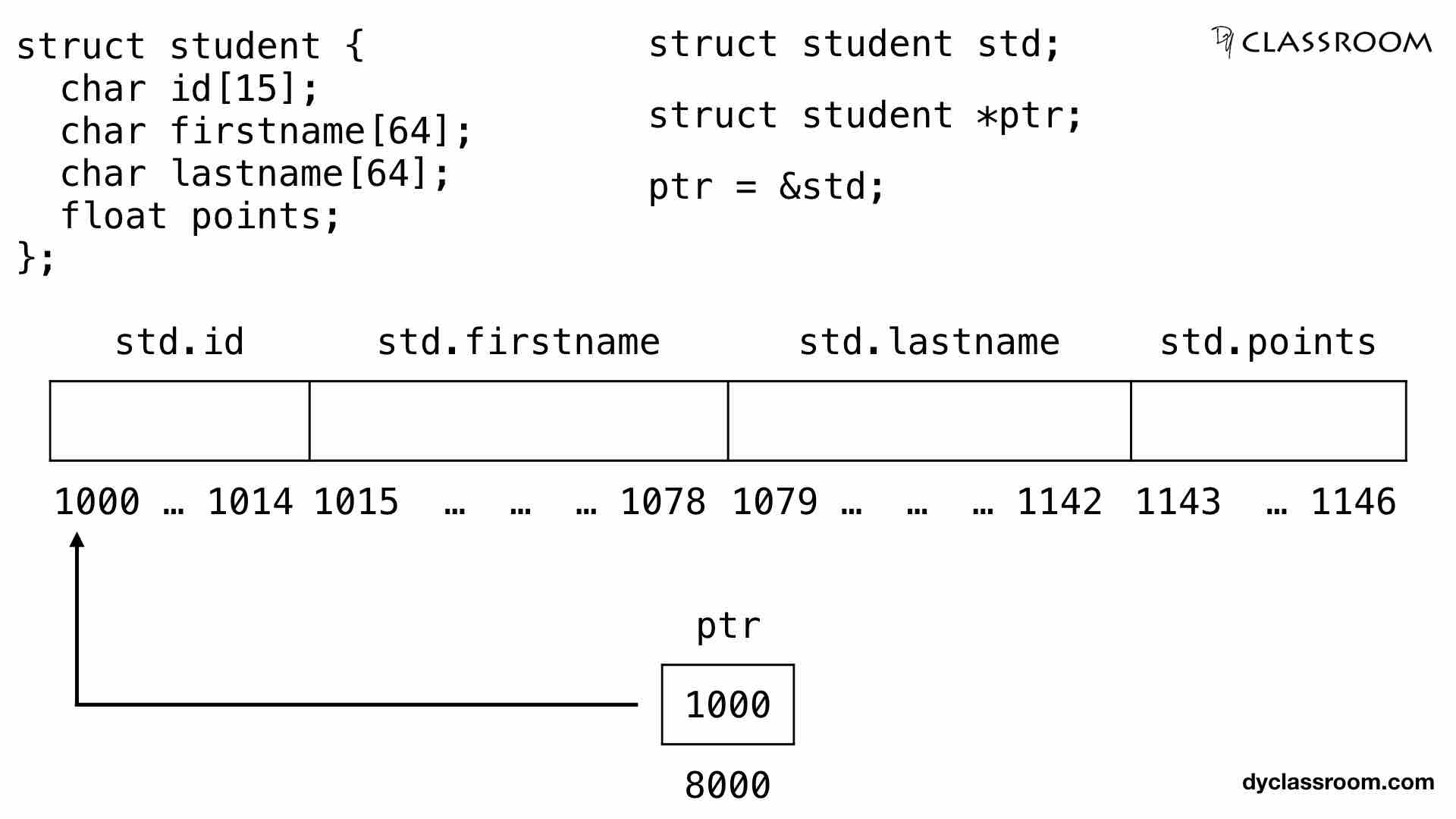
When working with a pointer to a struct, we use the arrow operator -> to access its members, instead of the dot operator .. The expression sptr->member is simply syntactic sugar for (*sptr).member.
Master Pointers in C: 10X Your C Coding!
The video 'Master Pointers in C' by Dave's Garage offers a great analogy and a clear, concise explanation of passing structs by pointer and the arrow operator.
Watch the segment from 04:03 to 06:27. Pay close attention to: The distinction between the dot . and arrow -> operators. The 'house appraiser' analogy for why passing an address is more efficient. The definition of pass-by-value vs. pass-by-reference.
Making Pass-by-Pointer Safe with const
A common use case is when a function only needs to read a struct, not modify it. We can enforce this by using the const keyword. This gives us the best of both worlds: the efficiency of pass-by-pointer and the safety of pass-by-value.
// The 'const' promises that this function will not change the data 'p' points to.
void print_point_by_ptr(const Point *p) {
    // We can read the members.
    printf("Point = (%d, %d)\n", p->x, p->y);

    // If you uncomment the line below, the compiler will produce an error.
    // p->x = 100; // ERROR: assignment of read-only location
}
This is a very important and widely used pattern in C programming.
3. The Performance Nuance: When is Value Better?
The standard advice is: "Pass small structs by value, large structs by pointer." But the reality, as is often the case in systems programming, is more nuanced. Given your interests in math-heavy fields and "under the hood" operations, this is a trade-off you'll find fascinating.
A modern compiler is an incredibly sophisticated piece of software. When you pass a small struct by value, the compiler can often optimize the code to be even faster than passing a pointer by keeping all the data in CPU registers, avoiding slower memory access entirely.
Pass by Value vs Pass by Pointer
The article 'Pass by Value vs Pass by Pointer' by Austin Morlan does a fantastic job of analyzing this trade-off by looking at the machine code the compiler generates. This is a deep dive, but the conclusions are highly practical.
I encourage you to read through this article. You don't need to understand every line of assembly code. Focus on: The two C code examples for vec4_add: one using pointers and one using values. The 'Pass by Pointer (-O2)' and 'Pass by Value (-O2)' sections for the 'Small Struct' to see how few instructions are needed with optimizations. The same optimized sections for the 'Large Struct' (mat4) to see how the pattern changes. Read the 'Conclusion' section carefully. It summarizes the trade-offs regarding performance, readability, and potential compiler optimizations.
Key Takeaway from the Analysis:
- For small structs (like a 2D/3D vector), pass-by-value is often preferable. It can be faster due to compiler optimizations and leads to more readable code (e.g.,
c = add(a, b)). - For large structs, the cost of copying the data outweighs any register optimization benefits. Pass-by-pointer is the clear winner for performance. The
constkeyword should be used if the data is read-only.
4. "Returning" Structs from Functions
Now, how do we get a struct out of a function? There are a few ways, each with different implications.
How to return and pass a struct to a function
The CodeVault video we'll watch now walks through the different strategies for returning a struct, highlighting a major pitfall and showing the most common C idiom.
Watch the video from 01:26 to 07:42, and then from 09:52 to 12:41. Pay attention to the following progression: Returning by Value (01:26 - 04:22): The function returns a full copy of the struct. Simple, but involves copying. A Dangerous Idea (05:53 - 07:42): The video shows why you must never return a pointer to a local variable. That memory is on the stack and becomes invalid as soon as the function returns. The Output Parameter Idiom (09:52 - 12:41): This is the most efficient and idiomatic C approach for 'returning' large structs. The caller provides the memory, and the function fills it in. Notice how this avoids both unnecessary copying and the dangling pointer problem.
To summarize the output parameter pattern:
// This function 'returns' a Point by writing into the memory location
// provided by the caller via the 'out_p' pointer.
void create_point(int x, int y, Point *out_p) {
    out_p->x = x;
    out_p->y = y;
}

int main() {
    Point new_point; // The 'main' function allocates the memory on its stack.

    // We pass the address of 'new_point' to the function to be filled.
    create_point(50, 60, &new_point);

    printf("Created point: (%d, %d)\n", new_point.x, new_point.y);
}
This pattern is extremely common in C libraries because it's efficient and gives the caller control over memory allocation.
Practical Challenge
Let's apply these techniques to the Note struct from our last lesson.
Your task:
- Start with the
Notestructandtypedeffrom the previous lesson. - Write a function
void print_note(const Note *note)that takes a constant pointer to aNoteand prints its members in a formatted way. - Write a function
void transpose_note(Note *note, int semitones)that modifies the note's pitch. For simplicity, just add thesemitonesvalue to the character representing the note letter (e.g.,'G' + 2would become'I'). This is just a placeholder for a real music logic function, the goal is to practice modification. - Write a function
void create_rest_note(Note *output_note)that uses the output parameter pattern to create a "rest" note (e.g., pitch "---", duration 1.0, velocity 0). - In
main, create a note, print it, transpose it, print it again, and then create a rest note and print that.
Click here for a sample solution
#include <stdio.h>
#include <string.h>

typedef struct {
    char pitch[4];
    float duration;
    int velocity;
} Note;

// 2. Print function (read-only access)
void print_note(const Note *note) {
    printf("Note(Pitch: %s, Duration: %.2f, Velocity: %d)\n",
           note->pitch, note->duration, note->velocity);
}

// 3. Modification function
void transpose_note(Note *note, int semitones) {
    // A simplified 'transpose' for demonstration
    if (note->pitch[0] != '-') {
        note->pitch[0] += semitones;
    }
}

// 4. Output parameter function
void create_rest_note(Note *output_note) {
    strcpy(output_note->pitch, "---");
    output_note->duration = 1.0f;
    output_note->velocity = 0;
}

int main() {
    // 5. Putting it all together
    Note my_note = {"C4", 0.5f, 100};

    printf("Original note: ");
    print_note(&my_note);

    transpose_note(&my_note, 2);
    printf("Transposed note: ");
    print_note(&my_note);

    Note rest;
    create_rest_note(&rest);
    printf("Rest note: ");
    print_note(&rest);

    return 0;
}
Conclusion
Today you've mastered a critical concept: how to handle structs in functions. This knowledge is essential for building any non-trivial C program.
Key Takeaways:
- Pass-by-value copies the entire
struct. It's safe but can be slow for large structs. - Pass-by-pointer passes only a memory address. It's efficient and allows the function to modify the original data.
- Use
constwith pointers (const MyStruct *s) to get the efficiency of pointers with the safety of preventing modification. - For small structs, passing by value can be faster due to compiler optimizations and may lead to more readable code.
- The output parameter pattern (
void func(MyStruct *out)) is the standard, efficient C idiom for having a function "return" a large data structure.
Next Up
We've used typedef as a convenience to simplify our struct declarations. In the next lesson, we'll explore its power more broadly. We will see how it can dramatically improve code readability and maintainability when working with more complex types, setting the stage for creating more modular and scalable programs.