Introduction
Hello! In our last lesson, we dove into the world of manual memory management, learning how to use the new and delete operators to control the lifetime of data on the heap. This is a powerful feature that gives you fine-grained control over your program's resources, a significant departure from the garbage-collected environments you're used to in Java and Python.
As our programs grow, we face another challenge: organization. If you define dozens of functions or use several third-party libraries, what happens when two different parts of your code try to use the same name for a function, like print() or init()? This leads to naming conflicts, a problem you've seen solved in other languages—for example, with packages in Java or modules in Python.
Today's lesson addresses this exact issue by covering the C++ solution: namespaces. Our goal is to learn how to use namespaces to organize code and prevent these naming conflicts. This is a fundamental skill for writing clean, maintainable, and scalable C++ applications.
1. The Problem: Naming Conflicts
Before C++ had namespaces, and in C programs today, a common way to avoid naming conflicts was to prepend a unique prefix to every function and type. You may have seen this in C libraries, with functions like glfwInit() or glGenTextures(). While effective, it can make code verbose and cumbersome.
C++ provides a more elegant solution. Let's start by watching a short video that clearly illustrates the problem and introduces namespaces as the answer.
This video from The Cherno demonstrates why naming conflicts are a problem and how C libraries historically solved it. It then introduces namespaces as the modern C++ approach.
Please watch from 0:46 to 5:07. The first part (until 4:12) sets up the problem of naming conflicts. The second part (starting at 4:12) introduces the basic syntax of a namespace as the solution.
As the video explains, the primary purpose of a namespace is to create a named scope, allowing you to group related code and prevent its names from clashing with names in other scopes.
2. Defining and Accessing Namespaces
The syntax for creating a namespace is straightforward. You use the namespace keyword followed by a name and a block of code enclosed in curly braces.
// In a file, perhaps named 'drawing_utils.h'
namespace drawing {
    void init() {
        // Code to initialize the drawing library
    }

    class Circle { /* ... */ };
}

// In another file, perhaps 'audio_utils.h'
namespace audio {
    void init() {
        // Code to initialize the audio engine
    }

    class Sound { /* ... */ };
}
Now we have two init() functions, but they don't conflict because they live in separate namespaces. To call a specific one, you use the scope resolution operator (::).
#include "drawing_utils.h"
#include "audio_utils.h"

int main() {
    drawing::init(); // Calls the init function from the 'drawing' namespace
    audio::init();   // Calls the init function from the 'audio' namespace

    drawing::Circle my_circle;
    audio::Sound my_sound;

    return 0;
}
This operator tells the compiler exactly which namespace to look in. You can think of it as providing a "full path" to the function or type.
3. The using Keyword: Convenience vs. Safety
Constantly prefixing names with namespace:: can become tedious. C++ provides two mechanisms to simplify this: the using declaration and the using directive.
using Declaration (Safer)
A using declaration brings a single specific name from a namespace into the current scope.
#include <iostream>

int main() {
    using std::cout; // Bring only 'cout' into this scope.

    cout << "Hello, world!\n"; // No 'std::' prefix needed for cout.
    std::endl; // Still need 'std::' for other names like endl.

    return 0;
}
This is a safe and explicit way to reduce verbosity for commonly used names.
using Directive (Use with Caution)
A using directive brings all names from a namespace into the current scope.
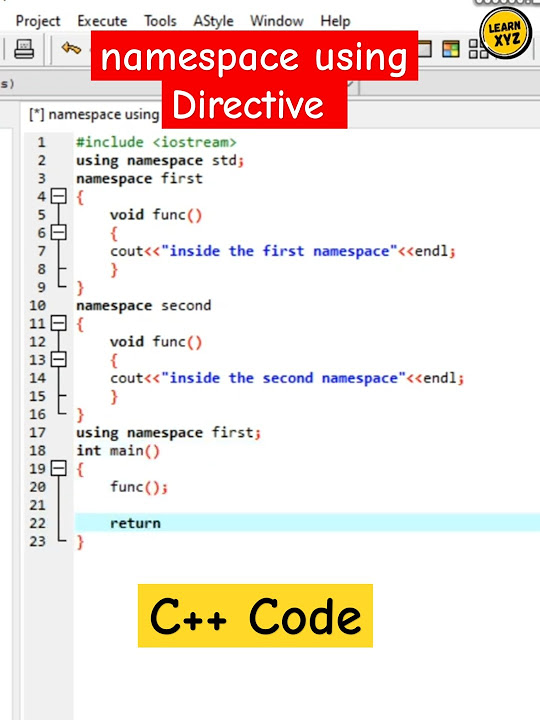
#include <iostream>

namespace messaging {
    void print(const std::string& msg) {
        std::cout << msg << std::endl;
    }
}

int main() {
    using namespace messaging;

    print("This is a message."); // 'print' is resolved to 'messaging::print'.

    return 0;
}
This is convenient, but it can also re-introduce the very problem we're trying to solve! If you use using namespace on two different namespaces that both contain a function named print(), you will get an ambiguity error.
This leads to the most important rule of thumb for namespaces:
Never put a
usingdirective (likeusing namespace std;) in a header file.
If you do, you force every file that includes your header to bring in all of those names, potentially causing unexpected conflicts across your entire project. It's generally acceptable to use them within the narrow scope of a function in a .cpp file, but it's best to be cautious.
How to use your namespaces to their best
For a detailed guide on best practices, particularly regarding using declarations and directives, please read this section from Sandor Dargo's blog.
Please read the section titled "Use using declarations as much as you need, but only in .cpp files". Focus on the explanation of why using directives are dangerous in header files and why using declarations are a better alternative.
4. Common Patterns and a Java Analogy
Given your background, it's helpful to compare C++ namespaces with Java packages.
namespaces (C++) vs. packages (Java):
- Purpose: Both organize code and prevent naming conflicts.
- Structure: In Java, package names are tied directly to the directory structure (
com.mycompany.appmaps tocom/mycompany/app/). In C++, there is no such requirement. While it's a common convention to have namespaces mirror the directory structure, it is not enforced by the language. - Importing: C++'s
using namespace my_lib;is similar to Java'simport com.mylib.*;. C++'susing my_lib::MyClass;is similar to Java'simport com.mylib.MyClass;.
The Stack Overflow answer below provides a concise summary of these differences.
C++ Namespaces, comparison to Java packages
This Stack Overflow answer provides an excellent comparison between C++ namespaces and Java packages. It will help connect the concepts to what you already know.
Read the accepted answer, focusing on the sections "Avoiding conflicts", "How much nested namespaces should be?", and "Differences in languages". This will clarify the conceptual differences in how namespaces are used in practice in C++ compared to Java.
Advanced Usage
Namespaces have a few other useful features for organizing large projects.
This video from Portfolio Courses covers some more advanced but common patterns, including nested namespaces and creating aliases.
Watch from 6:54 to 10:02. This section demonstrates: How to create an alias for a long namespace name. How to nest namespaces for better organization. The modern C++17 syntax for nesting namespaces.
-
Nested Namespaces: You can define namespaces within other namespaces to create a hierarchy.
namespace my_app {
    namespace core {
        class Engine { /*...*/ };
    }
    namespace utils {
        void log(const std::string&);
    }
}
// Access with: my_app::core::Engine engine;
Since C++17, you can use a more compact syntax:
namespace my_app::core { ... }. -
Namespace Aliases: You can create a shorter alias for a long namespace name.
namespace core_engine = my_app::core;
core_engine::Engine engine; // Much shorter!
5. Practical Exercise
Let's refactor a small program to use namespaces. Imagine we have a small utility for analyzing game data.
- Create a file named
game_analysis.cpp. - Define a namespace called
math. Inside it, create a functiondouble average(double arr[], int size)that calculates and returns the average of an array of doubles. - Define a namespace called
io. Inside it, create a functionvoid print_results(double avg)that prints the average score to the console in a nicely formatted way. - In your
mainfunction:- Create an array of
doubles representing player scores, e.g.,{ 9.5, 8.0, 7.3, 10.0, 6.8 }. - Call your
math::averagefunction to calculate the average. - Call your
io::print_resultsfunction to display the result.
- Create an array of
- Bonus: Modify your
mainfunction to use ausingdeclaration forio::print_resultsand see how it simplifies the function call.
This exercise will give you hands-on practice with defining namespaces and accessing their members.
Conclusion
Today you've learned how to use namespaces, a crucial feature for managing complexity in C++ programs. By creating named scopes, you can build large, modular applications and integrate third-party libraries without fear of naming collisions.
Key Takeaways:
- Namespaces exist to prevent naming conflicts in your code.
- Use the
namespacekeyword to define a new named scope. - Use the scope resolution operator (
::) to access a specific member of a namespace (e.g.,std::cout). usingdeclarations (using std::cout;) are a safe way to import specific names into a scope.usingdirectives (using namespace std;) import all names and should be used cautiously, never in header files.- It is a common and good practice to wrap your own project code in a unique namespace.
Next Up
Now that we understand how to keep functions with the same name separate by placing them in different namespaces, our next lesson will explore the opposite concept: having multiple functions with the same name in the same scope. This is called function overloading, and it allows you to create different versions of a function that accept different types or numbers of parameters.