Welcome back to your internship. In our last session, you refactored the warehouse system's main method into a clean, modular structure using methods. This was a critical step in moving from a simple script to an organized application. Now, we're going to introduce a new, powerful member to your development team: an AI coding assistant.
As you know from your own experience, AI tools are transforming software development. For your interns, learning to use these tools effectively and ethically is as important as learning Java syntax. This lesson is about establishing the right relationship with AI from day one. We won't be using it as a black-box code generator, but as a "sparring partner" or a "senior developer" on the team—a resource for asking questions, reviewing code, and exploring new concepts.
By the end of this lesson, you will have configured an AI assistant within your development environment, understood how to provide it with the necessary project context, and learned to craft guided prompts that support and accelerate learning, rather than replace it. This is the final and crucial piece of your onboarding before we dive into object-oriented programming.
The Core Principle: AI as a Collaborative Partner
The single most important rule for your interns is that AI is a tool to enhance their understanding, not to bypass it. It's a collaborator, not a replacement for thinking. This approach ensures they build strong foundational skills while learning to leverage modern tools.
To establish this mindset, we'll adopt a core principle for the entire course.
AI Coding Assistants for Beginners | Complete Guide
The article "AI Coding Assistants for Beginners" from Frontend Mentor opens by introducing a crucial principle for using AI in development.
Please read the first two main sections, from the beginning of the article down to the comparison of bad vs. good prompts. Focus on the core idea presented as Ask-Don't-Copy and the reasoning behind it, as well as the examples provided.
This "Ask-Don't-Copy" principle is the foundation of ethical and effective AI use in this course. We are not forbidding AI; we are teaching how to use it to become a better developer.
A critical part of this is understanding that AI models are not infallible. They can provide outdated information, invent non-existent functions (a phenomenon known as "hallucination"), or give code that looks correct but is subtly wrong.
AI Coding Assistants for Beginners | Complete Guide
The same article has an excellent section on the fallibility of AI.
Read the section titled When AI gets it wrong (and it will). Pay close attention to the specific ways AI can be wrong and the checklist for verifying its suggestions. This reinforces why the intern must always remain in control and think critically.
Setting Up Your AI Assistant
For this course, we'll primarily use GitHub Copilot. It integrates directly into the IDE, is free for verified students through the GitHub Student Developer Pack, and provides a good balance of features for learners.
The following video provides a step-by-step guide for setting up Copilot in the most common Java IDEs: VS Code, IntelliJ IDEA, and Eclipse. Your interns should follow the instructions for their chosen IDE.
GitHub Copilot for JAVA Developers: Code 10x Faster with AI Assisted Development!
The video "GitHub Copilot for JAVA Developers" by Karpado provides clear setup instructions.
Watch the section that corresponds to your IDE: VS Code: This segment covers installing the necessary Java and Copilot extensions. IntelliJ IDEA: This segment shows how to install and authorize the Copilot plugin. Eclipse: This segment details the setup for the Eclipse IDE. The main goal is to get the Copilot extension installed and successfully logged in with a GitHub account.
The Art of the Prompt: Context, Role, and Intent
Getting useful output from an AI assistant is a skill. A vague prompt yields a generic, often useless, response. A great prompt is specific, provides context, and clearly states your intent. The components of a well-crafted prompt can be visualized as a recipe.
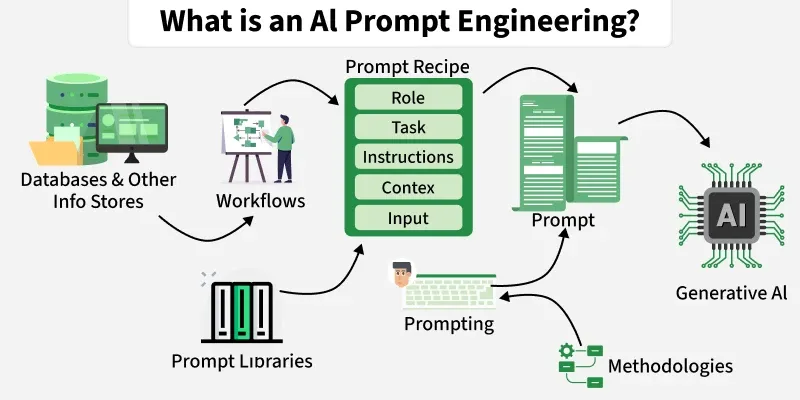
1. Providing Context
The AI doesn't know about our "Smart Warehouse" project unless we tell it. Providing context—your code, your project goals, your file structure—is the most critical step to getting relevant suggestions.
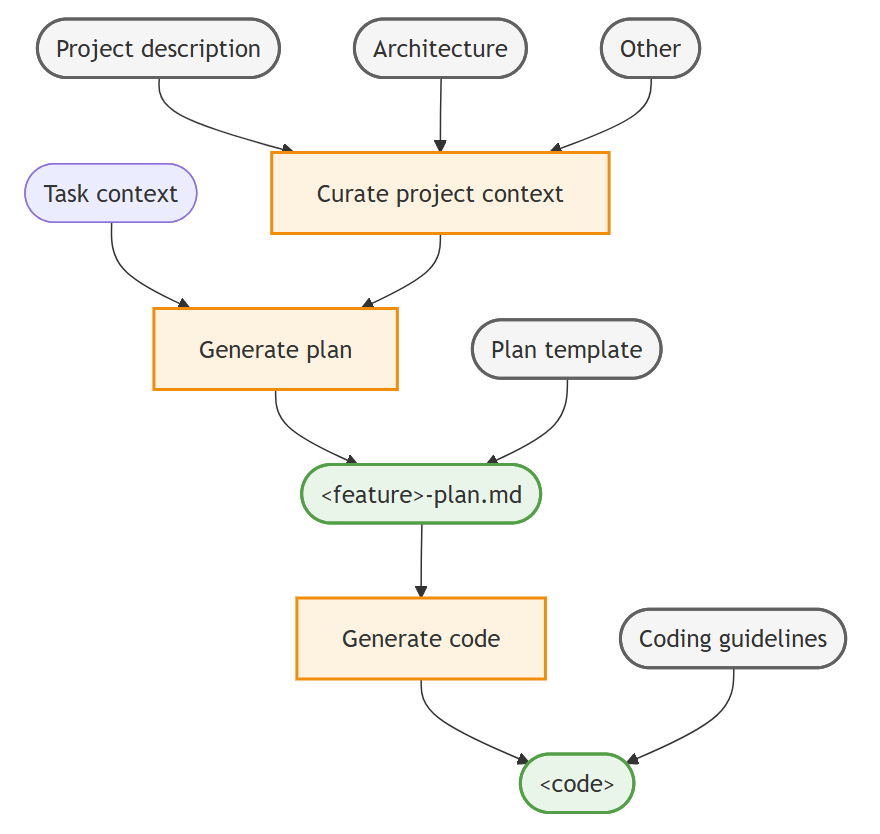
In practice, this means:
- Keeping related files open: Copilot analyzes your open tabs to understand the surrounding code.
- Using the chat feature: You can explicitly add files or code snippets to the chat window to focus the AI's attention.
- Being specific in your prompts: Mention the class names, method names, and variables you're working with.
The following video section offers excellent strategies for providing context.
GitHub Copilot for JAVA Developers: Code 10x Faster with AI Assisted Development!
The video "GitHub Copilot for JAVA Developers" explains several best practices for guiding the AI.
Watch the final section of the video, Best Practices and Strategies. Pay close attention to the advice on setting the right context, using meaningful names, and being specific.
2. Crafting Guided Prompts
Now, let's focus on the prompt itself. Instead of asking the AI to do the work, we'll ask it to help us learn how to do the work. The Visual Studio Code channel has an excellent video on prompt strategies that we can adapt for our Java learning.
Essential AI prompts for developers
The video "Essential AI prompts for developers" demonstrates several powerful prompting techniques.
Watch these key strategies: Assign a Role: Watch the Role Prompt section. This is how you turn the AI into a "senior Java developer" or a "patient tutor." Ask for Options: Watch the Pros and Cons section. This prompts the AI to provide multiple solutions and explain the trade-offs, encouraging critical thinking. Learn Step-by-Step: Watch the Stepwise Chain of Thought section. This is perfect for breaking down a complex topic or refactoring task into manageable chunks.
A Practical Workflow for Learning
Let's apply these ideas to a task in our warehouse project. Imagine an intern needs to implement a method to check if the warehouse has enough stock for a given product.
The "Ask-Don't-Copy" Workflow:
-
The Wrong Way:
- Prompt:
// Write a Java method to check stock - Result: Copilot generates a complete method. The intern copies it, learns very little, and can't explain how it works.
- Prompt:
-
The Right Way (The Sparring Partner Workflow):
- The intern opens the relevant files (
Warehouse.java,Product.java). - Prompt 1 (Role & Planning):
"Act as a senior Java developer. I need to write a method
hasSufficientStock(productId, quantity). Don't write the code for me. First, what are the key steps I need to implement? What data structures would be best for storing my inventory for efficient lookup?" - Prompt 2 (Review): The intern writes their first draft of the method.
"Here is my implementation of
hasSufficientStock. Please review it. Are there any edge cases I'm missing, like a product not existing? Is there a more efficient way to write this?" - Prompt 3 (Debugging): The code throws a
NullPointerException."My code is throwing a
NullPointerExceptionwhen I test with a non-existentproductId. Can you explain why this might be happening and suggest a way to handle it gracefully?"
- The intern opens the relevant files (
This workflow keeps the intern in the driver's seat. They are writing the code, but using the AI to plan, get feedback, and understand errors—exactly what we want.
Building Your Personal Prompt Library
As you and your interns work, you'll discover prompts that are particularly effective. It's a great practice to collect these in a personal "prompt library." Here are some starters for your Java course:
# For generating JUnit 5 test cases
Generate JUnit 5 test cases for this Java class. Cover the happy path, edge cases (like null inputs and empty collections), and expected exception scenarios.


# For explaining concepts
Explain the difference between an Interface and an Abstract Class in Java, using my `Product` and `Sellable` classes as an example.


# For code review
Act as a senior Java engineer and a stickler for Clean Code. Review the following method for readability, performance, and adherence to SOLID principles. Provide suggestions for improvement and explain the reasoning behind your recommendations.
Conclusion
You have now completed your "internship onboarding." You've set up your environment, learned the basics of Java syntax and program flow, and most importantly, established the principles for working with your AI assistant. This final skill is what elevates a modern developer from merely a coder to a strategic problem-solver.
Key takeaways for your interns from this first module:
- Fundamentals First: A solid grasp of variables, control flow, and methods is non-negotiable.
- Structure Matters: Well-organized, modular code is readable, maintainable, and the mark of a professional.
- AI is a Partner, Not a Panacea: Use the "Ask-Don't-Copy" principle. Your goal is to use AI to learn faster and think deeper, not to avoid thinking altogether.
- Prompting is a Skill: Providing context, assigning roles, and stating clear intent will dramatically improve the quality of AI assistance you receive.
In the next module, we will leave the world of primitive types and static methods behind and enter the core of Java: Object-Oriented Programming. You will start modeling the real-world entities of the warehouse—Product, StorageSlot, Order—by designing and implementing your first Java classes. You will be expected to use your AI sparring partner to discuss design choices and deepen your understanding of these new, powerful concepts.