Welcome back to your internship onboarding. In our previous sessions, you successfully set up your professional development environment with a modern IDE and JDK, and you've already started practicing one of the most critical skills in software engineering: version control with Git. You now have a local repository for the Smart Warehouse System project, ready to hold the history of your work.
But before you write your first line of Java code, it's essential to understand what happens "under the hood." You've installed the JDK, but what is it? How does the code you write, which looks like English, get transformed into something a computer can actually execute? This lesson addresses a fundamental concept in the Java ecosystem and a very common topic in technical interviews.
Today, we will dissect the roles of the three key components that make Java work: the JDK (Java Development Kit), the JRE (Java Runtime Environment), and the JVM (Java Virtual Machine). By the end of this session, you'll be able to explain how these three pillars work together to compile your source code and bring your application to life.
The Journey of a Java Program
At its core, creating and running a software application involves two major stages: writing the code and executing it. In Java, this process is distinct and well-defined. You, the developer, write human-readable source code, which is then transformed into an intermediate format called bytecode. This bytecode is then executed by a special program that translates it into instructions for the computer's processor.
The following flowchart provides a high-level map of this entire lifecycle. We will be referring back to this process as we examine each component responsible for making it happen.

As you can see, the process is split into two clear phases: Compilation, handled by the JDK, and Execution, handled by the JRE. Let's break down the components involved.
The Core Components: JVM, JRE, and JDK
To understand the Java platform, it's best to build from the inside out: starting with the execution engine (JVM), adding the necessary libraries (to form the JRE), and finally including the development tools (to form the JDK).
1. The JVM: The Java Virtual Machine
The JVM is the heart of the Java platform. It is an abstract computing machine or a "virtual" computer that resides within your computer's memory. Its primary job is to load, verify, and execute Java bytecode.
Key functions of the JVM include:
- Execution: It reads the platform-agnostic bytecode and translates it into native machine code for the specific operating system and processor it's running on. This is the secret behind Java's famous "Write Once, Run Anywhere" principle. Your single
.classfile can run on any machine that has the correct JVM installed. - Memory Management: The JVM automatically manages memory for your application. This includes allocating memory for new objects and, crucially, reclaiming memory from objects that are no longer in use—a process known as garbage collection.
- Security: The JVM provides a secure environment for your application to run in, protecting the underlying system from potentially malicious code.
You don't install a JVM by itself; it comes bundled as part of the JRE.
2. The JRE: The Java Runtime Environment
The JRE is the minimum software package required to run a Java application. If you were an end-user who just wanted to run a program written in Java, you would only need to install the JRE.
The JRE contains two essential pieces:
- The JVM: The execution engine we just discussed.
- Java Class Libraries: A vast collection of pre-written code that your program can use to perform common tasks, from handling text (
String) and mathematical operations (Math) to managing data structures (List,Map) and network communication.
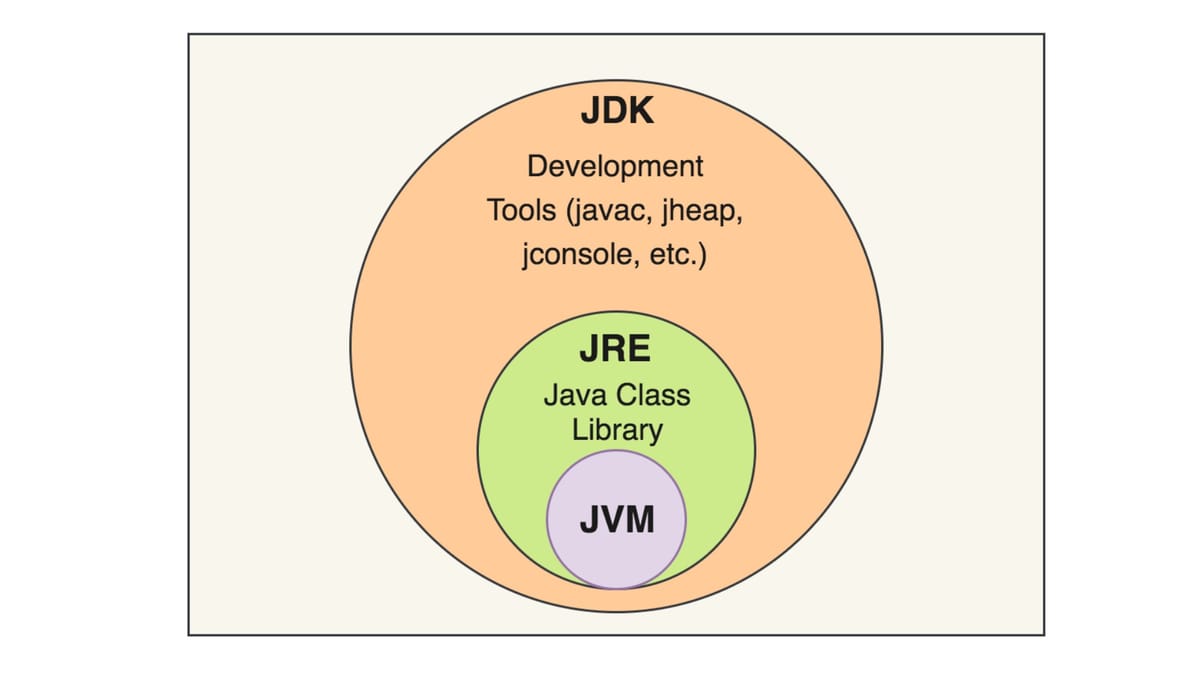
In simple terms: JRE = JVM + Class Libraries.
3. The JDK: The Java Development Kit
Finally, we have the JDK, which is the complete toolkit for developing Java applications. This is what you installed in our first session. As a developer, you need more than just the ability to run programs—you need to write, compile, and debug them.
The JDK includes everything that the JRE has, plus a suite of essential development tools.
The most important of these tools is the Java compiler (javac). This is the program that takes your human-readable .java source files and compiles them into machine-readable .class bytecode files that the JVM can execute.
Therefore, the relationship is hierarchical: JDK = JRE + Development Tools.
Visualizing the Relationship
The relationship between these three components can be easily visualized as a set of nested containers. The JDK is the outermost box, containing everything needed for development. Inside it is the JRE, providing the runtime environment. And at the very core is the JVM, doing the actual execution.
To get a quick and clear verbal explanation of these concepts, the following video is an excellent resource.
JVM, JRE, and JDK - Fully Explained in 5 Minutes
This short video from the "Coding with John" channel provides a quick and clear overview of what JDK, JRE, and JVM are and how they relate to each other.
Watch the entire video (Full Explanation). Pay close attention to how he defines each component's role and the hierarchical structure: What do you need if you only want to run Java programs? What is the specific job of the JVM? What extra tools does the JDK provide for developers?
Diving Deeper into the Definitions
Now that you have a solid high-level understanding, it's time to familiarize yourself with the more formal definitions and distinctions. This is crucial for precise technical communication and for answering interview questions accurately.
Differences Between JDK, JRE and JVM - GeeksforGeeks
The video gave you a great summary. Now, let's dive into the specifics with this article from GeeksforGeeks. It breaks down the components and their functions in more detail, which is excellent preparation for technical discussions.
Please read the following sections: The description of the JDK, focusing on its components and purpose. The section on the JRE, noting what it provides and what it lacks. The definition and function of the JVM, highlighting its role as the core execution engine. Finally, review the comparison table at the end. This is a very common format for interview questions, so getting comfortable with this summary is useful.
Seeing it in Action
To bridge the gap between theory and practice, let's see how these components are used from the command line. The following video demonstrates the exact two-step process of compilation and execution. This will serve as a perfect preview for our next lesson, where you will perform these steps yourself.
To see how these components work together, let's watch a segment from a tutorial by Telusko. This gives you a concrete look at the compilation and execution process you'll be performing in our next session.
Focus on these key moments in the video: First, watch the explanation of how a developer's .java code is turned into bytecode by the javac compiler (compilation process). Next, see the live demonstration where the instructor compiles Hello.java into a Hello.class file and then runs it using the java command (command-line demo). Finally, watch the recap of the JDK > JRE > JVM hierarchy (hierarchy recap), which reinforces everything we've discussed.
Conclusion
Understanding the roles of the JDK, JRE, and JVM is fundamental to being a Java developer. It demystifies the process of how your code runs and clarifies why different components are needed for development versus deployment.
Let's summarize the key takeaways:
- JVM (Java Virtual Machine): The core engine that executes bytecode. It provides platform independence and manages memory.
- JRE (Java Runtime Environment): The package needed to run Java applications. It contains the JVM and the standard Java libraries.
- JDK (Java Development Kit): The full toolkit for developing Java applications. It contains the JRE plus development tools like the compiler (
javac) and debugger. - The Workflow: You write
.javasource code. The JDK's compiler (javac) turns it into.classbytecode. The JRE'sjavacommand initiates the JVM to execute that bytecode.
With this foundational knowledge in place, you are now ready to put it all into practice. In our next lesson, you will write your first Java class for the Smart Warehouse System, then compile and execute it from both the command line and your IDE.