Introduction
Welcome back! In our last lesson, we introduced the concept of graphs, defining them as a collection of vertices and edges. We explored the different types: directed vs. undirected and weighted vs. unweighted. This gave us the theoretical language to describe networks.
Today, we bridge the gap between theory and practice. Our goal is to answer the question: "How do we actually store a graph in a computer's memory?" This lesson focuses on the most common and versatile method you'll encounter in technical interviews: representing a graph using an adjacency list in Python. Mastering this representation is the essential next step before we can start writing algorithms to analyze and traverse these graphs.
What is an Adjacency List?
Imagine you have a list of cities and the roads connecting them. To plan a trip from one city, the most useful piece of information is a direct list of all the other cities you can drive to from your current location. An adjacency list works on exactly this principle.
An adjacency list represents a graph by mapping each vertex to a list of the vertices it is directly connected to (its "neighbors").
In Python, this is most naturally implemented using a dictionary, where:
- The keys are the vertices of the graph.
- The values are lists containing the neighbors of each vertex.
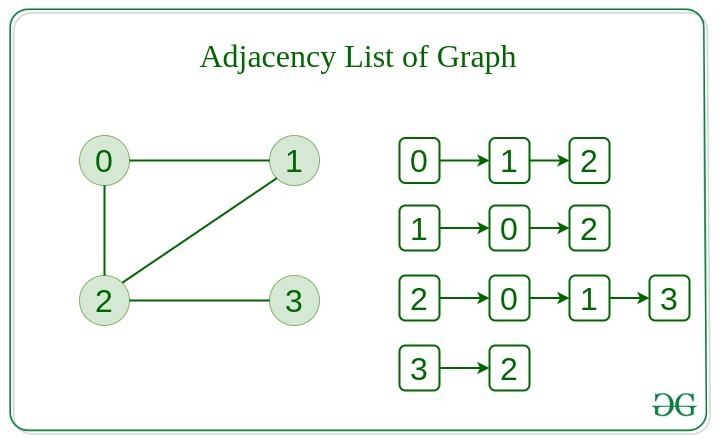
From Edge List to Adjacency List
In many programming problems, a graph is given to you as a simple edge list—a list of pairs, where each pair represents an edge. For example: edges = [["Mumbai", "Paris"], ["Mumbai", "Dubai"], ["Paris", "New York"]].
While simple, an edge list isn't efficient for finding all the places you can go from "Mumbai". You would have to scan the entire list. The first step in most graph algorithms is to convert this edge list into a more useful adjacency list.
Let's watch a short video that explains why this transformation is so important.
Graph Introduction - Data Structures & Algorithms Tutorials In Python #12
This clip from the codebasics channel clearly explains the motivation for converting a simple list of edges into a more structured adjacency list, setting the stage for our implementation.
Watch from 07:45 to 09:08. Focus on the core idea: transforming the input data (the list of tuples/edges) into a dictionary that's more effective for finding connections.
Building an Adjacency List in Python
Now that we see the "why," let's focus on the "how." We'll build our adjacency list by iterating through the edge list and populating a dictionary.
Let's say we have a directed graph defined by these routes:routes = [("Mumbai", "Paris"), ("Mumbai", "Dubai"), ("Paris", "New York")]
The logic is as follows:
- Create an empty dictionary, let's call it
adjacency_list. - For each edge
(start, end)in ourrouteslist:- Check if
startis already a key inadjacency_list. - If it is, append
endto its list of neighbors. - If it's not, create a new entry:
adjacency_list[start] = [end].
- Check if
The following video demonstrates this exact process, writing the Python code from scratch.
Graph Introduction - Data Structures & Algorithms Tutorials In Python #12
Let's continue with the codebasics video. The presenter will now implement the logic we just discussed to build the adjacency list using a standard Python dictionary.
Watch from 09:08 to 11:44. Pay close attention to the for loop and the if/else logic used to handle vertices that are seen for the first time versus those that are already in the dictionary.
Here is a summary of the code for a directed graph:
# Input data
routes = [("Mumbai", "Paris"), ("Mumbai", "Dubai"), ("Paris", "New York"), ("Dubai", "New York")]


# Initialize an empty dictionary
adjacency_list = {}


# Loop through each edge
for start, end in routes:
    if start in adjacency_list:


        # If the start city is already a key, append the end city
        adjacency_list[start].append(end)
    else:


        # If the start city is not yet a key, add it with the end city in a new list
        adjacency_list[start] = [end]

print(adjacency_list)


# Expected Output: {'Mumbai': ['Paris', 'Dubai'], 'Paris': ['New York'], 'Dubai': ['New York']}
Handling Undirected Graphs
What if the graph is undirected, like a Facebook friendship? The connection goes both ways. If Alice is friends with Bob, Bob is also friends with Alice.
To handle this, for every edge (u, v), we must make two updates:
- Add
vtou's neighbor list. - Add
utov's neighbor list.
Here’s how you would modify the code for an undirected graph:
friendships = [("Alice", "Bob"), ("Bob", "Charlie"), ("Alice", "Charlie")]
adjacency_list = {}

for person1, person2 in friendships:


    # Add person2 to person1's friend list
    if person1 in adjacency_list:
        adjacency_list[person1].append(person2)
    else:
        adjacency_list[person1] = [person2]


    # Add person1 to person2's friend list
    if person2 in adjacency_list:
        adjacency_list[person2].append(person1)
    else:
        adjacency_list[person2] = [person1]

print(adjacency_list)


# Expected Output: {'Alice': ['Bob', 'Charlie'], 'Bob': ['Alice', 'Charlie'], 'Charlie': ['Bob', 'Alice']}
A Cleaner Method: collections.defaultdict
The if/else check to see if a key already exists is a common pattern. Python's collections module provides a convenient tool called defaultdict that simplifies this.
A defaultdict is like a regular dictionary, but when you try to access a key that doesn't exist, it automatically creates it with a default value that you specify. If we specify the default as list, we can skip the if/else check entirely.
To see this cleaner implementation in action, let's turn to another resource.
Graphs: Edge List, Adjacency Matrix, Adjacency List, DFS, BFS - DSA Course in Python Lecture 11
The channel Greg Hogg provides a very concise and practical guide to building adjacency lists, focusing on the defaultdict approach common in competitive programming and technical interviews.
Watch from 24:48 to 26:29. Notice how using defaultdict(list) eliminates the need for the conditional if key in dict logic. The video also clearly shows the simple change needed for an undirected graph.
Here is the code using defaultdict for the same undirected friendship graph. Notice how much more concise it is.
from collections import defaultdict

friendships = [("Alice", "Bob"), ("Bob", "Charlie"), ("Alice", "Charlie")]


# Initialize a defaultdict where the default value for a new key is an empty list
adjacency_list = defaultdict(list)

for person1, person2 in friendships:


    # No need to check if the key exists!
    adjacency_list[person1].append(person2)
    adjacency_list[person2].append(person1)

print(dict(adjacency_list)) # Convert to regular dict for clean printing


# Expected Output: {'Alice': ['Bob', 'Charlie'], 'Bob': ['Alice', 'Charlie'], 'Charlie': ['Bob', 'Alice']}
This defaultdict approach is highly recommended for its simplicity and is widely used in practice.
A Note on Weighted Graphs
Finally, how would we handle a weighted graph, where each edge has a cost (like distance or time)?
The change is simple: instead of a list of neighbors, the value in our dictionary becomes a list of tuples. Each tuple contains the neighbor and its corresponding weight.
{'A': [('B', 5), ('C', 3)]} means the edge from A to B has weight 5, and the edge from A to C has weight 3.

We'll work more with weighted graphs later in the course. For now, just be aware of how the adjacency list structure can be adapted for them.
Conclusion
In this lesson, we tackled the fundamental task of representing a graph in code. You now have a practical and efficient tool for storing complex networks, which is the starting point for almost any graph algorithm.
Key Takeaways:
- An adjacency list is an efficient way to represent a graph, mapping each vertex to a list of its direct neighbors.
- In Python, an adjacency list is typically implemented with a dictionary of lists.
- We can build an adjacency list by processing an edge list. For undirected graphs, we must add an edge in both directions.
- Using
collections.defaultdict(list)simplifies the code for building an adjacency list by removing the need to check if a key already exists. - The structure can be easily adapted for weighted graphs by storing lists of
(neighbor, weight)tuples.
Preview of the Next Lesson:
Now that we know how to store a graph, we can finally start exploring it! In the next lesson, we will implement our first graph traversal algorithm: Breadth-First Search (BFS). BFS is a cornerstone algorithm used to systematically visit vertices and is the basis for solving many problems, like finding the shortest path in an unweighted graph. The adjacency list you learned to build today will be the primary data structure we use.