Hello! Welcome back to our course on getting started with Binance.
In our last lesson, you learned what a trading pair is and how to find the specific market you want to trade on Binance. You're now ready to move from finding the market to understanding what's happening inside it.
Today, we will decode the heart of any trading screen: the order book. By the end of this lesson, you will be able to interpret the bid price, ask price, and order book on the trading screen. This is a crucial skill that shows you the live supply and demand for a cryptocurrency, which is the foundation for making any trade.
What is an Order Book?
Imagine a live auction bulletin board. On one side, sellers post the minimum price they're willing to accept for their item. On the other side, buyers post the maximum price they're willing to pay. The order book on Binance is the digital, real-time version of this for cryptocurrencies. It's a constantly updated list of all the open buy and sell orders for a specific trading pair.
To get a formal understanding of this concept, let's turn to Binance's official explanation.
Understanding Order Book and Market Depth
This article from the Binance Support center provides a clear definition of what an order book is and its core components.
Please read the first two main sections, titled 'What is an order book?' and 'How does an order book work?'. Focus on understanding the four parts of an order book: buy orders, sell orders, price, and size.
As you've just read, the order book gives us a transparent view of the market's interest in an asset. Let's break down its most important elements.
Bids vs. Asks: The Two Sides of the Market
The order book is always split into two sides, which are color-coded on Binance for easy reading:
- Ask Prices (Red): This is the sellers' side. Each line in red represents an order from someone who wants to sell the base currency (e.g., BTC in the BTC/USDT pair). The price listed is the "ask price" they want to receive.
- Bid Prices (Green): This is the buyers' side. Each line in green represents an order from someone who wants to buy the base currency. The price listed is the "bid price" they are offering to pay.
The video below gives a concise visual walkthrough of this on the Binance interface.
Binance Tutorial For Beginners 2026 (FULL STEP-BY-STEP GUIDE)
Let's watch a short clip from the 'Binance Tutorial For Beginners' by Collection Crypto that clearly explains how to interpret the red and green sections of the order book.
Watch from 00:37:17 to 00:37:55. Pay close attention to how the narrator differentiates between the prices people are willing to sell at (red) and the prices people are willing to buy at (green).
Now, let's look at a static image to examine these parts more closely.

In this image, you can see three columns:
- Price (USDT): The price per unit of the base asset (in this case, per BTC).
- Amount (BTC): The quantity of the base asset being bid or asked for at that price. This is the "size" of the order.
- Total (USDT): The total value of the order (Price × Amount).
The Most Important Prices: Highest Bid and Lowest Ask
While the order book contains many prices, two are particularly important:
- The Lowest Ask Price: This is the lowest price on the red list (the one at the very bottom of the red section). It's the cheapest price you can pay to buy the asset right now.
- The Highest Bid Price: This is the highest price on the green list (the one at the very top of the green section). It's the best price you can get if you want to sell the asset right now.
The small difference between these two prices is known as the bid-ask spread. A trade occurs when a buyer's bid matches a seller's ask, or when a trader places an order that instantly accepts one of these best prices.
The Full Picture: The Trading Screen
Now, let's put this into the context of the full trading interface you'll be using.
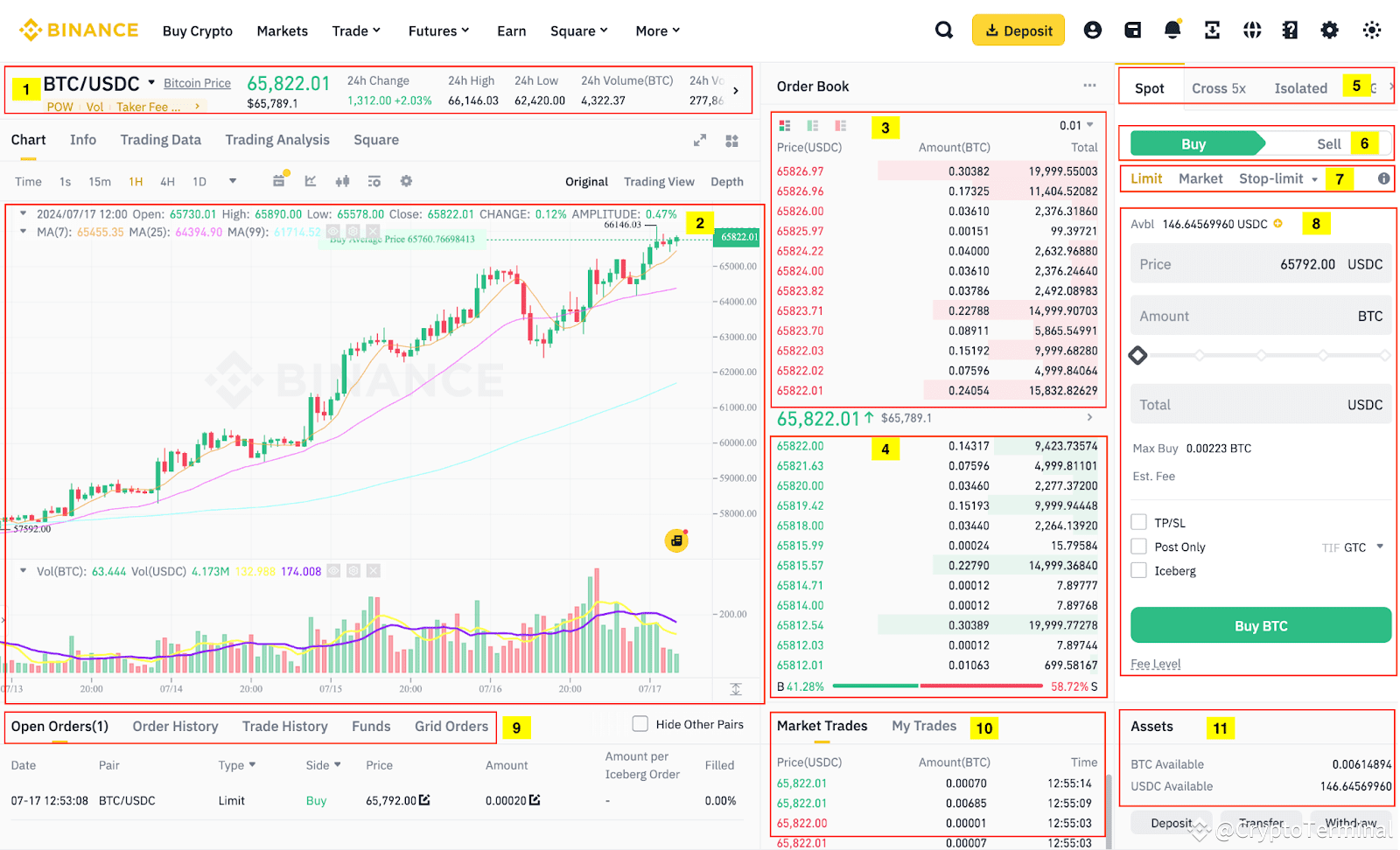
When you are on this screen and ready to trade:
- If you want to buy BTC, you are effectively looking to accept a price from the red list (the asks). To buy immediately, you would have to pay the lowest ask price.
- If you want to sell BTC, you are looking to accept a price from the green list (the bids). To sell immediately, you would get the highest bid price.
Understanding this dynamic is the key to reading the market. You are no longer just looking at a single price; you are seeing the entire landscape of supply and demand that creates that price.
Conclusion
Excellent work today. You have demystified one of the most intimidating parts of any trading platform. Instead of just seeing a list of flashing red and green numbers, you can now interpret them as a clear representation of market supply and demand.
Key Takeaways:
- The order book is a live, electronic list of all open buy (bid) and sell (ask) orders.
- Ask prices are displayed in red and represent orders from sellers.
- Bid prices are displayed in green and represent orders from buyers.
- The lowest ask is the cheapest price to buy immediately, and the highest bid is the best price to sell immediately.
- The numbers in the order book show you not just the price, but also the quantity of an asset available at each price level (market depth).
What's Next?
You now know how to find a market and how to read its supply and demand. The next logical step is to participate in it. In our next lesson, we will walk through the exciting step of executing your very first trade using a market order, which interacts directly with the bid and ask prices you've just learned to interpret.