Hello! In our last lesson, you learned how to create functions to package up and reuse blocks of code. This is a huge step toward writing organized programs. For example, you can now write a single calculate_damage function and call it for every attack in your game.
But now we face a new question: where do we store all the data our functions will use? How do we manage a player's inventory of swords, potions, and keys? Or how do we keep track of a monster's stats like HP, attack power, and defense?
This is where data collections come in. Your goal for this lesson is to learn how to create and manipulate lists and dictionaries to store collections of data. These are two of the most fundamental and useful data structures in Python, and they are the backbone of almost any game you will create.
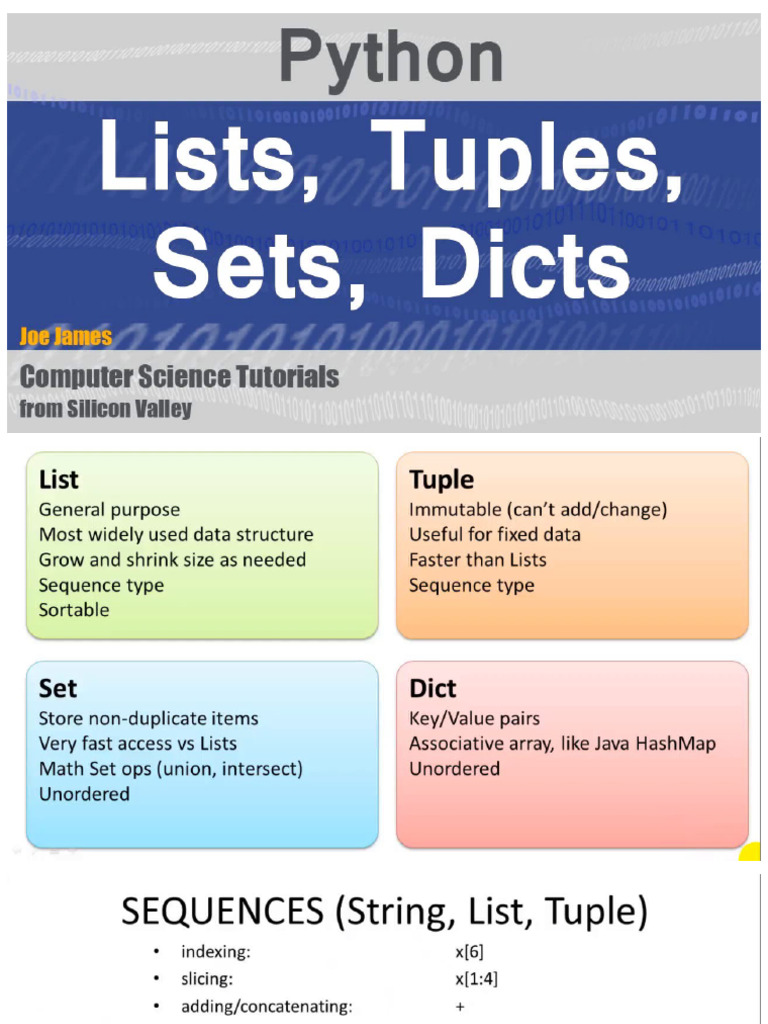
- Lists are perfect for ordered sequences of items, like an inventory, the steps in a quest, or a patrol path for a guard.
- Dictionaries are ideal for storing related pieces of information using key-value pairs, like a character's stats (
'HP': 100), the properties of an item, or the different rooms in a dungeon.
By the end of this lesson, you'll be able to organize your game's data effectively, making your code cleaner and more powerful.
Part 1: Lists - Your Digital Backpack
Think of a list in Python like an inventory in an RPG. It's a container where you can store items in a specific order, add new ones, and remove old ones.
A list is an ordered, changeable collection of items.
Let's start with a comprehensive video that covers the basics of creating and working with lists.
Python Tutorial for Beginners 4: Lists, Tuples, and Sets
The video 'Python Tutorial for Beginners 4: Lists, Tuples, and Sets' by Corey Schafer is an excellent guide. We'll start with the essentials: what lists are, how to create them, and how to access their elements.
Watch from 00:10 to 05:16. This segment will show you how to: Create a list using square brackets []. Get the number of items in a list with len(). Access specific items using their index (e.g., my_list[0] for the first item). Use negative indices (e.g., my_list[-1] for the last item). Get a range of items using slicing (e.g., my_list[0:2]).
As the video explained, zero-based indexing is a core concept. The first item is at index 0, the second at index 1, and so on. This is a common convention in many programming languages.
Here's a quick example for your RPG:
# A player's starting inventory
inventory = ["Rusty Sword", "Bread", "Cloth Tunic"]

# Let's see what the first item is
first_item = inventory[0]
print(f"The first item is: {first_item}") # Output: The first item is: Rusty Sword

# What's the last item?
last_item = inventory[-1]
print(f"The last item is: {last_item}") # Output: The last item is: Cloth Tunic
Manipulating Lists: Adding and Removing Items
Your inventory changes as you play an RPG. You find new loot and use up items. Lists have built-in functions (called methods) to handle this.
Let's continue with the video to see how to add and remove items.
Python Tutorial for Beginners 4: Lists, Tuples, and Sets
Now let's learn how to modify our lists. This part of Corey Schafer's video covers adding and removing items.
Watch from 05:16 to 10:02. Pay close attention to the difference between these key methods: .append(): Adds one item to the end of the list. .insert(): Adds an item at a specific index. .remove(): Removes the first occurrence of a specific item. .pop(): Removes and returns the item at a specific index (or the last item if no index is given).
The .pop() method is especially useful in games. Imagine using a potion: you want to remove it from your inventory and get its information to apply its healing effect.
inventory = ["Rusty Sword", "Healing Potion", "Cloth Tunic"]
print(f"Inventory before using potion: {inventory}")

# The player uses a potion. We remove it from the list and can use the value.
used_item = inventory.pop(1) # Removes the item at index 1
print(f"Player uses a {used_item}!")
# Now you could write code to restore the player's health.

print(f"Inventory after using potion: {inventory}")
Output:
Inventory before using potion: ['Rusty Sword', 'Healing Potion', 'Cloth Tunic']
Player uses a Healing Potion!
Inventory after using potion: ['Rusty Sword', 'Cloth Tunic']
Test your understanding!
Your player has an inventory represented by the list inventory = ["Shield", "Apple"].
- They find a treasure chest containing a "Dragon's Tooth". Add this item to the end of their inventory.
- They are then ambushed and need to quickly equip the first item in their inventory. To do this, you decide to move the "Shield" to the end of the list for better access later. First, remove "Shield", then add it back to the end.
- Finally, they eat the "Apple". Remove it from the inventory.
- Print the final inventory.
Show answer
inventory = ["Shield", "Apple"]

# 1. Add "Dragon's Tooth"
inventory.append("Dragon's Tooth")
# inventory is now ["Shield", "Apple", "Dragon's Tooth"]

# 2. Remove "Shield" and add it to the end
inventory.remove("Shield")
inventory.append("Shield")
# inventory is now ["Apple", "Dragon's Tooth", "Shield"]

# 3. Remove "Apple"
inventory.remove("Apple")
# inventory is now ["Dragon's Tooth", "Shield"]

# 4. Print the final list
print(f"Final inventory: {inventory}")

# Expected output:
# Final inventory: ['Dragon's Tooth', 'Shield']
Note: A more efficient way to do step 2 would be inventory.append(inventory.pop(0)), but the separate remove and append steps are also perfectly correct!
Part 2: Dictionaries - Your Character Sheet
While lists are great for ordered collections, they aren't ideal for storing structured data like a character's stats. It would be confusing to remember that stats[0] is HP, stats[1] is MP, and so on.
A dictionary is perfect for this. It's an unordered collection of key-value pairs. You look up a value by its specific key, just like looking up a word in a dictionary to find its definition.
Python Dictionaries Deep Dive: Key-Value Pairs Explained
To understand dictionaries, let's watch 'Python Dictionaries Deep Dive' by Code with Gunnar. This first segment introduces the concept and shows how to create and access them.
Watch from 01:02 to 05:34. Focus on: The key-value pair concept. Creating dictionaries with curly braces {}. Accessing values using their key (e.g., my_dict['key']). The .get() method, which is a safer way to access a value that might not exist.
Using .get() is a great habit to build. If you try player_stats['Stamina'] and the 'Stamina' key doesn't exist, your program will crash. If you use player_stats.get('Stamina'), it will simply return None (or a default value you provide), which you can handle gracefully.
Here's how you'd define a character and a monster:
player = {
    "Name": "Galador",
    "HP": 100,
    "MP": 50,
    "Class": "Knight"
}

slime_monster = {
    "Name": "Green Slime",
    "HP": 25,
    "Attack": 4
}

# Accessing data is clear and readable
print(f"{player['Name']} has {player['HP']} HP.")
print(f"The {slime_monster['Name']} has {slime_monster['Attack']} attack power.")
Output:
Galador has 100 HP.
The Green Slime has 25 attack power.
Manipulating Dictionaries: Updating Stats
A character's stats are not static. Their HP changes in combat, and they might gain new abilities. Dictionaries are easy to modify.
Python Dictionaries Deep Dive: Key-Value Pairs Explained
Let's continue with the video to see how to add, change, and remove data from dictionaries.
Watch from 05:23 to 07:51. This segment covers: Adding a new key-value pair. Updating the value of an existing key. Using .update() to modify multiple pairs at once. Using .pop() to remove a key-value pair.
Here's a combat example. Notice how readable it is:
slime_monster = {
    "Name": "Green Slime",
    "HP": 25,
    "Attack": 4
}

damage_taken = 10
print(f"The {slime_monster['Name']} has {slime_monster['HP']} HP.")

# Update the slime's HP
slime_monster['HP'] = slime_monster['HP'] - damage_taken

print(f"After taking {damage_taken} damage, it now has {slime_monster['HP']} HP.")

# The slime gets enraged! Let's add a status effect.
slime_monster['Status'] = 'Enraged'
print(f"The slime's current status is: {slime_monster}")
Output:
The Green Slime has 25 HP.
After taking 10 damage, it now has 15 HP.
The slime's current status is: {'Name': 'Green Slime', 'HP': 15, 'Attack': 4, 'Status': 'Enraged'}
Looping Through Dictionaries
What if you want to display all of a character's stats? You can loop through a dictionary. The .items() method is especially useful as it gives you both the key and the value on each iteration.
Python Dictionaries Deep Dive: Key-Value Pairs Explained
This final clip from 'Python Dictionaries Deep Dive' shows how to access all keys, values, or items, which is essential for looping.
Watch from 08:40 to 10:51. Focus on the .keys(), .values(), and especially the .items() methods and how they can be used in a for loop.
Example: Displaying a character sheet.
player = {
    "Name": "Galador",
    "HP": 100,
    "MP": 50,
    "Class": "Knight"
}

print("--- CHARACTER SHEET ---")
for stat_name, stat_value in player.items():
    print(f"{stat_name}: {stat_value}")
print("-----------------------")
Output:
--- CHARACTER SHEET ---
Name: Galador
HP: 100
MP: 50
Class: Knight
-----------------------
Combining Lists and Dictionaries
The real power for game development comes when you combine these two data structures.
- An inventory can be a list of dictionaries, where each dictionary describes an item.
- A game world can be a dictionary of dictionaries, where each key is a room name and its value is a dictionary describing that room's exits and items.
This is exactly how many text-based RPGs are built.
Python: Creating better rooms in text RPG
Let's look at a practical example from Stack Overflow where a developer is building a text RPG. This answer shows a perfect use of nested dictionaries to represent a game map.
Read the section titled 'Nested Dictionaries' and the code blocks under 'Begining code', 'Location code', and 'Item acquiring code'. Notice how the main rooms variable is a dictionary. Each value in it is another dictionary that contains keys like 'SOUTH' and 'ITEMS'. The value for 'ITEMS' is a list!
This structure is powerful and flexible. You can define your entire game world in a structure like this, and then write functions that navigate and modify it based on player commands.
Here's another example: an inventory as a list of dictionaries.
inventory = [
    {
        "name": "Healing Potion",
        "type": "Consumable",
        "effect": "Heals 25 HP"
    },
    {
        "name": "Iron Sword",
        "type": "Weapon",
        "damage": 12
    }
]

# Get the name of the second item in the inventory
print(inventory[1]["name"]) # Output: Iron Sword

# Loop through the inventory and print a description for each item
for item in inventory:
    print(f"- {item['name']} ({item['type']})")
Output:
Iron Sword
- Healing Potion (Consumable)
- Iron Sword (Weapon)
To see these concepts in the context of simple, complete games, check out the examples in the article "9 Easy Games to Make in Python".
- The "Word Rescue" game (Section 2) uses a list to store the letters of the hidden word.
- The "Quiz Game" (Section 4) uses a dictionary to store questions and answers.
You can find this resource here: https://www.idtech.com/blog/easy-games-to-make-in-python. Exploring its code is a great way to reinforce what you've learned.
Conclusion
You've just learned about two of the most important tools in your Python toolbox. Mastering lists and dictionaries is essential for managing the complex data that makes a game world feel alive.
Here are the key takeaways:
- Lists are ordered collections, accessed by an integer index (starting at 0). Use them for sequences like inventories, waypoints, or animations.
- Dictionaries are unordered collections of key-value pairs, accessed by a unique key. Use them for structured data like character stats, item properties, or level data.
- The most powerful applications often come from nesting lists and dictionaries to model complex game data.
In our next lesson, we'll take another big step forward by learning about classes and objects. You've learned how to store data in lists and dictionaries, and how to write logic in functions. Classes will allow us to bundle related data and functions together into a single, neat package, like a Player object that not only holds HP and inventory but also has its own attack() and use_item() methods.