Hello! Welcome to the final and perhaps most exciting module of our course: Containerized Django Deployment with Podman.
In the previous modules, you've done an excellent job setting up a complete web application stack—Nginx, Gunicorn, and PostgreSQL—directly on your Fedora system. You learned to configure, secure, and manage each service individually. This is a foundational skill for any system administrator.
Now, we're going to explore a more modern, portable, and scalable way to deploy applications: containerization. Instead of installing software directly on the host, we will package our entire Django application and its services into isolated, lightweight environments called containers.
This first lesson sets the stage for all the practical work to come. Our goal is to explain the key architectural differences between Podman and Docker, the two leading container engines. While this lesson is more conceptual than our usual 80/20 practical/theory split, mastering these core ideas is crucial. Understanding why Fedora prefers Podman will make you a more effective administrator and developer.
1. The Tale of Two Architectures: Docker vs. Podman
Containerization was popularized by Docker, and you will see it mentioned in countless tutorials and articles. However, Fedora and other modern enterprise Linux distributions have embraced Podman. To understand why, we need to look at how they are fundamentally built. The key differences come down to two concepts: daemonless and rootless.
Let's start by watching a short video that clearly explains Docker's traditional architecture and then introduces Podman's alternative approach.
This video from IBM Technology provides a concise overview of the client-server architecture used by Docker and contrasts it with Podman's daemonless design.
Please watch the following two segments: Docker's Architecture (01:18 - 02:17): Pay close attention to the explanation of the "Docker daemon"—a background process that runs everything with root privileges. Podman's Architecture (02:17 - 04:08): Focus on how Podman works without a central daemon and how this enables it to run containers in a "rootless" fashion by default.
2. Deconstructing the Architectures
As the video explained, the core difference lies in their process models. Let's break this down.
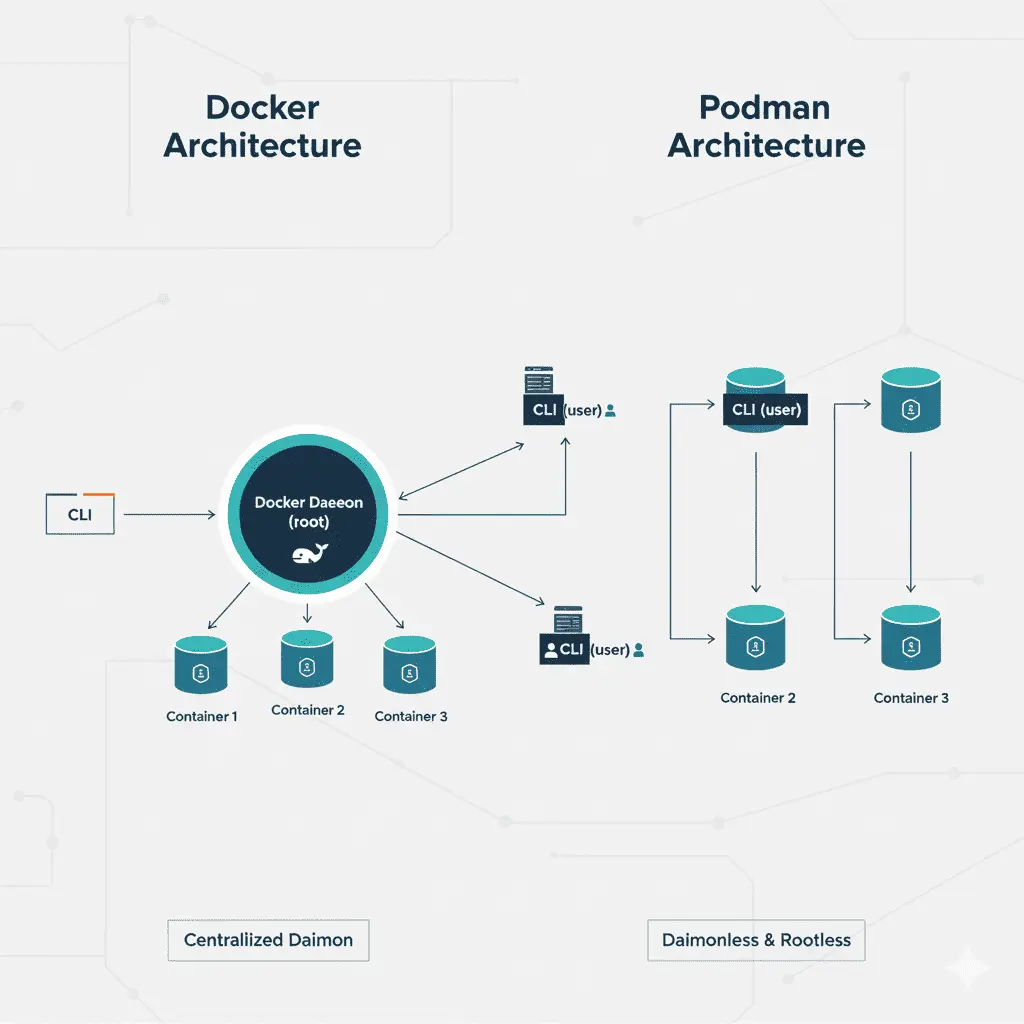
Docker: The Client-Server Model
- Daemon-based: Docker uses a long-running background service called the Docker daemon (
dockerd). This single process is responsible for building images, running containers, and managing networks and storage. - Client-Server: When you type a command like
docker run, your command-line interface (the client) sends instructions to the daemon (the server), which then performs the action. - Root-Privileged: Traditionally, the Docker daemon runs as the
rootuser. This is a significant security concern. If a malicious process were to "escape" a container, it could potentially gain root access to the entire host machine because the daemon that created it has those privileges.
Podman: The Daemonless Fork-Exec Model
- Daemonless: Podman does not have a central, always-running daemon.
- Fork-Exec Model: When you type
podman run, the Podman application directly "forks" itself, and this new child process becomes the container. This is a traditional Unix process model, making it simpler and more transparent. - Rootless by Design: Because there's no central daemon that requires
rootprivileges, Podman is designed to run containers as a regular, unprivileged user. This is called rootless mode. A process that escapes a rootless container only gains the permissions of the user who launched it—not the entire system. This dramatically reduces the potential attack surface.
The following image provides a clear visual summary of this fundamental difference.
To reinforce these security implications, let's watch one more brief clip.
Is it time to switch? // Docker vs Podman Desktop
This clip from Christian Lempa clearly explains why Podman's rootless and daemonless approach is a major advantage for security.
Watch from 07:37 to 08:36. The video directly discusses how being rootless and daemonless reduces the attack surface and makes it harder for an attacker to escalate privileges on the system.
3. A Head-to-Head Comparison
To summarize the key distinctions, let's review an excellent article from Red Hat, the primary developer of Podman.
This article from Red Hat, titled 'What is Podman?', provides an authoritative explanation of its architecture and a direct comparison with Docker.
Please read the following two sections: Start at the beginning and read down to the section titled "How does Podman manage containers?". This first part directly explains what makes Podman different, focusing on the daemonless and rootless concepts. Then, scroll down to the section "Podman vs. Docker" and read it. This provides a concise, direct comparison.
Based on what you've learned, here is a summary table of the core architectural differences:
| Characteristic | Docker | Podman |
|---|---|---|
| Process Model | Client-Server | Fork-Exec |
| Core Component | Persistent background daemon (dockerd) |
No daemon; commands execute directly |
| Default Privileges | Daemon runs as root |
Designed to run as a regular user (rootless) |
| Security | Larger attack surface due to root daemon | Smaller attack surface; aligns with the principle of least privilege |
| Single Point of Failure | Yes (if the daemon fails, all containers stop) | No (each container is an independent process) |
| System Integration | Managed by the daemon | Containers are standard Linux processes, visible to ps, systemd etc. |
4. Hands-On: Seeing the Daemonless Model in Action
Even in a theoretical lesson, a practical demonstration helps solidify the concepts. Let's prove Podman's daemonless and rootless nature using commands you already know.
-
Run a Simple Container:
Open your terminal and run the standard "hello-world" container. Notice you do not need to usesudo.podman run hello-worldThis command will pull a tiny container image and run it. The output will confirm it worked.
-
Inspect the Process Tree:
Now, let's see how this looks from the operating system's perspective. In a separate terminal, run a container that stays alive for a moment, and then inspect the processes.First, run a container that sleeps for 60 seconds:
podman run --rm -it alpine sleep 60While that is running, open another terminal and use the
pscommand with the--forestflag to see the process hierarchy. We'llgrepfor your username to filter the output. Replaceyour_usernamewith your actual username.ps -ef --forest | grep your_usernameIn the output, you should see something like this:
your_username   1234  1233  0 10:30 pts/1   00:00:00  \_ /bin/bash
your_username   5678  1234  0 10:32 pts/1   00:00:00      \_ podman run --rm -it alpine sleep 60
your_username   5690  5678  0 10:32 ?         00:00:00          \_ /usr/bin/conmon
your_username   5695  5690  0 10:32 ?         00:00:00              \_ sleep 60
This output clearly shows that the
sleep 60command inside the container is a child process of thepodman runcommand, which itself is a child process of your shell (/bin/bash). It's all running under your user account, with no central daemon in sight. This is the fork-exec model in action!
Conclusion
In this lesson, you've learned the crucial architectural differences between Docker and Podman. This foundational knowledge is key to understanding why Podman is a modern, secure choice for container management, especially on systems like Fedora.
Key Takeaways:
- Docker uses a client-server architecture with a persistent, root-privileged daemon that manages all containers.
- Podman uses a daemonless, fork-exec model where containers are run as direct child processes of the command.
- Podman is rootless by design, meaning it can run containers as a standard user without
sudo, which drastically improves security. - The absence of a central daemon in Podman eliminates a single point of failure and allows for tighter integration with standard Linux tools like
systemdandps.
Preview of the Next Lesson:
Now that you understand the "why" behind Podman, it's time to get your hands dirty. In our next lesson, you will write a Dockerfile to containerize a Django application. This is the first practical step toward building and deploying your entire web stack using Podman.