Hello! Welcome to the fourth lesson in your "AI Automation" course.
In the last lesson, we learned how to store information using variables and different data types like strings, numbers, and booleans. You now know how to represent states like is_available = True. This lesson is the next logical step: making your program do different things based on whether a condition is True or False.
Today, we will cover conditional logic. You will learn to use if, elif, and else statements to control the flow of your program. This is how you give your scripts the power to make decisions, which is a fundamental part of building any useful automation.
Introduction to Conditional Logic
In your work as a storekeeper, you constantly make decisions: "If this product's expiry date is near, move it to the front. Otherwise, stock it normally." Or, "If an order is for a controlled substance, follow procedure A. Else, follow procedure B."
In programming, we use conditional statements to create the same kind of logic.
To see how this works in Python, let's watch a video that introduces the if, elif, and else keywords.
If statements in Python are easy (if, elif, else) 🤔
This video from Bro Code provides a clear and fast-paced introduction to conditional statements in Python. It's a great starting point to see them in action.
Watch the first four minutes of the video to get a solid overview: 00:00 - 01:37: The basic if statement. 01:37 - 02:21: Adding an else for an alternative action. 02:21 - 04:17: Using elif (else if) to check multiple conditions and why the order is important.
Now, let's break down these concepts one by one.
1. The if Statement and Conditions
The if statement is the simplest form of decision-making. It runs a block of code only if a certain condition is True.
A condition is an expression that Python can evaluate as either True or False. We create conditions using comparison operators.
| Operator | Meaning | Example (a = 5, b = 10) |
Result |
|---|---|---|---|
== |
Equal to | a == 5 |
True |
!= |
Not equal to | a != 10 |
True |
> |
Greater than | b > a |
True |
< |
Less than | a < b |
True |
>= |
Greater than or equal to | a >= 5 |
True |
<= |
Less than or equal to | b <= 10 |
True |
Notice the == for comparison. A single equals sign (=) is for assigning a value to a variable, while a double equals sign (==) is for checking if two values are the same. This is a common point of confusion for new programmers.
Here's an example related to your experience:
stock_quantity = 35

# The code inside this 'if' block will only run if stock_quantity is greater than 0.
if stock_quantity > 0:
    print("Item is in stock.")
    print(f"We have {stock_quantity} units available.")
2. Indentation: Python's Special Rule
Since you have experience with C, you know that C uses curly braces {} to group blocks of code. Python does this differently: it uses indentation (the spaces at the beginning of a line).
Any code that should be part of an if, elif, or else block must be indented underneath it. This is not just for style; it is a strict rule of the language.
If Else Conditional Statements in Python | Python Tutorial - Day #14
The following video explains Python's use of indentation for code blocks and specifically contrasts it with the curly braces used in C. This will be very helpful for you.
Watch the clip from 05:14 to 08:01. It clearly demonstrates how indentation defines code blocks in Python, which is a key difference from C.
3. The else and elif Statements
What if you want to do something when the if condition is False? That's where else comes in.
stock_quantity = 0

if stock_quantity > 0:
    print(f"We have {stock_quantity} units available.")
else:
    print("This item is OUT OF STOCK.")
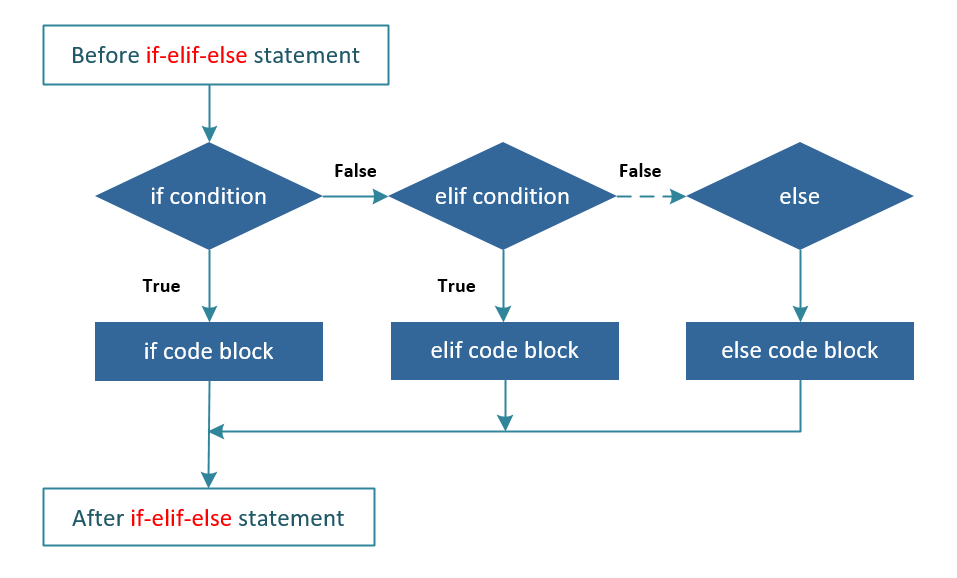
And what if you have more than two possibilities? You can use elif (short for "else if") to check multiple conditions in order.
Let's build a more complete inventory checker:
stock_quantity = 15

if stock_quantity > 50:
    print("Stock level is high.")
elif stock_quantity > 0:  # This is only checked if the first 'if' was False.
    print("Stock level is low. Time to re-order!")
else:  # This runs if all the above conditions were False.
    print("This item is OUT OF STOCK.")
Python checks the conditions from top to bottom and runs the code for the first one that is True. Once a match is found, it skips the rest of the elif and else blocks.
Test your understanding!
Write a small script. Create a variable age and set it to a number. Then, write an if/elif/else structure that prints:
- "Access denied: too young" if
ageis less than 18. - "Welcome!" if
ageis between 18 and 65 (inclusive). - "Access denied: senior hours only" if
ageis greater than 65.
Try changing the value of age to see if your logic works for all cases.
Show answer
Here's one way to solve it. Create a new file in VS Code (e.g., age_checker.py) and run it.
age = 25  # Try changing this value to 15 or 70

if age < 18:
    print("Access denied: too young")
elif age >= 18 and age <= 65:
    print("Welcome!")
else:
    print("Access denied: senior hours only")
We used and to combine two conditions. Let's look at that next.
4. Combining Conditions with and, or, not
Sometimes you need to check more than one thing at once. Python gives you three logical operators for this:
and:Trueonly if both conditions are true.or:Trueif at least one condition is true.not: Reverses the result (makesTrueintoFalseandFalseintoTrue).
The 'Automate the Boring Stuff with Python' book has an excellent, detailed explanation of these operators. Reading this will solidify your understanding of how to build complex conditions.
Read the sections titled 'Boolean Operators' and 'Mixing Boolean and Comparison Operators'. They explain and, or, and not with clear examples and truth tables.
Here are some practical examples:
# 'and' example: check if a product is both a specific type AND requires special handling.
product_type = "pharmaceutical"
requires_refrigeration = True

if product_type == "pharmaceutical" and requires_refrigeration == True:
    print("Handle with care: This is a refrigerated pharmaceutical product.")

# 'or' example: check if it's the weekend.
today = "Sunday"

if today == "Saturday" or today == "Sunday":
    print("It's the weekend! The warehouse is operating on reduced hours.")

# 'not' example: check if an order has not been shipped yet.
is_shipped = False

if not is_shipped:
    print("Order is pending shipment. Please prepare for dispatch.")
Let's Practice: Building an Access Control Script
Now it's time to put it all together. Open VS Code, create a new file named access_control.py, and type the following code. This script checks a user's role and decides what message to show them.
# access_control.py

print("--- System Access Control ---")
user_role = "storekeeper"  # Try changing this to "admin" or "guest"
is_active = True

if user_role == "admin" and is_active:
    print("Welcome, Admin. You have full system access.")

elif user_role == "storekeeper" and is_active:
    print("Welcome, Storekeeper. Accessing inventory management system.")

elif user_role == "guest":
    print("Welcome, Guest. You have view-only access.")

else:
    print("Access Denied. Your role is unrecognized or your account is inactive.")

print("---------------------------")
Run this script. Then, change the user_role variable to "admin" or "guest" and run it again. Also try changing is_active to False to see how the and operator affects the outcome.
Conclusion
Excellent work today! You have just learned one of the most powerful concepts in programming. By using if, elif, and else, you can make your scripts intelligent, responsive, and far more useful for automation.
Key Takeaways:
- Conditional Logic allows your program to make decisions and execute different code based on conditions.
- The
if,elif, andelsestatements form the structure for this logic. - A condition is an expression that results in
TrueorFalse, often using comparison operators (==,>,<=, etc.). - In Python, indentation (spacing) is used to define which code belongs to which block. It is not optional.
- You can create complex conditions by combining them with logical operators:
and,or, andnot.
Next Lesson:
So far, we've worked with single pieces of data in variables. But what if you need to handle a list of items, like all the products in a customer's order? In the next lesson, we will learn about lists and dictionaries, two powerful data structures that let you store and organize collections of data.