Hello! Welcome to our next lesson on Java concurrency.
In our previous session, we tamed the chaos of race conditions using the synchronized keyword. You learned how to lock methods and code blocks to ensure thread safety. While effective, this approach involves managing the locking mechanism directly. Today, we'll take a significant step up in abstraction and learn the modern, standard way to manage concurrent tasks in Java.
This lesson introduces the ExecutorService framework. Instead of creating and managing threads manually, you'll learn to use a powerful API that handles thread pooling, task queuing, and lifecycle management for you. This is a cornerstone of building high-performance, scalable backend systems—a key part of your goal to master enterprise Java development. We will focus on how to create thread pools, submit tasks for execution, and ensure your application shuts down cleanly.
1. Why Not Just Keep Creating Threads?
In our first concurrency lesson, we created threads like this: new Thread(runnable).start(). This seems simple, but it has major drawbacks in a real-world application, especially a backend server that needs to handle many requests.
- Costly Creation: Each
Threadobject in Java corresponds to a native operating system thread. Creating and destroying these OS threads is a relatively expensive and slow operation. - No Resource Control: If you create a new thread for every incoming request on a busy server, you could easily spawn thousands of threads. This can overwhelm your system's memory and CPU, leading to poor performance and even crashes.
- Complex Management: You are responsible for managing the entire lifecycle of every thread you create.
The ExecutorService framework was designed to solve these exact problems.
Java's ExecutorService: A Practical Guide with Real-Life ...
This article does a great job of explaining the "why" behind the ExecutorService.
Read the sections "Why use it?" and the two following sections that contrast ExecutorService with Using Thread and Using parallelStream(). This will solidify your understanding of the problems that the framework solves.
At its core, the ExecutorService manages a thread pool—a collection of worker threads that are ready to execute tasks. When you have a task to run, you don't create a new thread; you simply submit the task to the ExecutorService. The framework then assigns an available thread from the pool to execute it. This is far more efficient.

2. Creating an ExecutorService
The ExecutorService is an interface. The most convenient way to create an instance is by using the factory methods provided in the Executors utility class.
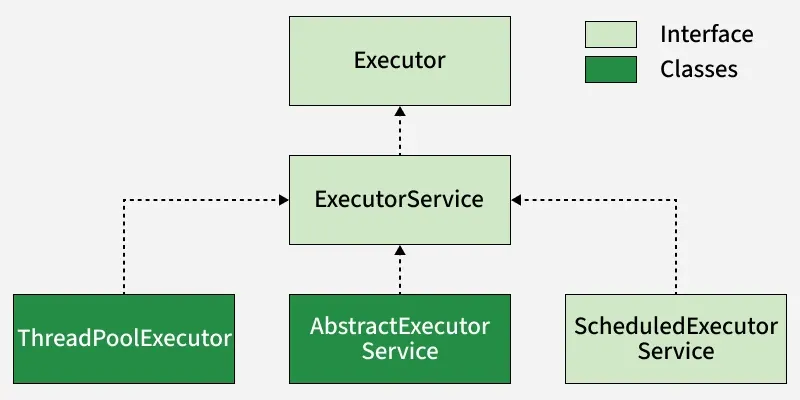
There are several factory methods, but the most common one to start with is newFixedThreadPool():
import java.util.concurrent.ExecutorService;
import java.util.concurrent.Executors;

// Creates an ExecutorService with a pool of 5 threads.
int numberOfThreads = 5;
ExecutorService executor = Executors.newFixedThreadPool(numberOfThreads);
This creates a thread pool that has a fixed number of threads. If all threads are busy, new tasks will wait in a queue until a thread becomes available. This is perfect for controlling resource consumption, as you guarantee that no more than numberOfThreads will be active at once.
Other useful factory methods include:
Executors.newSingleThreadExecutor(): Creates a pool with only one thread. This is useful for ensuring tasks execute sequentially.Executors.newCachedThreadPool(): Creates a flexible pool that grows and shrinks as needed. It can be useful but also risks creating too many threads if not used carefully.
For most backend services, starting with a fixed-size thread pool is a sensible and safe choice.
Jakob Jenkov provides a great visual and code-based introduction to creating and using an ExecutorService.
Watch the first part of the video, from the beginning to get back to them, to see a demonstration of creating a fixed thread pool and submitting simple tasks. He then gives a brief look at the ThreadPoolExecutor class from for both of them, which is the underlying implementation; this provides good context on what's happening under the hood.
3. Submitting Tasks
Once you have an ExecutorService, you can submit tasks to it. These tasks are typically implementations of the Runnable interface, which you're already familiar with.
The Executor interface (which ExecutorService extends) provides the execute() method. This is a "fire-and-forget" method. You give it a Runnable, and the ExecutorService will run it at some point in the future. You get no information back about when the task completes or if it was successful.
// A simple Runnable task
Runnable task = () -> {
    System.out.println("Executing task in thread: " + Thread.currentThread().getName());
};

// Submit the task to the pool
executor.execute(task);
If you submit more tasks than there are threads in the pool, the extra tasks will be placed in a queue. As soon as a thread finishes its current task, it will pick up a new one from the queue.
4. The Crucial Step: Shutting Down
This is one of the most common mistakes beginners make. An active ExecutorService has running threads, which will prevent the Java Virtual Machine (JVM) from shutting down. Your application will just hang, even after your main method has finished.
You must explicitly shut down the ExecutorService. There are two main methods for this:
shutdown(): This is a graceful shutdown. The service stops accepting new tasks, but it allows already submitted tasks to complete.shutdownNow(): This is an abrupt shutdown. It attempts to stop all actively executing tasks, halts the processing of waiting tasks, and returns a list of the tasks that were awaiting execution.
The recommended practice is to use a combination of these with awaitTermination(), which blocks until all tasks have completed after a shutdown request, or the timeout occurs, or the current thread is interrupted, whichever happens first.
A Guide to the Java ExecutorService
The Baeldung guide provides an excellent, clear explanation of the shutdown process.
Read section "4. Shutting Down an ExecutorService". Pay close attention to the recommended shutdown pattern using shutdown(), awaitTermination(), and shutdownNow(). This is a robust pattern you will use in production code.
Here's the pattern in action:
executor.shutdown(); // Disable new tasks from being submitted
try {
    // Wait a while for existing tasks to terminate
    if (!executor.awaitTermination(60, TimeUnit.SECONDS)) {
        executor.shutdownNow(); // Cancel currently executing tasks
        // Wait a while for tasks to respond to being cancelled
        if (!executor.awaitTermination(60, TimeUnit.SECONDS))
            System.err.println("Pool did not terminate");
    }
} catch (InterruptedException ie) {
    // (Re-)Cancel if current thread also interrupted
    executor.shutdownNow();
    // Preserve interrupt status
    Thread.currentThread().interrupt();
}
5. A Practical Example: High-Performance Backend Service
Let's tie this to your goal of building backend applications. Imagine you're building a user dashboard for an e-commerce site using Spring Boot. When a user logs in, the dashboard needs to display their profile information, their recent orders, and their saved wishlist items.
- User Profile: Fetched from your primary database.
- Recent Orders: Fetched from an external
Ordermicroservice via an API call. - Wishlist Items: Fetched from a
Wishlistmicroservice.
If you do these three operations sequentially, the total load time is the sum of all three. If each takes 1 second, the user waits 3 seconds.
However, these are independent operations. There's no reason to wait for the profile to load before you start fetching the orders. This is a perfect use case for an ExecutorService.
Java's ExecutorService: A Practical Guide with Real-Life ...
The scenario and code in this article are highly relevant to your goals.
First, read the section "Real-Life Scenario". Then, study the code example in the section "Code: Parallel Calls Using ExecutorService" and the explanation that follows.
You'll notice the example uses Callable and Future. Callable is like Runnable, but it can return a result, and Future is an object that represents the result of an asynchronous computation. We are submitting three Callable tasks to the ExecutorService. The calls to result.get() block and wait for each task to complete and return its value.
Don't worry about the specific details of Callable and Future right now—that is the entire topic of our next lesson! For today, focus on how the ExecutorService is used to orchestrate running these three independent tasks in parallel, drastically reducing the total response time from 3 seconds to approximately 1 second (the time of the longest single task).
6. Coding Exercise
It's time to apply what you've learned.
Goal: Write a program that simulates downloading several "files" concurrently using an ExecutorService.
-
Create a Task:
- Create a
FileDownloaderclass that implementsRunnable. - In its
run()method, print a message like "Downloading [file-name]...". - Simulate the download time using
Thread.sleep()for a random duration (e.g., between 1 and 5 seconds). - After the sleep, print a message like "Download complete for [file-name]".
- The class should take a file name in its constructor to use in the print statements.
- Create a
-
Create the Executor:
- In your
mainmethod, create a fixed-size thread pool usingExecutors.newFixedThreadPool(3).
- In your
-
Submit Tasks:
- Create a list of file names (e.g., "file1.zip", "file2.pdf", "image.jpg", "document.docx", "archive.tar").
- Loop through the list, create a new
FileDownloadertask for each file name, and submit it to the executor using theexecute()method.
-
Shut Down:
- After submitting all the tasks, implement the proper shutdown sequence we discussed (
shutdown(),awaitTermination(), etc.).
- After submitting all the tasks, implement the proper shutdown sequence we discussed (
Run your program. You should see that the downloads start in parallel (up to 3 at a time) and that your program exits cleanly after all downloads are complete.
Conclusion
Today you've learned a powerful and essential part of the Java concurrency toolkit. You've moved beyond manual thread management to using a sophisticated framework that provides efficiency, control, and robustness.
Key Takeaways:
- Directly creating threads with
new Thread()is inefficient and not scalable for server-side applications. - The
ExecutorServiceframework manages a thread pool to reuse threads and control resource usage. - You can easily create an
ExecutorServiceusing the factory methods in theExecutorsclass, likeExecutors.newFixedThreadPool(). - You submit
Runnabletasks using theexecute()method for "fire-and-forget" execution. - It is critical to shut down an
ExecutorServiceto allow the JVM to exit. Theshutdown()andawaitTermination()pattern is the standard, robust way to do this.
We've seen a glimpse of how to get results back from tasks. In our next lesson, we will fully explore the Callable and Future interfaces, which will unlock the ability to design much more complex and interactive concurrent applications.