Welcome to the next lesson in our journey through Java concurrency.
In our last session, you mastered the ExecutorService, learning how to manage a pool of threads to run tasks efficiently. We used the Runnable interface for those tasks, which is perfect for "fire-and-forget" operations. However, in backend development, it's rare that you just want to run a task without caring about its outcome. You'll often need to fetch data from a database, call an external API, or perform a complex calculation and get a result back.
Today, we'll address that exact need. You will learn how to execute asynchronous tasks that return values and can throw exceptions. We will differentiate between Runnable and Callable, and you'll learn to use Future objects to retrieve the results of these asynchronous computations. This is a fundamental pattern for building responsive and high-performance applications, directly aligning with your goal of mastering enterprise Java.
1. Beyond Runnable: The Need for Callable
So far, our tasks have been implementations of Runnable. The run() method in Runnable has a signature of public void run(). This presents two key limitations:
- No Return Value: The method is
void, so it cannot return a result from the computation. - No Checked Exceptions: It cannot throw checked exceptions. You have to handle them with a
try-catchblock inside therun()method itself.
This is where the Callable<V> interface comes in. It's a close cousin to Runnable, but designed specifically for tasks that produce a result.
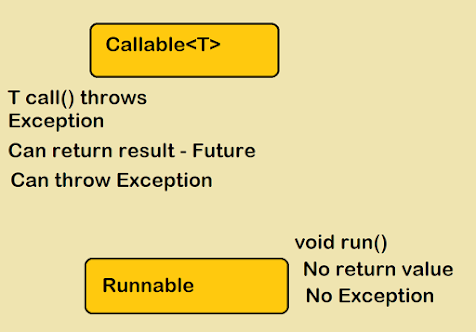
As the image shows, Callable<V> is a generic interface with a single method: V call() throws Exception.
- It returns a value of type
V. - It can throw an
Exception, which allows for more flexible error handling.
This makes Callable a much more powerful tool for many real-world concurrency scenarios.
Java ExecutorService - Part 4 - Callable / Future
This video from Defog Tech starts with a great explanation of the limitations of Runnable and why Callable was introduced.
Watch the beginning of the video, from a random number, to understand the core motivation and see the Callable interface defined in code.
2. Submitting Callable Tasks and the Future Placeholder
How do we run a Callable and get its result? In the previous lesson, we used executor.execute(runnable). For Callable, we use a different method: submit().
When you submit a Callable to an ExecutorService using executor.submit(callable), the method doesn't wait for the task to finish. It returns immediately. But if it returns immediately, how does it give you the result?
It gives you a Future<V> object.
A Future acts as a placeholder for the result of a computation that hasn't completed yet. Given your experience with the MERN stack, you can think of a Java Future as being conceptually similar to a JavaScript Promise. It represents a value that will be delivered at some point in the future.
The most important method of the Future interface is get(). When you call future.get(), one of two things happens:
- If the task has already completed,
get()immediately returns the result. - If the task is still running,
get()blocks the current thread and waits until the task is finished and the result is available.
Let's see this in action.
Java Callable and Future Tutorial | CalliCoder
The CalliCoder tutorial provides a clear, step-by-step introduction with a great code example.
First, read the section "Callable" for a quick recap. Then, carefully study the section "Executing Callable tasks using ExecutorService and obtaining the result using Future". Pay close attention to the code example and its output. Notice how the println statements in the main method execute immediately after the task is submitted, but the program waits at future.get() to print the final result.
The blocking nature of future.get() is a critical concept. Your main thread of execution can continue doing other work while the task runs in the background, and only when it absolutely needs the result does it call get() and potentially wait.
3. Managing the Future
Blocking indefinitely with get() can be risky. What if the task hangs or a remote service you're calling is unresponsive? Your application could become stuck. The Future interface provides several methods to manage the asynchronous task more robustly.
Timeouts
You can use an overloaded version of get() that accepts a timeout. future.get(5, TimeUnit.SECONDS) will wait for a maximum of 5 seconds. If the result isn't ready by then, it throws a TimeoutException. This is essential for building resilient backend services that don't wait forever on dependencies.
Checking Task Status
You can check if a task is finished without blocking by using the isDone() method. This returns true if the task has completed (either normally, by throwing an exception, or by being cancelled).
Cancelling a Task
You can attempt to cancel a task using future.cancel(boolean mayInterruptIfRunning).
- If the task hasn't started yet, it will be cancelled and never run.
- If the task is already running, the
mayInterruptIfRunningparameter comes into play. Iftrue, theExecutorServicewill attempt to interrupt the thread executing the task.
After cancellation, isDone() will return true, and isCancelled() will also return true. Calling get() on a cancelled future will throw a CancellationException.
Creating Threads and Executing Tasks | Thread, Runnable, Callable, Future, Executors | Geekific
This video from Geekific provides a very concise and clear overview of Callable, Future, and how to handle timeouts.
Watch the section on Callable and Future from additional methods. It effectively demonstrates the get() method's blocking behavior and introduces the timeout version to prevent an unresponsive application.
4. Handling Multiple Futures
Let's return to the dashboard example from our last lesson. We wanted to fetch a user's profile, orders, and wishlist in parallel. Now we can implement this properly. We can create three Callable tasks, submit them all, and get back three Future objects.
ExecutorService executor = Executors.newFixedThreadPool(3);

Callable<Profile> profileTask = () -> fetchProfile(userId);
Callable<List<Order>> ordersTask = () -> fetchOrders(userId);
Callable<List<WishlistItem>> wishlistTask = () -> fetchWishlist(userId);

Future<Profile> profileFuture = executor.submit(profileTask);
Future<List<Order>> ordersFuture = executor.submit(ordersTask);
Future<List<WishlistItem>> wishlistFuture = executor.submit(wishlistTask);

// Now, we need the results to build the dashboard
Profile profile = profileFuture.get(); // Blocks until profile is ready
List<Order> orders = ordersFuture.get(); // Blocks until orders are ready
List<WishlistItem> wishlist = wishlistFuture.get(); // Blocks until wishlist is ready

// ... build the dashboard DTO and return
This is a massive improvement over sequential execution! However, there's a subtle trap. Imagine fetchProfile takes 1 second, fetchOrders takes 5 seconds, and fetchWishlist takes 2 seconds.
In the code above, we call profileFuture.get(), then ordersFuture.get(), then wishlistFuture.get(). Even if the wishlist is ready after 2 seconds, our code is still blocked on ordersFuture.get(), waiting for the full 5 seconds. We can't get the wishlist result until the orders result is available.
Java ExecutorService - Part 4 - Callable / Future
This Defog Tech video has an excellent visualization that explains this exact problem.
First, watch from visualize all this to see how you can submit multiple tasks and collect their Future objects in a list. Then, pay close attention to the visual explanation starting at list of futures. It clearly illustrates how sequentially calling get() on a list of futures can cause unnecessary blocking.
While this sequential get() pattern is simple, for highly optimized systems you might use more advanced techniques like a CompletionService or CompletableFuture (which we may cover later). For now, being aware of this potential bottleneck is the most important takeaway.
5. Coding Exercise
Let's put this all together. You will adapt the coding exercise from the previous lesson to use Callable and Future.
Goal: Write a program that simulates downloading several "files" concurrently and calculates the total size of all downloaded files.
-
Create a
CallableTask:- Create a
FileDownloaderclass that implementsCallable<Integer>. - Its constructor should accept a file name (e.g., "file1.zip").
- In its
call()method:- Print a message like "Downloading [file-name]...".
- Simulate download time using
Thread.sleep()for a random duration (1 to 5 seconds). - Generate a random integer between 1000 and 5000 to represent the file size in "bytes".
- Print a message like "Download of [file-name] complete. Size: [size] bytes."
- Return the generated file size.
- Create a
-
Set up the Executor:
- In your
mainmethod, create a fixed-size thread pool with 3 threads. - Create a
List<Future<Integer>>to hold the results.
- In your
-
Submit Tasks and Collect Futures:
- Create a list of file names.
- Loop through the file names, create a new
FileDownloaderfor each, submit it to the executor, and add the returnedFutureobject to your list.
-
Retrieve Results and Shut Down:
- After submitting all tasks, create an integer variable
totalBytesinitialized to 0. - Loop through your list of
Futureobjects. For eachFuture, callget()to retrieve the file size and add it tototalBytes. - After the loop, print the total size: "Total downloaded size: [totalBytes] bytes."
- Finally, implement the proper shutdown sequence for the
ExecutorService.
- After submitting all tasks, create an integer variable
This exercise will give you hands-on practice with the entire lifecycle: creating Callable tasks, submitting them, managing Future objects, and retrieving their results.
Conclusion
You've now unlocked a much more powerful and practical side of Java's concurrency framework. You're no longer limited to tasks that don't produce a result.
Key Takeaways:
Runnablevs.Callable:Runnable.run()isvoidand can't throw checked exceptions.Callable.call()returns a generic value and can throw exceptions.Future: A placeholder for the result of an asynchronous task, returned byexecutor.submit(). It is conceptually similar to a JavaScriptPromise.future.get(): The primary method to retrieve a result. It blocks the calling thread until the result is available.- Robustness: Use the timed
get()method with a timeout to prevent your application from hanging. - Multiple Results: You can collect multiple
Futureobjects, but be mindful of the blocking nature ofget()when retrieving results sequentially.
In our next lesson, we'll address another core challenge of concurrency: how do multiple threads share and modify data safely? We'll explore Java's concurrent collections, such as ConcurrentHashMap, which are essential tools for building thread-safe applications.