Hello! In our previous lesson, we worked with text-based data, learning to read from and write to files using BufferedReader and BufferedWriter. That's a vital skill for handling logs, configuration files, and simple data formats. Today, we'll take a significant step forward and learn how to persist the entire state of a Java object.
This lesson covers object serialization and deserialization. Serialization is the process of converting a live Java object into a stream of bytes, which can then be saved to a file or sent across a network. Deserialization is the reverse: converting that byte stream back into a fully functional object in memory. For backend development, this is a cornerstone technique used for caching, saving application state, and in various communication protocols between distributed services.
We will explore the ObjectOutputStream and ObjectInputStream classes, the primary tools for this task, and learn the rules and best practices that ensure your objects can be saved and restored reliably.
1. What is Object Serialization?
While text files are great for human-readable data, they can't capture the complete picture of a complex object. An object in Java isn't just its data; it's a structured entity in memory with a specific type, fields, and relationships. Serialization allows us to preserve this entire structure.
- Serialization: The process of converting an object's state into a byte stream. This is done with
ObjectOutputStream. - Deserialization: The reverse process of reconstructing an object from a byte stream. This is done with
ObjectInputStream.
The following video from Bro Code provides an excellent high-level introduction to these concepts.
This video introduces the core ideas behind serialization and deserialization.
Watch the first part of the video (the explanation) to understand what serialization is and why it's useful for making an object's state persist after a program terminates.
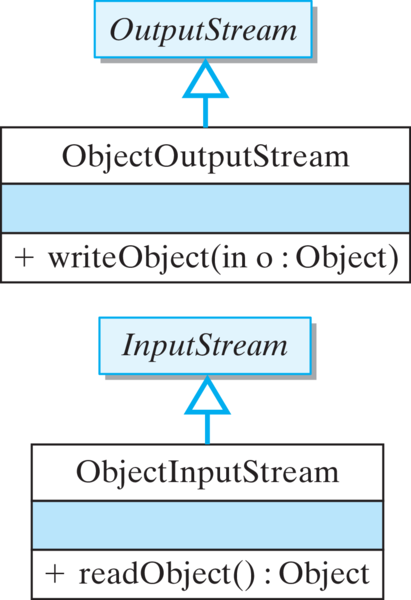
The key classes for these operations, ObjectOutputStream and ObjectInputStream, act as decorators for other streams, much like the buffered readers and writers we saw previously. They wrap byte-oriented streams (like FileOutputStream and FileInputStream) to add the capability of handling objects.
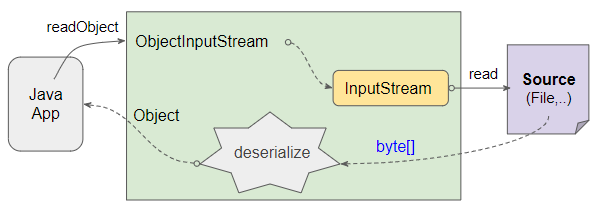
The process of deserialization can be visualized as reading raw bytes from a source and reconstructing them into a live object that your Java application can use.
2. Serialization: Writing an Object to a File
To make an object serializable, there's one simple but mandatory rule: its class must implement the java.io.Serializable interface.
public class User implements Serializable { ... }
Serializable is a marker interface, meaning it has no methods to implement. It simply signals to the Java Virtual Machine (JVM) that you are giving it permission to serialize and deserialize instances of this class.
Once your class is serializable, the process of writing an object to a file involves three main steps, which should feel familiar:
- Create a
FileOutputStreamto specify the destination file (e.g.,"user.ser"). The.serextension is a common convention for serialized object files. - Wrap the
FileOutputStreamin anObjectOutputStream. - Call the
writeObject(yourObject)method on theObjectOutputStream.
As always, we use a try-with-resources block to ensure the streams are closed properly.
The following article from Coding Shuttle provides a clear, complete example of this process.
ObjectInputStream and ObjectOutputStream | Coding Shuttle
This resource demonstrates how to serialize a Student object.
Read the section "Example". Note the Student class implementing Serializable and how ObjectOutputStream is used within the try-with-resources block to write the student object to a file named student.ser.
3. Deserialization: Reading an Object from a File
Deserialization brings our object back to life from the byte stream stored in the file. The process mirrors serialization:
- Create a
FileInputStreamthat points to the.serfile. - Wrap it in an
ObjectInputStream. - Call the
readObject()method on theObjectInputStream.
There are two critical details to handle during deserialization:
- Casting: The
readObject()method returns a value of typeObject. You must cast this back to the specific class you are expecting (e.g.,Student student = (Student) ois.readObject();). - Exception Handling: Besides the potential
IOException,readObject()can also throw aClassNotFoundException. This happens if the JVM cannot find the class definition for the object you are trying to deserialize (e.g., if the class file is missing from your project's classpath). Yourcatchblock must handle both.
Let's return to the Coding Shuttle article to see the deserialization code.
ObjectInputStream and ObjectOutputStream | Coding Shuttle
This part of the article shows the reverse process: reading the Student object back from the file.
Now, study the example under the section "ObjectInputStream Methods". Pay close attention to two key parts: the cast (Student) ois.readObject() and the multi-catch block catch (IOException | ClassNotFoundException e).
4. Important Considerations for Robust Serialization
While the basics are straightforward, professional backend development requires attention to detail to avoid bugs and security vulnerabilities. Here are two essential concepts to master.
The transient Keyword
Sometimes, you have fields in an object that you do not want to serialize. A prime example is a user's password; for security reasons, you should never write it to a file. Other examples include fields that can be recalculated, or fields that hold references to non-serializable resources.
To exclude a field from serialization, you mark it with the transient keyword.
private transient String password;
When an object with a transient field is deserialized, that field will be initialized to its default value (null for objects, 0 for numbers, false for booleans).
The "Bro Code" video explains this concept very clearly.
This segment demonstrates how to use the transient keyword to prevent a field from being saved.
Watch the section explaining the transient keyword (the demonstration). The video shows how a password field marked as transient becomes null after deserialization.
The serialVersionUID
What happens if you serialize an object, then update its class (e.g., add a new field), and then try to deserialize the old object? By default, Java will throw an InvalidClassException. This is because the JVM implicitly calculates a version ID for each serializable class. If the version ID of the class in your code doesn't match the version ID stored in the serialized file, deserialization fails.
To prevent this and take control of versioning, it is a strong best practice to explicitly declare a serialVersionUID in your class.
private static final long serialVersionUID = 1L;
This is a unique ID for your class version. If you make a compatible change (like adding a field), you can leave the serialVersionUID the same. If you make an incompatible change (like changing a field's type), you should increment the version number. Most IDEs will offer to generate or add this field for you.
The "Bro Code" video provides an excellent walkthrough of why this is so important.
This final segment explains the purpose and importance of serialVersionUID.
Watch this detailed explanation of the serialVersionUID (the explanation). It shows exactly what happens when the UIDs don't match and how to declare one yourself.
For a concise textual summary of these important rules, the article from "Learn Code with Durgesh" is a great reference.
This resource provides a quick reference for the key rules of serialization.
Read the section titled "Important Notes". It efficiently summarizes the requirements we've discussed: implementing Serializable, the behavior of static and transient fields, and the purpose of serialVersionUID.
Conclusion
You have now completed the I/O module by learning how to persist entire objects, a powerful capability that moves beyond simple text files. This is a fundamental skill for building applications that need to maintain state between sessions, cache data for performance, or communicate in a distributed environment.
Key Takeaways:
- Serialization converts an object into a byte stream using
ObjectOutputStreamand itswriteObject()method. - Deserialization reconstructs an object from a byte stream using
ObjectInputStreamand itsreadObject()method. - A class must implement the
Serializablemarker interface to be eligible for this process. - When deserializing, you must cast the result of
readObject()to the correct type and handle a potentialClassNotFoundException. - Use the
transientkeyword to prevent sensitive or temporary fields from being serialized. - Always declare a
serialVersionUIDin your serializable classes to manage version compatibility and avoidInvalidClassException.
With this lesson, we conclude our module on Exception Handling and I/O Streams. You are now equipped to handle errors gracefully and manage data both as text and as objects.
In our next lesson, we will begin a new module: Java Collections and Generics. We'll start by exploring ArrayList and LinkedList, two fundamental data structures for managing ordered groups of objects in memory.