Hello! In our last lesson, we focused on structuring our application professionally by organizing classes into packages. This macro-level organization is crucial for building scalable systems. Now, we shift our attention from structure to resilience. No matter how well-organized your code is, things will go wrong: a network connection will drop, a file will be missing, or a user will provide invalid input. For the enterprise backend systems you aim to build, simply crashing is not an option.
This lesson introduces Exception Handling, Java's powerful mechanism for managing errors gracefully. You will learn how to distinguish between different types of errors—checked and unchecked exceptions—and how to handle them using try, catch, and finally blocks. This is a fundamental skill for writing robust, production-ready Java applications.
1. What is an Exception?
In programming, an "exception" is an exceptional event that occurs during program execution and disrupts the normal flow of instructions. In Java, when such an event occurs, an object representing that error is created and "thrown." If this thrown exception isn't "caught" and handled, the program terminates abruptly.
To see this in action, watch the beginning of the following video. It demonstrates what happens when the program tries to perform an operation on a null value, leading to a NullPointerException.
Java Exception Handling Tutorial
This video from Programming with Mosh provides a clear, practical introduction to what exceptions are and why we need to handle them.
Watch from the beginning until the end of the section. Pay close attention to the concept of the stack trace, which is the trail of method calls that led to the error. Understanding how to read a stack trace is an essential debugging skill.
As you saw, the stack trace is your primary tool for diagnosing what went wrong and where. It shows the exact line of code that threw the exception and the sequence of method calls that led to it.
2. The Exception Hierarchy: Checked vs. Unchecked
Java classifies exceptions into a hierarchy to help developers decide how to deal with them. This is one of the most important concepts in Java error handling. All exceptions inherit from the Throwable class, which has two main subclasses: Error and Exception.
Error: Represents serious problems that a reasonable application should not try to catch, such asOutOfMemoryErrororStackOverflowError. These are usually caused by issues in the environment (the JVM) or infinite recursion in your code, and they typically cause the program to crash.Exception: Represents conditions that a reasonable application might want to catch. This class is further divided into two critical categories: checked exceptions and unchecked exceptions.

Checked Exceptions
These are exceptions that the Java compiler checks at compile-time. They represent predictable, recoverable problems that are often outside the programmer's direct control, like a missing file or a failed network connection. If a method can throw a checked exception, the compiler forces you to either handle it (with a try-catch block) or explicitly declare that your method can throw it (using the throws keyword, which we'll cover later).
Common Examples: IOException, SQLException, FileNotFoundException.
Unchecked (Runtime) Exceptions
These are exceptions that are not checked at compile-time and occur during the execution of the program. They almost always represent programming errors or bugs, such as attempting to access a null object (NullPointerException) or accessing an array with an invalid index (ArrayIndexOutOfBoundsException). The best practice is not to catch these, but to write code that prevents them from happening in the first place (e.g., by adding null checks or validating array indices).
Common Examples: NullPointerException, ArithmeticException, IllegalArgumentException.
The following article provides a detailed breakdown of this distinction.
Java Exceptions: Checked vs Unchecked - Medium
This article clearly defines and contrasts checked and unchecked exceptions, providing examples and best practices for each.
Please read the sections titled "Checked Exceptions," "Unchecked Exceptions," and the summary table under "Key Differences." This will solidify your understanding of when and why each type is used.
To hear another excellent explanation, the next video walks through the distinction with code examples for both FileNotFoundException (checked) and NullPointerException (unchecked).
Checked vs. Unchecked Exceptions in Java Tutorial - What's The Difference?
This video from "Coding with John" offers a concise, practical comparison of how the Java compiler treats checked versus unchecked exceptions.
Watch the segments on checked exceptions and unchecked exceptions. Notice how the compiler flags the checked exception as an error, demanding it be handled, while it completely ignores the possibility of the unchecked exception.
3. Handling Exceptions with try, catch, and finally
Now that we understand the "what" and "why" of exceptions, let's focus on the "how." The primary mechanism for handling exceptions in Java is the try-catch block.
The basic structure is:
tryblock: You place the code that might throw an exception inside this block.catchblock: If an exception occurs in thetryblock, the Java runtime looks for a matchingcatchblock to handle it. Acatchblock specifies the type of exception it can handle.finallyblock: This is an optional block that is always executed after thetry(andcatch, if any) block completes. It runs whether an exception was thrown or not. It's typically used for cleanup code, like closing files or database connections.
Single and Multiple catch Blocks
You can have multiple catch blocks to handle different types of exceptions. When an exception is thrown, Java looks for a matching catch block in order.
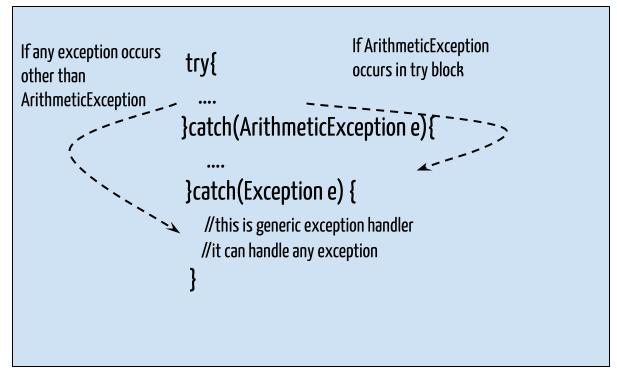
A crucial rule is that catch blocks must be ordered from most specific to most general. For instance, you must catch FileNotFoundException before you catch its parent, IOException. If you put the general exception first, the more specific one becomes unreachable, resulting in a compile-time error.
The following video from Programming with Mosh is an excellent, comprehensive walkthrough of try-catch-finally.
Java Exception Handling Tutorial
This video provides a step-by-step guide to implementing exception handling.
Please watch these three segments: Catching Exceptions: This demonstrates the basic try-catch structure with a checked exception. Catching Multiple Exception Types: This covers using multiple catch blocks, the importance of order, and the | syntax for combining exceptions. The finally Block: This explains the purpose of finally for resource cleanup and demonstrates why it's so important.
4. Common Pitfalls and Best Practices
Using try-catch is essential, but it's easy to misuse. Building robust backend services requires disciplined error handling. Here are some common mistakes to avoid.
- Mistake 1: Swallowing Exceptions. Never leave a
catchblock empty. This hides the error entirely, leaving your application in an unknown state and making debugging nearly impossible. At a minimum, log the exception. - Mistake 2: Catching Overly Generic Exceptions. Avoid catching
ExceptionorThrowableunless absolutely necessary. Doing so can hide critical, unexpected runtime exceptions that you should be aware of. Be as specific as possible. - Mistake 3: Using Exceptions for Control Flow.
try-catchis for exceptional circumstances, not for normal program logic. For predictable conditions, like validating user input, anif-elsestatement is far more efficient and readable. - Mistake 4: Mismanaging Unchecked Exceptions. The primary response to an unchecked exception (like
NullPointerException) should be to fix the underlying bug, not to wrap the faulty code in atry-catchblock. Adding anullcheck is better than catching the exception.
This article provides excellent examples of these mistakes and how to correct them.
Beginner's Guide To Try And Catch In Java
This section from a Zero To Mastery article is a practical guide to writing clean, effective exception handling code.
Please read the entire section "Common mistakes in exception handling". Pay close attention to the "How to fix it" examples, as they demonstrate professional coding practices.
5. Your Turn: Making the Notification Service More Resilient
Let's apply these concepts to our notification system.
Task:
Modify your SMSService class (or EmailService) to simulate a potential failure and handle it correctly.
-
Simulate a Network Failure (Checked Exception):
- Inside the
sendNotificationmethod inSMSService, add logic to simulate a failure. For example, use aRandomobject to make the method fail 50% of the time. - When it fails,
throwa newIOException("Network connection failed"). SinceIOExceptionis a checked exception, your IDE will immediately flag an error. - Add
throws IOExceptionto thesendNotificationmethod signature. YourSMSServicewill now compile, but the error will move to where you call the method (likely inMain.javaorNotificationService.java).
// Inside SMSService.java public void sendNotification(String recipient, String message) throws IOException { System.out.println("Sending SMS to " + recipient); if (new java.util.Random().nextBoolean()) { throw new IOException("Simulated network failure"); } System.out.println("SMS sent successfully to " + recipient); } - Inside the
-
Handle the Checked Exception:
- Go to the class where you call
sendNotification. - Wrap the call in a
try-catchblock to handle theIOException. - In the
catchblock, print a user-friendly error message, like "Failed to send SMS due to a network error. Please try again later." - Also, print the exception's stack trace using
e.printStackTrace()so you have the full details for debugging.
- Go to the class where you call
-
Introduce and Fix an Unchecked Exception:
- In the same calling class, before the
try-catchblock, deliberately introduce aNullPointerException. Create anSMSServiceinstance but set it tonull. SMSService smsService = null;- Run the program. It will crash with a
NullPointerExceptionbefore it even gets to yourtry-catchblock. - Now, fix the bug. Instead of wrapping the call in another
try-catchforNullPointerException, initialize the service correctly:SMSService smsService = new SMSService();. - This exercise should demonstrate the fundamental difference in strategy: you handle checked exceptions, but you fix the code to prevent unchecked exceptions.
- In the same calling class, before the
Conclusion
In this lesson, you've learned one of the most critical skills for a Java developer: how to build resilient applications using exception handling. You now understand the fundamental difference between checked and unchecked exceptions and have the tools to manage them.
Key Takeaways:
- Exceptions are objects representing errors that disrupt the normal program flow.
- Checked exceptions are for predictable, recoverable errors (e.g., I/O failures) and are checked at compile-time. You are forced to handle them.
- Unchecked exceptions are for programming bugs (e.g.,
NullPointerException) and occur at runtime. The best practice is to fix the code to prevent them. - The
tryblock contains code that might fail. - The
catchblock handles a specific type of exception. - The
finallyblock contains cleanup code that always runs, ensuring resources are released.
In our next lesson, we will continue exploring exception handling. You'll learn how to explicitly throw exceptions yourself and how to use the throws keyword to propagate them up the call stack, giving you even more control over your application's error-handling strategy.