Hello! Welcome back.
In our last lesson, we explored the difference between TCP and UDP at Layer 4, understanding how applications choose between reliability and speed. We saw how a TCP packet, for example, is addressed to a specific port on a destination IP address.
But this raises a new question: once your computer has a packet ready for a device on the same local network (like your router, or another server in the same rack), how does it actually send it? The physical network hardware, like switches, operates at Layer 2 and uses MAC addresses, not IP addresses, to forward frames. How does your system bridge the gap between the Layer 3 IP address and the Layer 2 MAC address?
This is where the Address Resolution Protocol (ARP) comes in. Today, we will inspect the ARP table on a Linux system and trace how an IP address is mapped to a MAC address on the local network. Understanding this process is fundamental for diagnosing a wide range of local connectivity issues.
1. The Role of ARP: A Phone Book for the Local Network
Imagine you want to hand-deliver a letter to a neighbor on your street. You know their name (the IP address), but to find their house, you need their street number (the MAC address). ARP is the process of shouting down the street, "Who is John Doe?" and waiting for him to reply, "I am! I live at number 123."
ARP resolves a Layer 3 (logical) IP address into a Layer 2 (physical) MAC address for communication within a local network segment.
What is an ARP table and how does it work?
To start, let's get a clear definition of what an ARP table is and how it functions. This article from Portnox provides an excellent, concise explanation.
Read the section 'What is an ARP table and how does it work?'. Focus on understanding the ARP request/reply process and the difference between dynamic and static entries.
As the article explains, this process involves two key messages:
- ARP Request: A broadcast message sent to every device on the local network, asking, "Who has this IP address?"
- ARP Reply: A unicast message sent directly back from the device that owns the IP address, saying, "I have that IP address. Here is my MAC address."
This exchange is visualized in the diagram below.
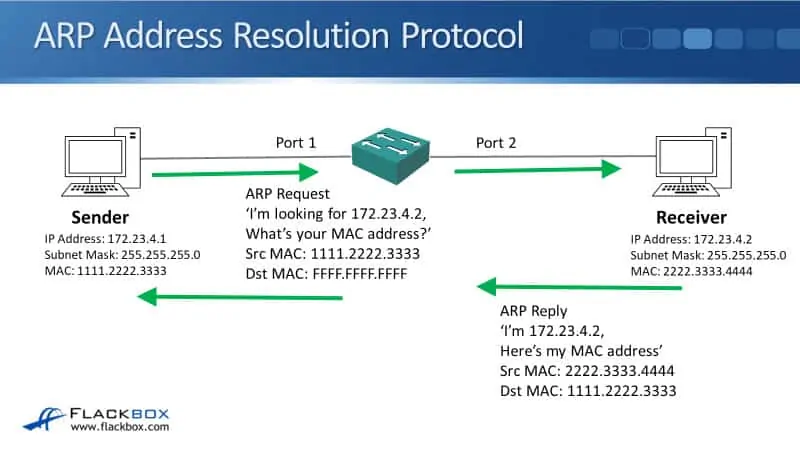
Once a device receives an ARP Reply, it stores the IP-to-MAC mapping in its ARP cache (or ARP table) so it doesn't have to ask again for a short period.
2. Practice: Inspecting the ARP Table in Linux
Your primary tool for diagnosing local network issues is inspecting this ARP table. In Linux, there are two main commands for this: the classic arp and the modern ip neighbour. As a professional, you should be familiar with both.
Linux networking: arp versus ip neighbour
This Red Hat blog post clearly explains the syntax for both the old arp command and its modern replacement, ip neighbour. It also explains why it's important to learn the new command.
Please read the entire article. Pay close attention to the command examples for displaying, adding, and removing entries with both arp and ip. The final section, 'This is the way?', highlights the industry trend toward the ip command suite.
Let's put this into practice on your Linux VM.
To view the ARP table:
-
The classic way:
# The -n flag prevents DNS resolution, showing raw IP addresses. This is faster and often clearer.
arp -n
You will see columns for
Address(IP),HWaddress(MAC), andIface(the network interface). -
The modern way:
ip neigh showThe output shows the IP address, the device (
dev), the MAC address (lladdrfor "link-layer address"), and the state of the entry (e.g.,REACHABLE,STALE).
For a job interview, knowing that ip neigh is the modern standard and part of the iproute2 suite that replaces older net-tools (like ifconfig and arp) shows your knowledge is current.
3. Practice: Tracing an ARP Resolution in Real-Time
Now for the fun part. Let's use our "katana" and force an ARP resolution to happen, watching the table update in real-time. We'll simulate the exact process shown in this image.
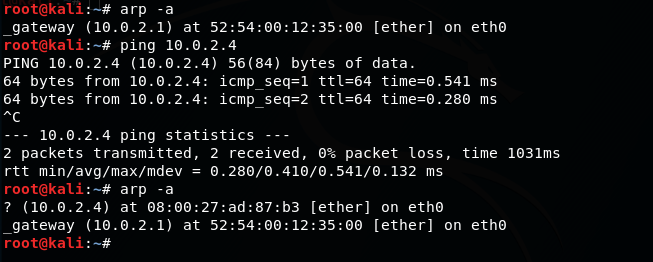
To see the underlying packets, we can use tcpdump. The following video provides a perfect, guided demonstration of this entire process.
network mapping using the address resolution protocol (arp)
This video from BlueMonkey 4n6 will walk us through using the arp command and, more importantly, will use tcpdump to let us 'see' the ARP request and reply packets as they happen.
Watch from 00:39 to 04:43. The video first introduces the arp command and its flags. Then, it sets up tcpdump to monitor ARP traffic and demonstrates exactly how a ping command triggers an ARP resolution that populates the table.
Let's replicate this on your system.
- Find a target IP: Identify the IP address of another device on your local network (like your router/gateway, or another VM). You can find your gateway's IP with
ip route show. - Clear the ARP entry (optional but good for testing): To ensure a clean test, you can manually delete the entry for your target IP. Replace
192.168.1.1with your target's IP.sudo ip neigh flush 192.168.1.1 - Check the ARP table: Run
ip neigh showorarp -n. The entry for your target should be gone. - Trigger the resolution: Simply
pingthe target IP once.ping -c 1 192.168.1.1 - Check the table again: Run
ip neigh showorarp -n. The entry is back! Your ping forced the system to perform an ARP request/reply, and the result is now cached.
What if the device doesn't exist?
The video also explores what happens when you ping a non-existent IP. Your system sends out ARP requests but gets no reply. If you check your ARP table, you'll see an entry marked as incomplete or (incomplete). This is a valuable troubleshooting clue, indicating that a host is unreachable at Layer 2.
4. Dynamic vs. Static ARP Entries
You may have noticed that ARP entries don't stay in the cache forever. They are dynamic and have a timeout. This is by design, as devices leave the network and IP addresses can be reassigned by DHCP.
However, in a data center environment, you sometimes need to ensure a mapping is permanent. This is where static ARP entries come in.
This final reading from Portnox explains the dynamic nature of the ARP cache and contrasts it with static entries, providing clear use cases and security considerations.
Read the sections 'Why does the ARP table keep changing or clearing?' and 'What is the difference between a static and dynamic ARP entry?'. Focus on the reasons for using static entries, particularly in a server environment.
- Dynamic Entries: Learned automatically, have a limited lifetime, and are flexible. This is the default for 99% of network traffic.
- Static Entries: Manually configured, permanent, and do not expire. They are used for critical infrastructure like routers, firewalls, or key servers to enhance security (preventing ARP spoofing) and ensure stable connectivity.
To create a static entry in Linux, you would use the ip neigh command:
# sudo ip neigh add {IP_ADDRESS} lladdr {MAC_ADDRESS} dev {INTERFACE} nud permanent
sudo ip neigh add 192.168.1.50 lladdr 00:1A:2B:3C:4D:5E dev eth0 nud permanent
This is a powerful technique for locking down communication paths in a high-security environment.
Conclusion
You now have a complete picture of how devices on a local network find each other. We've bridged the gap between Layer 3 and Layer 2, moving from a logical IP address to a physical MAC address.
Key Takeaways:
- ARP's Role: To resolve IP addresses into MAC addresses for local network communication.
- ARP Process: A broadcasted ARP Request ("Who has this IP?") is answered by a unicast ARP Reply ("I do, here's my MAC").
- Inspection Tools: The
arp -nandip neigh showcommands allow you to view the ARP cache on a Linux system. Knowing the modernipcommand is crucial. - Tracing: A simple
pingis enough to trigger the ARP process. You can observe the results by checking the ARP table before and after. - Entry Types: Most entries are dynamic and expire. Static entries are permanent and can be used to secure critical devices.
In our next lesson, we will zoom out from the packet level. We'll learn how to analyze a network diagram to identify its topology (e.g., star, leaf-spine) and evaluate its redundancy. This will shift our focus from how individual devices talk to how the entire network is structured for resilience and performance.