Hello! Welcome to the fourth lesson in our module on Transforming Data with Spark SQL.
In our previous lesson, you learned how to use CREATE TABLE AS SELECT (CTAS) to materialize the results of your transformation queries into new Delta tables. This is a fundamental step in building data pipelines. Now, we're going to dive deeper into the "T" in ELT—the transformation itself.
This lesson focuses on one of the most common and essential transformation tasks: manipulating strings. You'll learn how to apply a variety of Spark SQL functions to clean, reformat, combine, and parse string data. Mastering these functions is critical for dealing with the messy, inconsistent text data that is common in real-world data sources.
1. Why String Manipulation is Crucial
Data rarely arrives in a perfect format. You'll often encounter issues like:
- Extra whitespace in names or addresses.
- Inconsistent capitalization (e.g., "CA", "Ca", "ca").
- Multiple pieces of information packed into a single column (e.g., "Firstname Lastname").
- A need to create new identifiers or descriptive fields from existing ones.
String functions are your toolkit for solving these problems. They allow you to standardize data for accurate filtering and joining, extract valuable features from text, and reshape your data to fit the required schema.
2. The Essential String Functions
Let's explore the core set of string functions you'll use most often. We'll start with a comprehensive video that covers the most important ones with practical examples.
The Only SQL String Functions Video You Need - SUBSTR, CONCAT, TRIM, LENGTH & More!
The video "The Only SQL String Functions Video You Need" by Sumit Mittal provides an excellent, hands-on tour of the most common string functions. It covers their syntax and demonstrates their use in realistic scenarios, such as data quality checks.
Please watch the video from 02:22 to 42:55. This covers a series of key functions. As you watch, pay attention to: CONCAT (02:22): How to combine columns and literal strings. LENGTH (07:19): How to find the length of a string and use it for data quality validation. LOWER / UPPER (16:14): The importance of case conversion for filtering. SUBSTRING (19:17): How to extract parts of a string using start positions and lengths. TRIM (25:02): How to clean leading/trailing spaces and a clever trick to find records that need cleaning. REPLACE (32:09): How to substitute parts of a string. LOCATE / INSTR (36:15): How to find the starting position of a substring, which is often used in combination with other functions.
The video provides a great foundation. Now, let's formalize these concepts within the Spark SQL context and introduce a few more critical functions.
Combining Strings: CONCAT and CONCAT_WS
As you saw, CONCAT joins strings together. In Spark SQL, you can also use the || operator for the same purpose.
SELECT 'Spark' || ' ' || 'SQL'; -- Returns 'Spark SQL'
A very useful variation is CONCAT_WS (Concatenate With Separator). It takes a separator as the first argument and then concatenates the remaining arguments, automatically placing the separator between them. This is often cleaner than using CONCAT with manual separators.
-- Combines first and last names with a single space
SELECT CONCAT_WS(' ', 'John', 'Fitzgerald', 'Kennedy'); -- Returns 'John Fitzgerald Kennedy'
Important Note on NULLs: A key difference is how they handle NULL values.
CONCAT('a', 'b', NULL)will result inNULL.CONCAT_WS(' ', 'a', 'b', NULL)will result in'a b', as it skipsNULLvalues. This makesCONCAT_WSgenerally safer for combining columns that might contain nulls.
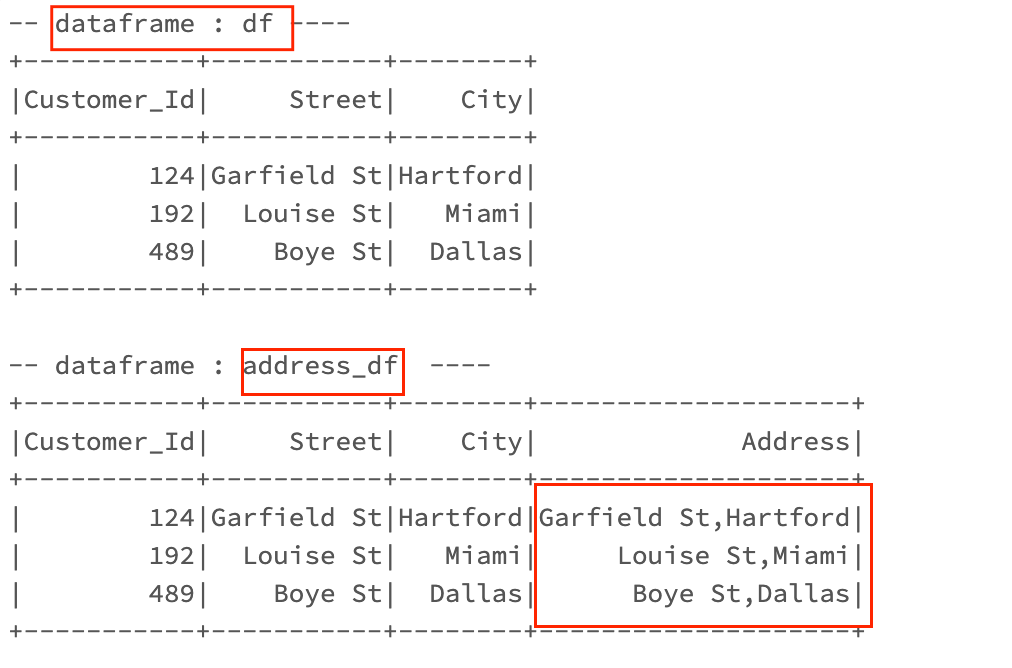
Extracting and Parsing: SUBSTRING, SPLIT, and LOCATE
You've seen SUBSTRING and LOCATE. Let's add SPLIT to the mix, as it's one of the most powerful parsing functions.
The SPLIT function takes a string and a delimiter (which can be a regular expression) and returns an array of substrings. You can then access elements of this array using bracket notation [index]. Remember, array indexing in Spark SQL is 0-based.
Example: Extracting a username from an email address
If you have an email like 'jane.doe@databricks.com', you can extract the username 'jane.doe' like this:
SELECT SPLIT('jane.doe@databricks.com', '@')[0]; -- Returns 'jane.doe'
This query splits the string at the @ symbol, creating an array ['jane.doe', 'databricks.com'], and then selects the first element (at index 0).
For a more detailed reference on these and other functions, the Spark SQL documentation is your best friend.
Spark SQL String Functions Code Examples
The article "Spark SQL String Functions Code Examples" from MSSQLTips is a great reference that lists many functions available in Spark SQL, including aliases that might be familiar from other SQL dialects.
You don't need to read this entire article now, but I recommend bookmarking it. For this lesson, quickly scan these sections to see the variety of functions available: "Combining Strings": Note the mention of concat, concat_ws, and the || operator. "String Part – Return or Replace": Reinforces substring and replace. "Splitting Strings": Introduces split and split_part. split_part is a useful alternative that directly returns the nth part of the string instead of an array.
3. Hands-On Practice: Cleaning User Data
Time to put this theory into practice. Let's tackle a realistic data cleaning task. Imagine we have a source table where user information is crammed into a single, messy field. Our goal is to parse it into clean, separate columns.
Instructions:
Open a Databricks SQL notebook and follow these steps.
Step 1: Create a Messy Source Table
First, run this code to create our sample data. It contains names and emails in an inconsistent format with extra spaces.
CREATE OR REPLACE TABLE messy_users (
  id INT,
  user_details STRING
);

INSERT INTO messy_users VALUES
  (1, '  John Doe <john.doe@example.com>'),
  (2, 'Jane Smith   <JANE.SMITH@BIGCORP.COM> '),
  (3, '   peter jones <p.jones@another.org>');
Step 2: Build the Cleaning Logic with a CTE
We'll build a query using a Common Table Expression (CTE) to progressively clean the data. This makes the logic easy to follow and debug.
Copy and paste the entire query below into a cell and run it. Then, we'll break down what each part does.
WITH
  -- Step 1: Basic cleaning - trim whitespace and convert to lowercase for consistency.
  cleaned_details AS (
    SELECT
      id,
      LOWER(TRIM(user_details)) AS details
    FROM
      messy_users
  ),
  -- Step 2: Find the positions of key characters ('<' and '>') that separate name and email.
  positions AS (
    SELECT
      id,
      details,
      LOCATE('<', details) AS open_bracket_pos,
      LOCATE('>', details) AS close_bracket_pos
    FROM
      cleaned_details
  ),
  -- Step 3: Extract the full name and email using the positions found in the previous step.
  extracted_parts AS (
    SELECT
      id,
      TRIM(SUBSTRING(details, 1, open_bracket_pos - 1)) AS full_name,
      SUBSTRING(details, open_bracket_pos + 1, close_bracket_pos - open_bracket_pos - 1) AS email
    FROM
      positions
  )
-- Final Step: Split the full name into first and last names and select the final, clean columns.
SELECT
  id,
  SPLIT(full_name, ' ')[0] AS first_name,
  SPLIT(full_name, ' ')[1] AS last_name,
  email
FROM
  extracted_parts;
Let's analyze the query step-by-step:
cleaned_detailsCTE: We start by usingTRIMto remove leading/trailing spaces andLOWERto standardize the case. This is a standard first step in data cleaning.' John Doe <john.doe@example.com>'becomes'john doe <john.doe@example.com>'.
positionsCTE: We useLOCATEto find the index of the<and>characters. These numbers will guide ourSUBSTRINGfunctions.extracted_partsCTE: Here's where the main extraction happens.- For
full_name, we take aSUBSTRINGfrom the beginning of the string up to the position of<. We wrap it in anotherTRIMto remove any trailing space before the bracket. - For
email, we take aSUBSTRINGthat starts one character after<and has a length calculated from the positions of the two brackets.
- For
- Final
SELECT: We use theSPLITfunction on thefull_nameusing a space as the delimiter. This creates an array (e.g.,['john', 'doe']). We then select the first element ([0]) asfirst_nameand the second ([1]) aslast_name.
You have successfully transformed a single messy column into three clean, structured columns by combining several string functions! In a real pipeline, you could wrap this entire query in a CREATE OR REPLACE TABLE clean_users AS ... statement to persist the result, just as you learned in the previous lesson.
Conclusion
You've now added a powerful set of string manipulation tools to your Spark SQL skillset. Being able to combine these functions is key to solving complex data cleaning and preparation challenges.
Key Takeaways
- Cleaning is Key: Functions like
TRIM,LOWER, andUPPERare fundamental for standardizing data before joins or analysis. - Combine and Conquer:
CONCATandCONCAT_WSare used to build new string fields from existing ones.CONCAT_WSis often preferred for its handling ofNULLvalues. - Parse with Precision: A combination of
SUBSTRING,LOCATE, andSPLITallows you to deconstruct complex strings into their component parts. - Build Sequentially: Using CTEs to apply string functions in a step-by-step manner makes complex parsing logic readable and maintainable.
Next Steps
Now that you are comfortable manipulating strings, our next lesson will shift focus to another critical data type: dates and timestamps. You will learn how to parse, format, and perform calculations with temporal data in Spark SQL.