Hello! Welcome to the next lesson in our journey through Structured Streaming.
In our last lesson, you successfully built your first end-to-end streaming pipeline. You learned how to use spark.writeStream to write data to a Delta table, focusing on the critical role of checkpointing for fault tolerance. We used the default output mode, append, which is perfect for adding new, immutable records to a table.
Today, we'll expand on that foundation. The real power of Structured Streaming shines when you handle more complex scenarios, like real-time aggregations where results change over time. To manage this, you need to tell Spark what to write at each step. This is controlled by the output mode.
By the end of this lesson, you will be able to select the appropriate output mode (append, complete, or update) for a given streaming scenario, a crucial skill for building correct and efficient streaming applications.
Why Do We Need Different Output Modes?
In the previous lesson, our stream was stateless. Each incoming row was independent and we simply added it to the sink.
However, many streaming applications are stateful. A common example is aggregation. Imagine you are counting events from a stream of IoT sensor data. The total count changes every time a new event arrives. Spark needs to maintain the current count as an intermediate "state".
The output mode determines what happens with this state during a write operation. Do you write:
- Only new, finalized results?
- The entire, up-to-the-second result?
- Just the specific rows that have changed?
The answer depends on your use case, and choosing the right mode is key. There are three to learn: Append, Complete, and Update.
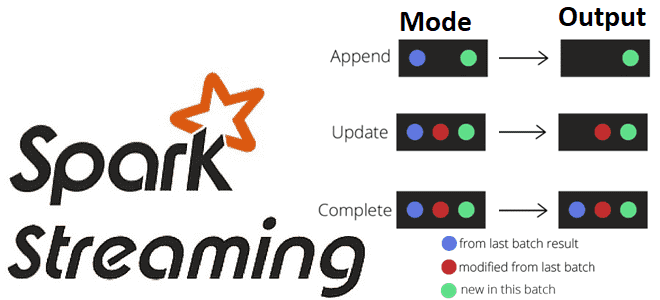
The Three Output Modes Explained
Let's formally define each mode. The Databricks documentation provides a concise and authoritative overview.
Select an output mode for Structured Streaming
Please read the following sections from the official Databricks documentation. It introduces why output modes are needed for stateful streaming and provides a clear summary table of the three modes.
Read the sections 'What is output mode?' and 'Available output modes'. Pay close attention to the summary table defining Append, Update, and Complete modes.
To summarize and build on that reading:
-
Append Mode (Default)
- What it does: Writes only the new rows that are added to the Result Table since the last trigger. For stateful operations like aggregations, this means it will only output results once they are considered "final" and will no longer be updated. This is typically determined by a watermark, which you've seen before.
- When to use it:
- Stateless queries (e.g.,
select,where,map). - Writing raw event logs or data that doesn't change after being generated.
- Stateful aggregations where you only want the final result for a given window (e.g., after the window has closed plus a watermark delay).
- Stateless queries (e.g.,
-
Complete Mode
- What it does: Rewrites the entire set of aggregated results to the sink in every trigger.
- When to use it:
- Only for queries with aggregations (
groupBy,count, etc.). - When the downstream system needs the full, up-to-date picture at all times (e.g., powering a real-time dashboard that shows total sales across all stores).
- Only for queries with aggregations (
- Caution: This can be inefficient if the result set is large, as it rewrites everything repeatedly.
-
Update Mode
- What it does: Writes only the rows in the Result Table that were updated since the last trigger. If a row that was previously output is not updated, it won't be part of the new output.
- When to use it:
- For queries with aggregations.
- When you need to send only the changes to a downstream sink (e.g., updating specific rows in a database or a key-value store). This is more efficient than
Completemode if the number of updates is small compared to the total state.
Seeing the Modes in Action
Reading definitions is one thing, but seeing the behavior is another. Let's watch a video that demonstrates the difference between complete and update modes using the classic "word count" example.
05 Spark Streaming Output Modes, Optimization and Background
This video from 'Ease With Data' provides an excellent, practical demonstration of how complete and update modes behave differently with a running word count aggregation.
Please watch the following segments: 06:10 - 09:07: The presenter explains the conceptual difference between complete, update, and append modes using the word count example. 09:36 - 12:06: Watch the live coding demos for complete and update modes. Observe the console output in each case as new words are typed into the stream. Notice how complete mode always prints all counts, while update mode only prints the counts for the words that just appeared.
As you saw, with complete mode, every word count seen so far was printed with each new batch. With update mode, only the counts for the words in the current batch were printed. This is the core difference in behavior.
Your Turn: Experiment with Output Modes
Now it's time to apply these concepts yourself. We will set up a simple streaming aggregation and observe how each output mode behaves.
Scenario: We have a stream of sales data containing (category, amount). We want to calculate the total sales amount for each category.
Instructions:
-
Set up the following in a new Databricks Python notebook. This code creates a temporary directory, defines a schema, and prepares a function to drop new JSON files into our source directory.
# 1. Setup source_path = "/tmp/streaming_output_modes_source" # Clean up previous runs dbutils.fs.rm(source_path, True) dbutils.fs.mkdirs(source_path) # Define the schema for our streaming data from pyspark.sql.types import StructType, StructField, StringType, DoubleType schema = StructType([ StructField("category", StringType(), True), StructField("amount", DoubleType(), True) ]) # Helper function to add new data to our source def add_new_data(file_name, data): dbutils.fs.put(f"{source_path}/{file_name}", data, overwrite=True) print("Setup complete.") -
Run this cell to define our streaming DataFrame and the aggregation we want to perform.
# 2. Define the stream and aggregation # Read the stream from the source directory streaming_df = (spark.readStream .schema(schema) .format("json") .load(source_path) ) # Define our aggregation: sum of amount per category aggregated_df = streaming_df.groupBy("category").sum("amount") print("Streaming DataFrame and aggregation defined.") -
Experiment with Output Modes. Now, run each of the following three queries in separate cells. After starting each stream, use the
add_new_datafunction in a new cell to see how the output changes.-
Query 1: Complete Mode
This writes the entire set of running totals to the console every time.# Query 1: Complete Mode (aggregated_df.writeStream .outputMode("complete") .format("console") .queryName("complete_mode_query") .start() ) -
Query 2: Update Mode
This writes only the categories whose totals were updated in the last batch.# Query 2: Update Mode (aggregated_df.writeStream .outputMode("update") .format("console") .queryName("update_mode_query") .start() ) -
Note on Append Mode: If you try to run the aggregation with
appendmode without a watermark, Spark will throw an error because it doesn't know when an aggregated result is "final". It is not supported on aggregations without a watermark.
-
-
Add data and observe. While the streams are running, execute the following cells one by one and observe the console outputs for the
complete_mode_queryandupdate_mode_query.# Add first batch of data add_new_data("batch1.json", '{"category": "electronics", "amount": 1200.00}\n{"category": "books", "amount": 50.00}')Observe: Both streams should show results for 'electronics' and 'books'.
# Add second batch of data
add_new_data("batch2.json", '{"category": "electronics", "amount": 300.00}\n{"category": "apparel", "amount": 150.00}')
Observe:
completemode will show all three categories ('electronics', 'books', 'apparel').updatemode will only show the updated totals for 'electronics' and the new total for 'apparel'. 'books' will not be in the output for this batch.
Once you are done, you can stop all streams by running for s in spark.streams.active: s.stop().
Production Considerations & Choosing the Right Mode
Your hands-on experiment showed the functional differences. In a real-world project, you also need to consider other factors.
Select an output mode for Structured Streaming
Let's return to the Databricks documentation to understand the practical trade-offs.
Please read the 'Production considerations' section to understand how factors like application needs, sink compatibility, latency, and cost influence your choice. Then, quickly review the 'Stateful streaming and output modes example' section for a concrete scenario involving watermarks and all three modes.
Knowledge Check: Select the Mode
Based on what you've learned, choose the most appropriate output mode for each scenario.
Scenario 1: You are building a streaming pipeline to ingest raw JSON logs from Kafka and archive them into a Delta table for compliance. No transformations or aggregations are performed.
Click for answer
**Append Mode**. This is a classic stateless ETL use case. Each log entry is a new, immutable row. `Append` is the most efficient and direct way to write this data.Scenario 2: You need to maintain a Delta table that always contains the most up-to-date count of active users per country. A downstream dashboard queries this table directly every 30 seconds to show a world map of user activity.
Click for answer
**Complete Mode**. The requirement is for the downstream system to always see the *full* picture. `Complete` mode ensures the target table is a complete, rewritten snapshot of the aggregated state with every trigger, perfectly matching the dashboard's needs.Scenario 3: A streaming query calculates the average temperature for thousands of IoT sensors. The results are written to a key-value store. You want to minimize write operations to this store, only sending an update for a specific sensor when its calculated average temperature changes.
Click for answer
**Update Mode**. This mode is designed for exactly this purpose. It ensures that only the rows (in this case, sensors) whose state has actually changed are propagated to the sink, minimizing I/O and downstream processing.Conclusion
You now have a solid grasp of one of the most fundamental concepts in stateful stream processing. Choosing the correct output mode is not just about getting the code to run; it's about ensuring your pipeline is correct, efficient, and meets the semantic requirements of your application.
Key Takeaways
- Append Mode: For new, immutable data. Use it for stateless ETL or for finalized results from a stateful aggregation with a watermark.
- Complete Mode: For aggregations where the downstream sink must always have the entire, up-to-the-minute result set.
- Update Mode: For aggregations where you only want to propagate the changes to the downstream sink, which is often more efficient.
- The choice depends on the query (stateless vs. stateful), the sink's capabilities, and the business logic you need to implement.
Next Steps
We've now covered what to write to a sink using output modes. The next logical question is when and how often to write it. In our next lesson, we will dive into trigger options, learning how to use trigger options (e.g., availableNow, processingTime) to control the execution frequency of your streaming queries.