Hello! Welcome to the fourth lesson in our module on "Managing Tables with Delta Lake."
In our last session, you learned the fundamental Data Definition Language (DDL) commands to CREATE and DROP both managed and external Delta tables. You practiced creating tables and saw the critical difference in what happens to the underlying data when you drop each type.
Now that you can manage the table structures, it's time to manipulate the data within them. This lesson focuses on the core Data Manipulation Language (DML) operations you'll use daily as a data engineer. Our learning outcome is to perform INSERT, UPDATE, and DELETE operations to manipulate data in Delta tables. Mastering these commands is essential for building robust data pipelines and for success on the certification exam.
Let's get started.
1. The Core DML Commands: INSERT, UPDATE, DELETE
Data Manipulation Language (DML) is the subset of SQL used to add, modify, and remove data. The three primary commands are INSERT, UPDATE, and DELETE. The following resource from the official Databricks documentation provides clear, practical examples of the SQL syntax for each.
Tutorial: Create and manage Delta Lake tables
This Databricks tutorial provides concise, code-first examples for the standard DML operations. Let's review the SQL syntax for each.
Please review the SQL tabs in the following three sections: 'Write to a table' (for INSERT), 'Update a table', and 'Delete from a table'. Focus on the structure of each command: what keywords are used and how conditions are specified with a WHERE clause.
Let's briefly summarize the syntax for each:
INSERT: Adds new rows to a table. The basic syntax specifies the target table and the values to be inserted.INSERT INTO table_name (column1, column2) VALUES (value1, value2); -- Or, to insert from another query result INSERT INTO table_name SELECT * FROM source_table;UPDATE: Modifies existing rows in a table that match a condition.UPDATE table_name SET column1 = new_value1, column2 = new_value2 WHERE condition;DELETE: Removes existing rows from a table that match a condition.DELETE FROM table_name WHERE condition;
2. How DML Works in Delta Lake
Given your physics background, you might find the mechanism behind these operations particularly interesting. Unlike traditional databases that might modify data blocks in-place, Delta Lake uses a copy-on-write methodology, which is fundamental to its reliability and features like time travel.
When you issue an UPDATE or DELETE command, Delta Lake does not change the existing data files. Instead, it performs the following steps:
- Identifies the data files (Parquet files) containing the rows that match your
WHEREclause. - Reads these files into memory.
- Rewrites the data into new data files, applying the specified changes (updating values or omitting deleted rows).
- Commits a new transaction to the
_delta_log, atomically marking the old files as "removed" and the new files as "added".
The table's state is defined by the set of active files listed in the most recent transaction log entry. The old files are not immediately deleted, allowing you to query previous versions of the table.
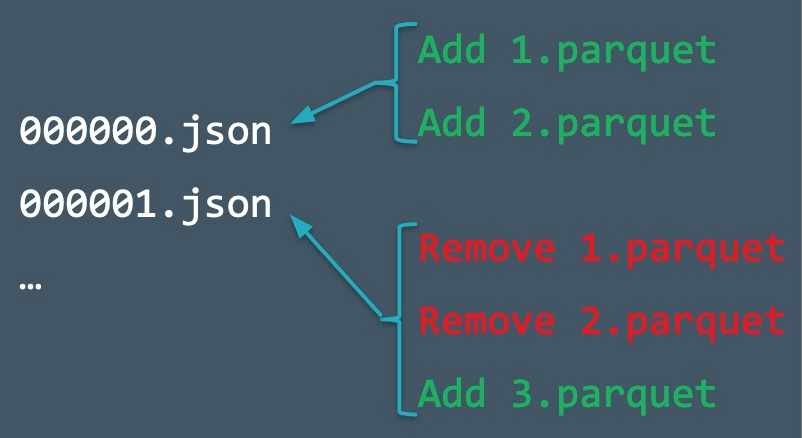
The following video provides a more detailed look at the internals of these operations.
Tech Talk | Diving into Delta Lake Part 3: How do DELETE, UPDATE, and MERGE work
This tech talk from Databricks offers a clear explanation of what happens under the hood during DML operations. Understanding this is key to appreciating Delta Lake's architecture.
Please watch two segments: From 04:39 to 07:58 to understand the mechanics of an UPDATE operation, including file scanning and rewriting. From 16:56 to 18:40 to see how DELETE follows a similar process and learn about the VACUUM command for permanent data removal.
As the video explains, if you need to physically delete old data files (for example, to comply with data privacy regulations like GDPR), you must explicitly run the VACUUM command.
3. Practice: Manipulating a Delta Table
Now it's time for you to apply these commands. Please open a Databricks SQL notebook and run the following queries. We'll create and manage a simple inventory of subatomic particles, a topic that might be familiar to you.
Step 1: Create and Populate the Table
First, create a managed Delta table and insert some initial data.
-- Create a table to store our particle inventory
CREATE OR REPLACE TABLE particle_inventory (
  particle_id INT,
  particle_name STRING,
  particle_class STRING,
  quantity_observed LONG
)
USING DELTA
COMMENT 'Inventory of observed subatomic particles';

-- Insert some initial observations
INSERT INTO particle_inventory VALUES
  (1, 'Proton', 'Baryon', 10500),
  (2, 'Neutron', 'Baryon', 9700),
  (3, 'Electron', 'Lepton', 25000),
  (4, 'Muon', 'Lepton', 120);
Step 2: Verify the Initial Data
Query the table to ensure the data was inserted correctly.
SELECT * FROM particle_inventory ORDER BY particle_id;
You should see the four rows you just inserted.
Step 3: Update a Record
Imagine we've made more observations of Muons. Let's update the quantity_observed for that particle.
UPDATE particle_inventory
SET quantity_observed = 250
WHERE particle_name = 'Muon';

-- Verify the update
SELECT * FROM particle_inventory WHERE particle_name = 'Muon';
The quantity for Muon should now be 250.
Step 4: Delete a Record
Let's assume the Muon is an unstable particle that has now decayed and is no longer in our active inventory. We'll delete it from the table.

-- Delete the Muon record
DELETE FROM particle_inventory
WHERE particle_name = 'Muon';

-- Verify the deletion
SELECT * FROM particle_inventory ORDER BY particle_id;
The table should now only contain three rows, with the Muon record removed.
Conclusion
In this lesson, you've learned and practiced the three fundamental DML commands for manipulating data in Delta tables. This is a crucial skill set for any data engineering task involving data refinement, cleaning, or maintenance.
Key Takeaways
- DML Commands:
INSERT,UPDATE, andDELETEare the standard SQL commands for adding, modifying, and removing rows in a table. - Delta Lake Internals:
UPDATEandDELETEoperations are atomic and reliable. They work by rewriting the affected data files into new files and creating a new version of the table via the transaction log. This is a "copy-on-write" mechanism. - Syntax: The commands use
WHEREclauses to specify which rows to affect, giving you precise control over your data modifications.
Next Steps
While INSERT, UPDATE, and DELETE are powerful, performing them as separate steps can be inefficient, especially when synchronizing data between a source and a target table. In our next lesson, we will explore a more powerful DML command that combines all three of these operations: MERGE. You'll learn how to use it to perform "upserts" (update or insert) efficiently, a cornerstone of modern ELT pipelines.