Hello! Welcome to the first lesson in our module on declarative pipelines.
In the previous module, you learned how to build streaming data pipelines from the ground up using Structured Streaming. You manually configured sources, sinks, transformations, output modes, and triggers. While this gives you granular control, it also involves a lot of operational overhead: managing checkpoints, handling errors, optimizing performance, and orchestrating the different steps. For production pipelines, this complexity can become a significant challenge.
This is where Delta Live Tables (DLT) comes in. It's a framework designed to abstract away this operational complexity, allowing you to focus on the core logic of your data transformations.
In this lesson, we will explore the "what" and "why" of DLT. By the end of our 60 minutes, you will be able to describe the purpose and benefits of Delta Live Tables (DLT) for building production pipelines.
The Problem: Why Are Data Pipelines So Hard?
Before we dive into what DLT is, let's understand the problems it's designed to solve. Building and maintaining reliable data pipelines has traditionally been a complex task for data engineers.
To get a sense of these challenges, please read the following section from an article by Flexera.
Delta Live Table 101: Streamline your data pipeline
This section of the article 'Delta Live Table 101' clearly outlines the common hurdles faced when building data pipelines the traditional way, such as complex code, difficult troubleshooting, and high maintenance.
Please read the section titled 'What Are the Hurdles of Building Data Pipelines the Traditional Way?'. As you read, think about how the Structured Streaming components we've discussed (checkpoints, triggers, error handling) are part of this bigger picture of operational complexity.
As you can see, a lot of engineering effort goes into just making pipelines run reliably, often more than the effort spent on the data transformation logic itself. This is the core problem DLT aims to fix.
The Solution: A Declarative Approach to Pipelines
Delta Live Tables offers a new paradigm for building pipelines. Instead of writing procedural code that specifies how to execute each step, you simply declare the desired outcome.
Watch this brief introduction from Databricks to understand what this means.
DLT Overview: Modern Software Engineering for ETL Processing
This clip from the 'DLT Overview' video by Databricks introduces DLT as a declarative framework that automates the complex operational parts of ETL.
Watch this segment to get a high-level sense of DLT's purpose. Note the distinction it makes between focusing on 'transforming data' versus managing 'tooling and infrastructure'.
The key idea here is declarative ETL. What does that mean in practice?
- Procedural (Traditional ETL): You write a script that says, "Step 1: Read data from source A. Step 2: Apply transformation X. Step 3: Write the result to table B. Step 4: Then, read from table B and source C, join them, and write to table D." You are responsible for defining the sequence, dependencies, and error handling for each step.
- Declarative (DLT): You define a set of tables and the queries that produce them. For example, you define
table_Bas the result of a query onsource_A, andtable_Das the result of a query that joinstable_Bandsource_C. You've declared the state you want to achieve, and DLT figures out the "how"—the dependencies, execution order, infrastructure, and updates.
This is analogous to the difference between navigating with turn-by-turn directions (procedural) versus simply entering a destination into a GPS and letting it calculate the best route (declarative).
To deepen your understanding of this fundamental concept, the following video provides an excellent explanation.
Should You Use Databricks Delta Live Tables?
In this video, 'Should You Use Databricks Delta Live Tables?', Bryan Cafferky gives a clear, practical explanation of what a declarative framework is and why it's a different way of thinking for engineers.
Please watch from 04:04 to 05:08. Focus on the core message: with DLT, you 'state the outcome, not how to get there', and you must be ready to let the service manage the work for you.
By analyzing the queries you write, DLT automatically builds a dependency graph, often called a Directed Acyclic Graph (DAG), to manage the data flow.
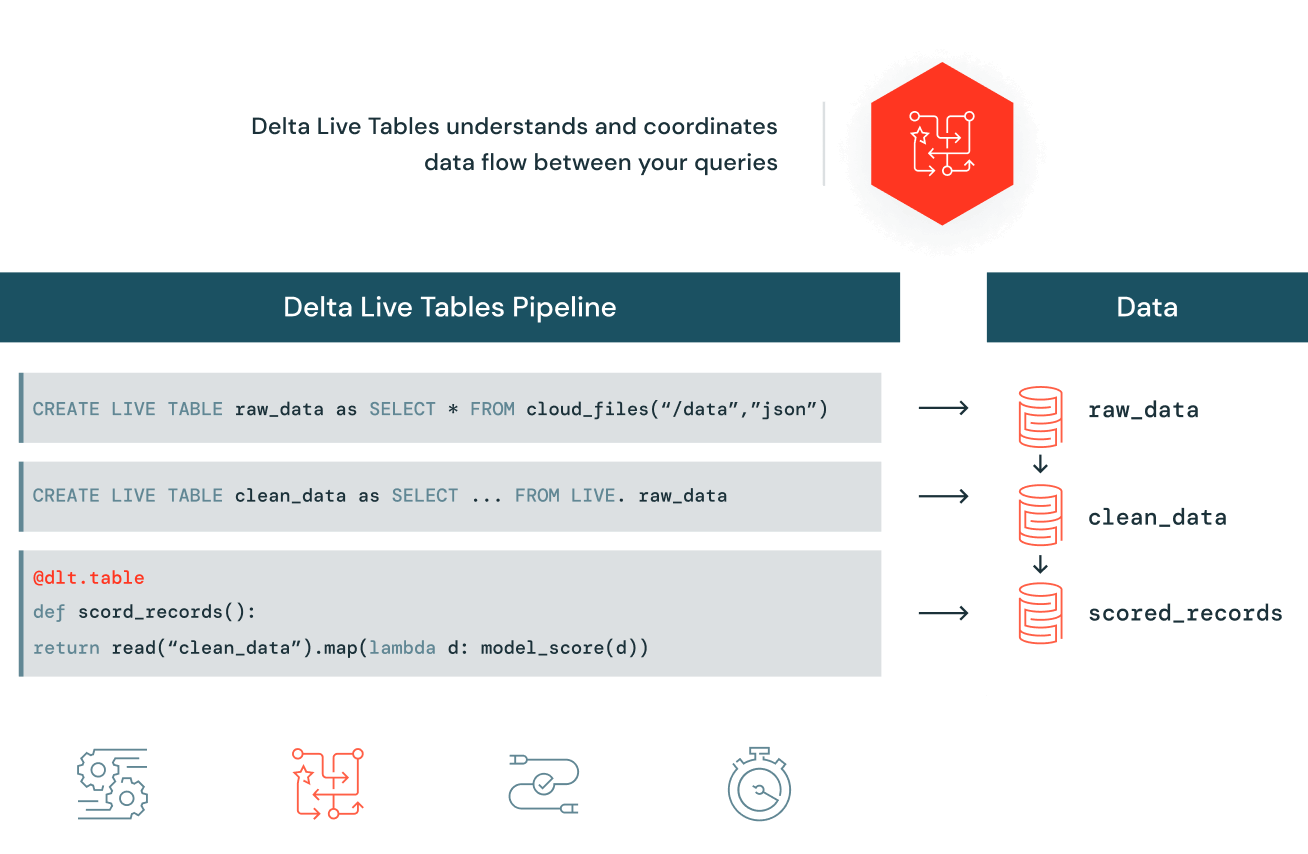
Key Benefits of DLT for Production Pipelines
By adopting this declarative model, DLT delivers several major benefits that make it ideal for building production-grade data pipelines.
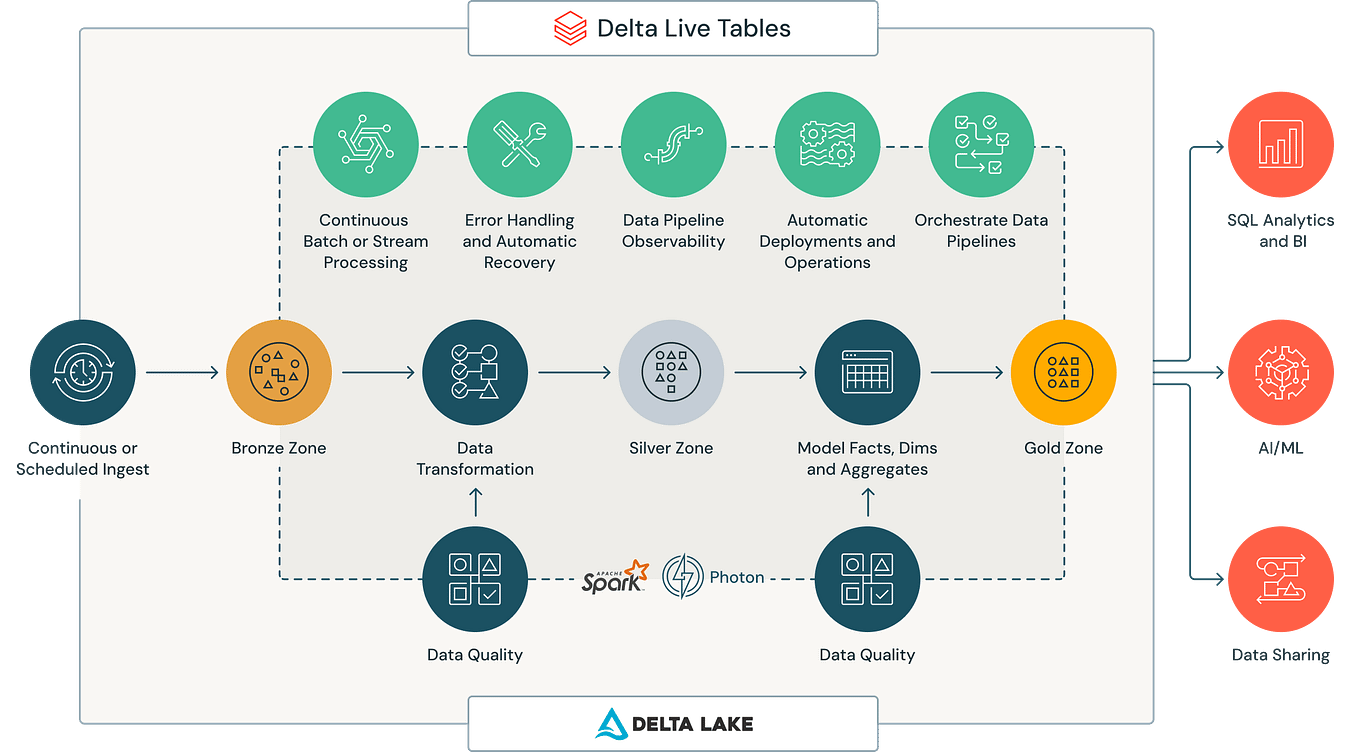
Let's break down these benefits.
1. Accelerated and Simplified Development
Because DLT handles the "how," you can build pipelines faster. You write simple SQL or Python queries that define your transformations, and DLT automates the rest.
- Focus on Business Logic: Engineers spend less time on orchestration and infrastructure, and more time delivering value from the data.
- Reduced Code Complexity: No need for complex boilerplate code to manage dependencies, retries, or checkpointing.
2. Automated Pipeline Operations
DLT automates the most time-consuming aspects of pipeline management.
- Task Orchestration: Automatically determines the correct order to run your transformations based on the dependencies you've declared.
- Infrastructure Management: Manages the underlying compute clusters, including auto-scaling to match the workload, which optimizes performance and cost.
- Error Handling & Recovery: Automatically retries failed tasks and provides mechanisms for handling bad records, making pipelines more resilient.
3. Built-in Data Quality and Monitoring
Reliable data is crucial for production systems. DLT integrates data quality directly into the pipeline.
- Expectations: You can define data quality rules (e.g.,
customer_id IS NOT NULL) directly in your pipeline. DLT will then track records that violate these rules and allow you to decide whether to drop them, quarantine them, or halt the pipeline. - Monitoring & Lineage: The DLT UI provides a visual graph of your pipeline, tracks metrics, and logs events, making it easy to monitor health and troubleshoot issues. It also automatically captures data lineage, so you always know where your data comes from.
4. Unified Batch and Stream Processing
DLT simplifies one of the biggest challenges in data engineering: handling both streaming and batch data. It uses Structured Streaming as its underlying engine but provides a much simpler interface.
- You can ingest data from streaming sources (like Kafka or Auto Loader) or batch sources using the same declarative syntax.
- DLT manages the complexity of incremental processing, ensuring data is processed efficiently whether it arrives in real-time or in periodic batches.
To see a summary of these benefits, let's turn back to the Flexera article.
Delta Live Table 101: Streamline your data pipeline
This section of the Flexera article provides a concise, structured list of DLT's benefits, categorized into areas like data ingestion, transformation, and pipeline management.
Please read the section titled 'Benefits of Building/Running ETL/ELT Pipelines with Databricks Delta Live Tables'. This will reinforce and expand on the points we've just discussed.
Clarifying the Terminology: DLT vs. Delta Lake
It's common for beginners to confuse Delta Live Tables with Delta Lake. They are related but distinct technologies.
- Delta Lake is a storage format. It's an open-source technology that adds reliability features like ACID transactions, time travel, and schema enforcement to your data lake files (e.g., Parquet). It's about how the data is stored.
- Delta Live Tables is a pipeline framework. It's a Databricks feature for building and managing ETL pipelines. DLT pipelines almost always read from and write to Delta Lake tables, using Delta Lake's features to ensure reliability. It's about how the data is processed and moved.
Think of it this way: Delta Lake provides the reliable, high-performance "bricks" (the tables), while Delta Live Tables is the "construction company" that builds the "house" (the pipeline) using those bricks.
The Flexera article provides a helpful table that summarizes these differences.
Delta Live Table 101: Streamline your data pipeline
To solidify your understanding, please review this clear comparison.
Read the section 'What Is the Difference Between Delta Table and Databricks Delta Live Table?'. Pay close attention to the comparison table and the 'Pros and Cons' list.
Conclusion
In this lesson, we've established the fundamental purpose and benefits of Delta Live Tables. You learned that DLT is not just another tool but a different, declarative approach to building data pipelines.
Key Takeaways
- Purpose: DLT is a declarative framework for building reliable, maintainable, and testable data processing pipelines. Its primary purpose is to automate operational complexity so engineers can focus on transformation logic.
- Declarative vs. Procedural: Instead of defining how to run a pipeline step-by-step, you declare the what—the final state of the tables you want—and DLT manages the execution.
- Core Benefits:
- Simplified Development: Faster pipeline creation with less code.
- Automated Operations: Handles orchestration, scaling, and error recovery automatically.
- Built-in Quality: Integrates data quality checks and monitoring directly into the pipeline.
- Unified Batch & Streaming: Provides a single framework for both data-processing paradigms.
- DLT vs. Delta Lake: Delta Lake is the storage format (the "what"), while DLT is the pipeline framework (the "how").
Next Steps
One of the most common patterns used with DLT is the medallion architecture, which organizes data into Bronze (raw), Silver (cleaned), and Gold (aggregated) tables. In our next lesson, we will dive into this powerful architectural pattern and see how it provides a structured approach for building high-quality data pipelines with DLT.