Hello! Welcome to the next lesson in our module on Multi-Peripheral System Integration.
In our previous lessons, we built the two core components of our smart fan project. First, we created a temp_sensor_task that uses a timer to take periodic measurements. Then, we implemented a motor_control_task that follows the "actor" pattern, waiting efficiently for commands to arrive on a FreeRTOS queue. These two tasks currently operate in isolation.
Today, we will connect them. The learning outcome for this lesson is to use a FreeRTOS queue to send sensor data or commands between the sensor and motor tasks. By the end of this lesson, you will have a functional closed-loop control system where the sensor task measures the temperature and commands the motor task to adjust the fan's speed accordingly.
1. The Need for Safe Inter-Task Communication
In a multitasking system, having tasks communicate is essential, but it must be done safely. A naive approach might be to use a global variable—the sensor task writes the desired speed to a global int g_motor_speed, and the motor task reads from it. However, this is fraught with peril.
To understand why, let's watch a short video that explains the pitfalls of using global variables for inter-task communication.
Introduction to RTOS Part 5 - Queue | Digi-Key Electronics
The video 'Introduction to RTOS Part 5 - Queue' from Digi-Key Electronics clearly illustrates the problems with sharing data via global variables, such as race conditions and data tearing.
Please watch from the beginning until 2:50. Focus on the examples of how data can be corrupted when two tasks access a global variable, especially when the data is larger than the processor's word size.
As the video explained, when multiple tasks access shared data without protection, you can get:
- Race Conditions: The final state of the data depends on the unpredictable order in which tasks are scheduled.
- Data Tearing/Corruption: If a task is preempted midway through a multi-step write operation (like updating a 64-bit number on a 32-bit CPU, or a struct), another task might read a value that is half old and half new—garbage data.
Given your experience with C and C++, you'll recognize that these issues of concurrent data access are fundamental problems in multithreaded programming. FreeRTOS provides a robust solution: the queue.
2. Queues: The FreeRTOS Solution
A FreeRTOS queue is a thread-safe, first-in, first-out (FIFO) data structure designed specifically for passing data between tasks.
- Thread-Safe: The queue's internal implementation uses mechanisms to ensure that sending and receiving items are atomic operations. You don't have to worry about one task interrupting another in the middle of a queue operation.
- Data Copying: When you send an item to a queue, the RTOS copies the data by value into the queue's buffer. The receiving task gets its own copy. This prevents issues where the sending task might modify the data after sending it but before the receiver has processed it.
- Blocking: A task trying to receive from an empty queue will automatically be put into a 'Blocked' state, consuming no CPU time. The RTOS will wake it up only when an item becomes available. The same is true for a task trying to send to a full queue.
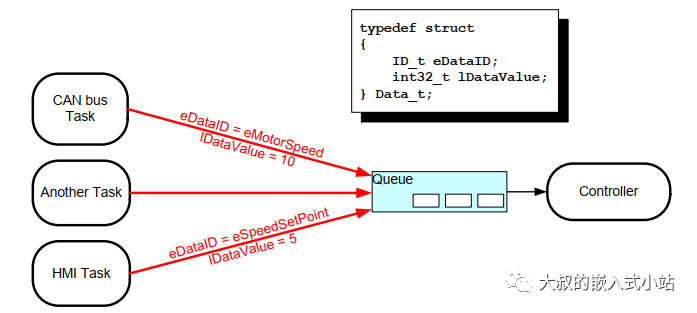
The core API for using queues is straightforward. The following resource provides a concise overview.
ESP32 FreeRTOS Inter Task Communication Tutorial
The article 'ESP32 FreeRTOS Inter Task Communication Tutorial' from ControllersTech offers a clear, practical explanation of the main queue functions.
Please read the section 'FreeRTOS Queues on ESP32'. Focus on the descriptions of xQueueCreate(), xQueueSend(), and xQueueReceive(), as these are the three functions we will use.
To summarize the key functions:
xQueueCreate(uxQueueLength, uxItemSize): Creates a queue.uxQueueLength: The maximum number of items the queue can hold.uxItemSize: The size, in bytes, of a single item. Usesizeof()for this.
xQueueSend(xQueue, pvItemToQueue, xTicksToWait): Sends an item to the queue.xQueue: The handle of the queue.pvItemToQueue: A pointer to the item to be copied into the queue.xTicksToWait: The time the task should block if the queue is full.portMAX_DELAYwill block indefinitely.
xQueueReceive(xQueue, pvBuffer, xTicksToWait): Receives an item from the queue.xQueue: The handle of the queue.pvBuffer: A pointer to a buffer where the received item will be copied.xTicksToWait: The time the task should block if the queue is empty.
3. Integrating the Sensor and Motor Tasks
Now, let's apply these concepts to connect our temp_sensor_task and motor_control_task. The goal is for the sensor task to calculate a desired motor speed and send it as a command to the motor task.
Step 1: Modifying the Sensor Task
In the previous lesson, our temp_sensor_task simply waited for a notification and printed the temperature. We now need to expand its logic. After receiving the notification and reading the sensor, it will:
- Define a simple control logic (e.g., a temperature setpoint).
- Calculate the required motor speed based on this logic.
- Construct a
motor_command_tmessage. - Send this message to the motor's command queue.
First, let's ensure the queue handle, which was previously only used by the motor_control_task and app_main, is also accessible to the temp_sensor_task. We declared it as a static global variable in the last lesson, so it's already accessible within the same file.
Here is the modified temp_sensor_task. We will reuse the motor_command_t struct we defined previously.
// This is the command queue handle we created in the last lesson
extern QueueHandle_t s_motor_command_queue;
// The extern keyword tells the compiler this variable is defined elsewhere.
// This is good practice if tasks are in separate files. If in the same file, it's not strictly needed.

// Assume a function read_temperature() exists
float read_temperature();

#define TEMPERATURE_SETPOINT_LOW  25.0f
#define TEMPERATURE_SETPOINT_HIGH 30.0f

void temp_sensor_task(void *pvParameters) {
    // The parameter is the task notification handle
    TaskHandle_t task_to_notify = (TaskHandle_t)pvParameters;

    while (1) {
        // Wait indefinitely for a notification from the timer ISR
        ulTaskNotifyTake(pdTRUE, portMAX_DELAY);

        float current_temp = read_temperature();
        printf("Sensor task: Read temperature: %.2f C\n", current_temp);

        // --- New Logic to Control the Motor ---
        int motor_speed = 0;
        if (current_temp > TEMPERATURE_SETPOINT_HIGH) {
            motor_speed = 100; // Full speed
        } else if (current_temp > TEMPERATURE_SETPOINT_LOW) {
            // Linearly scale speed between LOW and HIGH setpoints
            motor_speed = (int)(100.0f * (current_temp - TEMPERATURE_SETPOINT_LOW) / (TEMPERATURE_SETPOINT_HIGH - TEMPERATURE_SETPOINT_LOW));
        } else {
            motor_speed = 0; // Off
        }

        // Construct the command message
        motor_command_t cmd;
        cmd.cmd = MOTOR_CMD_SET_SPEED;
        cmd.value = motor_speed;

        // Send the command to the motor task's queue
        // We use a timeout of 0, so it won't block. If the queue is full,
        // it's better to drop an old command than to stall the sensor task.
        if (xQueueSend(s_motor_command_queue, &cmd, 0) != pdPASS) {
            printf("WARN: Motor command queue full.\n");
        } else {
            printf("Sensor task: Sent SET_SPEED command with value %d\n", cmd.value);
        }
    }
}
This pattern of one task reading a sensor and sending its value to another task for action is extremely common. The following resource provides an excellent, analogous example using a potentiometer and an LED.
ESP32 FreeRTOS Queues: Inter-Task Communication ...
The article 'ESP32 FreeRTOS Queues' from Random Nerd Tutorials provides several practical examples. The first one is a perfect analogy for our system.
Please review 'Example 1: Using Queues to Control LED Brightness'. Notice how potTask reads an analog value and sends it via xQueueSend, while LEDBrightnessTask receives it with xQueueReceive to act upon it. This is exactly the architecture we are building.
Step 2: Confirming the Motor Task
The beauty of this decoupled, queue-based architecture is that our motor_control_task needs no changes at all. It was designed from the start to wait for a motor_command_t on its queue and process it. It doesn't know or care that the commands are now coming from a sensor task instead of a test loop in app_main. This demonstrates the power and scalability of this design pattern.
4. Handling More Complex Data
Our motor_command_t struct is simple, containing just a command type and a single integer. But queues can handle any data type, including more complex structures. What if we wanted the motor task to also log the temperature that prompted the speed change? We could modify our struct to include it.
typedef struct {
    motor_cmd_t cmd;
    int speed_value;
    float temp_value; // Add temperature to the payload
} motor_command_ext_t;
Sending a struct is no different from sending an int, as long as you correctly specify the uxItemSize when creating the queue: sizeof(motor_command_ext_t).
The following resources show practical examples of passing structs via queues.
#381 How to work with a Real Time Operating System and is it any good? (FreeRTOS, ESP32)
In this video from Andreas Spiess, he discusses the core concepts of FreeRTOS and demonstrates passing a struct between tasks in his Morse Trainer project.
Please watch from 16:52 to 18:50. He explains exactly why and how you would use a struct to pass multiple related variables through a queue.
For a full code example, the Random Nerd Tutorials article we looked at earlier has an excellent demonstration.
ESP32 FreeRTOS Queues: Inter-Task Communication ...
Let's revisit the Random Nerd Tutorials article for an example of sending a struct.
Please review 'Example 3: Display Sensor Data on a Screen (Sharing a Data Structure)'. Focus on how the SensorData struct is defined and then sent from the SensorTask to the DisplayTask.
This ability to pass complex data structures makes queues a powerful tool for building sophisticated, message-driven systems.
Test your understanding!
Imagine you want the fan to operate in two modes: MANUAL and AUTO. In AUTO mode, it behaves as we've just implemented. In MANUAL mode, it should ignore the sensor and only respond to speed commands from another source (e.g., a web interface).
How would you modify the motor_control_task to support this? You can assume the task has a bool is_auto_mode = true; variable. Where in the task's logic would you check the source of an incoming command if the motor_command_t struct was expanded to include a source field?
Show answer
You would add a source field to the command struct:
typedef enum { SOURCE_SENSOR, SOURCE_MANUAL } command_source_t;

typedef struct {
    motor_cmd_t cmd;
    int value;
    command_source_t source;
} motor_command_t;
Then, inside the motor_control_task, after receiving a command, you would add a check:
// Inside the while(1) loop of motor_control_task
if (xQueueReceive(command_queue, &received_cmd, portMAX_DELAY) == pdPASS) {

    // If in AUTO mode, only accept commands from the SENSOR.
    if (is_auto_mode && received_cmd.source != SOURCE_SENSOR) {
        printf("Ignoring manual command in AUTO mode.\n");
        continue; // Skip to the next loop iteration
    }

    // If in MANUAL mode, only accept commands from a MANUAL source.
    if (!is_auto_mode && received_cmd.source != SOURCE_MANUAL) {
        printf("Ignoring sensor command in MANUAL mode.\n");
        continue; // Skip to the next loop iteration
    }

    // If the command is from an accepted source, process it.
    switch (received_cmd.cmd) {
        // ... command processing logic ...
    }
}
This shows how you can build more complex logic into the consumer task to filter and interpret messages.
Conclusion
In this lesson, we bridged the gap between our sensor and actuator tasks, creating a complete, albeit simple, smart device. We've seen how FreeRTOS queues provide a safe, efficient, and decoupled mechanism for inter-task communication.
Key Takeaways:
- Queues are the standard: They are the preferred FreeRTOS method for safely passing data between tasks, avoiding the pitfalls of shared global variables.
- Decoupled by Design: The sender (producer) task doesn't need to know anything about the receiver (consumer) task, and vice-versa. They only need a handle to the shared queue. This makes the system modular and easy to maintain.
- Blocking is Efficient: Tasks waiting on a queue consume no CPU resources, allowing the processor to perform other work or save power.
- Flexible Data Payloads: Queues can transport anything from simple integers to complex
structs, allowing you to design rich messaging protocols between your tasks.
Our system now has multiple tasks working together. However, what happens if two tasks need to use the same hardware peripheral at the same time, like a shared I2C bus or the Serial port for logging? A queue sends data, but it doesn't protect a shared resource. For that, we need another tool.
In the next lesson, we will explore mutexes, a synchronization primitive designed specifically to protect shared resources from race conditions, ensuring that only one task can access a critical section of code or a hardware peripheral at a time.