Hello! Welcome to the first lesson of our module on the ESP32 platform. In the previous module, we focused on the fundamentals of the C++ language. Now, we're shifting gears to explore the specific hardware you'll be programming: the ESP32 microcontroller.
This lesson is all about understanding the "engine" of the ESP32. We will look under the hood to explore its core architecture. Specifically, our goal is to describe the ESP32's architecture, including its dual-core processor and its memory layout.
Just as a mechanical engineer needs to understand the properties of materials and the design of a system to build robust machines, a good embedded developer needs to understand the underlying hardware. This knowledge will help you write more efficient code and debug problems more effectively, especially as we move on to controlling motors and other peripherals.
The Heart of the ESP32: A Dual-Core Powerhouse
At the center of any ESP32 development board lies the ESP32 chip itself. This tiny piece of silicon is packed with powerful features. Let's start by getting acquainted with the chip and its most prominent feature: its dual-core processor.
To see what this looks like in practice, the following video gives a great overview of a typical ESP32 development board and the chip at its core.
ESP32 DevKit v1 Explained for Beginners | Board Overview, Pins, Peripherals
Watch this short segment from the video 'ESP32 DevKit v1 Explained for Beginners' by OceanLabz to see the physical ESP32 module and learn about the chip inside.
Watch from the beginning of the video until the 2:30 mark. Pay attention to the distinction between the ESP32 chip and the development board it sits on, and the initial mention of its dual-core nature.
As you saw, the ESP32 isn't just a single processor. Its key feature is a dual-core CPU. To get a quick sense of what this means, watch this brief clip.
Why ESP32's Are The Best Microcontrollers (ESP32 + Arduino series)
This clip from Simply Explained's video 'Why ESP32's Are The Best Microcontrollers' quickly summarizes the processor's capabilities.
Watch the segment from 0:10 to 0:35. Note the clock speeds and the mention of the two main cores plus the ULP co-processor.
Having two cores is a significant advantage. It allows the ESP32 to perform two tasks in parallel, a capability known as Symmetric Multiprocessing (SMP). To understand what this means for us as programmers, we can look at the official documentation from Espressif, the makers of the ESP32.
ESP-IDF FreeRTOS (SMP) - ESP32
This document, 'ESP-IDF FreeRTOS (SMP)', explains how the dual-core system works. While it's in the context of the FreeRTOS operating system (which we'll cover later), the hardware description is fundamental.
Read the sections titled 'Basic Concepts' and 'SMP on an ESP Target'. Focus on understanding the definition of SMP and the names and typical roles of the two cores: CPU0 (PRO_CPU) and CPU1 (APP_CPU).
To summarize the key points from that reading:
- Symmetric Multiprocessing (SMP): The ESP32 has two identical processor cores. This is like having two independent workers that can access the same shared workshop and tools.
- Identical Cores: Because the cores are identical, the same code will run exactly the same way on either one.
- PRO_CPU and APP_CPU: By convention, the two cores are often referred to as:
- Core 0 (PRO_CPU): The "Protocol" CPU. This core is typically reserved for handling demanding, time-sensitive tasks like the Wi-Fi and Bluetooth stacks. Offloading these tasks to one core ensures that they run without interruption.
- Core 1 (APP_CPU): The "Application" CPU. This is where your main application code usually runs.
This dual-core design is perfect for complex projects. For example, you could have one core dedicated to precise motor control while the other handles communication, user input, or sensor data processing, all at the same time.
Visualizing the ESP32 Architecture
A block diagram is often the best way to visualize how a system's components are connected. The diagram below shows a high-level view of the ESP32's internal architecture.

Take a moment to trace the connections in the diagram. You can see the two cores, the memory blocks they share, and the peripherals they can control. This structure is what enables the powerful multitasking capabilities of the ESP32.
The ESP32's Memory Layout
Now that we've covered the processors, let's look at the other side of the equation: memory. Just like a workshop has different types of storage—a workbench for active projects, shelves for frequently used tools, and a warehouse for long-term storage—the ESP32 has several types of memory, each with a specific purpose.
The following article provides a fantastic, developer-focused overview of the ESP32's memory map.
This article, 'ESP32's family Memory Map 101' from Espressif, breaks down the different types of memory inside the ESP32. It's a bit technical, but provides an excellent foundation.
Read the sections under the main 'ESP32' heading, specifically the descriptions for 'ROM', 'SRAM', 'RTC-SRAM', and 'Instruction & data cache'. Don't worry about the specific memory addresses for now; focus on the purpose of each memory type.
Let's distill that information into the most important categories:
-
ROM (Read-Only Memory): This memory is burned-in at the factory and cannot be changed. It contains the most fundamental software required to start the chip, known as the bootloader, as well as some core library functions. It's like the embedded firmware in a machine that's present from the moment you turn it on.
-
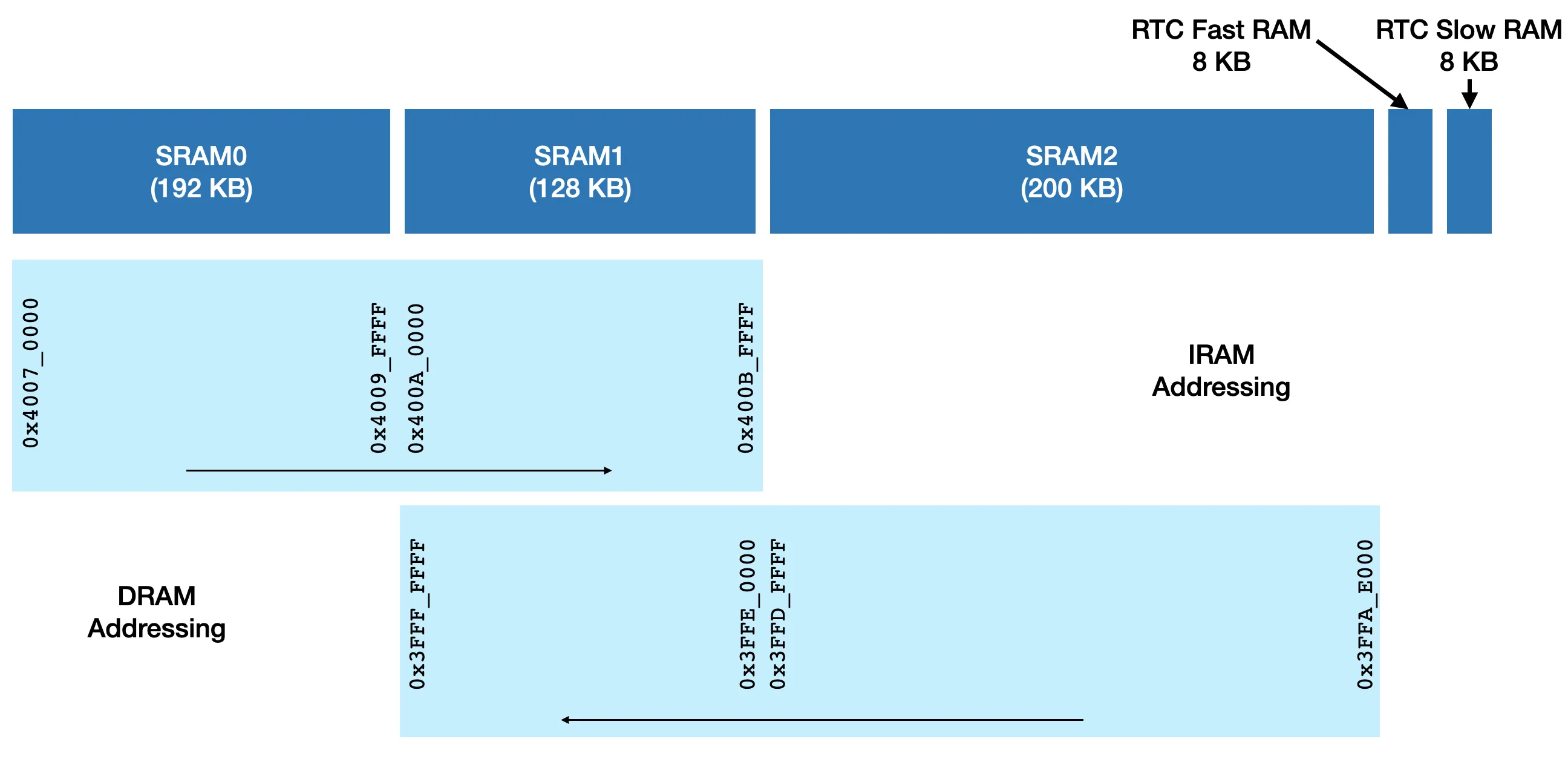
SRAM (Static RAM): This is the main working memory of the ESP32. It's fast, but it's also volatile, meaning its contents are lost when the power is turned off. This is where your program stores variables and executes code. The ESP32 has several SRAM blocks that the two cores share.
-
Flash Memory: This is non-volatile memory, meaning it retains its data without power. The program you write is stored here. When the ESP32 boots, the bootloader copies your program from the external Flash memory into SRAM and cache to be executed. This is analogous to a computer's hard drive or SSD.
-
RTC-SRAM (Real-Time Clock SRAM): This is a small, special block of memory that is part of the "Real-Time Clock" subsystem. Its key feature is that it can retain data even when the main CPUs are in a deep sleep mode, consuming very little power. This is incredibly useful for battery-powered devices that need to wake up periodically and remember some state from the previous session.
The image below gives a visual breakdown of the ESP32's main SRAM blocks, showing their relative sizes and how they are addressed by the CPU for instructions (IRAM) versus data (DRAM).
Test your understanding!
You are designing a battery-powered weather station. It needs to wake up once every 30 minutes, measure the temperature, and then go into a deep sleep mode to conserve power. To detect long-term trends, you need to calculate the average temperature over the last 24 hours. This requires storing the last 48 temperature readings.
Which type of memory would be most suitable for storing these 48 temperature readings between wake-up cycles, and why?
Show answer
The most suitable memory would be the RTC-SRAM.
The reason is that RTC-SRAM is designed to retain its data during deep sleep mode, which is when the main CPUs are powered down. Storing the temperature readings in regular SRAM would not work, as its contents would be lost every time the device enters deep sleep. Using Flash memory would be possible, but it has a limited number of write cycles and is much slower, making RTC-SRAM the ideal choice for this kind of state-retention in low-power applications.
Conclusion
In this lesson, we took our first look at the hardware architecture of the ESP32. You now have a foundational understanding of its core components, which will be essential as we begin writing code for it.
Here are the key takeaways:
- The ESP32 features a dual-core processor architecture, enabling true parallel processing through Symmetric Multiprocessing (SMP).
- The two cores, PRO_CPU and APP_CPU, work together by convention to handle protocol stacks and user applications separately.
- The ESP32 has a hierarchical memory layout consisting of non-volatile Flash for program storage, fast SRAM for execution, factory-programmed ROM for the bootloader, and low-power RTC-SRAM for retaining data during sleep.
We've covered the "what" and "why" of the ESP32's architecture. In the next lesson, we'll move on to the "how." We will set up the ESP-IDF toolchain, which is the official development framework from Espressif. This will give us the software tools we need to start compiling and running our own C++ code on the ESP32.