Hello! Welcome back to your second lesson on prompt engineering for HR.
In our last session, we established the critical foundation of any strong prompt: assigning a clear Persona and providing rich Context. You learned that by telling the AI who to be and what it needs to know, you can transform its generic responses into strategically relevant outputs.
Today, we will build directly on that foundation by adding the next layer of command. You'll learn how to precisely control the AI's final product by specifying its Format, Length, and Tone. If the last lesson was about setting the stage, this one is about directing the performance. Mastering these constraints is the key to achieving the efficiency and attention to detail you're aiming for, allowing you to generate outputs that are not just good, but immediately usable.
Adding Precision: Format, Length, and Tone
Once you've set the Persona and Context, the AI understands the who and the why. Now you need to define the what and the how. This is done by adding constraints that shape the final output. The most powerful constraints for your HR work will be Format, Length, and Tone.
This image provides a simple but powerful mental model for what we're doing. In our last lesson, we focused on Step 1: Assigning a Role. Today, we are mastering Steps 2 and 3: Defining the Output and Adding Constraints.
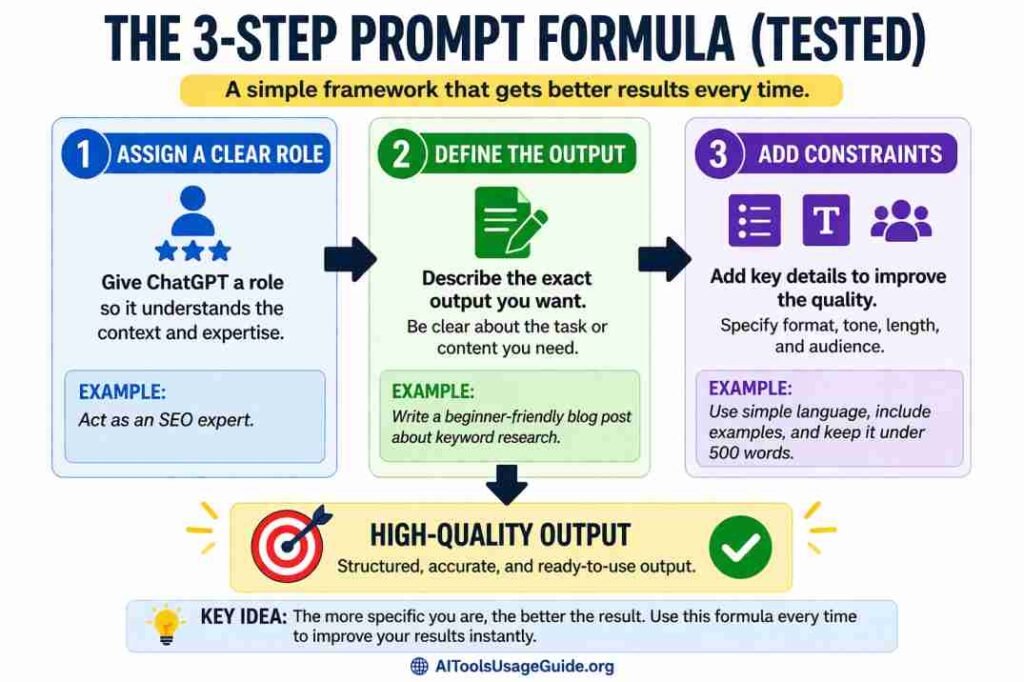
Let's break down each of these new components.
Format: Structuring the Output for Usability
The "Format" instruction tells the AI how to structure its response. This is crucial for efficiency. A well-formatted response is one you can use immediately, whether it's by copying it into a spreadsheet, an email, or a policy document, with minimal editing.
Common format instructions include:
- Structure: Ask for
bullet points, anumbered list, atable with specific columns,JSON, ormarkdown with headers. - Length: Specify a
word count(under 150 words), aparagraph limit(in 3-5 sentences), or apage limit(a one-page summary). - Sections: Instruct the AI to include specific sections like
an executive summary,a list of action items, ora 'pros and cons' section.
The video we reviewed in our last lesson has excellent, quick explanations of both Format and Tone. Let's revisit it.
Master the Perfect ChatGPT Prompt Formula (in just 8 minutes)!
This video by Jeff Su, "Master the Perfect ChatGPT Prompt Formula," clearly explains the role of Format and Tone in a prompt.
First, watch the segment explaining the Format component, from this timestamp. Pay attention to the idea of visualizing the end result you want. Next, watch the segment on Tone, from this timestamp. The pro tip about describing the feeling you're going for is particularly useful in HR. Finally, see how it all comes together in the comprehensive example, where Persona, Context, Task, Format, and Tone are all combined.
Tone: The Voice of Your Organization
In human resources, how you say something is often as important as what you say. The tone of a message can determine whether an employee feels supported or dismissed, whether a policy is seen as fair or draconian, and whether a communication builds trust or creates anxiety.
You can direct the AI's tone using a wide range of adjectives. The cheat sheet below offers a great menu of options.

When specifying tone, you can be direct (Use a warm, professional tone) or, as the video suggested, more descriptive (Write this in a way that is supportive and encouraging, but also firm about the non-negotiable deadline). The more specific you are, the better the AI can match the nuanced voice required for sensitive HR communications.
From Theory to HR Practice: The P-C-T-F Framework
Now let's apply this in a way that is directly relevant to your daily work. A highly effective way to structure your prompts is the P-C-T-F Framework: Persona, Context, Task, Format. This framework, detailed in the guide below, formalizes the process we've been learning.
The following resource is a goldmine of practical, HR-specific prompts. We'll use it to see how the Format component is used across different HR functions.
50 Research-Backed AI Prompts for HR (2026) | Talent, Ops & DEI
This guide from ValueX2 is built around the P-C-T-F framework and provides dozens of ready-to-use prompts for HR. We will examine a few key examples to see how format, tone, and length constraints are applied in real-world scenarios.
First, read the introduction to the P-C-T-F Framework to solidify your understanding of how these components fit together. Next, let's look at three examples from different HR domains. For each, carefully analyze how the Format instruction precisely shapes the output: Talent Acquisition: Scroll down to "Use Case 6: Rejection Letter (Empathetic, With Feedback)." Read this prompt carefully, paying attention to the Format instruction: "Use warm, professional tone; keep under 200 words; include a specific timeline suggestion...". Notice how it combines tone, length, and structure. Employee Relations: Continue to the "AI Prompts for Employee Relations" section and find "Use Case 11: The 'Tone Polisher'." Examine this prompt's Format instruction: "Tone should be assertive but respectful... Keep under 150 words. Structure: 1) Direct statement of issue...". This is a perfect example of using AI to handle difficult conversations with precision. HR Operations & Analytics: Now go to the "AI Prompts for HR Operations" section and find "Use Case 32: Survey Sentiment Analysis." Analyze how this prompt requests a highly structured output for data analysis: "Present as: Executive Summary... Theme Breakdown Table... Key Insights...". This shows how formatting can turn raw data into a leadership-ready report, a task that aligns well with your MBA background.
As you can see, the Format instruction is where you translate your need for a specific, usable output into a direct command for the AI.
Your Turn: Practice Exercise
Now, let's put all the pieces together. You will construct a complete prompt from scratch that includes Persona, Context, Task, and detailed constraints for Format, Length, and Tone.
Scenario:
Your company is implementing a new, mandatory 30-minute online data privacy training for all employees, which must be completed within the next 30 days. In the past, some employees have complained that this type of mandatory training is boring and a waste of time. Your task is to draft an announcement about this new training for the company's main communication channel (e.g., a company-wide Slack channel or intranet news post).
Your Task:
Write a prompt for an AI assistant to generate this announcement. Do not simply ask it to "write the announcement." Instead, construct a complete prompt using the P-C-T-F framework. Your prompt must include specific instructions for Persona, Context, Task, Format, Length, and Tone.
Take about 10 minutes to write your prompt in a text editor.
Example Solution Breakdown:
To help you evaluate your prompt, here is an example of a strong solution, broken down by its components. Your prompt might be different, but it should contain similar elements of specificity.
- Persona:
Act as a Senior HR Communications Manager with expertise in internal change management. - Context:
Our company is launching a new mandatory data privacy training for all employees. The training is a 30-minute online module and must be completed within 30 days. Historically, there has been some employee resistance to mandatory training, with feedback that it can be boring or irrelevant. The key business reason for this training is to protect sensitive customer and employee data and ensure legal compliance. - Task:
Draft a company-wide announcement about this new training. - Format, Length, and Tone: `The announcement should be under 200 words. The tone should be professional and clear, but also engaging and positive—it should emphasize the benefit of protecting our data rather than just being a mandate. Structure the message as follows:
- A clear, engaging headline.
- A brief paragraph explaining why this training is important for everyone.
- A bulleted list with the key details: What the training is, how long it takes, and the completion deadline.
- A final sentence on where to find the training and who to contact with questions.`
This detailed set of instructions leaves very little to chance and is much more likely to produce a draft that is close to your final needs.
Conclusion
In this lesson, we added a crucial layer of control to your prompting skills. You now have a complete framework for building prompts that are not only well-contextualized but also precisely shaped to meet your exact requirements.
Here are the key takeaways:
- Go Beyond Context: After setting the Persona and Context, you must define the output with constraints for Format, Length, and Tone.
- Control the Structure: Use Format instructions to specify lists, tables, word counts, and specific sections, making the AI's output immediately usable.
- Command the Voice: Use Tone instructions to ensure your communications are appropriate for the audience and situation, a vital skill in HR.
- Use the P-C-T-F Framework: Systematically applying Persona, Context, Task, and Format will consistently produce superior results.
You are now able to construct a detailed, single-shot prompt for a wide variety of HR tasks. But what happens when the first output still isn't quite right? In our next lesson, we will address that by learning how to systematically iterate on a prompt, refining your instructions to zero in on the perfect result.