In our last lesson, we established the foundational philosophy of DevOps by exploring its core principles: collaboration, automation, fast feedback, and continuous improvement. We framed these as cultural shifts designed to break down the "wall of confusion" between development and operations. With that "why" in mind, this lesson transitions to the "what" and "how" by mapping those principles onto the practical stages of a modern software delivery lifecycle.
Your extensive experience with CI/CD tools and test automation means you've operated at the very heart of this cycle. Today, we'll place your expertise within the complete end-to-end workflow. Our goal is to describe each stage of the lifecycle, from initial idea to production monitoring, in a DevOps context. This will provide a crucial roadmap, showing how all the tools and practices we'll cover in this course fit together into a cohesive whole.
The DevOps Infinity Loop
The modern software delivery lifecycle is not a linear project with a distinct beginning and end. Instead, it's a continuous, iterative process. This is most often visualized as an "infinity loop," representing the seamless and perpetual flow of work and feedback.

The loop consists of two interconnected halves. The left side is traditionally associated with "Dev" activities—creating and building the software. The right side is associated with "Ops"—releasing, running, and observing the software. The power of DevOps comes from erasing the boundary between these two halves.
Let's begin with a video that provides a great walkthrough of this entire loop, explaining how the stages flow into one another.
This video, "A Complete Overview of DevOps" by ForrestKnight, offers a clear, step-by-step narration of the infinity loop, which will serve as our guide.
Watch the introductory segment where the presenter defines DevOps and introduces the infinity loop concept. Pay close attention to how feedback from the "Ops" side fuels the next iteration of the "Dev" side.
Now, let's break down each of these stages in more detail, starting with the "Dev" half of the loop.
From Idea to Artifact: The "Dev" Side
This half of the loop is focused on turning an idea or a requirement into a testable piece of software, often called a "build" or an "artifact."
1. Plan
Every cycle begins with planning. This is where teams decide what to build next. It involves defining new features, prioritizing bug fixes, and mapping out the work required. In a DevOps culture, planning is a collaborative activity, ensuring that development, operations, and business stakeholders have a shared understanding of the goals.
The feedback gathered from monitoring the application in production is a primary input for this stage, closing the loop and ensuring the team is working on what provides the most value.
Azure DevOps Lifecycle Explained: CI/CD, Workflow & ...
This article from GUVI provides a great breakdown of the lifecycle stages specifically within the Azure context.
Please read the section on the Planning Phase. Note how it emphasizes creating clarity and avoiding rework, and how a tool like Azure Boards facilitates this process.
2. Code
Once the plan is set, development begins. This stage involves writing code, but just as importantly, it involves managing that code using a version control system (VCS) like Git. With your background, you're undoubtedly familiar with branching strategies and pull requests. In a DevOps context, these aren't just technical processes; they are mechanisms for collaboration and quality control, enabling code reviews and discussion before changes are integrated.
Azure DevOps Lifecycle Explained: CI/CD, Workflow & ...
Continuing with the same article, let's look at the development stage.
Read the section on the Development Stage. The key takeaway is how a version control system like Azure Repos enables multiple developers to work concurrently without conflict.
3. Build
This is the first major point of automation in the lifecycle and the core of Continuous Integration (CI). As soon as a developer commits code to the shared repository, an automated process kicks off. This process:
- Compiles the source code.
- Runs a suite of automated tests (like unit and integration tests) to provide immediate feedback on the health of the change.
- Packages the application into a deployable artifact. In modern cloud-native development, this is often a Docker container image—a topic we'll explore deeply in Module 3.
Your work with CI tools like Jenkins and GitLab CI has made you an expert in this stage. The principle remains identical in an Azure-centric world, with Azure Pipelines being the primary tool.
4. Test
This stage can sometimes cause confusion. Didn't we just run tests in the Build stage? Yes, but those were typically fast, automated tests focused on code-level correctness. The Test stage in the lifecycle diagram usually refers to a more comprehensive quality assurance effort performed on the integrated, built application.
This is where your test automation expertise plays a pivotal role. It can involve:
- End-to-end automated tests that simulate user journeys.
- Performance and load testing.
- Security scanning.
- Exploratory manual testing by a QA team.
The goal is to validate the application as a whole, not just its individual parts. The following video segment makes this distinction very clearly.
Let's return to the "A Complete Overview of DevOps" video.
Watch the segment from the discussion on testing. The presenter does an excellent job of differentiating the automated tests that run during the build from the dedicated Quality Assurance (QA) testing phase that follows. This highlights the collaborative handoff between the development and QA functions.
From Artifact to Value: The "Ops" Side
Once an artifact has been built and has passed the necessary quality gates, the focus shifts to delivering it to users and ensuring it runs reliably. This is the essence of Continuous Delivery/Deployment (CD).
5. Release
The release stage involves managing the successfully tested artifacts. This isn't just about storing the final package; it's about controlling its promotion through various environments. A typical flow might be from a Testing environment to a Staging (or pre-production) environment, and finally to Production.
Azure Pipelines and Azure Artifacts are used to manage these release workflows, often incorporating approval gates to ensure that a human can give a final sign-off before a deployment to a critical environment.
Azure DevOps Lifecycle Explained: CI/CD, Workflow & ...
Let's examine the Release phase in our reference article.
Read the short section on the Release Phase. It correctly frames this as a structured and controlled process, which is key to making deployments safe and predictable.
6. Deploy
Deployment is the act of pushing the application into an environment where users can access it. In a fully automated Continuous Deployment scenario, this happens automatically for every change that passes all the preceding stages. More commonly, teams practice Continuous Delivery, where the deployment to production is automated but triggered manually.
This is where Infrastructure as Code (IaC) tools like Terraform and configuration management tools like Ansible, which we will cover later, become critical for automating the provisioning and configuration of the underlying infrastructure.
7. Operate
Once deployed, the application must be operated. This involves ensuring the system is stable, performant, and available. Traditionally, this was the sole domain of the operations team. In a DevOps model, it's a shared responsibility. The principle of "you build it, you run it" means developers are also involved in the operational health of their services. This stage includes tasks like managing infrastructure, performing backups, and planning for scale.
What Are the 7 Key Phases of the DevOps Lifecycle?
This article from roadmap.sh provides another excellent perspective on the lifecycle stages.
Find the final phase in the list, and read the section on Continuous operations. It introduces important operational concepts like zero-downtime deployments and automated recovery, which are central to modern Ops practices.
8. Monitor
The lifecycle doesn't end at deployment. The Monitor stage is arguably the most critical part of the "Ops" loop. It involves collecting telemetry—logs, metrics, and traces—from the live application and its infrastructure.
This data is used to:
- Detect and diagnose problems in real-time.
- Alert teams to issues before they impact many users.
- Understand application performance and user behavior.
Crucially, the insights gained from monitoring provide the feedback that feeds directly back into the Plan stage of the next cycle, completing the infinity loop.
Putting It All Together
We've walked through each stage of the lifecycle. Now, let's look at a more detailed diagram that shows how many of the tools you'll learn in this course fit into this flow to create a complete CI/CD pipeline on Azure.
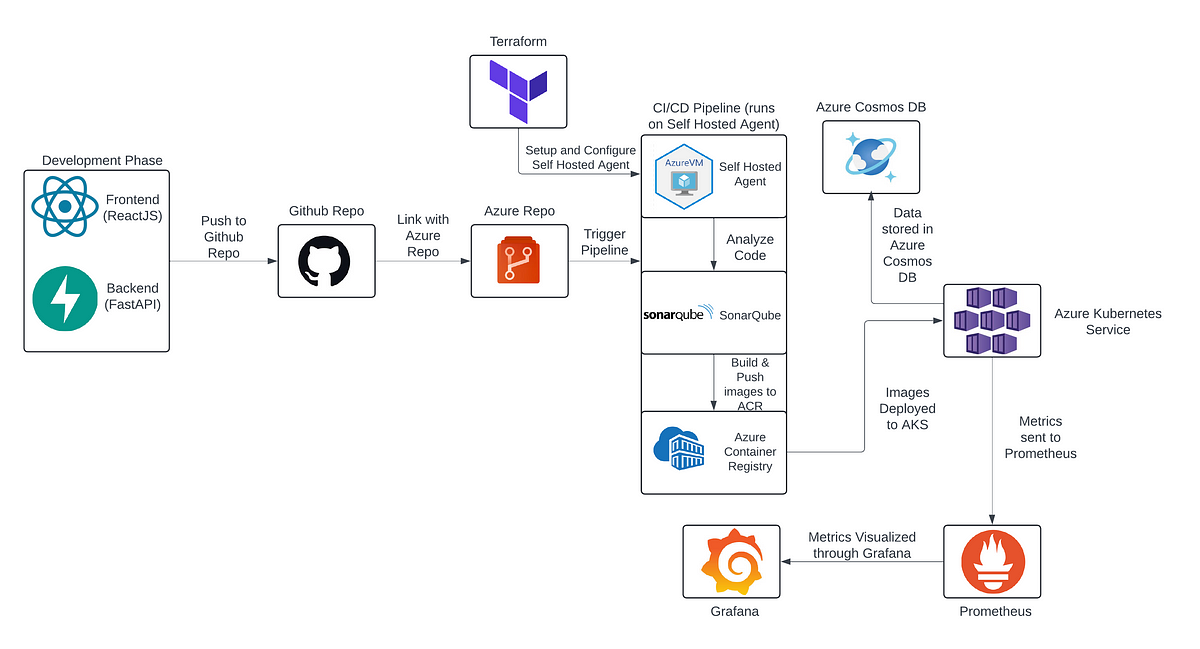
Don't worry about understanding every component right now. The key is to see the pattern: Code is committed, a pipeline builds and tests it, pushes a container artifact to a registry (ACR), and then deploys it to a running environment (AKS). This entire process is the practical manifestation of the infinity loop we've been discussing.
Conclusion
In this lesson, we have dissected the modern software delivery lifecycle within a DevOps context. You should now be able to describe the key stages and their purpose:
- Plan: Define and prioritize work.
- Code: Write and version control application code.
- Build: Automate compilation, testing, and packaging (Continuous Integration).
- Test: Perform comprehensive quality assurance on the built artifact.
- Release: Manage and control the promotion of artifacts through environments.
- Deploy: Push the application to production (Continuous Delivery/Deployment).
- Operate: Ensure the application runs reliably and performantly.
- Monitor: Observe the system and gather data to create a feedback loop.
You've seen how your deep experience in testing and CI/CD is a critical part of this process. The next steps in your journey will involve gaining proficiency in the other stages—particularly using IaC for deployment and operational tooling for monitoring—to develop the holistic, end-to-end perspective of a DevOps professional.
In our next lesson, we will further clarify the unique position of DevOps by differentiating it from Agile methodologies and traditional IT operations, providing more context for its transformative impact.