Welcome to our fourth lesson. In our previous sessions, we established the core principles of DevOps, charted the software delivery lifecycle, and contextualized DevOps by comparing it to Agile and traditional IT operations. We've built the "what" and the "why." Today, we shift our focus to the "where," by exploring the foundational cloud services that bring a DevOps strategy to life.
Your goal is to become a DevOps professional on the Azure platform. This lesson provides the map for that territory. We will outline the key Azure services that form the building blocks of a modern DevOps workflow, focusing on the categories of Compute, Storage, Networking, and Containers. Understanding this landscape is the critical next step before we dive into hands-on implementation in the following modules.
The Big Picture: An Azure DevOps Workflow
Let's start by looking at a typical end-to-end workflow in Azure. This diagram visualizes how various services come together to take code from a developer's machine to a running application in the cloud.
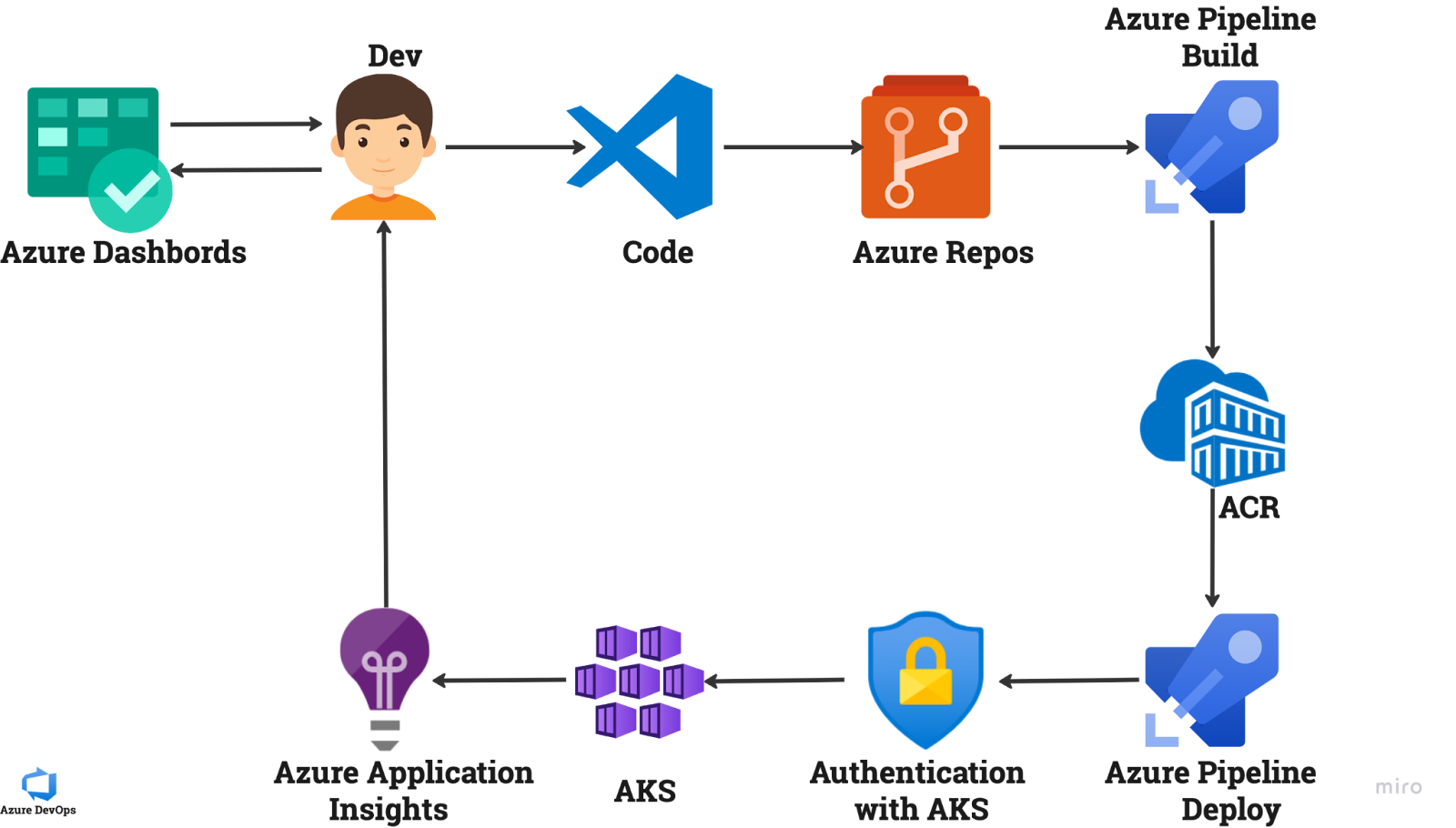
This flow should feel familiar, given your extensive experience with CI/CD tools. You've built pipelines that automate build and test stages. Here, you can see how those concepts map directly to Azure services:
- Azure Repos hosts the source code (like Git).
- Azure Pipelines orchestrates the build, test, and deployment process.
- Azure Container Registry (ACR) stores the packaged application (as a container image).
- Azure Kubernetes Service (AKS) runs the application.
- Azure Application Insights monitors the running application.
To make sense of the hundreds of services Azure offers, we group them into logical categories. Let's break down the essential ones you'll encounter constantly in a DevOps role.
Compute: Where Your Code Runs
Compute is the fundamental layer where your application code is executed. Azure offers a spectrum of compute services, which can be understood through the lens of three hosting models: Infrastructure as a Service (IaaS), Platform as a Service (PaaS), and Functions as a Service (FaaS).
- IaaS (Infrastructure as a Service): This gives you the most control. You manage virtual machines, operating systems, and runtimes. This is the closest model to a traditional on-premises data center.
- PaaS (Platform as a Service): This provides a managed hosting environment. The cloud provider manages the underlying infrastructure (including VMs and OS patching), and you just deploy and manage your application.
- FaaS (Functions as a Service) / Serverless: This is the highest level of abstraction. You provide small pieces of code ("functions") that run in response to events, and the platform handles everything else automatically.
The choice between these models involves a trade-off between control and convenience. To get a comprehensive overview of Azure's compute options and these hosting models, the following reading is an excellent guide from the Azure Architecture Center.
Choose an Azure Compute Service
This document provides a decision tree and detailed comparisons for Azure's main compute offerings. It's a foundational resource for any cloud architect or engineer.
Start by reading the introduction to understand the flowchart, which helps select a service based on workload type. Then, read the section "Understand the basic features" for a brief description of each major compute service. Finally, read the section "Understand the hosting models" to solidify your understanding of IaaS, PaaS, and FaaS.
Let's summarize the key compute services you just read about:
- Azure Virtual Machines (VMs): The core IaaS offering. You get a full virtual server (Linux or Windows) and have complete control. Your previous experience provisioning VMs gives you a solid starting point here. This is for when you need maximum control or need to run legacy applications that aren't cloud-native.
- Azure App Service: A quintessential PaaS offering. It's designed to host web applications and APIs without you needing to manage the underlying server OS. You simply deploy your code (e.g., from a Git repository) and App Service handles the rest, including scaling and load balancing.
- Azure Functions: Azure's primary FaaS or "serverless" compute service. It's ideal for event-driven scenarios, like processing a file upload or running a scheduled task. You pay only for the time your code is actually running.
Containers: Packaging and Orchestrating Applications
Containerization is a core pillar of modern DevOps, and this is a key area of new learning for you. In Azure, the container ecosystem revolves around two primary services that work together.
-
Azure Container Registry (ACR): Before you can run a container, you need to build and store its image. An image is a lightweight, standalone, executable package that includes everything needed to run a piece of software: code, runtime, system tools, and libraries. ACR is a private registry for storing and managing these container images. It serves the same role for containers that artifact repositories like Artifactory or Nexus do for Java JARs or npm packages in CI/CD pipelines you've managed before.
-
Azure Kubernetes Service (AKS): While you can run a single container on services like Azure Container Instances, real-world applications often consist of many containers that need to be managed, scaled, and networked together. This is called container orchestration. Kubernetes is the industry-standard open-source orchestrator, and AKS is Azure's managed Kubernetes service. It simplifies deploying and managing containerized applications by handling critical tasks like scheduling containers onto nodes, managing service discovery, and performing automated rolling updates.
Look back at the first diagram. The flow from Azure Pipeline Build -> ACR -> Azure Pipeline Deploy -> AKS is the canonical path for containerized applications on Azure. The pipeline builds the image, pushes it to the registry (ACR), and then tells the orchestrator (AKS) to pull that image and run it.
For a dynamic overview of these compute and container services, the following video provides a concise explanation of each service's role.
90% Of Azure EXPLAINED In 20 Minutes | COMPLETE Crash Course For Beginners
This video, "90% Of Azure EXPLAINED In 20 Minutes," provides a rapid but clear tour of Azure's core services. The presenter groups them into logical "buckets."
Watch the section on compute and containers, from this point. The presenter covers Virtual Machines, Functions, AKS, Container Apps, Container Instances, and App Service, highlighting the key use case for each.
Storage and Databases: Where Your Data Lives
Applications are rarely just code; they need to store and retrieve data. Azure provides a wide array of services for both general-purpose storage and structured databases.
- Azure Blob Storage: This is the workhorse for object storage. It's designed to store massive amounts of unstructured data, such as images, videos, log files, backups, and importantly for web applications, static content like HTML, CSS, and JavaScript files.
- Azure Files: Provides fully managed file shares in the cloud that can be accessed via the standard SMB and NFS protocols. This is useful when multiple VMs or applications need to access the same set of files, behaving like a traditional network drive.
- Azure Disk Storage: Provides high-performance, durable block storage for Azure Virtual Machines, acting as the virtual hard drives for your VMs.
For structured data, you'll choose a database based on your application's requirements, primarily deciding between relational (SQL) and non-relational (NoSQL) models.
- Azure SQL Database: A fully managed PaaS offering for relational databases, based on the Microsoft SQL Server engine. It handles patching, backups, and high availability, letting you focus on your data model and queries. Azure also offers managed services for other popular open-source databases like PostgreSQL and MySQL.
- Azure Cosmos DB: Azure's flagship NoSQL database. It's a globally distributed, multi-model database service designed for massive scale and low-latency access. It's a great fit for modern applications that need high availability and scalability worldwide.
To see how these fit into the broader Azure ecosystem, let's return to the video overview.
90% Of Azure EXPLAINED In 20 Minutes | COMPLETE Crash Course For Beginners
We'll continue with the "90% Of Azure EXPLAINED" video.
Watch the segment on storage and databases from this point. It covers Blob Storage, Managed Disks, Azure Files, and then moves on to Azure SQL, Cosmos DB, and other data services.
Networking: Connecting and Securing Your Services
Finally, none of these services can work in isolation. They need to communicate with each other and with the outside world in a secure and controlled manner. Azure Networking services provide this connective tissue.
- Azure Virtual Network (VNet): This is the fundamental building block for your private network in Azure. A VNet allows your Azure resources to communicate securely with each other, the internet, and your on-premises networks.
- Subnets: You can segment a VNet into one or more subnets. This allows you to logically group and isolate resources, applying different security rules to each group (e.g., a public subnet for web servers and a private subnet for databases).
- Network Security Groups (NSGs): An NSG acts as a basic firewall, containing a list of security rules that allow or deny network traffic to resources within a VNet. You can associate an NSG with a subnet or a specific network interface.
- Azure Load Balancer: When you run multiple instances of an application for high availability (e.g., several VMs or containers), a load balancer distributes incoming traffic among them.
The video below provides a quick summary of these core networking components.
90% Of Azure EXPLAINED In 20 Minutes | COMPLETE Crash Course For Beginners
Let's watch the final segment from the "90% Of Azure EXPLAINED" video for this lesson.
Watch the explanation of networking services from this point. The presenter covers VNets, Load Balancers, and the important concept of Private Endpoints for securing traffic.
Conclusion
In this lesson, we've surveyed the essential landscape of Azure services that underpin a DevOps workflow. You now have a high-level map of the tools you'll be using to build, deploy, and operate applications in the cloud.
Let's recap the key takeaways:
- A DevOps workflow in Azure is realized by integrating services for code hosting, CI/CD pipelines, artifact storage, compute, and monitoring.
- Compute services exist on a spectrum from IaaS (Virtual Machines) to PaaS (App Service) and FaaS (Functions), offering a trade-off between control and management overhead.
- Container services like Azure Container Registry (ACR) and Azure Kubernetes Service (AKS) are central to modern application packaging and delivery.
- Storage and Database services provide diverse options for handling everything from unstructured files (Blob Storage) to managed relational (Azure SQL) and NoSQL (Cosmos DB) data.
- Networking services like VNets and NSGs provide the secure and isolated environment needed to connect all these components together.
You've now completed the foundational module of this course, establishing the "why" and the "what" of DevOps on Azure. In our next lesson, we will make the exciting transition from theory to practice. You will install the Azure Command-Line Interface (CLI) and begin interacting with the Azure platform directly, learning the fundamental commands to create and manage your own cloud resources.