Welcome to the final lesson of our foundational module on DevOps. Over the past few lessons, we've explored the core principles of DevOps and mapped out the key Azure services that form the landscape for modern cloud operations. You now have a solid understanding of why we practice DevOps and what services are available on Azure.
Today, we will connect these concepts by explaining how the specific tools you'll be learning—Docker, Terraform, Ansible, and Kubernetes—fit together to form a powerful, cohesive toolchain. Your extensive experience with CI/CD pipelines provides an excellent foundation here. You're used to automating the build and test process; this lesson will show you how Infrastructure as Code and containerization tools integrate into and extend that automation to cover the entire software delivery lifecycle.
The Big Picture: A Modern DevOps Toolchain
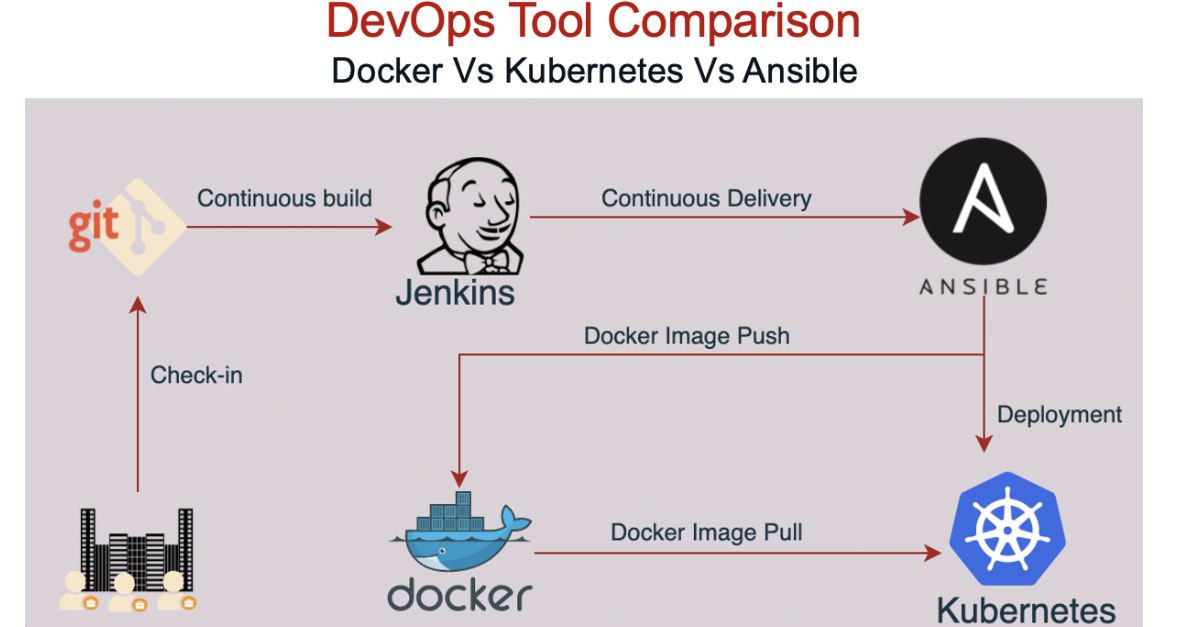
Let's begin by looking at a complete, end-to-end workflow. This visualization illustrates how code moves from a developer's machine to a live application running for users, orchestrated by a suite of powerful tools.

This diagram should resonate with the CI/CD processes you've managed. The key difference, and the focus of our course, is the introduction of tools that manage infrastructure and the application's runtime environment as code. Let's break down the roles of the four main players in this process.
Terraform: Provisioning the Foundation
The first step in deploying any application is to have an environment to deploy it to. This is where Terraform comes in.
Terraform is an Infrastructure as Code (IaC) tool. Its purpose is to define and provision infrastructure—such as virtual networks, subnets, databases, and even entire Kubernetes clusters—using a high-level configuration language. Instead of manually clicking through the Azure portal to create resources, you write code that describes your desired infrastructure.
Key characteristics of Terraform:
- Declarative: You define the end state you want (e.g., "I need a virtual network and a Kubernetes cluster with 3 nodes"), and Terraform figures out the steps to get there.
- Stateful: Terraform keeps track of the infrastructure it manages in a "state file." This allows it to know what changes to make when you update your configuration, or what to destroy when you're done.
- Idempotent: Running the same Terraform configuration multiple times will result in the same infrastructure state, without creating duplicate resources.
To better understand Terraform's role in provisioning, watch the first part of this explanatory video from IBM Technology.
Ansible vs. Terraform: What's the difference?
This video provides a clear distinction between Terraform and Ansible. We'll start with the segment on Terraform.
Please watch the section from the beginning of the Terraform explanation. Notice how the presenter emphasizes its declarative nature and its ability to manage dependencies between resources automatically.
Ansible: Configuring the Environment
Once Terraform has provisioned the bare-bones infrastructure (like a set of virtual machines), you often need to install software, apply security patches, or configure system settings on those machines. This is the job of a configuration management tool like Ansible.
Ansible automates the configuration of computer systems. It can be used to install application runtimes, set up web servers, manage user accounts, and perform a wide range of administrative tasks.
Key characteristics of Ansible:
- Procedural/Hybrid: Ansible playbooks execute tasks in the order they are written, top to bottom. While individual tasks can be declarative (e.g., "ensure this package is installed"), the overall workflow is procedural.
- Agentless: Unlike some other configuration management tools, Ansible doesn't require any special software (an "agent") to be installed on the target machines. It typically communicates over standard SSH.
- Playbooks: You define your configuration tasks in YAML files called "playbooks," which are designed to be human-readable.
Let's return to the video to see how Ansible contrasts with Terraform and, more importantly, how they work together.
Ansible vs. Terraform: What's the difference?
Now we'll watch two more segments from the same video. The first explains Ansible's role, and the second shows how the two tools complement each other.
First, watch the segment explaining Ansible's purpose as a configuration management tool. Then, watch the final segment on how Terraform and Ansible can be used together. This integration is a common and powerful pattern in DevOps.
As the video highlights, a typical pattern is to use Terraform to provision infrastructure and then have it call Ansible to configure that infrastructure.
Docker: Packaging the Application
We now have our infrastructure provisioned and configured. The next challenge is to package our application in a reliable and consistent way. This is Docker's role.
Docker is a containerization platform. It allows you to package your application code, along with all its libraries and dependencies, into a single, isolated, and portable unit called a container image.
This solves the classic "it works on my machine" problem. Because the container includes everything the app needs to run, you can be confident that it will behave the same way in development, testing, and production environments. For someone with your background in test automation, the consistency and isolation provided by containers are major benefits for creating reliable test environments.
Let's watch a short video that breaks down the components of Docker.
Docker vs. Kubernetes: The ONLY Video You Need to Finally Understand Containers!
This video from The Coding Gopher clearly explains the relationship between Docker and Kubernetes. We'll focus first on the Docker-specific part.
Please watch the section from this timestamp. It gives a technical breakdown of the Dockerfile, Docker image, and Docker container, which are the fundamental building blocks of this technology.
Within a CI/CD pipeline, the "build" stage is where you would use Docker to create this image, which is then stored in a container registry like Azure Container Registry (ACR).
Kubernetes: Orchestrating the Application
Running a single container is straightforward. However, modern applications are often composed of many containers (microservices) that need to be deployed, scaled, and managed as a cohesive system. This is where Kubernetes comes in.
Kubernetes is a container orchestration platform. It automates the deployment, scaling, and management of containerized applications.
If Docker creates the shipping containers, Kubernetes runs the entire port. It tells the containers where to go, how many to run, how they should talk to each other, and what to do if one of them fails.
Key capabilities of Kubernetes:
- Declarative Deployments: You tell Kubernetes the desired state (e.g., "I want 3 replicas of my web-app container running"), and it works to maintain that state.
- Self-Healing: If a container or even a whole server node fails, Kubernetes automatically restarts or replaces it.
- Scaling: Kubernetes can automatically scale the number of running containers up or down based on CPU usage or other metrics.
- Service Discovery & Load Balancing: Kubernetes provides networking to expose your application and distribute traffic among your containers.
Let's see how Kubernetes builds on top of Docker to manage applications at scale.
Docker vs. Kubernetes: The ONLY Video You Need to Finally Understand Containers!
We will watch a few more clips from the same video on Docker and Kubernetes.
Start with the excellent analogy at the beginning, from the very start. Then, jump to the technical explanation of Kubernetes' features, like Pods, Deployments, and self-healing. Finally, watch the segments explaining the typical workflow and the reason for using both tools together.
An Integrated Workflow in Practice
Now, let's put it all together. To see how these tools collaborate in a real-world Azure project, we'll look at a guide that clearly shows the hand-off between Terraform and Ansible for setting up an AKS cluster.
Advanced Kubernetes Deployment with GitOps: A Hands-On Guide ...
This guide from Utibe Okon on dev.to demonstrates a practical GitOps workflow on Azure. It effectively shows how different tools are responsible for different parts of the lifecycle.
Please read the Introduction to understand the project's goals. Then, read the section "Infrastructure Provisioning". Pay close attention to how the author describes using Terraform to provision the AKS cluster and then using a local-exec provisioner to trigger an Ansible playbook for subsequent configuration. This is a classic pattern of using these tools together.
This article showcases a common sequence you will encounter and implement:
- Terraform creates the foundational infrastructure (the AKS cluster on Azure).
- Ansible is triggered to install and configure tools within that cluster.
- Docker has already been used (in a separate CI pipeline) to package the application into an image.
- Kubernetes (the AKS cluster) runs the Docker image, with deployment managed by another tool (ArgoCD in this case, which we will touch on later in the course).
Conclusion
In this lesson, we've pieced together the puzzle of a modern DevOps toolchain. You now have a conceptual map of how the core technologies in this course interoperate to automate the entire software delivery lifecycle.
Here are the key takeaways on the roles of each tool:
- Terraform: The architect and builder. It provisions the cloud infrastructure, creating the "land" where your application will live.
- Ansible: The interior decorator and installer. It configures the software and environment on the infrastructure that Terraform built.
- Docker: The packaging and shipping department. It bundles your application and its dependencies into a standardized, portable container.
- Kubernetes: The port authority and logistics manager. It receives the Docker containers and manages their entire lifecycle at scale—running, scaling, and ensuring they are healthy.
This lesson marks the end of our first module, where we've established the "why" and "what" of DevOps on Azure. In the next module, we will begin our hands-on journey. You'll start by installing the Azure Command-Line Interface (CLI), which is the first step toward interacting with and managing your cloud environment programmatically, laying the groundwork for everything that follows.