Hello! Welcome back to the course.
In our last lesson, we explored how Cisco's CMX and Hyperlocation services can turn a wireless network into a powerful sensor for location analytics and user engagement. We touched on the "Connect & Engage" pillar of CMX, which provides tools for building guest experiences. Today, we will dive into the practical application of that concept.
This lesson focuses on a core skill for any enterprise network professional: providing controlled internet access to guests. Our learning objective is to configure guest access using a web authentication portal on a wireless LAN controller. We will examine the different architectural approaches and then walk through a practical configuration on a modern Cisco Catalyst 9800 series controller.
Understanding Guest Web Authentication
Before jumping into configuration, it's essential to understand the high-level architecture. When a guest user connects to a specific SSID, how is their traffic intercepted and redirected to a login portal? There are two primary methods to achieve this, and as a solutions engineer, choosing the right one depends on the scale and requirements of the deployment.
These methods are Local Web Authentication (LWA) and Central Web Authentication (CWA).
To get a clear overview of these two approaches, please review the following presentation slides.
[PDF] Becoming a Wi-Fi Guest Star - Cisco Live
This presentation from a Cisco Live session, 'Becoming a Wi-Fi Guest Star', provides an excellent high-level comparison of guest portal options. It visually breaks down the operational flow of both LWA and CWA.
Please review slides 11-18 and 47-48. Focus on the diagrams for LWA (slide 17) and CWA (slide 47). Pay attention to where the redirection is configured and where the authentication decision is made in each flow.
Let's summarize the key differences based on what you just read:
-
Local Web Authentication (LWA):
- Intelligence on the WLC: The Wireless LAN Controller is responsible for intercepting the user's HTTP/HTTPS traffic and redirecting them to a web portal.
- Local Configuration: The redirection URL and the pre-authentication Access Control List (ACL), which defines what traffic is allowed before login (like DHCP and DNS), are configured directly on the WLC.
- Portal Hosting: The portal itself can be hosted internally on the WLC or on an external server. Even if external, the WLC initiates the redirect.
- Authentication: The WLC handles the authentication, either against its own local user database or by proxying the credentials to an external RADIUS server.
-
Central Web Authentication (CWA):
- Intelligence on the Policy Server: This method offloads the logic to a central policy server, almost always Cisco Identity Services Engine (ISE).
- RADIUS-driven: The process starts with a MAC Authentication Bypass (MAB) request from the WLC to ISE. ISE responds with RADIUS attributes, including a
url-redirectattribute that tells the WLC where to send the client. - Dynamic and Scalable: Because ISE controls the policy, you can create much more sophisticated guest experiences (e.g., sponsored guest, self-registration, social login) and apply them dynamically across the entire network.
For the CCNP ENCOR exam and for building a foundational skill set, a solid understanding of LWA is crucial. We will focus our practical configuration on LWA, and then explore how CWA builds upon these concepts.
Configuring Local Web Authentication on a Catalyst 9800 WLC
Let's configure a guest WLAN that uses the WLC's internal web portal to authenticate users stored in its local database. The process on a modern Catalyst 9800 controller involves several logical components that work together.
The following video provides a practical walkthrough of this entire process using the controller's web interface (GUI).
Cisco WLC 9800 Guest SSID Configuration | English
This video from the 'Life of a Network Engineer' channel demonstrates the end-to-end configuration of a guest SSID with web authentication on a Catalyst 9800 WLC. It clearly shows each step we will be discussing.
Watch the video from the beginning until 06:15. As you watch, map the steps shown to the logical components of the configuration: AAA, Web Authentication parameters, the WLAN itself, and the user database.
As you saw in the video, the configuration can be broken down into these key steps:
1. Define the Authentication Method (AAA)
First, you need to tell the WLC how to authenticate the guest users. We create a named authentication method list that specifies using the local user database for login attempts.
- GUI Path:
Configuration > Security > AAA > AAA Method List > Authentication - CLI Command:
aaa authentication login GUEST_LWA_METHOD local
2. Configure the Web Authentication Portal
This involves two parts: a global parameter map for system-wide settings and a specific parameter map for our guest portal.
- Global Parameter Map: This is where you configure the virtual IP address (e.g., 192.0.2.1) that the WLC uses to intercept and redirect client traffic. This IP should be a non-routable address that doesn't exist elsewhere in your network.
- GUI Path:
Configuration > Security > Web Auth > Web Auth Parameter Map(select the 'global' map)
- GUI Path:
- Named Parameter Map: Here, you can customize the portal's behavior, such as setting a banner or changing the authentication type. For our case, the type is
webauth(username/password).- GUI Path:
Configuration > Security > Web Auth > Web Auth Parameter Map(click 'Add' to create a new one)
- GUI Path:
3. Create the Guest WLAN
This is where you define the guest SSID and, most importantly, its security settings.
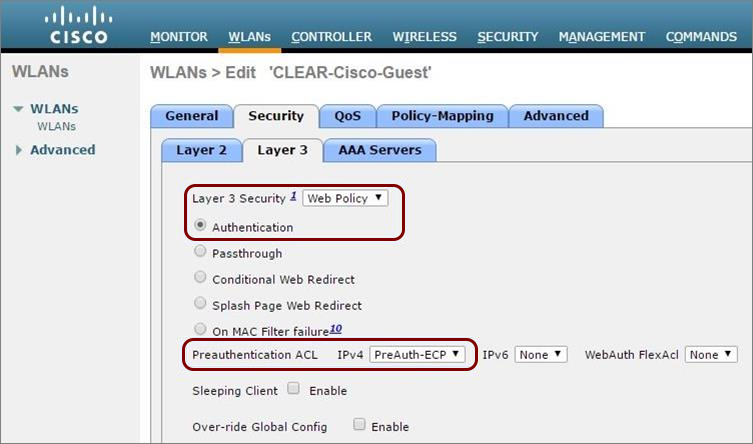
- Layer 2 Security: For a basic guest portal, this is set to None. The network is open, but no traffic can pass until Layer 3 web authentication is complete.
- Layer 3 Security:
- Check the Web Policy box.
- Select the Authentication List created in Step 1.
- Select the Web Auth Parameter Map created in Step 2.
- (Optional but recommended) Apply a Preauthentication ACL. This ACL permits essential services like DHCP and DNS before the user authenticates. All other traffic (like a user's attempt to browse to
http://www.cisco.com) is denied by the ACL and is then intercepted by the WLC for redirection.
4. Create a Policy Profile and Tag
In the Catalyst 9800 architecture, the WLAN Profile (with the SSID and security) is tied to a Policy Profile (which defines the VLAN for guest clients). This combination is then placed in a Policy Tag, which is ultimately assigned to the Access Points that need to broadcast the guest SSID.
- Policy Profile: Defines the VLAN where guest clients will be placed after authentication. (
Configuration > Tags & Profiles > Policy) - Policy Tag: Maps the WLAN Profile to the Policy Profile. (
Configuration > Tags & Profiles > Tags)
5. Create Guest User Credentials
Finally, since we are using the local database, we need to create a user account for our guests to use.
- GUI Path:
Configuration > Security > Guest User(On newer versions, this might be underAdministration > User Administration)
For a detailed, step-by-step guide covering both the WebUI and the CLI for all these components, the official Cisco configuration guide is an excellent resource to bookmark.
Web-Based Authentication on Cisco Catalyst 9800 Series Controllers
This official Cisco documentation provides the definitive step-by-step workflow for configuring Local Web Authentication on Catalyst 9800 controllers. It's a valuable reference for seeing both the GUI and CLI side-by-side.
Please skim through the 'Configure Local Web Authentication using the WebUI' section to see the detailed steps corresponding to what you saw in the video. Then, look at the corresponding CLI sections under 'Configure Local Web Authentication using the CLI'. You don't need to memorize the commands, but see how the configuration concepts map to the CLI structure. This provides the deep theoretical and practical knowledge you prefer.
Test your understanding!
A guest user connects to the new guest SSID. They open their browser and try to navigate to an external website. The browser hangs and nothing happens; they are never redirected to the login portal. Based on the configuration steps we've discussed, which of the following is the most likely cause of this specific problem?
- The guest user account password was typed incorrectly.
- The
aaa authentication logincommand is pointing to the wrong method list. - The pre-authentication ACL is missing a rule to permit DNS traffic.
- The Policy Tag has not been assigned to the Access Point.
Show answer
The most likely cause is 3. The pre-authentication ACL is missing a rule to permit DNS traffic.
Here's the logic: When the user types a URL (e.g., www.cisco.com), the first thing their device must do is resolve that name to an IP address using DNS. If the pre-authentication ACL blocks DNS, the name resolution fails, and the browser never even attempts to make an HTTP request. Since the WLC only intercepts HTTP/HTTPS requests to trigger the redirect, if the HTTP request is never sent, the redirection process never starts.
- Option 1 is incorrect because the user hasn't even reached the login page.
- Option 2 is incorrect because the authentication method is only checked after the user submits their credentials on the portal.
- Option 4 is incorrect because if the tag wasn't assigned, the user wouldn't even see the guest SSID to connect to it.
Central Web Authentication (CWA) with ISE
While LWA is effective, CWA provides far more flexibility and is the standard for large-scale enterprise guest deployments. The configuration is a partnership between the WLC and ISE.
The general flow, as you saw earlier, involves the WLC performing MAB and ISE returning redirect instructions. The configuration on the WLC is primarily focused on setting up RADIUS communication with ISE and enabling the necessary features to accept dynamic policy from ISE.
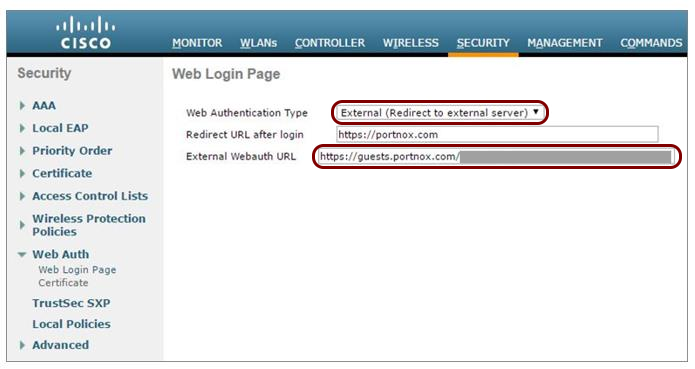
To get a sense of the CWA workflow and its components, please watch this overview from the comprehensive Cisco Community series on the topic.
Central Web Authentication with WLC, ISE, FlexConnect Local Switching
This video from the Cisco Community explains the high-level tasks required to configure Central Web Authentication, giving you an appreciation for the components on both the WLC and the Cisco ISE side.
Please watch the 'overview of tasks' from 02:42 to 06:03. Notice how the configuration is split between the WLC and ISE. This illustrates why CWA is considered a more centralized and powerful solution.
As you can see, the configuration for CWA is more involved, requiring policy creation on ISE for authentication and authorization. However, this unlocks powerful features like guest self-registration, sponsor approvals, and posture assessment, which are beyond the scope of LWA alone.
Conclusion
In this lesson, we've configured one of the most common features in enterprise wireless networks: a guest access portal. You have learned how to differentiate between the two main architectural approaches, LWA and CWA, and you have walked through the practical steps to implement Local Web Authentication on a Cisco Catalyst 9800 WLC.
Key Takeaways:
- LWA vs. CWA: LWA places the redirection and authentication logic on the WLC, making it simpler for basic deployments. CWA offloads this intelligence to a central server like ISE, enabling greater scale, security, and features.
- LWA Configuration Flow: A successful LWA setup requires configuring AAA methods, a web auth parameter map (with a virtual IP), a WLAN with a web policy, policy profiles/tags, and a user database (local or external).
- The Role of the Pre-auth ACL: This ACL is critical for allowing essential services like DHCP and DNS to function before authentication, enabling the redirection process to work correctly.
- CWA as a Partnership: CWA configuration involves setting up the WLC to communicate with ISE via RADIUS and enabling it to dynamically accept policy attributes like redirect URLs.
Preview of the Next Lesson:
We've seen how Access Control Lists (ACLs) play a vital role in guest wireless, specifically with pre-authentication ACLs that control traffic before a user logs in. In our next lesson, we will shift from wireless to core network security and take a much deeper dive into ACLs. We will move to the "Network Security and VPNs" module to learn how to implement and verify standard, extended, and time-based IPv4 ACLs, a fundamental skill for securing any network infrastructure.