Hello! In our last lesson, we took a big step forward by building a program that could interact with a user, taking their name as input and offering a personalized greeting. This showed how powerful the input() function can be.
Today, we'll build on that foundation to create programs that are not just conversational, but also computational. We'll tackle this lesson's main goal: to write a program that takes two numbers from a user, performs a calculation, and displays the result. This will require us to solve a classic puzzle that every new programmer encounters: how to make a computer understand that the text "10" is a number it can do math with.
The Problem with "Adding" Text
In the previous lesson, we learned that input() always gives us back a string. This is perfect for names and other text. But what happens when we ask for numbers?
Let's watch a short video that masterfully illustrates this common beginner mistake.
Python User Input - Visually Explained
This video from the "Visually Explained" channel clearly demonstrates the problem of trying to perform math on raw user input.
Please watch the section from 1:35 to 2:20. Pay close attention to the example where the program tries to add 1 and 2, and see the unexpected result.
As you saw, when you try to "add" the string "1" and the string "2", Python doesn't perform mathematical addition. Instead, it performs string concatenation—it joins them together to form the new string "12". This is because the + operator has different meanings depending on the data types it's working with.
To perform mathematical calculations, we first need to convert the user's string input into a numeric data type.
The Solution: Type Conversion
This process of converting a value from one data type to another is called type conversion or casting. You were introduced to this concept earlier in the course, and now we'll put it into practice.

Python gives us simple functions to do this:
int(): Converts a string to an integer (a whole number).float(): Converts a string to a floating-point number (a number with a decimal).
Using float() is often a good choice for user input, as it can handle both whole numbers (10) and numbers with decimal points (10.5), making your program more flexible. If you try to use int("10.5"), your program will crash with an error.
Let's return to the video to see how type conversion solves the problem.
Python User Input - Visually Explained
Continuing with the same video, let's see how casting the input to a numeric type fixes the calculation.
Now, watch the remainder of the clip from 2:20 to the end. Notice how the float() function is used to wrap the input() value, changing it from a string to a number before the addition happens.
Building an Interactive Calculator
Now that we understand the problem and the solution, we can lay out the steps to build a program that correctly adds two numbers from a user. The textbook resource below provides a great written explanation of this process.
Strings & Input :: Introduction to Python
This section from the KSU "Introduction to Python" textbook clearly explains how to handle numerical input.
In the chapter, find the subsection titled "Numerical Input." Read the text from the beginning of the section down to the first code example. It reinforces the use of int() and float() to convert string input into the correct data type for calculations.
Following this logic, here is the four-step process for our program:
- Get the first number: Use
input()to prompt the user and store their response in a variable.
num1_str = input("Enter the first number: ") - Convert the first number: Use
float()to convert the string to a number and store it in a new variable.
num1 = float(num1_str) - Repeat for the second number: Do the same for the second number.
num2_str = input("Enter the second number: ")
num2 = float(num2_str) - Calculate and display: Add the two numeric variables and print the result, preferably using an f-string for clean output.
sum_result = num1 + num2
print(f"The sum is: {sum_result}")
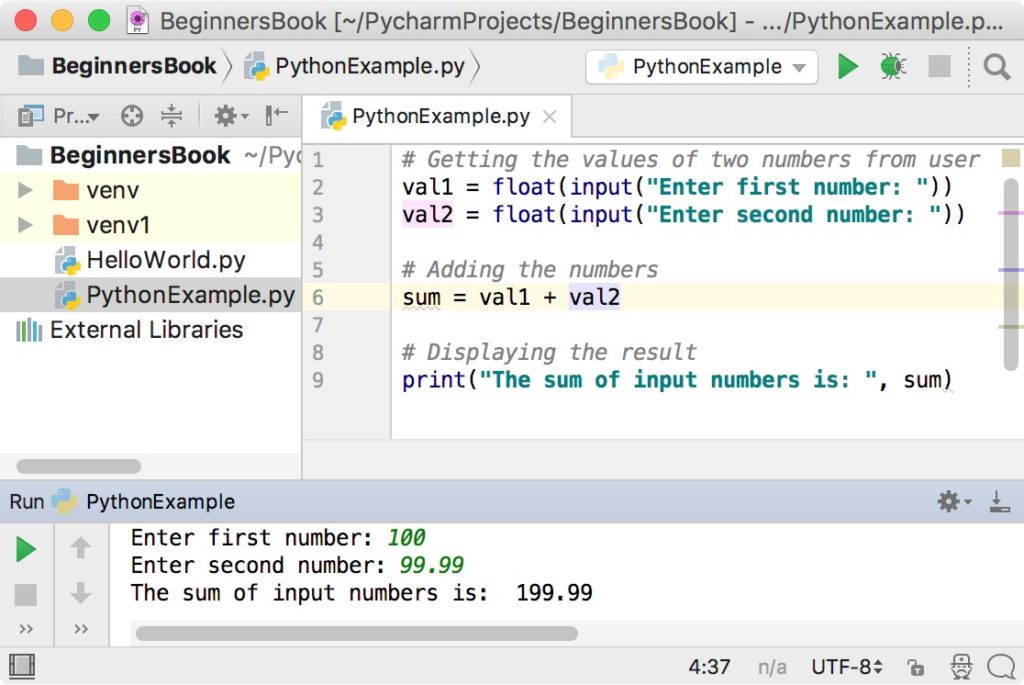
The image below shows a complete program that follows these steps. Notice how it takes two numbers (including one with a decimal), adds them correctly, and displays the result.
A More Concise Approach
As you get more comfortable, you can combine the input and conversion steps into a single line. This is a common practice in Python.
Instead of:
num1_str = input("Enter the first number: ")
num1 = float(num1_str)
You can write:
num1 = float(input("Enter the first number: "))
Here, the input() function runs first, gets the string from the user, and immediately passes that string to the float() function, which converts it. The final numeric result is then stored in the num1 variable.
This video provides a quick, complete walkthrough of a program built using this more concise style.
Add Two Numbers From User Input | Python Example
This short video from Portfolio Courses demonstrates the entire process of building a program to add two numbers from user input.
Watch the full video, which is under two minutes long. It covers getting the user input, converting it using float(), calculating the sum, and printing the result, from start to finish.
Practice: Build Your Own Calculator
Now it's your turn to write the code. We will follow a step-by-step guide to build a program that adds two numbers.
Python Project: Summing Up Two Numbers from User Input
This article from Daily Python Projects provides a perfect, beginner-friendly guide for the exact program we want to build.
Create a new file in your code editor named calculator.py. Follow the guide in the article, starting from the step-by-step guide. Try to build the "Original Solution" first, as its separate steps are very clear for learning. Then, try modifying your code to match the more compact "Alternative Solution".
Go ahead and complete the exercise. Run your program and test it with different numbers, including whole numbers and decimals, to see it work.
Conclusion
Congratulations on completing the final project for this module! You have successfully combined several key skills—variables, data types, user input, type conversion, and formatted output—to create a functional interactive calculator.
Here are the main takeaways from this lesson:
- The
input()function always returns a string, even if the user types digits. - To perform mathematical calculations, you must convert string inputs to a numeric type like
intorfloat. - The process involves getting the input, converting it, performing the calculation, and displaying the result.
- You can write more concise code by nesting the
input()function insideint()orfloat().
In our next module, we will explore conditional logic. You'll learn how to use comparison operators (<, >, ==) to make your programs "think" and make decisions based on the data they receive. This will open up a whole new world of possibilities for the applications you can build.