Hello! Welcome to the next lesson in our journey through Delta Live Tables.
In the previous lesson, we distinguished between DLT's two fundamental dataset types: streaming tables and materialized views. We learned that streaming tables are ideal for efficient, incremental ingestion, while materialized views are powerful for re-computing complex transformations and aggregations.
Now that we know how to structure a pipeline, our focus shifts to ensuring the data flowing through it is accurate and reliable. Today's goal is to implement data quality constraints using DLT expectations (expect, expect or drop, expect or fail). This is a core feature of DLT that allows you to build robust, trustworthy pipelines by declaratively defining and enforcing data quality rules.
1. What are DLT Expectations?
At a high level, DLT expectations are data quality rules that you attach to your datasets. They function similarly to CHECK constraints in a traditional database, but are far more flexible in how they handle records that violate the rules.
Let's start with a short conceptual overview.
Delta Live Tables A to Z: Best Practices for Modern Data Pipelines
This clip from a Databricks presentation introduces the concept of expectations and the flexible policies for handling violations. Notice how they're framed as a crucial defense against upstream data issues.
Watch from 10:20 to 12:00. Pay close attention to the three flexible policies mentioned: tracking bad records, dropping them, and aborting the pipeline.
As the video explained, every expectation consists of three parts:
- A description or name (e.g., "valid_order_status").
- A predicate (a boolean expression that returns true or false, e.g.,
order_status IS NOT NULL). - An action to take when a record fails the predicate.
DLT provides three primary actions for handling these violations, which we will explore one by one.
2. Defining and Applying Expectations
For a practical, hands-on demonstration, we will follow a tutorial that builds a small pipeline and injects bad data to see how expectations work. First, let's see how to define the rules themselves.
A common and reusable pattern in Python is to define your rules in a dictionary. This keeps your quality logic separate and easy to manage.
30 DLT Data Quality & Expectations | Monitor DLT pipeline using SQL | Define DQ rule |Observability
This video demonstrates a practical approach to defining data quality rules as a Python dictionary. This is a great practice for keeping your code clean and maintainable.
Watch from 01:08 to 03:18. Observe how separate dictionaries are created for different datasets (orders and customers) and how each rule is a key-value pair of a name and a SQL expression string.
Now that we have a way to define rules, let's apply them using the three different actions.
3. Action 1: expect (Warn/Allow)
The default behavior for an expectation is to warn you about records that fail the quality check but still allow them to be written to the target table. This is useful for monitoring and profiling data quality without stopping your pipeline or losing data.
In Python, you use the @dlt.expect() or @dlt.expect_all() decorators. In SQL, you define a CONSTRAINT without specifying an ON VIOLATION clause.
Let's see this in action.
30 DLT Data Quality & Expectations | Monitor DLT pipeline using SQL | Define DQ rule |Observability
The following segment shows how to apply the default 'warn' expectation, inject some invalid data, and then inspect the results in the DLT UI.
Watch from 03:18 to 08:54. Focus on these key points: The use of @dlt.expect_all() with the rules dictionary. How the narrator intentionally prepares invalid data to test the rules. In the DLT UI, notice that the pipeline completes successfully, and the 'Data quality' tab shows the count of failed records, but the action is 'Allow'.
As you saw, the invalid records were flagged in the metrics but still loaded into the target table. This behavior is ideal when you want to understand data quality issues before deciding on a stricter policy.
Here is the corresponding Python and SQL syntax for the warn action.
Databricks: hands-on tutorial for DLT Data Quality & Expectations
This article provides clear code examples for the 'warn' action in both Python and SQL. This will serve as a great reference.
Review the section titled "Expectation action: Warning". Note the Python example using @dlt.expect_all() and how it's described as the default behavior. You can find the SQL equivalent further down in the article under "SQL equivalents (DLT SQL)".
4. Action 2: expect or drop (Drop Row)
Sometimes, you want to filter out bad data entirely but keep the pipeline running. The drop action quarantines invalid records, preventing them from propagating downstream.
In Python, you use @dlt.expect_or_drop() or @dlt.expect_all_or_drop(). In SQL, you add ON VIOLATION DROP ROW to your constraint.
Let's see how DLT handles this.
30 DLT Data Quality & Expectations | Monitor DLT pipeline using SQL | Define DQ rule |Observability
Now, we'll change the action to 'drop'. Watch how the pipeline now filters out the records that don't meet our quality criteria.
Watch from 10:19 to 11:36. The key takeaway here is observing the 'Data quality' metrics in the UI, where the action is now 'Drop', and verifying that the invalid records are no longer present in the target table.
The UI provides a clear visual confirmation of this action.
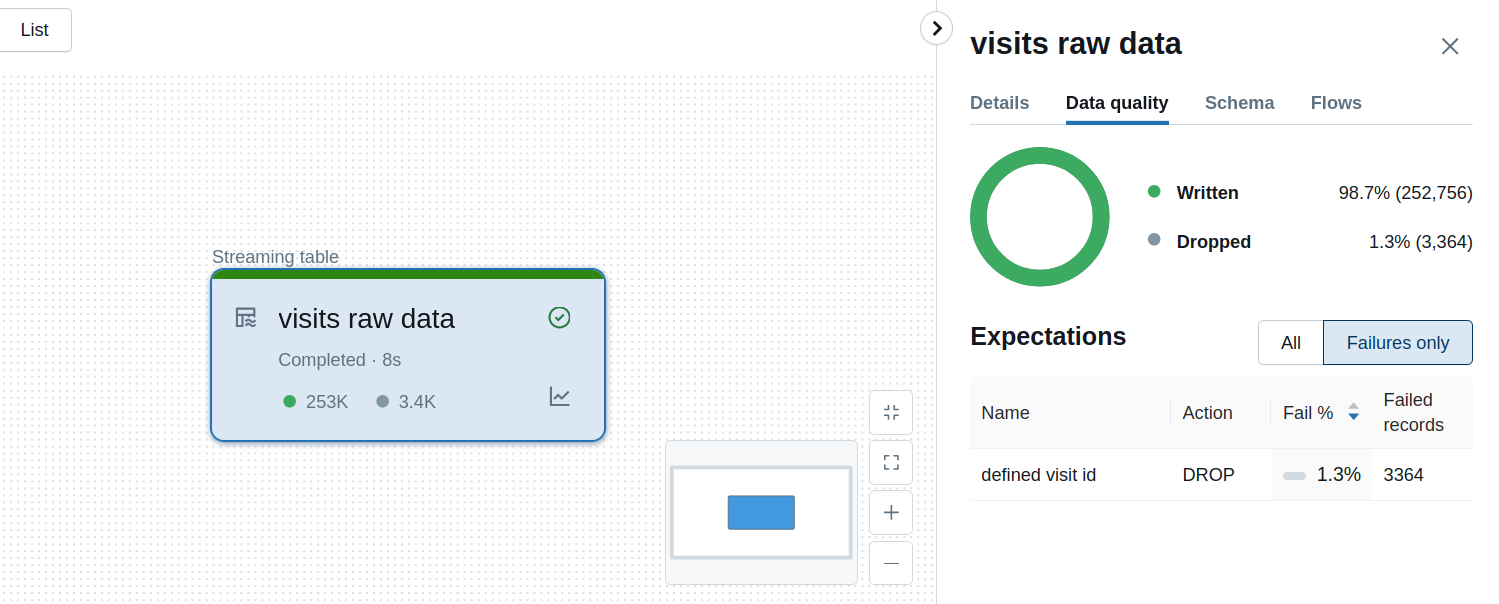
This approach is perfect for cleansing data where you can afford to discard a small number of malformed records without compromising the overall integrity of your analysis.
5. Action 3: expect or fail (Fail Update)
For mission-critical data where any invalid record signifies a serious problem, you need the pipeline to stop immediately. The fail action aborts the pipeline update as soon as a record violates the expectation. This fail-fast approach prevents bad data from ever being committed.
In Python, you use @dlt.expect_or_fail() or @dlt.expect_all_or_fail(). In SQL, you add ON VIOLATION FAIL UPDATE.
30 DLT Data Quality & Expectations | Monitor DLT pipeline using SQL | Define DQ rule |Observability
Finally, let's look at the strictest action: 'fail'. See how a single invalid record can halt the entire pipeline update.
Watch from 08:54 to 10:19. Notice how the pipeline graph immediately shows a 'Failed' status for the table with the constraint. The event log provides details on exactly which expectation failed.
When a pipeline fails due to an expectation, the UI makes it very clear what went wrong.
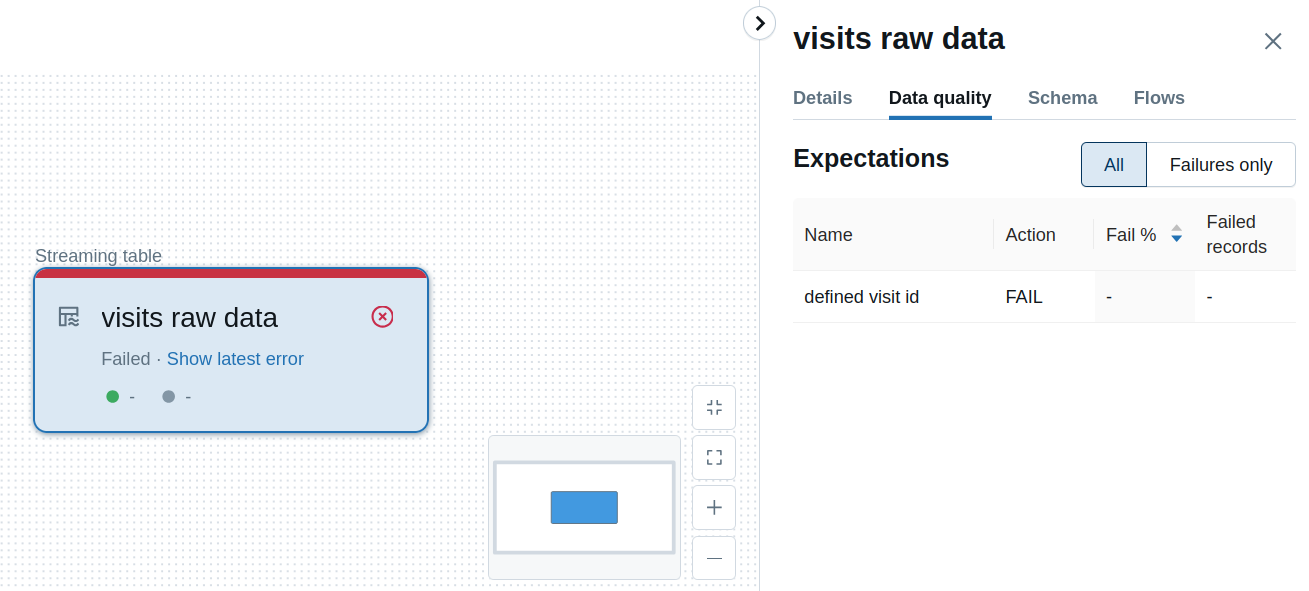
This is the right choice for enforcing strict data contracts, especially in the Silver and Gold layers of your Medallion architecture, where data consumers expect high-quality, reliable data.
To solidify your understanding of all three actions in Python and SQL, please review the following resource.
Data quality on Databricks - Delta Live Tables
This article provides a concise summary and code examples for all three enforcement constraints. It's an excellent reference for both the Python decorators and the SQL syntax.
Read the sections "Expect, drop, or fail, thus the enforcement constraints" and "Complex rules". Focus on the syntax for each of the three decorators (@dlt.expect_or_drop, @dlt.expect_or_fail, @dlt.expect_all_or_fail) and their SQL equivalents.
6. Advanced Use Cases
While the examples we've seen focus on row-level validation (e.g., column > 0), you can combine expectations with materialized views to enforce more complex, aggregate-level constraints.
Delta Live Tables A to Z: Best Practices for Modern Data Pipelines
This final clip provides examples of more sophisticated data quality checks, such as enforcing primary key uniqueness or checking for foreign key violations after a join. This demonstrates the full power of DLT's declarative model.
Watch from 12:00 to 13:30. You don't need to memorize the code, but understand the concept: you can create a materialized view that calculates a data quality metric (like a count of keys), and then place an expectation on that materialized view.
This pattern of creating dedicated materialized views for quality checks allows you to implement virtually any business rule you need, making DLT an extremely powerful framework for building high-quality data pipelines.
Conclusion
In this lesson, you've learned how to move beyond just defining pipeline structure to actively enforcing the quality of the data within it. This is a critical skill for any data engineer aiming to build production-grade systems.
Key Takeaways:
- DLT Expectations are declarative rules for enforcing data quality.
- You have three actions for handling violations:
expect(Warn/Allow): Logs failures but allows data to pass. Ideal for monitoring and profiling.expect or drop: Quarantines failing records, preventing them from entering the target table. Good for cleansing non-critical data.expect or fail: Stops the pipeline immediately upon failure. Essential for mission-critical data with strict quality requirements.
- Both Python decorators (
@dlt.expect...) and SQL constraints (CONSTRAINT ... ON VIOLATION ...) are available to implement these rules. - Combining expectations with materialized views enables complex, aggregate-level data quality checks.
Preview of the Next Lesson:
Now that you can define datasets and enforce quality, the next step is to manage the pipeline's execution environment. In the next lesson, we will learn how to configure DLT pipeline settings, including development vs. production mode, to control how your pipeline runs, how it handles failures, and how it's optimized for different environments.