Introduction
Welcome back! In our last lesson, you successfully created the foundational structure of a data environment within Unity Catalog by building catalogs, schemas, and managed tables. As you learned, by default, only you as the owner can access these new objects. This is secure, but not very collaborative.
This lesson directly addresses the learning outcome: Grant and revoke object permissions to principals using Unity Catalog. We'll focus on how to securely share the objects you've created with other users and teams. This is the heart of data governance on the Databricks platform and a critical topic for the Data Engineer Professional certification.
By the end of this 60-minute lesson, you will be able to:
- Describe the Unity Catalog security model, including principals, securable objects, and privileges.
- Understand and apply the privilege inheritance model.
- Write
GRANTandREVOKESQL commands to manage permissions on catalogs, schemas, and tables. - Use
SHOW GRANTSto audit permissions. - Apply best practices for managing permissions at scale.
Given your strong background in SQL and data engineering, we will focus on the specific SQL syntax and governance patterns within Unity Catalog, using hands-on examples that you can adapt for your own pipelines.
1. The Unity Catalog Security Model
Effective permission management starts with understanding three core components:
-
Principals: The "who." These are the identities that permissions are granted to. In Unity Catalog, this includes:
- Users: Individual user accounts (e.g.,
user@company.com). - Service Principals: Identities for automated jobs and services, which you'll use for production workflows.
- Groups: Collections of users and/or service principals (e.g.,
data_analysts,data_engineers). Using groups is the recommended best practice for scalable governance.
- Users: Individual user accounts (e.g.,
-
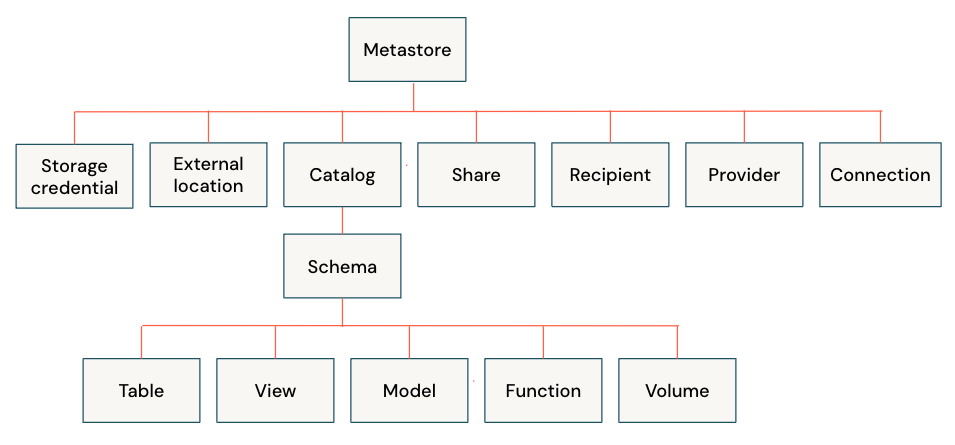
Securable Objects: The "what." These are the assets in Unity Catalog that you can grant privileges on. They exist in a clear hierarchy, which you're already familiar with.
- Privileges: The "how." These define the specific actions a principal can perform on an object (e.g.,
SELECTto read data,MODIFYto change data).
To get a quick overview of these concepts, please watch the first part of the following video.
Data Access Control with Databricks Unity Catalog
The video 'Data Access Control with Databricks Unity Catalog' from Pathfinder Analytics Academy provides a concise introduction to the security model.
Watch from 00:23 to 01:42. This section clearly defines principals, privileges, and securable objects, which are the fundamental building blocks of Unity Catalog's access control system.
2. The Privilege Inheritance Model
Unity Catalog's power comes from its hierarchical inheritance model. Privileges granted on a parent object are inherited by its child objects.
- If you
GRANT SELECT ON a_schemato a group, that group can select from all current and future tables and views within that schema. - If you
GRANT SELECT ON a_catalogto a group, that group can select from all tables and views in all schemas within that catalog.
This allows you to set broad permissions at a high level (a "top-down" approach) or fine-grained permissions at a low level (a "bottom-up" approach).
Manage privileges in Unity Catalog
The official Databricks documentation provides the definitive explanation of this model.
Please read the section titled 'Inheritance model'. It's short but contains the key principle that privileges are inherited downward from the catalog level.
The USAGE Privilege: A Critical Exception
There's one crucial exception to inheritance that is a frequent source of confusion and a common topic on certification exams. To access an object within a catalog or schema, a principal must have the USE CATALOG privilege on the parent catalog AND the USE SCHEMA privilege on the parent schema.
- These
USAGEprivileges are not inherited. - Granting
SELECTon a table is useless if the principal doesn't also haveUSAGEon the parent schema and catalog.
Think of it like a keycard system. You need a keycard for the building (USE CATALOG) and a keycard for the correct floor (USE SCHEMA) before you can even try to open the door to a specific room (SELECT on a table).
3. Granting and Revoking Permissions with SQL
As a data engineer, you will primarily manage permissions programmatically using SQL. The core commands are GRANT and REVOKE.
The general syntax is:GRANT <privilege(s)> ON <securable_object_type> <object_name> TO <principal>;REVOKE <privilege(s)> ON <securable_object_type> <object_name> FROM <principal>;
Let's walk through a practical scenario. Imagine you have two groups: data_analysts and data_engineers. You want to give analysts read-only access to a table, and engineers read-write access.
We will use the catalog you created in the previous lesson, dce_pro_practice.
Step 1: Grant USAGE on the Catalog and Schema
First, both groups need access to the building and the floor.
-- Assume you are a metastore admin or the owner of the catalog.
-- First, grant access to the catalog
GRANT USE CATALOG ON CATALOG dce_pro_practice TO `data_analysts`;
GRANT USE CATALOG ON CATALOG dce_pro_practice TO `data_engineers`;

-- Next, grant access to the schema within that catalog
GRANT USE SCHEMA ON SCHEMA dce_pro_practice.bronze_layer TO `data_analysts`;
GRANT USE SCHEMA ON SCHEMA dce_pro_practice.bronze_layer TO `data_engineers`;
Step 2: Grant Table-Level Privileges
Now that they can get to the table, we grant the specific data access privileges.
-- Grant read-only access to the analysts
GRANT SELECT ON TABLE dce_pro_practice.bronze_layer.customers TO `data_analysts`;

-- Grant read and write access to the engineers
-- The MODIFY privilege includes INSERT, UPDATE, DELETE, and MERGE operations.
GRANT SELECT, MODIFY ON TABLE dce_pro_practice.bronze_layer.customers TO `data_engineers`;
To see this entire process in action, including what happens when a user lacks the necessary USAGE privileges, the following video demonstration is extremely helpful.
Data Access Control with Databricks Unity Catalog
The 'Data Access Control' video clearly demonstrates how these privileges work together and provides examples in both the UI and SQL.
Please watch the following two segments: UI Demonstration (02:22 - 08:20): This section masterfully illustrates the importance of USE CATALOG and USE SCHEMA. Pay close attention to how a user can see a catalog but not its contents, and how a query fails due to 'insufficient privileges' until the USE SCHEMA permission is granted. SQL Demonstration (08:20 - 09:56): This part shows how to perform the same actions using the GRANT command in SQL, which directly aligns with how you'll automate these tasks.

4. Auditing Permissions and Best Practices
A core part of governance is being able to answer the question, "Who has access to what?" The SHOW GRANTS command is your tool for auditing.
-- Show all grants on a specific table
SHOW GRANTS ON TABLE dce_pro_practice.bronze_layer.customers;

-- Show all grants given to a specific group
SHOW GRANTS FOR `data_analysts`;
Building a secure and maintainable data platform requires more than just knowing the syntax. It requires adopting strong governance patterns.
How to Manage Permissions in Databricks Unity Catalog
The article 'How to Manage Permissions in Databricks Unity Catalog' from dateonic.com outlines several critical best practices for enterprise-level governance.
Please read the section 'Best Practices for Governance in Enterprise Settings'. Focus on understanding the 'why' behind each recommendation, especially preferring groups over individuals and the principle of least privilege.
The most important best practice from that article, and for your professional work, is: Always assign permissions to groups, not individual users. Managing permissions for a handful of role-based groups (e.g., finance_analysts, marketing_bi, data_engineers) is far more scalable than managing them for hundreds of individual users. When a person's role changes, you simply move them to a different group, and their permissions update automatically.
Conclusion
In this lesson, you have learned the essential mechanisms for securing data within the Databricks Lakehouse Platform. You can now control precisely who can access which data and what they are allowed to do with it.
Key Takeaways:
- The Unity Catalog security model is based on principals, securable objects, and privileges.
- Privileges are inherited down the object hierarchy, from catalog to schema to table.
- The
USE CATALOGandUSE SCHEMAprivileges are mandatory prerequisites for accessing any object within them and are not inherited. - You can manage permissions programmatically using
GRANT,REVOKE, andSHOW GRANTSSQL commands. - The most critical best practice for scalable governance is to grant permissions to groups, not individual users, and to adhere to the principle of least privilege.
Preview of the Next Lesson:
So far, we've focused on securing objects within Unity Catalog's metadata layer. But where is the actual data stored? In your cloud provider's storage (e.g., AWS S3, Azure Data Lake Storage). In the next lesson, we will configure external locations and storage credentials for managed data access. This will connect the logical world of Unity Catalog to the physical world of cloud storage, allowing you to govern data that lives outside of the default Databricks-managed buckets.