Introduction
Welcome to your next lesson in the "Advanced Delta Lake Features" module. In our previous session, you learned how to manage storage costs by configuring data retention policies and using the VACUUM command to remove old, unreferenced data files.
Today, we shift our focus from cleaning up old data to speeding up queries on your active data. This lesson will teach you how to optimize Delta table read performance using OPTIMIZE and Z-ORDER. As a data engineer, you know that query performance is critical. We'll tackle two common performance bottlenecks: the "small file problem" and inefficient data layout.
By the end of this 60-minute lesson, you will be able to:
- Compact small files into larger, more efficient ones using the
OPTIMIZEcommand. - Use
Z-ORDERto colocate related data and enable highly efficient data skipping. - Make informed design decisions about when to partition versus when to use
Z-ORDER.
This is a fundamental skill for building high-performance data pipelines on Databricks.
Part 1: The "Small File Problem" and Compaction
A common issue in large-scale data systems, especially with streaming or frequent updates, is the creation of many small files. Spark's performance suffers when reading thousands of small files compared to a few larger ones due to the overhead of opening each file and processing its metadata.
This isn't just a theoretical problem; it has significant real-world consequences. The following blog post from Salesforce Engineering describes how the small file problem severely impacted their production jobs.
Boost Delta Lake Performance with Data Skipping and Z-Order
Read this brief section from the Salesforce Engineering blog to understand how the small file problem manifested in a real production environment and the initial steps they took to solve it.
Read the sections 'First Iteration: Partition Pruning' and 'Apply Optimize Write and Auto Compaction to Engagement Ingestion and EngagementMutation Job'. Focus on how they identified the small file problem and the initial solutions they applied.
As the article describes, the primary solution to the small file problem is compaction. Delta Lake provides the OPTIMIZE command to accomplish this. It reads the small files in a partition and rewrites them into a smaller number of larger files (aiming for 1GB by default).
The basic syntax is simple:
OPTIMIZE table_name
While Delta Lake also offers automatic optimization features like Optimize Write and Auto Compaction, the manual OPTIMIZE command gives you the most control and is the foundation for the powerful Z-ORDER technique we'll discuss next.

Part 2: Supercharging Reads with Data Skipping and Z-Ordering
Compacting files is a great first step, but we can do even better. Delta Lake automatically collects statistics (like minimum and maximum values) for the first 32 columns of your table and stores this information in the transaction log. When you run a query with a WHERE clause, the query planner uses these statistics to figure out which files it can safely ignore, or "skip."
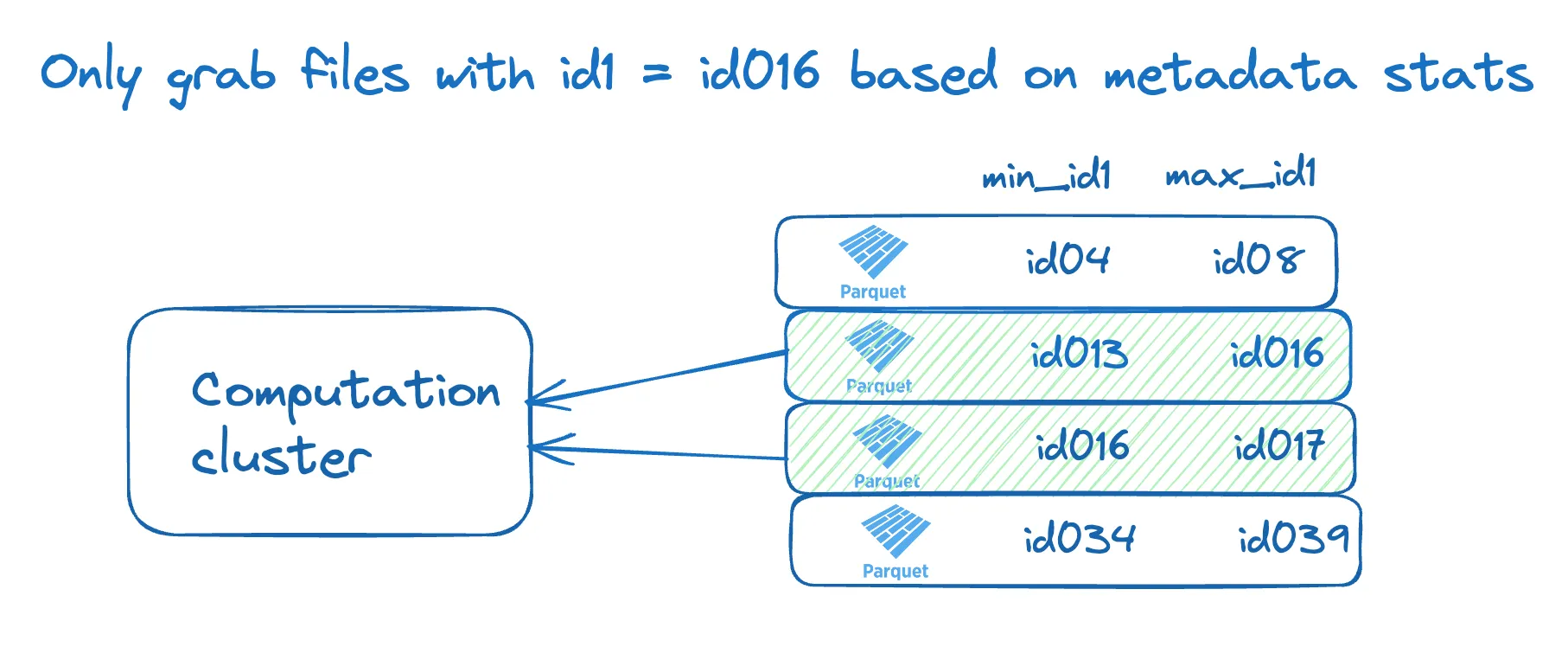
For data skipping to be effective, the data must be organized so that the min/max value ranges for a given column have minimal overlap between files. This is where Z-Ordering comes in.
Z-Ordering is a technique that colocates related data in the same set of files. It's like sorting your data, but across multiple dimensions (columns). When you run OPTIMIZE with a ZORDER BY clause, Delta Lake not only compacts the files but also reorganizes the data within them according to the columns you specify.
To understand this concept more deeply, let's watch a short video.
Advancing Spark - Give your Delta Lake a boost with Z-Ordering
This video from Advancing Analytics provides a clear, conceptual explanation of what Z-Ordering is and how it enhances data skipping.
Watch the first four minutes of the video (00:00 - 03:57). The speaker explains how data skipping works and how Z-Ordering physically reorganizes data to make it more effective. The analogy to a clustered index in a traditional database is particularly useful.
A Real-World Design Choice: Partitioning vs. Z-Ordering
Now, let's go back to the Salesforce Engineering blog. They realized that even with compaction, their partitioning strategy (partition by OrgId and EngagementDate) was still creating many small partitions for smaller organizations. Their solution was a brilliant example of data engineering design.
Boost Delta Lake Performance with Data Skipping and Z-Order
Read the next section of the Salesforce blog to see how they leveraged Z-Ordering to fundamentally solve their performance problem.
Read the section 'Second Iteration: I/O Pruning : Data Skipping and Z-Order'. Focus on their decision to remove EngagementDate as a partition column and use it as a ZORDER BY column instead. This is a key design pattern.
This example highlights a critical trade-off:
- Partitioning is best for low-cardinality columns (e.g., country, state). It works by physically separating data into different directories.
- Z-Ordering is best for high-cardinality columns that are frequently used in query filters (e.g.,
timestamp,user_id,event_id). It works by organizing data within files in a single partition directory.
Part 3: Hands-On Practice
Theory is great, but let's see the impact firsthand. We'll walk through a practical example in a notebook. The following video provides a great step-by-step demonstration that you can follow.
30 Data Skipping and Z-Ordering in Delta Lake Tables | Optimize & Data Compaction Delta Lake Tables
This video from Ease With Data provides an excellent, hands-on demonstration of applying Z-Ordering and measuring its impact. We will replicate the core steps shown here.
Watch from 04:32 to 11:53. Pay close attention to how the presenter: Creates a table with many small files. Runs a query and inspects the Spark UI to see that all 16 files are read. Runs OPTIMIZE ... ZORDER BY. Re-runs the query and shows that only 1 file is read, demonstrating the power of data skipping.
Now, let's perform these steps yourself in a Databricks notebook.
Step 1: Create Un-optimized Data
First, we'll create a Delta table with many small files. We'll use the same retail dataset from the video, which is available in Databricks datasets.
# Set a config to allow for smaller file sizes in this demo
# This helps exaggerate the small file problem for learning purposes
spark.conf.set("spark.databricks.delta.optimize.maxFileSize", 10 * 1024 * 1024) # 10MB


# Read the source data and force it into 20 small partitions/files
df = (spark.read
      .format("csv")
      .option("header", "true")
      .option("inferSchema", "true")
      .load("/databricks-datasets/online_retail/data-001/data.csv")
      .repartition(20))


# Write as a Delta table
df.write.format("delta").mode("overwrite").saveAsTable("retail_sales_unoptimized")
Step 2: Query Before Optimization
Now, run a query against a specific StockCode and examine the Spark UI to see how many files were read.
SELECT * FROM retail_sales_unoptimized WHERE StockCode = '85123A'
After the query runs, click on "View" in the cell output, then "Spark UI". Look at the job details and find the "number of files read". You should see that it read all 20 files.
Step 3: Apply OPTIMIZE and Z-ORDER
Let's optimize the table. Since StockCode is a high-cardinality column we filter on, it's a great candidate for Z-Ordering.
OPTIMIZE retail_sales_unoptimized
ZORDER BY (StockCode)
Step 4: Query After Optimization
Run the exact same query again and check the Spark UI.
SELECT * FROM retail_sales_unoptimized WHERE StockCode = '85123A'
This time, you should see that the number of files read has dropped dramatically (likely to just 1 or 2 files). This is the direct performance benefit of combining compaction and Z-Ordering.
Part 4: Advanced Considerations and Best Practices
To use these features professionally, you need to understand the nuances.
1. Combining Partitioning and Z-Ordering
The most effective strategy is often to combine partitioning on a low-cardinality column with Z-Ordering on a high-cardinality column. For example: PARTITION BY (Country) and ZORDER BY (CustomerID).
When you do this, you can also optimize individual partitions, which is much more efficient than re-optimizing the entire table.
OPTIMIZE retail_sales_partitioned
WHERE Country = 'France'
ZORDER BY (CustomerID)
The following video segment demonstrates exactly this powerful combination.
30 Data Skipping and Z-Ordering in Delta Lake Tables | Optimize & Data Compaction Delta Lake Tables
Watch this final segment from the 'Ease With Data' video to see how to combine partitioning with Z-ordering for the best possible performance.
Watch from 14:55 to 17:36. The presenter shows how to run a targeted OPTIMIZE on a single partition and measures the performance gain.
2. Choosing Z-Order Columns
- Choose wisely: Select columns that are frequently used in
WHEREclauses and have high cardinality. - Diminishing returns: You can Z-Order by multiple columns (
ZORDER BY (colA, colB)), but the effectiveness decreases with each additional column. One or two columns are typical. - Stats are required: Z-Ordering is only effective on columns for which Delta Lake has collected statistics. By default, this is the first 32 columns in the table, but this can be configured.
Data skipping | Databricks on AWS
This official Databricks documentation provides concise rules on when and how to use Z-Ordering.
Read the section 'What is Z-ordering?'. It reinforces the best practices for choosing Z-Order columns and mentions its limitations.
3. OPTIMIZE is a Maintenance Operation
OPTIMIZE with ZORDER can be a computationally expensive operation. It is not part of the auto-optimize features. You must run it as a separate, deliberate maintenance task. For most production tables, this is scheduled to run as a nightly or weekly job using Databricks Workflows.
Conclusion
In this lesson, you've gained a crucial skill for any Databricks Data Engineer: performance tuning for read queries. You've seen how to tackle the small file problem and enable highly efficient data skipping.
Key Takeaways:
- The
OPTIMIZEcommand compacts many small files into fewer large ones, reducing read overhead. ZORDER BYcolocates data within files based on high-cardinality columns, which dramatically improves the effectiveness of data skipping.- The best performance often comes from combining partitioning on low-cardinality columns with Z-Ordering on high-cardinality columns.
OPTIMIZEis a resource-intensive maintenance operation that should be scheduled to run periodically, not with every write.
Preview of the Next Lesson:
We have now covered managing table history (VACUUM) and optimizing read performance (OPTIMIZE). Next, we'll continue our exploration of advanced features by tackling another common challenge: managing changes to your table's schema over time. You'll learn how to implement schema evolution using the mergeSchema and overwriteSchema options.