Introduction
Welcome to your first lesson in the Databricks Certified Data Engineer Professional course! Your goal is to achieve this advanced certification, and this course is designed to build the deep, practical skills required to succeed. Given your background as a Data Engineer with experience in platforms like Spark, Airflow, and various cloud services, we'll be focusing on how Databricks provides a unified and streamlined approach to problems you've likely encountered in different contexts.
This first module, "Databricks Lakehouse Platform Essentials," establishes the foundational concepts of the platform. In this lesson, we will focus on the core architectural philosophy of Databricks. Our learning outcome is to describe the Databricks Lakehouse architecture and how it unifies data warehouses and data lakes.
Understanding this "why" is the critical first step before we dive into the "how." It provides the context for all the tools and features we'll explore, from data ingestion and transformation to governance and orchestration. Let's begin by exploring the evolution of data platforms that led to the Lakehouse.
The Evolution: From Warehouses to Lakes
To understand why the Lakehouse architecture is so significant, we need to look at the systems that came before it. Historically, data analytics has been split between two main types of platforms: data warehouses and data lakes.
-
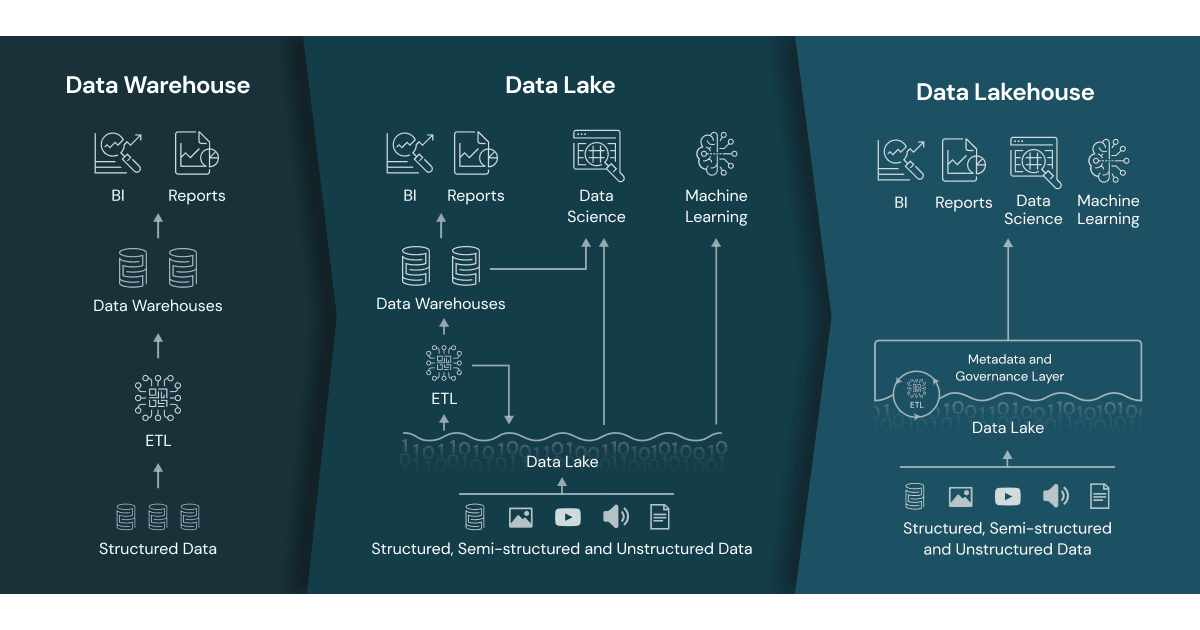
Data Warehouses (DWs): These are highly structured systems, optimized for business intelligence (BI) and reporting. They excel at running fast SQL queries on cleaned, organized data (structured data). However, they struggle with the massive volumes of unstructured and semi-structured data (like text, images, and logs) that are common today. Loading data also requires a rigid, pre-defined schema (schema-on-write), making them less flexible for exploratory analysis.
-
Data Lakes (DLs): These emerged to solve the warehouse's limitations. A data lake is essentially a vast storage repository (like AWS S3 or Google Cloud Storage) that can hold all of your data—structured, semi-structured, and unstructured—in its raw format. This flexibility and low cost are great for data science and machine learning. However, data lakes often suffer from a lack of governance, reliability, and transaction support. Without careful management, they can turn into "data swamps," where data is disorganized, unreliable, and difficult to query, making traditional BI tasks challenging.
This created a two-tiered system where data engineers had to maintain separate, complex pipelines to move data between a data lake and a data warehouse, leading to data redundancy, higher costs, and governance challenges.
To get a clear overview of this historical progression, please watch the first part of the following video.
Databricks Lakehouse Architecture | Delta Lake Databricks |Data Warehouse vs Data Lake vs Lakehouse
This video from SleekData provides a concise history of data architectures, explaining the shift from data warehouses to data lakes and the problems that led to the development of the Lakehouse.
Watch the segment from 00:28 to 02:37. Focus on the limitations of both data warehouses and data lakes that are highlighted.
Unifying the Best of Both Worlds: The Lakehouse
The Databricks Lakehouse architecture was designed to eliminate the trade-offs between data warehouses and data lakes. It aims to provide a single, unified platform that offers:
- The low-cost, flexible storage of a data lake for all data types.
- The powerful performance, governance, and reliability features of a data warehouse.
This means you can run traditional BI and SQL analytics directly on the same platform where you perform data science and machine learning, all on the same copy of your data.
This image provides a great visual summary of the concept.
To solidify this concept, the following reading from the lakeFS blog provides a great written explanation of the core ideas.
Getting Started with Databricks Lakehouse - lakeFS
This article, titled 'Getting Started with Databricks Lakehouse', reinforces the concepts from the video, providing a clear textual comparison of the architectures and introducing the key components of a Lakehouse.
Read the sections 'What is the Databricks Lakehouse?', 'Understanding Data Lakehouse, Data Warehouse and Data Lakes', and the 'Conclusion'. Pay attention to how it articulates the specific problems with data lakes (e.g., lack of ACID transactions, data swamps) that the Lakehouse is designed to solve.
How Databricks Implements the Lakehouse
Now that we understand the "what" and "why" of the Lakehouse, let's explore "how" Databricks technically achieves it. The architecture is built on a few key pillars.
1. Open Storage with Delta Lake
At its foundation, the Lakehouse stores data in your own cloud storage account (e.g., AWS S3, Azure Data Lake Storage, GCS) using open-source file formats like Apache Parquet. This is the "data lake" aspect—it's your data, in your account, in an open format.
The magic happens with Delta Lake, an open-source storage layer that sits on top of your data lake files. Delta Lake augments your Parquet files with a transaction log, bringing data warehouse-like capabilities to your cloud storage. Your experience with Spark will be useful here, as Delta Lake is fully compatible with Spark APIs.
Key features enabled by Delta Lake include:
- ACID Transactions: This ensures that operations on your data either complete fully or not at all, preventing data corruption from failed jobs or concurrent writes. This is a cornerstone of database reliability.
- Schema Enforcement and Evolution: Prevents bad data from being written to your tables, which is a primary cause of "data swamps." It also allows you to intentionally evolve your table schema over time.
- Time Travel: The transaction log records every version of your data, allowing you to query the state of a table at any point in time. This is invaluable for auditing, debugging, and reproducing experiments.
The following segment of the SleekData video does an excellent job of explaining the structure of a Delta table, particularly the _delta_log directory which is the heart of its functionality.
Databricks Lakehouse Architecture | Delta Lake Databricks |Data Warehouse vs Data Lake vs Lakehouse
Let's return to the SleekData video to see how Delta Lake works under the hood. This part explains the transaction log and how it enables powerful features like ACID transactions and time travel.
Watch the section from 04:09 to 06:17. Focus on understanding the role of the _delta_log folder and the JSON files within it. This is the mechanism that provides transactional guarantees on top of simple data files.
2. Unified Governance with Unity Catalog
A core weakness of data lakes is the lack of centralized governance. Unity Catalog is Databricks' solution to this problem. It provides a single, unified governance layer for all data and AI assets in your lakehouse.
With Unity Catalog, you can:
- Manage access controls using standard SQL
GRANTandREVOKEcommands. - Track data lineage to see how data flows through your pipelines.
- Audit access to data across all your workspaces.
- Securely share data with external partners.
This creates a single source of truth for governance, a feature traditionally associated with data warehouses.
3. The Databricks Architecture: Control and Compute Planes
It's crucial to understand how Databricks organizes its services. The architecture is split into two distinct parts:
- Control Plane: This is managed by Databricks in its own cloud account. It includes the web UI, notebooks, job scheduler, and metadata from Unity Catalog. When you write code in a notebook, you are interacting with the control plane.
- Compute/Data Plane: This resides in your cloud account. It consists of the Spark clusters that process your data and the cloud storage (S3, ADLS, GCS) where your Delta Lake tables are stored.
This separation is key for security and compliance, as your data never leaves your cloud environment unless you explicitly configure it to. The control plane simply sends commands to the compute resources in your data plane.
The following video provides a clear breakdown of the different architectural components and the distinction between the control and compute planes.
Databricks architecture - how it really works
This video from Databricks For Professionals offers a detailed look at the components of the Databricks platform and clarifies the separation between the control and compute planes.
Watch the segments from 02:35 to 04:46 and 21:28 to 22:55. The first part introduces key components like Unity Catalog and workflow orchestration. The second part explicitly defines what lives in the Databricks cloud (control plane) versus your cloud (compute/data plane).
This diagram shows how all these pieces fit together to form the complete Databricks Lakehouse architecture.

Conclusion
In this lesson, we've established the foundational concepts of the Databricks Lakehouse Platform. You'll find that many of the data engineering challenges you've solved with tools like Airflow and standalone Spark are addressed in a more integrated way within this architecture.
Key Takeaways:
- Data platforms evolved from structured Data Warehouses to flexible Data Lakes, each with significant limitations.
- The Lakehouse architecture unifies the best of both worlds: the reliability and performance of a warehouse with the low-cost, open storage of a data lake.
- Databricks implements the Lakehouse using Delta Lake to provide ACID transactions and reliability on top of open file formats in your own cloud storage.
- Unity Catalog provides a unified layer for data governance, security, and discovery across all data assets.
- The platform is architecturally split into a control plane (managed by Databricks) and a compute/data plane (which runs in your cloud account), ensuring your data remains secure.
This conceptual groundwork is essential. Now that you understand the "why," we can move on to the "how."
Preview of the Next Lesson:
In the next lesson, we will get hands-on with the platform. You'll learn to navigate the Databricks workspace and identify key components like notebooks, clusters, repos, and DBSQL. This will be our first step in translating these architectural concepts into practical skills.