Welcome back! In our last lesson, we examined the "verbs" of the web—the HTTP methods that define the action a request intends to perform. Now, we'll shift our focus to the metadata that accompanies those requests and responses: the HTTP headers.
This lesson will identify the role of four key HTTP headers: Host, Cookie, Content-Type, and User-Agent. For a security analyst, headers are not just passive information; they are a critical part of the attack surface. Understanding what they do and how they can be manipulated is fundamental to finding vulnerabilities, from simple access control bypasses to complex injection attacks.
The Anatomy of a Message: What are Headers?
If the HTTP method is the verb and the URL path is the noun, then headers are the adjectives and adverbs that provide essential context. They are key-value pairs that travel with every HTTP request and response, carrying information about the client, the server, the message body, and the connection itself.

Headers provide the instructions and context needed for the client and server to have a coherent conversation. A clear understanding of these headers is essential before we begin intercepting and modifying them with Burp Suite.
For a great verbal overview of the most common headers, the HackerSploit channel offers a clear walkthrough.
Web App Pentesting - HTTP Headers & Methods
This video provides a detailed breakdown of both request and response headers, explaining the purpose of each one in a practical context. It's a great way to hear the concepts explained before we dive into specific examples.
First, watch the section covering request headers from the explanation of the Host header. Then, continue with the section on response headers from the start of the response header analysis.
Now, let's explore the specific headers for this lesson in more detail, focusing on their security implications. The TryHackMe guide, "HTTP in detail," provides concise definitions that we can build upon.
HTTP in detail | Try Hack Me - Hammaad Mughal
This guide offers excellent, straightforward explanations for many common headers. It's a useful reference to have as we break down each header's function.
First, read the brief introductory paragraph under the Headers heading. Then, review the definitions under "Common Request Headers", specifically for Host, User-Agent, and Cookie. Also, find the definition for Content-Type under the "Common Response Headers" heading (note that it's also a crucial request header, which we'll discuss). Finally, read the dedicated section on Cookies.
Key Headers for the Ethical Hacker
With those definitions as our foundation, let's look at each header from a security analyst's perspective. Your goal in CTFs and bug bounties is often to find where the application makes flawed assumptions based on the data in these headers.
1. The Host Header
- Purpose: The
Hostheader specifies the domain name of the server the client is trying to reach. This is essential for modern web servers, which often host multiple websites on a single IP address (a practice known as virtual hosting). The server uses theHostheader to know which website's content to serve. - Security Relevance: If an application blindly trusts the
Hostheader, it can be vulnerable to Host Header Injection. For example, a password reset link might be generated using the value from theHostheader. By manipulating it to point to an attacker-controlled domain, you could trick the application into sending a user's password reset link to you instead.
2. The User-Agent Header
- Purpose: This header is a string that identifies the client's browser, operating system, and version. It allows the server to deliver content tailored to the specific client (e.g., a mobile version of a site for a mobile browser).
- Security Relevance: Changing the
User-Agentstring is a common technique. You might switch to a mobile user agent to see if the mobile site has weaker security controls. Sometimes, applications grant special access or reveal debugging information to specific user agents, like search engine crawlers. A CTF challenge might hide a flag that is only visible if you claim to be a specific, non-standard user agent.
This CTF write-up provides a perfect example of spoofing the User-Agent to solve a challenge.
TryHackMe CTF Collection Vol. 2
This write-up for a TryHackMe room demonstrates several header-based challenges. We'll focus on the one involving the User-Agent.
Read through the section for "Easter Egg 8". Notice how the hint provides a specific User-Agent string. The author intercepts the request, replaces the original User-Agent with the new one, and receives the flag in the response. This is a classic CTF puzzle.
3. The Content-Type Header
- Purpose: When sending data in the body of a request (like with a
POSTmethod), theContent-Typeheader tells the server how to interpret that data. Common values includeapplication/x-www-form-urlencodedfor standard web forms andapplication/jsonfor API requests. - Security Relevance: Mismatched or manipulated
Content-Typeheaders can be used to bypass security controls. For instance, a Web Application Firewall (WAF) might be configured to inspect JSON data but not XML. By sending a malicious payload with aContent-Type: application/xmlheader, you might evade detection. As you'll see in the next example, sometimes simply including the correct header is necessary for the application to process your request at all.
Let's look at another example from the same CTF write-up.
TryHackMe CTF Collection Vol. 2
This example shows a scenario where a request fails until the correct Content-Type header is added.
Read through the section for "Easter Egg 20". The author discovers that sending a POST request with data in the body isn't enough. The request only succeeds once the Content-Type: application/x-www-form-urlencoded header is added. This demonstrates that the server relies on this header to understand how to process the incoming data.
4. The Cookie Header
- Purpose: Since HTTP is stateless, servers use cookies to remember you between requests. The server first sends a
Set-Cookieheader in a response. Your browser stores this cookie and then sends it back to the server in aCookieheader on all subsequent requests to that domain. This is how websites keep you logged in. - Security Relevance: Cookies are a prime target. The
Cookieheader is where you'll find session tokens. If you can steal another user's cookie, you can often impersonate them. Furthermore, sometimes cookies contain other data, like user roles (e.g.,isAdmin=false). If the application trusts this data without server-side verification, you might be able to change it toisAdmin=trueand escalate your privileges.
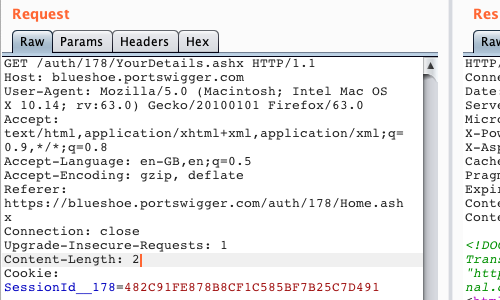
Our final CTF example shows how modifying a cookie's value can lead directly to a flag.
TryHackMe CTF Collection Vol. 2
Here we see a simple but effective demonstration of cookie manipulation.
Read through the section for "Easter Egg 7". The author finds a cookie with a value of "0". By sending the request to Burp Repeater and <span data-type="resource_reading_textrange" data-resource-subitem-id="d73d9604" data-range-start="let’s change that value from “0”to “1"." data-range-end="We should now receive the flag!">changing the cookie's value to "1", they receive the flag. This simulates a vulnerability where application logic is insecurely tied to a client-controllable cookie value.
To see these headers demonstrated in common tools, the Traversy Media HTTP Crash Course provides an excellent practical walkthrough.
HTTP Crash Course & Exploration
This video uses Chrome DevTools, Postman, and a simple server application to show how headers are sent, received, and interpreted. This will help solidify the concepts we've just discussed.
First, watch the section from the Chrome DevTools demo. Pay attention to how the "Network" tab displays the Request and Response headers for a live website, including User-Agent and Content-Type. Next, see how this works on the server side from the section on getting header values. This shows how a server application reads the Host and User-Agent headers from an incoming request. Then, observe how Content-Type is handled when sending data from the Postman demo. Notice how Postman automatically adds the correct Content-Type header when you select different data formats. Finally, watch the example of using a custom header for authentication from the token validation section. This is a very common pattern and highlights the security-critical role headers can play.
Conclusion
In this lesson, we moved beyond the HTTP method to explore the rich metadata contained in HTTP headers. They are fundamental to how the web functions and are a primary area of interest for any security tester.
Here are the key takeaways:
- Headers provide context: They are key-value pairs that tell the client and server about each other and about the message being sent.
Host: Tells the server which website you want, enabling multiple sites on one IP. Can be a target for injection attacks.User-Agent: Identifies your browser/OS. Spoofing it can bypass client-side controls or reveal hidden content.Content-Type: Describes the data in the request/response body. Manipulating it can be used to bypass filters, and sending the correct type is often required for an application to function.Cookie: Carries state information, most importantly session identifiers. Manipulating cookies is a classic technique for session hijacking and privilege escalation.
So far, we've discussed the structure of HTTP messages, their methods, and their headers. In the next lesson, we will finally bring Burp Suite into the picture by explaining the concept of a web proxy. You will learn how a proxy sits between your browser and the web server, allowing you to intercept, inspect, and—most importantly—modify these very headers before they reach their destination.