Hello, and welcome to a new module in our course. We're now shifting our focus from the internals of a single computer—operating systems, memory, and concurrency—to the principles that connect computers together: networking. In our last lesson, you mastered how to prevent deadlocks by applying the resource ordering strategy, a crucial skill for building robust, concurrent systems.
Today, we will begin our exploration of networking by tackling a fundamental question: what actually happens when you type a URL into your browser and press Enter? To answer this, we will trace the journey of a web request through the TCP/IP model. This lesson will equip you with a mental framework that explains how data travels from an application on your machine, across the vast internet, to a server, and back again. Understanding this layered model is essential, as it provides the foundation for all the networking protocols we will discuss in this module.
The Big Picture: A Web Request's Journey
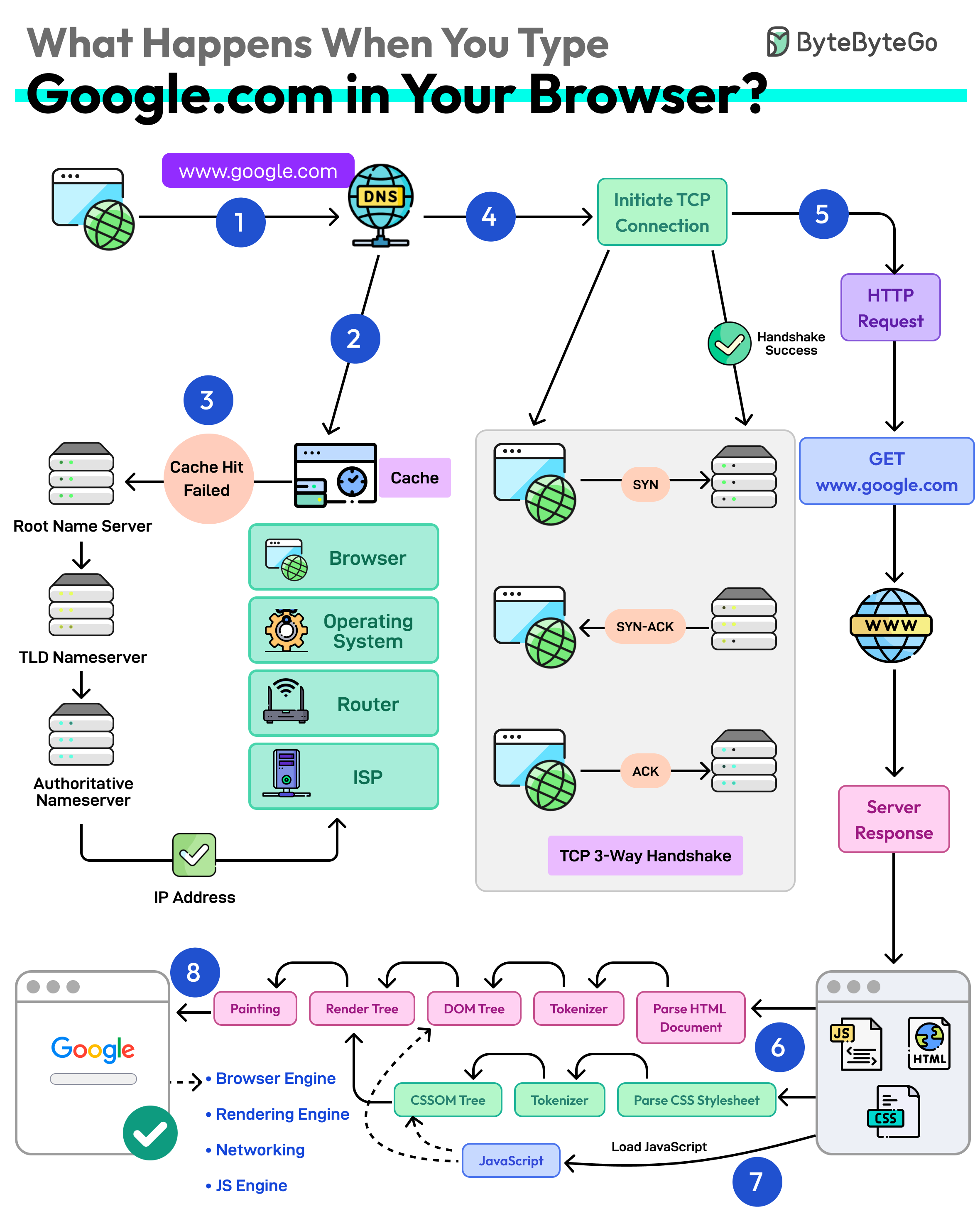
Before we dive into the details of each layer, let's look at a high-level overview of the entire process. The journey from typing google.com to seeing the page render involves multiple stages, from translating the domain name into an address to establishing a connection and finally rendering the content.
Why a Layered Model?
The complexity of network communication is managed by breaking it down into a set of layers. This is a core engineering principle: abstraction. Each layer is responsible for a specific task and only needs to know how to interact with the layers directly above and below it. This modularity allows a developer creating a web browser (at the top layer) to not worry about whether the user is on Wi-Fi or a wired Ethernet connection (at the bottom layer).
The de facto standard for the internet is the TCP/IP model, which typically consists of four layers. You may also encounter the seven-layer OSI model, which is more of a theoretical framework, but its terminology is still widely used (e.g., "Layer 7 load balancer"). We'll focus on the practical TCP/IP model.
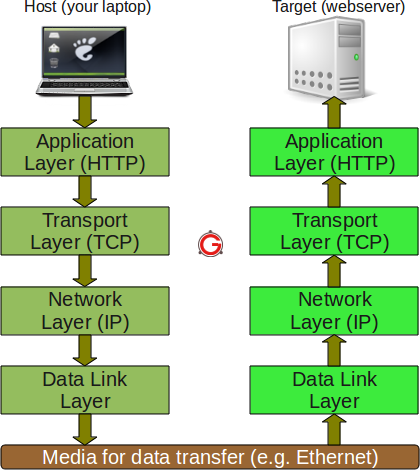
Let's get a quick overview of what each layer does.
TCP/IP Model: How the Internet Actually Works - FSD-Tech Blogs
This article from FSD-Tech Blogs provides a concise and clear description of each layer's role.
Please read the section titled "The Four Layers of the TCP/IP Model", from the description of The Application Layer to the end of the Network Access Layer description. This will give you a solid initial definition for each layer.
As the article explained, the four layers work in concert, each performing a distinct function:
| Layer | Name | Primary Role | Key Protocols | Data Unit | Address Type |
|---|---|---|---|---|---|
| 4 | Application | Enables application-to-application communication | HTTP, FTP, SMTP, DNS | Message/Data | N/A |
| 3 | Transport | Provides process-to-process communication & reliability | TCP, UDP | Segment (TCP), Datagram (UDP) | Port Number |
| 2 | Network | Routes packets from source to destination host across networks | IP (Internet Protocol) | Packet/Datagram | IP Address |
| 1 | Link (Network Access) | Transmits data between hosts on the same local network | Ethernet, Wi-Fi | Frame | MAC Address |
The Journey Down the Stack: Encapsulation
When your browser sends a request, the data travels down this stack of layers. At each layer, a "header" containing control information is added. This process is called encapsulation. Think of it as placing a letter into an envelope (Transport), then putting that envelope into a shipping box with an address (Network), and finally adding a local delivery sticker to the box (Link).
Let's trace a web request to www.google.com as it gets encapsulated.
-
Application Layer: Your browser, an application, creates an HTTP request message, such as
GET / HTTP/1.1. Before this can be sent, the browser needs the server's IP address. It performs a DNS query (another Application Layer protocol) to resolvewww.google.comto an IP address (e.g.,142.250.190.78). The HTTP message is then handed to the operating system's networking stack. -
Transport Layer: The TCP protocol receives the HTTP message. Its job is to ensure reliable delivery to the correct application on the server.
- It breaks the message into smaller chunks called TCP segments.
- It adds a TCP header to each segment. This header includes the source port (a random high-numbered port on your machine, e.g., 51234) and the destination port (port 443 for HTTPS, or 80 for HTTP). Ports are like apartment numbers for applications running on a host.
-
Network Layer: The IP protocol receives the TCP segment. Its job is to get the data to the correct destination host anywhere on the internet.
- It encapsulates the segment into an IP packet (also called a datagram).
- It adds an IP header, which contains the source IP address (your computer's public IP) and the destination IP address (the Google server's IP we found via DNS).
-
Link Layer: The IP packet is passed to the network interface hardware (e.g., your Ethernet or Wi-Fi card). Its job is to get the data to the next hop on the local network, which is typically your router.
- It encapsulates the packet into a frame (e.g., an Ethernet frame).
- It adds a Link Layer header, which includes the source MAC address (your computer's network card) and the destination MAC address (your router's MAC address). MAC addresses are hardware identifiers for devices on a local network.
- Finally, the frame is converted into electrical signals, radio waves, or light pulses and sent over the Physical Layer (the wires, fiber, or air).
The following video provides an excellent visual walkthrough of this encapsulation process.
Network Protocol Layers explained by example
This video from Mr Dimmick's Computing Channel clearly explains how a request for a webpage is processed down the protocol stack.
Please watch the segment that details sending the request. Pay close attention to how each layer (HTTP, TCP, IP, and the link/network layer) adds its own information to the data.
Across the Internet and Up the Stack: Decapsulation
Once the frame reaches your router, the router performs the reverse process: it "decapsulates" the frame to read the IP header, determines the next hop on the path to Google's server, re-encapsulates the IP packet into a new frame, and sends it on its way. This hop-by-hop routing continues across the internet.
When the packet finally arrives at the Google server:
- Link Layer: The server's network card receives the frame and checks if the destination MAC address matches its own. It then strips the Link Layer header and passes the enclosed IP packet up to the OS.
- Network Layer: The OS inspects the IP header, confirms the destination IP address is correct, and strips the header. It sees from a field in the header that the payload is a TCP segment and passes it to the TCP protocol handler.
- Transport Layer: The TCP handler reads the TCP header. It notes the destination port (443) and identifies the web server process listening on that port. It strips the TCP header and reassembles the segments into the original HTTP message.
- Application Layer: The OS delivers the complete HTTP request message to the web server application. The server can now process the request and generate a response, which will travel back to you through the exact same encapsulation/decapsulation process in reverse.
For a very detailed, step-by-step technical breakdown of this entire flow, the following resource is excellent. It connects all the concepts we've discussed into a single narrative.
Understanding TCP/Ip layering through internet flow? - Stack Overflow
This answer on Stack Overflow walks through a web request with specific examples for addresses and ports, reinforcing how the layers interact.
Please read the section titled A Concrete Example. This text synthesizes the roles of DNS, the Sockets API, and each layer of the TCP/IP stack to trace a request from the browser to the final web server.
Conclusion
Today, you have deconstructed the magic of a web request into a logical, layered process. By tracing data's journey through the TCP/IP model, you've seen how a complex task is managed through abstraction and standardization.
Key Takeaways:
- The TCP/IP model organizes network communication into four layers: Application, Transport, Network, and Link.
- Each layer has a distinct responsibility, from application-specific logic at the top to physical transmission at the bottom.
- Data moving down the stack is wrapped in headers at each layer in a process called encapsulation. The reverse process, decapsulation, occurs at the receiving end.
- Different addressing schemes are used at different layers to get data to the right process (Port), on the right host (IP Address), via the right next-hop device (MAC Address).
This foundational understanding of the network stack is crucial. In our next lesson, we will zoom in on the Transport Layer to analyze one of its most critical mechanisms: the TCP three-way handshake, which is responsible for establishing the reliable connections we depend on.