Introduction
In our previous lesson, we traced the journey of a DNS query, discovering how a browser finds a server's IP address from a domain name. Now that the browser knows where to send its message, we will explore what message it sends and what it gets back. This communication is governed by the Hypertext Transfer Protocol (HTTP), the fundamental protocol of the web.
This lesson will dissect the HTTP request/response cycle. You will learn to identify the essential components of these messages: the methods that define the client's intent, the status codes that signal the server's outcome, and the headers that carry critical metadata. For a senior engineering manager, a firm grasp of this cycle is indispensable for designing robust APIs, diagnosing production issues, and understanding the performance characteristics of web services.
The Request-Response Model
At its heart, HTTP operates on a simple client-server model. The client (e.g., your web browser) sends a request to a server, and the server sends back a response. This entire exchange, from the initial request to the final response, is known as the HTTP request-response cycle.
One of HTTP's defining characteristics is that it is stateless. Each request is an independent transaction. The server does not retain any memory of previous requests from the same client. This design choice promotes scalability, but it also necessitates mechanisms like cookies and authorization tokens to manage user sessions and state, which we will see reflected in the message headers.
Let's begin by examining the structure of the messages that are exchanged.
Understanding the HTTP Request-Response Cycle
This article provides a clear, high-level overview of the components of both HTTP requests and responses.
First, read the section on constructing the request, which introduces its four main parts. Then, read the parallel section on constructing the response. This will give you a solid framework for the detailed breakdown to follow.
Anatomy of an HTTP Request
An HTTP request is a formatted block of text sent by the client. It consists of a request line, headers, and an optional body. Let's examine each part.
1. Request Line
This is the first line of the request and is crucial. It specifies:
- Method: A verb that defines the desired action.
- URI (Uniform Resource Identifier): The path to the resource on the server (e.g.,
/products/123). - HTTP Version: Typically
HTTP/1.1orHTTP/2.
2. HTTP Methods (Verbs)
The method is the most important part of the request line. While there are several methods, the following are the most common in modern web development and API design. Understanding their specific properties—safety and idempotency—is critical for building predictable and reliable systems.
- Safe methods are not supposed to alter the state of the server. They are intended for read-only operations.
- Idempotent methods can be called multiple times with the same result. Making the same request once or ten times in a row should leave the server in the same state. This is a vital property for designing resilient client-side retry logic.
What is an HTTP Request? Methods, headers, and code
This resource from Webflow provides an excellent, concise summary of the key HTTP methods and their semantic properties.
Focus on the table under the heading HTTP request methods. Pay close attention to the "Safe" and "Idempotent" columns. Then, read the explanations under When to pick one method over another, which clarify the important distinctions between POST vs. PUT and PUT vs. PATCH.
3. Request Headers
Headers are key-value pairs that pass additional information with the request. They are essential for content negotiation, authentication, caching, and state management. Some common request headers include:
Host: The domain name of the server. Required in HTTP/1.1.Accept: Informs the server what content types (e.g.,application/json,text/html) the client can understand.Authorization: Carries credentials for the client to authenticate itself to the server (e.g., aBearertoken).User-Agent: A string identifying the client software (e.g., browser type and version).Cookie: Contains stateful information (like a session ID) that the server has previously sent to the client.
4. Request Body
The body is an optional part of the request that contains data to be sent to the server. It is primarily used with methods like POST, PUT, and PATCH to submit data, such as a JSON payload for creating or updating a resource. GET requests do not have a body.
Anatomy of an HTTP Response
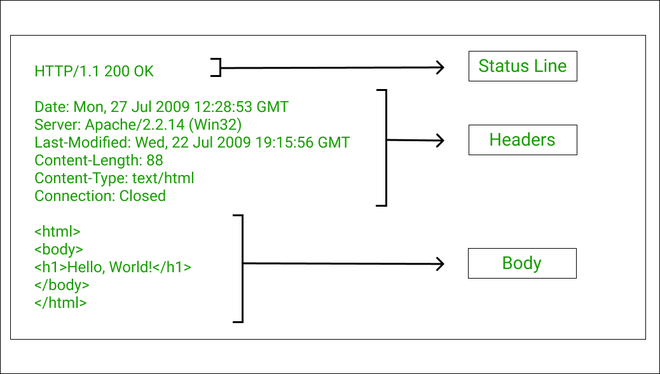
After processing the request, the server sends back an HTTP response. It mirrors the structure of a request, containing a status line, headers, and an optional body.
1. Status Line
The first line of the response informs the client of the outcome of its request. It contains:
- HTTP Version: The version of the HTTP protocol the server is using.
- Status Code: A three-digit code representing the result.
- Reason Phrase: A short, human-readable text summary of the status code (e.g.,
OK,Not Found).
2. HTTP Status Codes
Status codes are a standardized way for the server to communicate the outcome of a request. They are grouped into five classes, identifiable by their first digit.
What is an HTTP Request? Methods, headers, and code
This section succinctly explains the five classes of HTTP status codes.
Read the descriptions of the five classes: 1xx to 5xx. As you read, focus on understanding the general meaning of each class and familiarize yourself with the common examples provided, such as 200 OK, 201 Created, 301 Moved Permanently, 400 Bad Request, 401 Unauthorized, 403 Forbidden, 404 Not Found, and 500 Internal Server Error.
3. Response Headers
Similar to request headers, response headers provide additional context about the response. Common response headers include:
Content-Type: Specifies the media type of the response body (e.g.,text/html,application/json).Content-Length: The size of the response body in bytes.Set-Cookie: Used to send a cookie from the server to the client for later requests.Cache-Control: Gives caching directives to the client or intermediate proxies.Location: Used in redirection responses (3xxstatus codes) to specify the new URL.
4. Response Body
This is the main payload of the response. For a successful GET request, this is the resource you asked for—an HTML page, a JSON object, an image file, etc. For error responses (like a 404 or 500), the body might contain a more detailed error message.
Practical Inspection: Using Your Browser's Developer Tools
The best way to solidify your understanding of the HTTP cycle is to see it in action. All modern web browsers include developer tools with a "Network" tab that lets you inspect every single request and response.
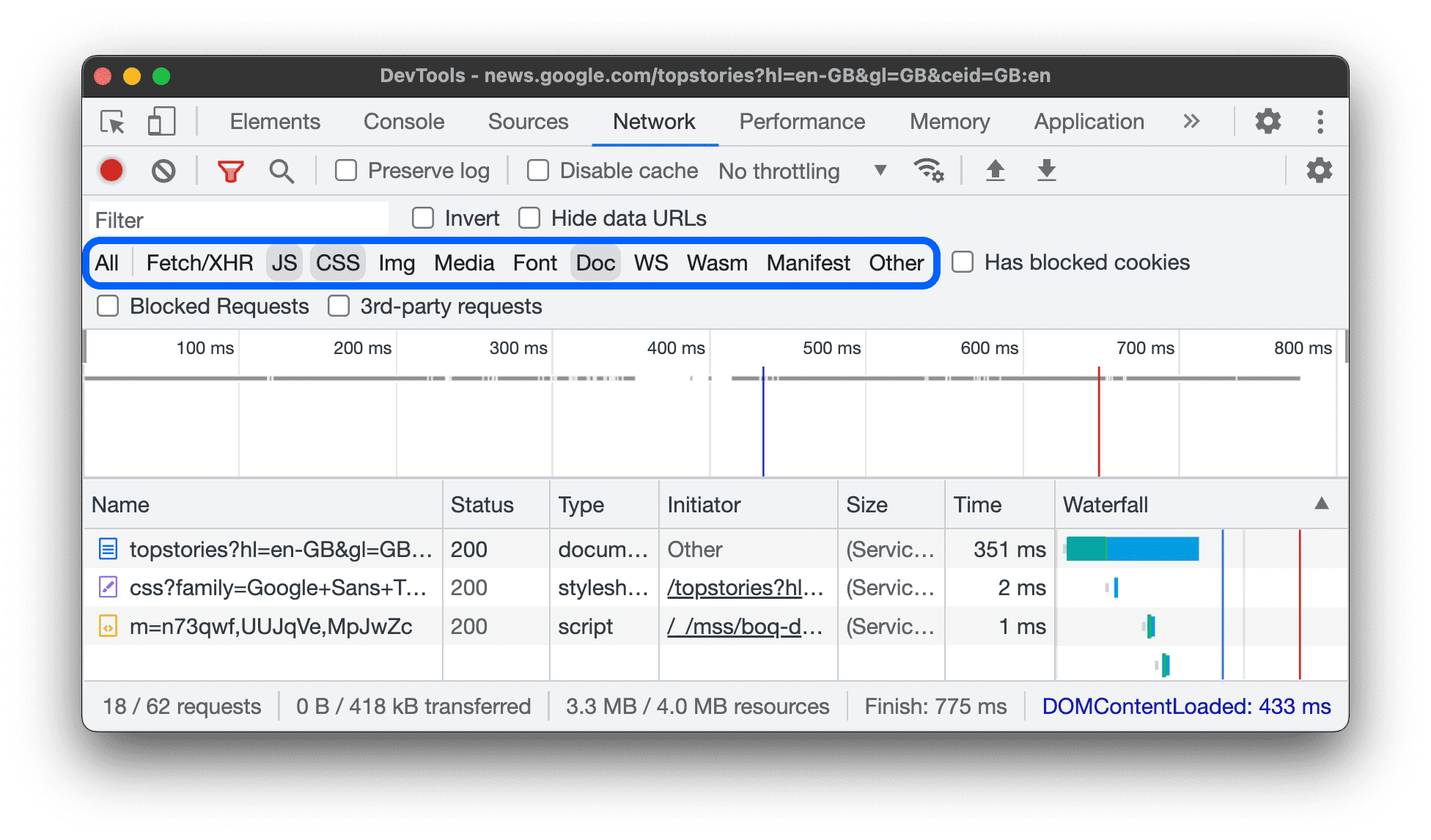
The following video provides a guided tour of using the Network tab to dissect the HTTP cycle.
HTTP Crash Course & Exploration
This segment of the "HTTP Crash Course" video by Traversy Media provides a clear, practical demonstration of inspecting HTTP traffic in Chrome DevTools.
Watch the section from inspecting network traffic. The presenter reloads a webpage and clicks on individual requests to show you exactly where to find the General information (URL, Method, Status Code), Response Headers, and Request Headers that we've just discussed. After watching, I encourage you to open a new browser tab, go to any website you frequent, open the developer tools (usually with F12 or Ctrl+Shift+I / Cmd+Opt+I), navigate to the Network tab, and reload the page. Click on the main document request (usually the first one in the list) and see if you can identify the key components we've covered.
By exploring the network tab, you can see how a single page load often involves dozens of HTTP requests to fetch the main HTML document, CSS stylesheets, JavaScript files, images, and data from various APIs. This hands-on practice is invaluable for debugging and performance analysis.
Conclusion
In this lesson, we have deconstructed the HTTP request-response cycle, the workhorse of web communication. You can now identify the key components of any HTTP exchange and understand their significance.
Key Takeaways:
- HTTP communication follows a stateless request-response pattern between a client and a server.
- An HTTP request consists of a method (defining intent, e.g.,
GET,POST), a URI, headers (metadata), and an optional body (payload). - An HTTP response consists of a status code (signaling outcome, e.g.,
200,404,500), headers, and an optional body. - Methods have semantic properties like safety and idempotency which are crucial for system design.
- Browser developer tools are the primary instrument for inspecting and debugging the live HTTP traffic of any web application.
Now that we have a solid understanding of the structure of an HTTP message, our next lesson will explore the evolution of the protocol itself. We will differentiate between HTTP/1.1, HTTP/2, and HTTP/3, focusing on the performance improvements each version introduced to address the growing complexity of the modern web.