Hello! In our previous lesson, we explored how middleware creates a structured pipeline for processing requests, handling common tasks like authentication and logging. We saw that these middleware components often need configuration to work correctly—for instance, an authentication middleware needs a secret key to validate tokens. This naturally leads us to our topic for today.
This lesson focuses on environment configuration and secrets management. Your learning outcome is to explain how backend applications are configured for different environments (like development, testing, and production) and how they handle sensitive data securely. This is a critical aspect of system architecture that bridges the gap between code and deployment, directly addressing your goal of understanding the deep technical realities of backend systems. As a QA professional, you are already familiar with the existence of different environments; today, we will dissect how applications adapt to them.
The Principle: Separating Configuration from Code
A fundamental principle of modern application development is the strict separation of configuration from code. An application's codebase should be identical across all its deployments, whether it's running on a developer's laptop, a staging server for testing, or in the live production environment. The only things that should change are the configuration values—like database connection strings, external API endpoints, and logging levels.
This principle is a core part of a widely respected set of best practices known as the 12-Factor App methodology.
Every Developer NEEDS To Know 12-Factor App Principles
This video from Travis Media provides a concise overview of the 12-Factor App principles. We'll focus on the one that is most relevant to our topic.
Please watch the section explaining Factor #3: Config. Pay close attention to the "litmus test" it proposes: could you make your codebase open-source at any moment without compromising any credentials?
The video makes a crucial point: config varies between deploys, but the code does not. This separation is what allows a single, version-controlled codebase to be deployed anywhere. To achieve this, we externalize configuration, primarily using two related techniques: configuration files and environment variables.
How Configuration is Managed
Let's explore the common patterns for managing external configuration for different environments. The article "Best Practices for Environment-Specific Configurations" provides an excellent overview.
Best Practices for Environment-Specific Configurations
This article from OneNine details the practical methods for handling configuration.
Please read the following sections to understand the core mechanics: In "Centralized Configuration Management," read the subsections on using environment variables and organizing with config files. Next, read the section on avoiding hard-coding. The "Bad Example" versus "Better Example" perfectly illustrates the principle. Then, review the table in the section on per-environment configurations to see how the focus changes between development, staging, and production. Finally, look at the FAQ entry that answers the difference between dev and prod.
From the reading, we can establish a standard hierarchy of practices:
-
Environment Variables: These are variables set in the shell or execution environment where the application process is running. They are the most fundamental way to pass configuration to an application. For example, a cloud hosting platform will set a
PORTenvironment variable to tell your application which network port to listen on. -
Configuration Files (
.env): For local development, managing dozens of environment variables in the terminal is cumbersome. A common practice is to use.envfiles (short for "environment"). A library (likedotenvin the Node.js world) reads this file at startup and loads its contents into the application's environment.
A crucial part of this practice is to never commit .env files containing secrets to version control. Instead, you commit a template file named .env.example that lists the required variables without their values. This serves as documentation for other developers.
Your experience in QA has likely shown you bugs that only appear in one environment. Often, the root cause is a discrepancy in configuration. This is why another 12-Factor principle, Dev/Prod Parity, is so important: keeping the development, staging, and production environments as similar as possible to prevent surprises. This includes using the same types and versions of backing services (like databases) and, of course, a consistent approach to configuration.
The Special Challenge of Secrets
While environment variables and .env files are great for general configuration, they introduce significant security risks when used for secrets. A secret is any piece of sensitive information that grants access to a resource.
Secrets Management: Secure Credentials & Avoid Data Leaks
This video from IBM Technology clearly defines what secrets are and the common problems associated with managing them.
Watch the first two sections: What are IT secrets? This part lists common examples like passwords, API keys, and cryptographic keys. Issues with storing secrets. This section explains problems like "secret sprawl," storing secrets in cleartext, and the need for rotation.
As the video highlights, the most dangerous and common anti-pattern is hardcoding secrets directly into source code or configuration files that get committed to version control.
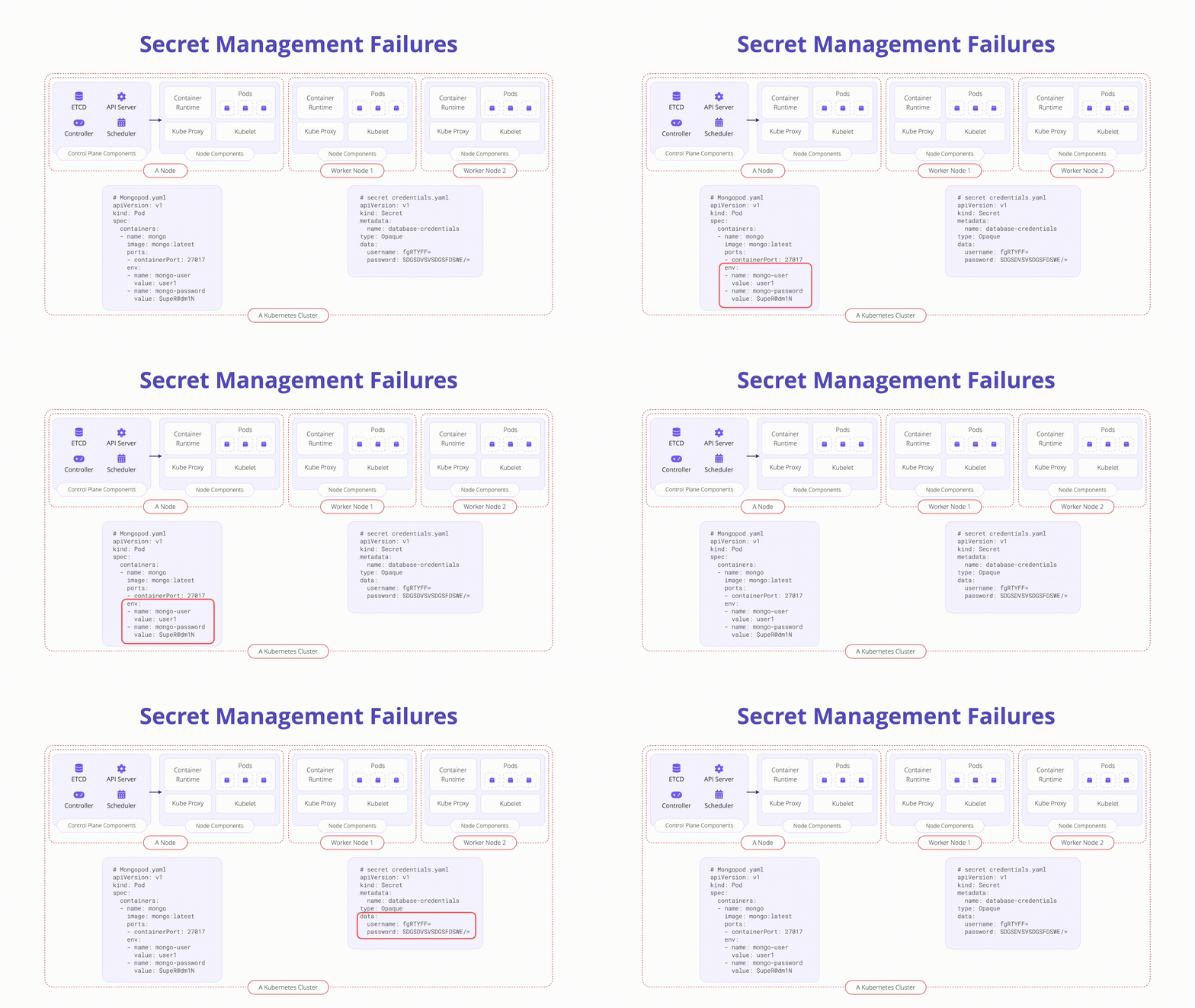
The image above shows this anti-pattern in a Kubernetes context. Committing a file like Mongopod.yaml with plain-text credentials would be a major security breach.
A seemingly better approach is to place secrets in environment variables. This follows the "separate config from code" rule, but it's not as secure as it seems.
The Dangers of Storing Secrets in Environment Variables
While placing secrets in environment variables prevents them from being checked into Git, it exposes them to other attack vectors. The article "Storing secrets in env vars considered harmful" provides a compelling argument against this common practice.
Storing secrets in env vars considered harmful - Arcjet blog
This Arcjet blog post explains why using environment variables for secrets is a risky practice.
Please read the introduction and the first three "Pitfall" sections: The introduction sets the stage. Pitfall #1 explains how an attacker who gains initial access can steal all environment variables to move to other systems. Pitfall #2 discusses how secrets can be leaked through logs or error reports. Pitfall #3 covers the operational pain of rotating secrets and the lack of an audit trail.
Your background in security testing with tools like OWASP ZAP gives you a practical understanding of how vulnerabilities are exploited. The "lateral movement" described in the article is a classic post-exploitation technique. If an attacker finds a single vulnerability (like Remote Code Execution) in an application, having all the database passwords and third-party API keys readily available in process.env is like leaving a master key under the doormat. It turns a small breach into a catastrophic one.
Modern Solution: Centralized Secrets Management
The industry best practice is to use a dedicated secrets management system or vault. These are specialized tools designed to securely store, control access to, and audit the use of secrets. Popular examples include HashiCorp Vault, AWS Secrets Manager, and Google Cloud Secret Manager.
The core idea is runtime secrets injection. The application is never given the secret directly via an environment variable. Instead, it is given a secure identity and permission to fetch the secret from the vault when it starts up.
Storing secrets in env vars considered harmful - Arcjet blog
Let's continue with the same Arcjet blog post to see the proposed solutions.
Now, read the sections on the solutions: The introduction to the solution. The descriptions of the three approaches: storing secret IDs, using platform managers directly, and using dedicated products.
This approach has several key advantages:
- Centralized Control: All secrets are in one place.
- Fine-Grained Access: You can define policies like "only the production user-service is allowed to read the production database password."
- Auditing: Every time a secret is accessed, it's logged. This is invaluable for security investigations.
- Dynamic Secrets: Vaults can generate temporary, short-lived credentials (e.g., a database password that is only valid for 30 minutes). This dramatically reduces the risk of a leaked credential being useful to an attacker.
The following diagram shows a modern, automated workflow for a CI/CD pipeline to access secrets without any long-lived credentials being stored anywhere.
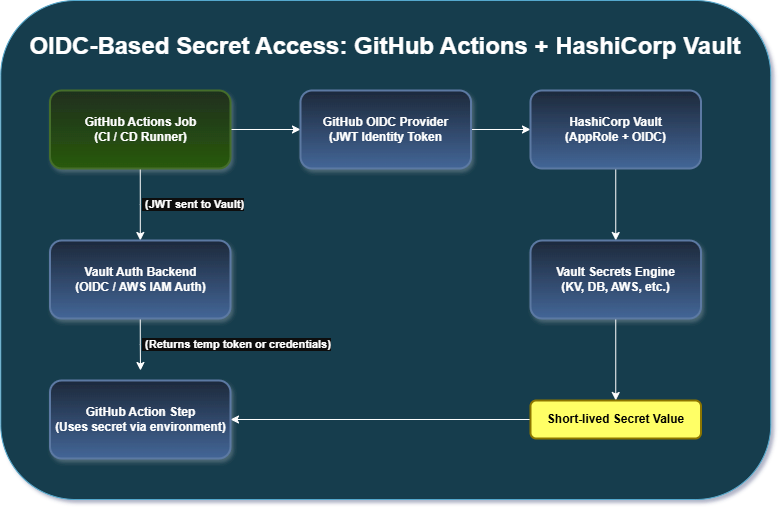
Here’s a high-level breakdown of the flow shown in the diagram:
- A CI/CD job (like a deployment script) starts in GitHub Actions.
- GitHub acts as an OIDC Provider and gives the job a unique, short-lived JWT Identity Token. This token contains claims about the job (e.g., repository name, branch).
- The job sends this JWT to HashiCorp Vault.
- Vault validates the JWT with GitHub and checks its internal policies to authorize the request.
- If authorized, Vault's Secrets Engine generates and returns a short-lived secret (like a temporary database credential) to the job.
- The job uses the secret for its task, after which the secret automatically expires.
This is the gold standard for secrets management in automated systems.
Conclusion
In this lesson, we have dissected the critical practices of managing configuration and secrets in backend systems. We've moved from the foundational principle of separating config from code to the sophisticated, security-first patterns of modern secrets management.
Here are the key takeaways:
- Separate Config from Code: This is the foundational principle (Factor #3 of the 12-Factor App) that allows a single codebase to be deployed across multiple environments.
- Use Environment Variables &
.envFiles: This is the standard mechanism for providing non-sensitive configuration to an application. Never commit.envfiles with real values to version control. - Secrets Are Not Just Config: Sensitive data like API keys and passwords require a higher level of security.
- Avoid Storing Secrets in Environment Variables: While common, this practice creates significant security risks, including enabling attacker lateral movement and accidental leakage through logs.
- Use a Centralized Secrets Manager: The best practice is to use a dedicated vault (like HashiCorp Vault or AWS Secrets Manager) and have applications fetch secrets at runtime using a secure identity.
As a QA professional aiming to contribute to architectural discussions, understanding these distinctions is paramount. You can now ask precise questions like, "How are we ensuring dev/prod parity in our database configuration?" or "What's our strategy for rotating API keys, and are we using a secrets vault to manage them?"
In our next lesson, we will transition from how we connect to data stores to the data stores themselves. Having just discussed how to manage database credentials securely, we'll now begin our exploration of databases by differentiating between the two major paradigms: relational (SQL) and non-relational (NoSQL) databases.