Introduction
In our last lesson, we diagnosed the performance issues in your Problem-Finder app, identifying that on-the-fly, CPU-intensive processing is the primary bottleneck blocking the Node.js event loop. Now that we understand the "why," we can begin building a more efficient solution. Our goal is to create a hybrid search system, and we'll start with the first component: semantic search.
This lesson focuses on the core mathematical concept behind semantic search. Our learning outcome is to calculate cosine similarity between a query vector and an array of document vectors in memory. We'll explore what cosine similarity is, how it represents the "meaning" of text, and how to implement it from scratch in TypeScript. This will be the first building block of your app's new, high-performance search functionality.
What is Cosine Similarity?
At its heart, semantic search works by converting text (like your Reddit posts and a user's query) into numerical representations called vectors or embeddings. Once we have these vectors, we need a way to measure how "close" they are in meaning. This is where cosine similarity comes in.
Cosine similarity measures the cosine of the angle between two vectors in a multi-dimensional space. The key insight is that it evaluates their orientation, not their magnitude (or length).
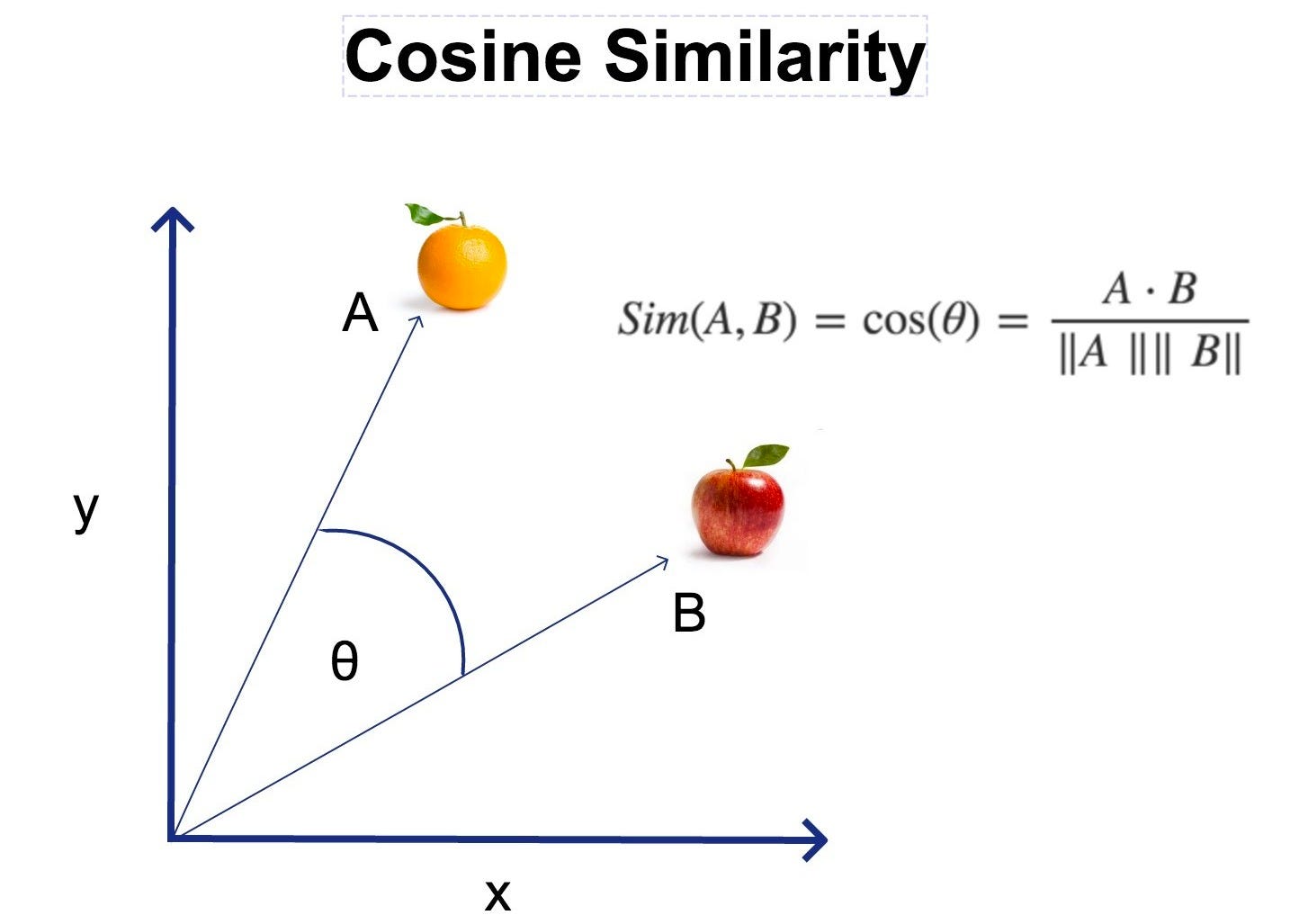
Why is this important for text? Imagine two documents:
- "The cat sat on the mat."
- "The cat sat on the mat. It was a fluffy cat."
The second document is longer, so its vector might have a larger magnitude. However, both documents are about the same thing. Because they point in a very similar direction in "meaning space," the angle between their vectors will be very small, and their cosine similarity will be close to 1.
From your background in electrical engineering, this is analogous to comparing two AC signals, like voltage or current sinusoids. The phase difference between them tells you how "in-sync" they are, which is conceptually separate from their amplitudes (magnitudes). Cosine similarity is like measuring that phase alignment for vectors.
The formula is:
Where:
- is the dot product of the vectors.
- and are the magnitudes (or L2-norms) of the vectors.
The resulting score ranges from -1 to 1:
- 1: The vectors point in the exact same direction (perfectly similar).
- 0: The vectors are orthogonal (90-degree angle), indicating no similarity.
- -1: The vectors point in opposite directions (perfectly dissimilar).
For a fantastic and intuitive visual explanation of this concept, the following video from StatQuest is highly recommended.
Cosine Similarity, Clearly Explained!!!
This StatQuest video masterfully explains the intuition behind cosine similarity using simple text examples.
Please watch these key segments: The introduction, which explains why we need a computational metric for similarity. The 2D example, showing how text is converted to vectors and plotted. The explanation of why similarity is independent of vector length (magnitude). The summary of what scores of 0 and 1 mean.
From Formula to Calculation
Now let's get comfortable with the components of the formula.
- Dot Product: For two vectors and , the dot product is the sum of the products of their corresponding components:
- Magnitude: The magnitude of a vector is its length, calculated using the Euclidean norm (an extension of the Pythagorean theorem). For a vector :
To see how these pieces fit together, let's walk through a manual calculation. The following reading provides a clear, step-by-step example.
How to Implement a Cosine Similarity Function in TypeScript for ...
This section from a blog post by Alex Opalka provides a simple, hands-on calculation that will solidify your understanding of the formula.
Please read the section titled Step-by-Step Example Calculation. Follow along as the author calculates the cosine similarity for the vectors v_1 = [3, 4] and v_2 = [5, 2].
Implementing Cosine Similarity in TypeScript
With the theory and manual calculation covered, we can now translate this logic into a reusable TypeScript function. This function will be the workhorse for the semantic search feature in your Problem-Finder app.
The article we just looked at also provides an excellent, optimized implementation.
How to Implement a Cosine Similarity Function in TypeScript for ...
This section contains the code that directly achieves our learning outcome. It's a clean and efficient function you can adapt for your project.
Read the section Building a Cosine Similarity Function. Pay close attention to how the mathematical concepts are implemented in code: The dot product is calculated efficiently using the reduce method. The magnitude is calculated using Math.hypot(), a built-in JavaScript method perfect for this purpose. It includes an important check to handle cases where one of the vectors has a magnitude of zero, preventing division-by-zero errors.
Here is the core function from the article for your reference:
function cosineSimilarity(vecA: number[], vecB: number[]): number {
  if (vecA.length !== vecB.length) {
    throw new Error("Vectors must have the same dimensions");
  }

  // Calculate dot product: A·B = Σ(A[i] * B[i])
  const dotProduct = vecA.reduce((sum, a, i) => sum + a * vecB[i], 0);

  // Calculate magnitudes using Math.hypot()
  const magnitudeA = Math.hypot(...vecA);
  const magnitudeB = Math.hypot(...vecB);

  // Check for zero magnitude
  if (magnitudeA === 0 || magnitudeB === 0) {
    return 0;
  }

  // Calculate cosine similarity: (A·B) / (|A|*|B|)
  return dotProduct / (magnitudeA * magnitudeB);
}
Finding the Most Similar Documents
In your Problem-Finder app, you won't be comparing just two vectors. You'll have one query vector (from the user's search term) and an array of document vectors (from the Reddit posts). Your task is to calculate the cosine similarity between the query vector and each document vector, then rank the documents by their similarity score.
The process is straightforward:
- Loop through the array of document vectors.
- For each document vector, calculate its cosine similarity with the query vector using the function we just created.
- Store each document along with its calculated similarity score.
- Sort the results in descending order of similarity score.
This pattern is very common. The Stack Overflow post below discusses this exact problem, and while it uses a pre-built library, the looping structure is what's important to see.
javascript - Node.js cosine similarity between array and object array - Stack Overflow
This answer from Stack Overflow shows the practical loop structure for comparing one vector against many.
Focus on the first answer provided by Issam EL-GUERCH. Notice the for loop that iterates through the array y, extracts the vector from each object, and calculates the similarity against the single vector x. This is the exact pattern you'll need.
Let's combine these ideas into a practical function for your application. Imagine you have your Reddit posts stored as an array of objects, where each object has an id and an embedding (the vector).
// Assume cosineSimilarity function from above is available

interface Document {
  id: string;
  text: string;
  embedding: number[];
}

interface SearchResult {
  document: Document;
  similarity: number;
}

function findSimilarDocuments(queryEmbedding: number[], documents: Document[]): SearchResult[] {
  const results: SearchResult[] = documents.map(doc => {
    return {
      document: doc,
      similarity: cosineSimilarity(queryEmbedding, doc.embedding)
    };
  });

  // Sort results by similarity in descending order
  return results.sort((a, b) => b.similarity - a.similarity);
}

// --- Example Usage ---
// This is a dummy example. In your app, these would come from an embedding model.
const queryEmbedding = [1, 1, 0]; // Represents a query like "backend performance"

const documents: Document[] = [
  { id: 'doc1', text: 'How to fix slow Node.js backend...', embedding: [0.9, 1, 0.1] },
  { id: 'doc2', text: 'Best frontend frameworks...', embedding: [0, 0.2, 0.9] },
  { id: 'doc3', text: 'Optimizing Node.js server performance...', embedding: [1, 0.8, 0.2] }
];

const topResults = findSimilarDocuments(queryEmbedding, documents);

console.log(topResults);
// Expected output would show doc3 and doc1 ranked highest.
This findSimilarDocuments function is a concrete implementation of the core in-memory semantic search logic. You can see how it takes a query vector and a list of documents, and returns an ordered list of the most relevant ones.
Conclusion
In this lesson, we took our first major step towards building a functional search engine. We moved from the abstract problem of "slowness" to a concrete implementation of semantic relevance.
Here are the key takeaways:
- Cosine similarity is a powerful metric for comparing vectors because it measures orientation (direction) rather than magnitude (length), making it ideal for comparing texts of different lengths.
- The calculation relies on two fundamental vector operations: the dot product and magnitude.
- You can implement a clean, efficient
cosineSimilarityfunction in TypeScript using built-in methods likeArray.prototype.reduceandMath.hypot. - To rank documents against a query, you simply iterate through your document embeddings, calculate the similarity for each, and sort the results.
You now have the "semantic" half of your hybrid search engine. In our next lesson, we will build the other half: a keyword-based ranking algorithm. After that, we'll be ready to combine them into a single, powerful hybrid score.