Welcome to your second lesson! In our first session, you successfully set up your digital workshop, the Jupyter Notebook environment. You're now ready to move from setting up tools to using them to write your first functional lines of Python code.
This lesson directly addresses your goal of building programs from the ground up by introducing two of the most fundamental concepts in any programming language: variables and print statements. You'll learn how to create variables to store and label data, and how to use the print() function to display that data and check the status of your program. These are the essential building blocks you'll use in every single AI model and script you write in the future.
Let's begin by opening Anaconda Navigator and launching a new Jupyter Notebook, just as you learned in our previous lesson. Name it something like lesson_2_variables.
What Are Variables? Storing Your Data
Think of a variable as a labeled container for a piece of information. Your background in administrative roles and working with databases has given you a lot of experience with organizing information. Just as you might label a folder "Client Invoices" or use a column header like "Patient ID" in a spreadsheet, a variable in Python gives a name to a piece of data so you can refer to it easily.
The video below, by CS Dojo, provides an excellent explanation of what variables are and how they work in Python. The presenter uses a helpful analogy of variables as "name tags" for values, which is a very accurate way to think about them in Python.
Python Tutorial for Absolute Beginners #1 - What Are Variables?
This video introduces the core concept of a variable and demonstrates how to assign values to it.
Please watch from the main topic. Focus on how the = symbol is used for assignment and how a variable can "refer" to a value, whether it's a number or text.
Let's put this into practice. In a new code cell in your Jupyter Notebook, type the following:
patient_id = 1024
Then, run the cell by pressing Shift + Enter. You won't see any output, but you've just created your first variable! The Python kernel, the engine running in the background, now knows that the name patient_id refers to the number 1024.
Basic Data Types: Numbers and Strings
Variables can hold different types of data. For now, we'll focus on three of the most common ones that you'll use constantly:
- Integers (
int): Whole numbers, like1024,-5, or30. - Floating-Point Numbers (
float): Numbers with a decimal point, like37.5,19.99, or-0.5. - Strings (
str): Textual data, which must be enclosed in either single ('...') or double ("...") quotes. For example,"Hello, world!"or'admin'.
One of Python's convenient features is that you don't have to tell it what type of data a variable will hold. It figures it out automatically. This is called dynamic typing.
The following video from Alex The Analyst clearly demonstrates the creation of variables with different data types.
Variables in Python | Python for Beginners
This clip shows how to assign both numbers and strings to variables and how Python automatically understands their type.
Watch from the beginning of the video. Pay attention to how a string value is assigned using quotation marks, while a number is not.
Hands-on Practice: Creating Different Variable Types
Now, try it yourself. In a new cell in your notebook, create one of each of these variable types. For example:
# An integer variable
number_of_files = 15


# A float variable
average_temperature = 37.2


# A string variable
user_name = "Jane Doe"
After running this cell, these three variables are stored in the kernel's memory. But how can we see their values?
Displaying Output with the print() Function
To see the value a variable holds, you use Python's built-in print() function. You simply put the variable's name inside the parentheses.
This is your primary tool for inspecting what your program is doing. The image below shows several examples of variables being created and their values being displayed using print().
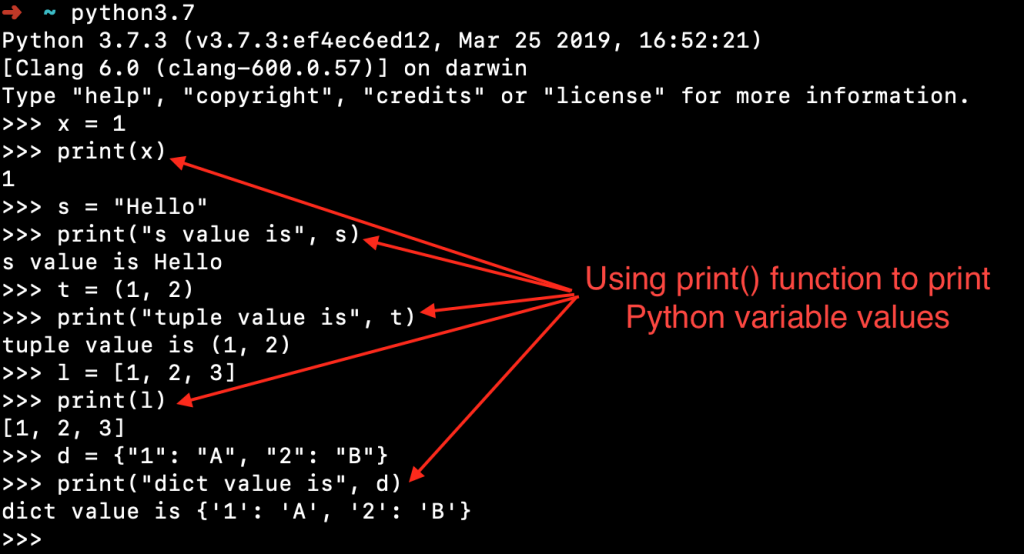
Let's print the variables you just created. In a new cell, type:
print(number_of_files)
print(average_temperature)
print(user_name)
When you run this cell, you should see the values 15, 37.2, and Jane Doe printed below, each on a new line.
Combining Text and Variables in Your Output
Just printing a number like 37.2 isn't very useful without context. You'll almost always want to print a descriptive message that includes the variable's value. There are several ways to do this in Python, but we'll focus on the most common and modern method.
The article from freeCodeCamp, "Python Print Variable", provides an excellent overview of the different techniques. We'll explore a few of them.
Python Print Variable – How to Print a String and Variable
This article explains multiple ways to combine strings and variables for clear output. We'll focus on two methods here: using commas and using f-strings.
First, read the section "separating each with a comma". This is a simple method that works well for quick checks. Next, scroll down and read the section on f-strings. This is the modern, preferred method for formatting strings in Python due to its readability.
To summarize what you just read:
- Using commas: You can list items inside
print(), separated by commas. Python will automatically add a space between them.print("User:", user_name, "has", number_of_files, "files.") - Using f-strings: This is the most readable method. You start the string with the letter
fbefore the quotation mark and place your variable names inside curly braces{}directly within the string.print(f"User: {user_name} has {number_of_files} files.")
Try both methods in your notebook to see that they produce similar output. Going forward, I recommend you get comfortable with f-strings, as they are the standard in modern Python code.
Variable Naming Rules and Conventions
Your experience in office administration and management has surely taught you the importance of clear and consistent labeling for files and documents. The same principle applies to programming. Choosing good variable names is crucial for writing code that is easy to read and understand.
There are some hard rules for naming, but also some community-agreed conventions. The next segment of the video by Alex The Analyst covers these rules and conventions excellently.
Variables in Python | Python for Beginners
This part of the video explains the rules for naming variables and introduces the most common naming styles.
Please watch from this section on naming variables. Pay close attention to the "bad" examples (what you cannot do) and the different styles like camelCase and snake_case.
To recap the key points from the video:
- Rules (must follow):
- Names can only contain letters, numbers, and underscores (
_). - Names cannot start with a number.
- Names are case-sensitive (
ageis different fromAge).
- Names can only contain letters, numbers, and underscores (
- Conventions (should follow):
- The most common and recommended style for Python is
snake_case, where all letters are lowercase and words are separated by underscores (e.g.,average_temperature). This improves readability.
- The most common and recommended style for Python is
For example, which of these is easier to read quickly? numberoflogfiles or number_of_log_files? The latter is much clearer, and this clarity becomes essential as your programs grow more complex.
Final Practice
Let's bring everything together. In a new cell in your notebook, complete the following task:
- Create a variable named
item_nameand assign it the string value"sensor reading". - Create a variable named
item_valueand assign it the float value98.6. - Create a variable named
item_countand assign it the integer value5. - Using a single f-string, print the following sentence:
The average of 5 sensor reading values is 98.6.
Here is the code to get you started:
item_name = "sensor reading"
item_value = 98.6
item_count = 5


# Your print statement here
Conclusion
Excellent work! You have just taken your first concrete steps into writing Python code. These concepts might seem simple, but they are the bedrock of everything you will do on your journey to building AI models.
Here are the key takeaways from this lesson:
- A variable is a name that refers to a piece of data.
- The fundamental data types are integers (whole numbers), floats (decimal numbers), and strings (text).
- The
print()function is used to display values and check the output of your code. - f-strings are the modern and most readable way to combine text and variables in a print statement (e.g.,
print(f"The value is {my_variable}")). - Variable names should be descriptive and follow the
snake_caseconvention for readability.
In our next lesson, we will build directly on this foundation. You'll learn how to use the print() statements you practiced today as a powerful tool for debugging, which is the process of finding and fixing errors in your code.