Introduction
In our last lesson, you built a bulletproof Statement of Work (SOW) template. That document is your closing tool—it's what turns a conversation into a contract. You now have your service, your pricing, and your proposal system ready.
Welcome to the Client Acquisition Engine. In this module, we pivot from building your product to actively hunting for clients. This lesson is the first and most critical step in that process: building your hit list. We're not "spraying and praying." We are going to use LinkedIn Sales Navigator with surgical precision to identify 20 ideal SaaS founders or Product Managers who are prime candidates for your UX audit service.
By the end of this 60-minute lesson, you will have a tangible deliverable: a highly-targeted list of 20 prospects, complete with their contact details and a strategic reason for reaching out. This list will be the fuel for the outreach campaigns we'll build in the next lesson.
1. Define the Target: Your Ideal Client Profile (ICP)
Before you open any tool, you must know exactly who you're looking for. A vague search yields vague results. We need to define your Ideal Client Profile (ICP) for a SaaS UX audit. This is the set of characteristics that make a company a perfect fit for your service.
A company that needs a UX audit typically exhibits signs of growth, complexity, or user friction. We're looking for companies that are big enough to have a budget but small enough that the founder or a key product leader still feels the pain of user issues directly.
9 chapters to master LinkedIn Sales Navigator in < 90 min
To start, let's look at the foundational criteria for any good search. The guide '9 chapters to master LinkedIn Sales Navigator' provides a simple but essential checklist for defining your ICP.
Read the brief section titled 'Chapter 0: Your ICP (Persona + Company) Criteria'. This reinforces the core categories we need to define: Job Titles, Industry, Company Size, and Location.
Based on this framework, here is the ICP for your $5,000 "Audit & Blueprint" service. These are the exact parameters we will use in Sales Navigator.
Your SaaS Audit ICP:
-
Company Criteria:
- Industry: "Software Development" or "Technology, Information and Internet"
- Company Headcount: 11-50 employees (founders are highly involved) or 51-200 employees (product teams are established, and budgets are larger).
- Geography: United States, Canada, United Kingdom, Germany, Netherlands (or other specific tech hubs you prefer).
-
Lead (Decision-Maker) Criteria:
- Job Titles: Founder, Co-Founder, Chief Executive Officer (CEO), Head of Product, VP of Product, Director of Product, Product Manager.
This is our blueprint. Now let's execute.
2. Precision Targeting with Sales Navigator Filters
LinkedIn Sales Navigator is your primary hunting ground. Used correctly, it allows you to filter its billion-user database down to the few dozen people who can actually hire you.
We'll start with the basic filters to narrow the field, then apply advanced techniques to zero in on the best prospects.
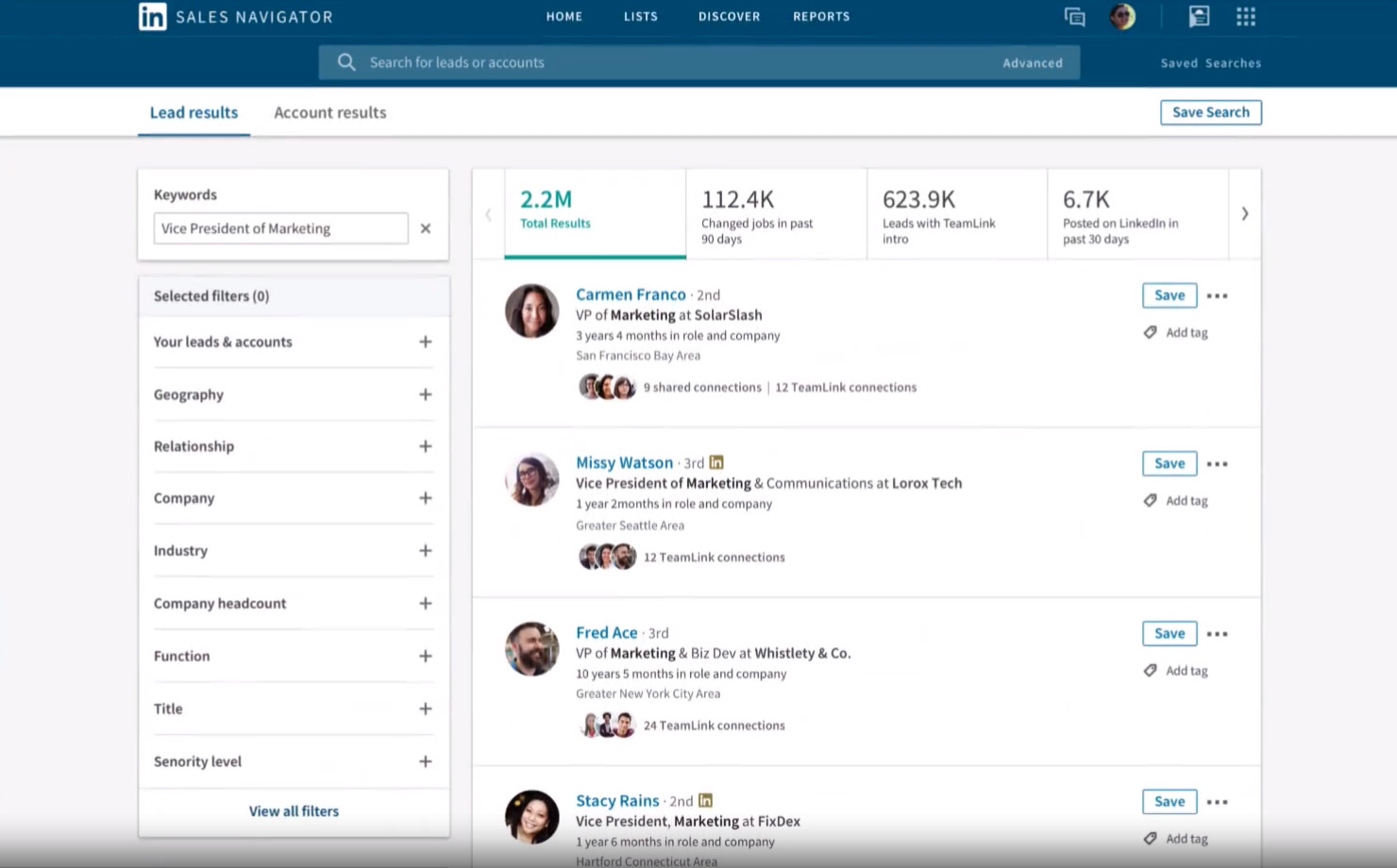
First, let's get a quick, practical overview of the most essential filters.
How To Use Linkedin Sales Navigator To Generate Leads
This video provides a direct, no-fluff walkthrough of the core filters we'll be using. It will quickly orient you within the Sales Navigator interface.
Watch the following segments to familiarize yourself with the foundational filters: Accessing Lead Filters (00:01:11 - 00:01:53) Company Filters (Headcount) (00:02:39 - 00:04:12): Note how headcount is a strong proxy for company maturity and budget. Role Filters (Job Title) (00:04:12 - 00:05:14): This is where we'll input our target titles from the ICP. Personal & Industry Filters (00:06:38 - 00:08:04): This covers the Geography and Industry filters.
Advanced Targeting with Boolean Search
Applying filters individually is good, but combining them with Boolean logic is what gives you sniper-like accuracy. Boolean operators (AND, OR, NOT) and parentheses () allow you to create highly specific search queries.
"Founder" OR "CEO"finds people with either title."Head of Product" AND SaaSfinds people with that title who also mention "SaaS" in their profile."Product Manager" NOT "Associate"finds Product Managers while excluding junior roles.
The following video demonstrates how to use these operators to refine your search and eliminate irrelevant results. This is a critical skill.
How To Use Linkedin Sales Navigator To Generate Leads
Now, let's look at how to use Boolean operators and negative keywords to go from a broad search to a precise hit list. This is what separates amateurs from professionals in lead generation.
Watch these two key segments: Using Negative Keywords (00:05:14 - 00:06:05): Learn how to exclude unwanted titles to clean up your results. Boolean Search in Action (00:11:17 - 00:14:37): See how to construct a complex query using AND, OR, NOT, and parentheses.
3. Identifying "Ready-to-Buy" Signals
A perfect ICP match is great. A perfect ICP match with a problem right now is a qualified lead. Certain activities and changes act as "buying signals," indicating a company may be facing challenges that your audit can solve.
The most potent signals for a UX audit are:
- Rapid Growth: A company that's hiring quickly is often breaking its internal processes and software. More users are hitting edge cases, and operational efficiency becomes a priority.
- Recent Job Changes: A new leader (e.g., a new Head of Product) has the budget and mandate to make an impact in their first 90 days. They are actively looking for quick wins.
- Active on LinkedIn: This is the simplest but most important signal. If a person hasn't posted in months, your outreach will likely go unseen. Targeting people who have
Posted on LinkedIn in the past 30 daysdramatically increases your chance of getting a response.
This short clip explains how to use these powerful behavioral filters.
LinkedIn Sales Navigator - Ultimate Guide 2026
Finding companies with an active need is the goal. This video highlights the 'behavioral filters' that act as proxies for business pain.
Watch the segment on 'Advanced Behavioral Filters' (00:04:28 - 00:05:50). Focus on how to use 'Company headcount growth' and 'senior roles who recently changed jobs' to find companies ripe for optimization.

4. Your Deliverable: Build the Target List of 20
It's time to execute. You will now combine all these concepts to build your initial hit list. The goal is not quantity, but extreme quality. Each person on this list should be a hand-picked, ideal potential client.
Your Task (25 minutes):
-
Open LinkedIn Sales Navigator and go to Lead filters.
-
Apply Your ICP Filters:
- Geography: Select your target countries (e.g., United States, United Kingdom).
- Industry: Add "Software Development" and "Technology, Information and Internet".
- Company headcount: Select "11-50" and "51-200".
-
Apply Role & Seniority Filters with Boolean Logic:
- In the Current job title field, paste this string:
"Founder" OR "Co-Founder" OR "CEO" OR "Head of Product" OR "VP of Product"
- In the Current job title field, paste this string:
-
Layer on the "Ready-to-Buy" Signal Filters:
- Under Recent updates, toggle on Posted on LinkedIn in past 30 days. This is non-negotiable.
- Under Company filters, find Company headcount growth and set it to a positive range (e.g., 10-20% or higher).
-
Build Your List:
- Your search should now show a highly relevant list of prospects. Manually review the top results.
- Create a simple table in a Figma file or a private Google Sheet with the following columns:
NameTitleCompanyLinkedIn URLReason for Targeting (1 Sentence)
- For each prospect that is a perfect fit, add them to your table.
- The "Reason for Targeting" is crucial for personalization. Examples:
- "Founder of a 35-person B2B SaaS, company grew by 25% in the last year."
- "New Head of Product at a 100-person fintech, started 2 months ago."
- Stop when you have 20 high-quality leads.
This list is the foundation of your entire client acquisition effort. Treat it as a valuable asset.
Conclusion
Excellent work. You've moved from theory to action, creating a tangible asset that is the first step toward your next client. You didn't just find 20 names; you identified 20 potential business opportunities based on a clear strategy.
Key Takeaways:
- Strategy First, Tool Second: A well-defined ICP is more important than any filter in Sales Navigator.
- Combine Filter Types: The power of Sales Navigator comes from layering demographic filters (title, company size) with powerful behavioral filters (growth, activity).
- Boolean is Your Best Friend: Use
AND,OR, andNOTto sculpt your search results with precision and eliminate irrelevant prospects. - Quality Over Quantity: A list of 20 hand-picked, well-researched leads is infinitely more valuable than a list of 2,000 random contacts.
Preview of the Next Lesson:
You have your "who." In the next lesson, we will craft the "what": a high-converting cold email sequence and a LinkedIn message template designed to turn these names on a list into scheduled sales calls. We will use the "Reason for Targeting" you just defined to write outreach that is impossible to ignore.