Introduction
In the previous lesson, we transitioned from proposing value to defending it. You mastered the frameworks for handling client objections, learning to redirect conversations about price, timelines, and stalls back to a collaborative discussion of scope and value. This skill is critical for moving a hesitant client toward a verbal "yes."
Now, we must translate that verbal agreement into a concrete, shared understanding. Before investing time in a formal Statement of Work (SOW), a systems architect validates the plan with the client. This lesson is dedicated to that crucial, intermediate step. Your objective is to synthesize discovery call notes into a concise, preliminary scope summary for client validation.
This is not a bureaucratic formality; it is a critical risk-reduction maneuver. A well-crafted summary ensures you and the client are perfectly aligned, prevents misunderstandings, and forms the unshakeable foundation for the formal contract to come.
The Architect's Blueprint: Anatomy of a Scope Summary
A beginner sends an email saying, "So, I'll build the thing we talked about." An architect submits a structured document that demonstrates clarity, foresight, and control. We will model our summary on a simplified version of a Business Requirements Document (BRD), a standard in large-scale systems engineering.
ERP Business Requirements Document: Free Template & Guide
To understand the professional standard we're aiming for, let's look at the components of a full-scale BRD. We will adapt this structure to create a lean but powerful summary for freelance automation projects.
Read the section titled 'What Should an ERP Business Requirements Document Include?'. Focus on the purpose of each of the 8 sub-sections. We will distill these into a more concise format suitable for our needs.
Drawing from that professional structure, our Preliminary Scope Summary will contain these core elements:
- Business Objective: The "why." The single, measurable goal the automation is meant to achieve. (e.g., "Reduce manual client onboarding time from 8 hours to under 1 hour per client.")
- Current State Pain Points: A brief, quantified summary of the problems diagnosed in the discovery call.
- Future State Vision (The Solution): A high-level narrative of how the new, automated process will work from start to finish.
- Key Deliverables (In Scope): A bulleted list of the major functional components the system will include.
- Boundaries (Out of Scope): An explicit list of what the system will not do. This is your primary tool for preventing scope creep.
- Assumptions & Dependencies: What must be true for the project to succeed (e.g., "Client will provide access to their Google Workspace API").

From Chaos to Clarity: The Synthesis Process
The most challenging part of this process is converting a chaotic collection of discovery call notes into the structured summary above. This is where you shift from note-taker to system designer. The process is not one of writing, but of logical synthesis.
You must map the client's narrative of their problems onto a procedural flow, identifying triggers, actions, data inputs, system outputs, and decision points.
How I Scope Automation Projects In Make.com
This video by Nick Saraev is a masterclass in this synthesis process. While he is building a full process map for his own technical scoping, his thought process is exactly what you need to extract a client-facing scope summary. He translates a messy client story into a logical, step-by-step flow.
Watch these three key segments to understand the thought process: Context Gathering (07:26 - 13:23): Notice how he absorbs the full client story—their business, their manual process, their pain points, and their tool stack. This is the raw input. Defining the Deliverable (13:23 - 15:20): His first step is to identify what the end customer sees. This focuses the entire project on the ultimate outcome. Strategic Design Decisions (19:14 - 23:37): Pay close attention to his logic for using a form instead of relying on email replies. He is actively redesigning the process for structure and reliability, not just automating the existing mess. This is a core architectural decision.
The video demonstrates the core of synthesis: you listen to the client's unstructured problem and impose a logical, efficient structure upon it. That structure becomes the "Future State Vision" in your summary.
Functional vs. Technical: Speaking the Client's Language
Your background is in engineering. Your instinct will be to describe the how: the n8n nodes, the API calls, the JSON transformations. You must suppress this instinct. The scope summary is for the client; it must describe the what and the why in purely functional, business-oriented terms.
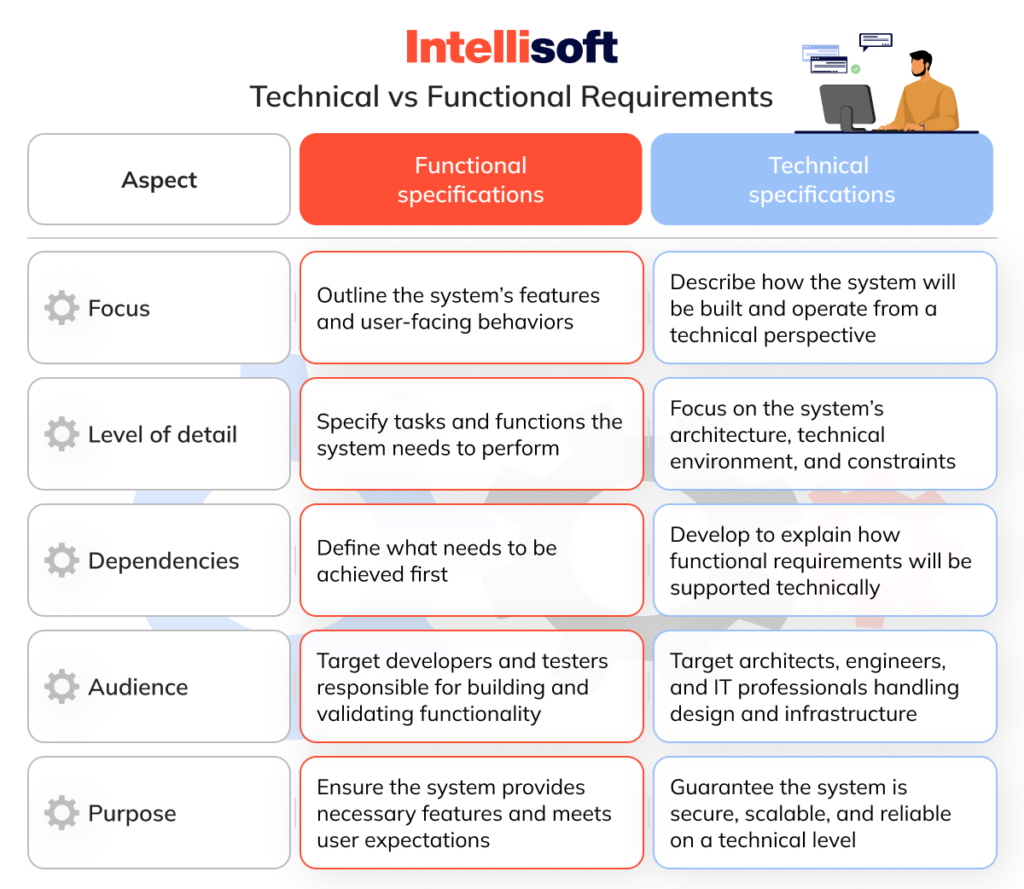
For example:
- Technical (Incorrect): "An n8n webhook will listen for a Typeform submission, then use the Google Drive API v3 to create a folder and the Trello API to clone a board using the
idBoardSourceparameter." - Functional (Correct): "Upon submission of the Client Intake Form, the system will automatically create a dedicated client folder in Google Drive and a new project board in Trello from the standard template."
This translation from technical implementation to functional benefit is a hallmark of a senior consultant.
Practical Task: Synthesize the Scope for 'GrowthMarketers'
You have successfully navigated objections from Alex at 'GrowthMarketers' regarding your proposal for an automated client onboarding system. He has agreed in principle. Before you write the SOW, you will send him a Preliminary Scope Summary for final validation.
Your task is to synthesize the following raw discovery call notes into a concise, one-page scope summary.
Raw Discovery Call Notes - Project "GrowthMarketers Onboarding"
- Attendees: You, Alex (Founder), Sarah (Project Manager).
- Main Pain: Onboarding a new client is "chaos." Takes Sarah 5-8 hours of back-and-forth emails over 3-4 days. They onboard 4-5 clients/month. Goal is <1 hour of manual work.
- Current Process:
- Alex closes a deal.
- Alex sends a manual welcome email to the client & CC's Sarah.
- Sarah then has to chase the client for access: Google Analytics, Google Ads, Facebook Business Manager, company logo files, brand style guide.
- Sarah manually creates a client folder in Google Drive from a template structure.
- Sarah manually creates a Trello board for the project, also from a template.
- Sarah manually invites the client and the internal team to the new Drive folder and Trello board.
- Sarah schedules the kickoff call via email. Sometimes forgets.
- Ideas Discussed / "What Ifs":
- A single, comprehensive intake form for the client to provide all credentials and files at once.
- Automatic creation of the Google Drive folder and Trello board.
- Automatically send a welcome email with the link to this new intake form.
- Generate and send a Calendly link for the kickoff call automatically.
- A Slack notification to the
#new-clientschannel when a client completes the form. - Alex asked about integrating Stripe to collect the first payment. I told him that's a larger effort and should be a separate project. He agreed.
- Tool Stack: Google Workspace (Drive, Gmail, Meet), Trello, Slack, Calendly. They are on standard paid plans for these services.
Deliverable
Produce a one-page Preliminary Scope Summary as a Google Doc or PDF. Use the structure defined in the "Anatomy of a Scope Summary" section. The document should be professional, clean, and ready to be sent to a client.
Evaluation Criteria
- Structure & Clarity: The document must follow the 6-part BRD-Lite structure.
- Synthesis: Raw notes must be accurately and concisely synthesized into the appropriate sections (e.g., Alex's Stripe question correctly identified as "Out of Scope").
- Client-Centric Language: All descriptions must be functional and outcome-oriented, avoiding technical jargon.
- Professionalism: The document's tone and formatting should inspire confidence and demonstrate architectural thinking.
Conclusion
Mastering the preliminary scope summary is a force multiplier for a freelance automation engineer. It forces clarity, manages expectations, and drastically reduces the risk of project failure due to misalignment. It is the final checkpoint before you commit to a formal agreement, transforming a conversational understanding into a documented plan of action.
Key Takeaways:
- A scope summary is a validation tool to de-risk a project before writing a formal SOW.
- Structure your summary like a professional architect: Objective, Current/Future State, In/Out of Scope, and Assumptions.
- Your primary task is to synthesize chaotic client needs into a logical, structured process flow.
- Always write for the client. Translate technical implementation details into functional, business-level outcomes.
Preview of the Next Lesson:
With a validated scope summary in hand, you are ready to create a binding agreement. The next lesson, "Translate client requirements into a formal Statement of Work (SOW) with defined deliverables and timelines," will equip you to construct the legal and project management document that defines the project, protects you from scope creep, and sets the stage for a successful delivery.