Introduction
In the previous lesson, you mastered the art of forging an ironclad scope definition—the contractual blueprint of what a system will do. This protects you from scope creep and aligns expectations in writing. Now, we move from the legal contract to the functional and visual contract.
This lesson addresses the learning outcome: Create client-facing system architecture diagrams and user guides for all portfolio projects.
A scope document tells the client what they bought. The architecture diagram and user guide show them what it looks like and how to operate it. For a systems architect, these are not afterthoughts; they are core deliverables that embody professionalism, justify premium rates, and ensure a clean project handoff. This is the difference between a freelance implementer and a freelance consultant.
Part 1: Architecting for Clarity - Client-Facing Diagrams
Given your engineering background, you are familiar with complex system diagrams. However, showing a raw n8n workflow or a detailed infrastructure map to a client is a common mistake. It provides too much low-level detail, causing confusion rather than clarity. The goal of a client-facing diagram is not to show every technical step, but to illustrate the system's role within the business process at a high level.

The challenge is to abstract complexity without losing accuracy. The C4 model provides a structured framework for this, allowing you to create diagrams at different levels of detail for different audiences.
To understand this model and its application, we will go straight to the source.
Visualising software architecture with the C4 model - Simon Brown, Agile on the Beach 2019
Simon Brown, the creator of the C4 model, provides a masterclass on the philosophy and practice of effective software architecture visualization. This is required viewing for any engineer who needs to communicate complex systems to others.
Watch the following key segments from 'Visualising software architecture with the C4 model': The Problem with Diagrams (00:00 - 06:07): Absorb the critique of typical, unstructured diagrams. This establishes why a methodical approach is necessary. The C4 Hierarchy (07:52 - 19:58): This is the core of the lesson. Focus on understanding the purpose of the System Context (Level 1) and Container (Level 2) diagrams. For most of your freelance projects, these are the two levels you will operate in for client communication. Diagramming Best Practices (19:58 - 33:40): Pay close attention to the practical advice on titles, legends, explicit text, and directional arrows. These are non-negotiable rules for creating professional, self-explanatory diagrams.
Applying C4 to n8n Automations
For an n8n project, the C4 abstractions map cleanly:
- Level 1: System Context: This is your most important client-facing diagram. It shows your automation system as a single black box, interacting with users and other software systems.
- Level 2: Container: This zooms into your "system". The "containers" are the major logical parts of your solution. For an n8n automation, this would be the main n8n workflow, the connected Google Sheet, the Slack workspace it notifies, the external API it calls, etc.
- Level 3: Component: This zooms into a single container. For an n8n workflow, the "components" could be the major logical blocks or sub-workflows inside your main workflow (e.g., "Data Validation Block," "Enrichment Sub-Workflow," "Reporting Block"). This is typically for your own technical documentation, not for the client.
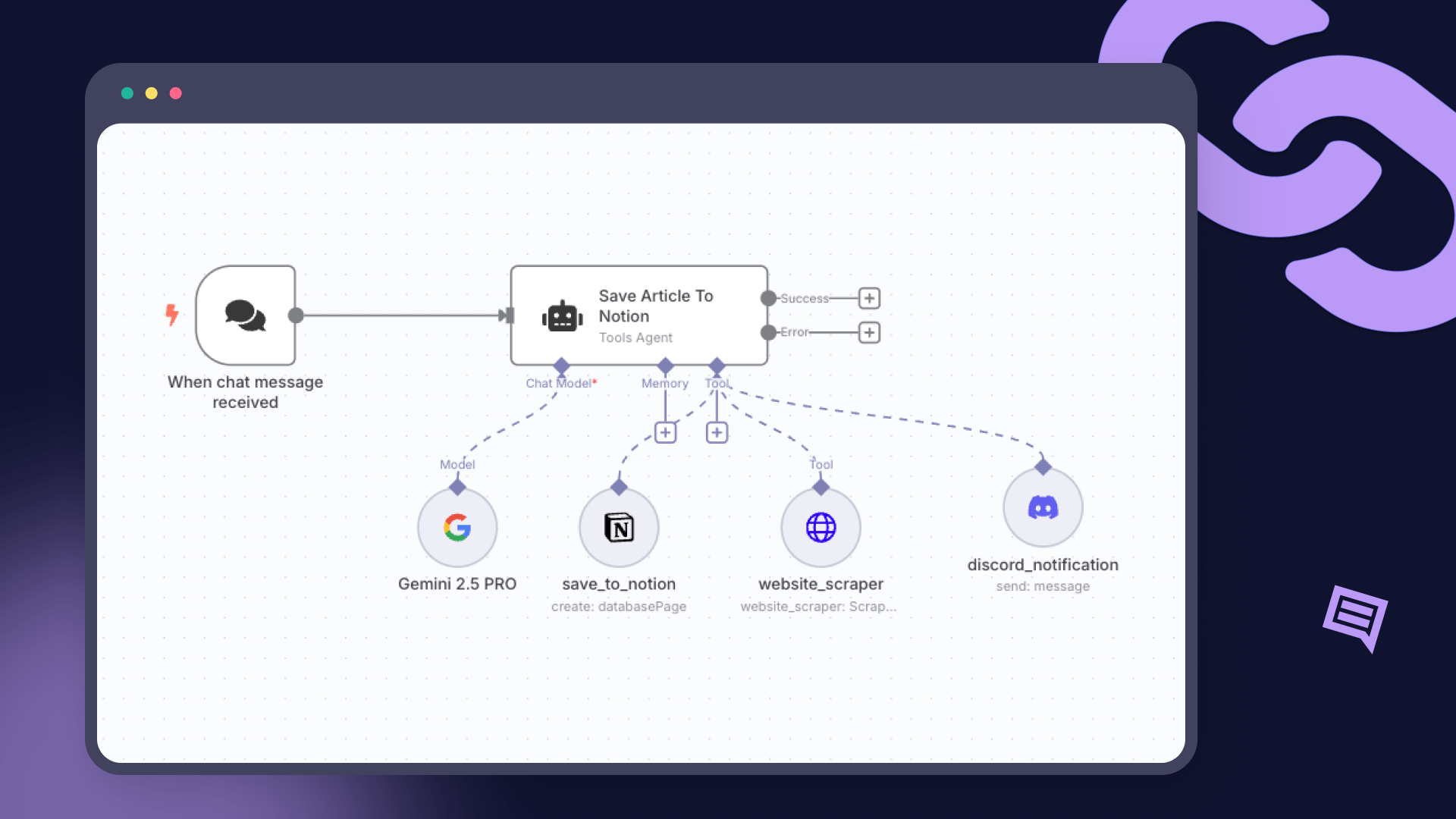
Example Translation:
For the system in the n8n workflow diagram above, a Level 1 (System Context) diagram would look like this:
- A box for the User ("Sales Rep").
- A central box for the System ("AI Article Saver").
- Boxes for the external systems it interacts with: "Chat Platform," "Notion," and "Discord."
- Arrows showing the relationships: The Sales Rep Uses the Chat Platform. The Chat Platform Sends messages to the AI Article Saver. The AI Article Saver Saves articles to Notion and Sends notifications to Discord.
This is simple, accurate, and immediately understandable by a non-technical manager.
Tools for Diagramming
You need a professional tool. Given your preference for no-cost, code-centric tools, PlantUML is an excellent choice. It allows you to define diagrams as code, which can be version-controlled with Git alongside your workflow's JSON files.
Writing good software architecture diagrams
This article provides another concise overview of the C4 model and introduces a powerful, free tool for creating the diagrams: PlantUML.
Read the sections that introduce the C4 levels (as a reinforcement) and, more importantly, the section 'Enter PlantUML'. Pay attention to the sample code for a Level 1 diagram. This shows how you can define a professional diagram in plain text. Alternatively, a WYSIWYG tool like diagrams.net (formerly draw.io) is also a free and excellent choice.
Part 2: The Handoff Package - User Guides and Technical Documentation
A project is not "done" when the automation is active. It is done when the client is fully enabled to own, operate, and understand the system you have built. The handoff package is the deliverable that achieves this.
A professional handoff consists of more than just a Loom video. It's a structured set of documents that minimizes your post-project support burden and solidifies your value.
Custom Web Application Development Handover Checklist
This checklist from Bitecode is your new standard for project handoffs. It is written for large custom software projects, but we will adapt its rigorous principles to our n8n automations. This is what 'production-ready' looks like.
Study these sections to build your template for a handoff package: 'Documentation that must remain in the company after handover': This is your checklist. Focus on the sub-sections 'Product-facing documentation' and 'Technical documentation'. This defines the structure of your user guide. 'Vendor checklist (what you should ask the contractor to deliver)': Review this list. You are the vendor. This is the quality standard you must meet for every project.
To make this specific to n8n, let's hear from an n8n expert on the practicalities of delivery.
How to Deliver Your n8n Project to Clients Like a PRO!
Austin Reed provides practical, n8n-specific advice on what to include in your delivery package. This bridges the high-level framework from the previous article with on-the-ground n8n realities.
Watch the segment from 02:43 to 03:56. Note the emphasis on documenting where the client can find and change credentials, webhooks, and API keys. This is a critical part of your user guide.
Standard User Guide Structure for n8n Projects
Synthesizing these resources, every client user guide you deliver should contain the following sections (as a Google Doc, Notion page, or PDF):
- System Overview & Purpose
- What is the business goal of this automation?
- Include the Level 1 System Context diagram you created.
- Business Process Flow
- A step-by-step description of the automation in plain English.
- Example: "1. When you add a file to the 'Input' Google Drive folder... 2. The system automatically transcribes the audio... 3. A draft is created in WordPress..."
- Critical Access & Configuration
- Webhook URLs: List any webhook URLs the client needs to configure in other systems.
- Credentials: Instruct the client on how to find the relevant credentials in their n8n instance (e.g., "Google Drive API credentials," "OpenAI API Key"). State clearly that you do not store these.
- Editable Variables: Point out any easily editable settings (e.g., an email address in a Code node, a threshold value in a Function node) and explain what they do.
- Operational Guide
- How to View Executions: A brief guide on how to open the n8n workflow and check the "Executions" list to see successes and failures.
- Error Handling: Explain what happens when an error occurs (e.g., "You will receive a notification in the #automation-alerts Slack channel.").
- Troubleshooting: Provide a simple "First Steps" guide for when something doesn't work (e.g., "1. Check the Executions log for an error message. 2. Ensure your API key for X service has not expired.").
- Domain Glossary
- Define any specific terms used in the system (e.g., "Lead Status: 'Warm'", "Enrichment: The process of adding company data...").
Practical Task: Create a Professional Handoff Package
You will now apply these principles by creating the complete client-facing documentation for your first portfolio project.
Scenario:
You are preparing to hand off the "AI Lead Intelligence Engine" (from Module 5) to your client, a sales manager named "David." David is technically competent but not an automation expert. He needs to understand the system's value and how his team can rely on it.
Assume the system's functionality is as follows:
- A webhook receives lead data from a website form.
- The system validates the data.
- It calls a free enrichment API (e.g., Clearbit free tier) to get company size and location.
- It calculates a score (Hot/Warm/Cold) based on this data.
- It adds the lead and its enriched data/score to a Google Sheet.
- It sends a notification to a Slack channel for "Hot" leads.
- A dead-letter queue (a separate Google Sheet) catches leads that fail enrichment.
Your Task:
Create a complete handoff package for David.
Deliverables
- System Architecture Diagram: A client-facing Level 1 (System Context) diagram for the "AI Lead Intelligence Engine." It must clearly show the users and all external systems involved. Create this using
diagrams.netor as code using PlantUML. - User Guide: A formal document (simulated as a Google Doc or PDF) that contains all five sections outlined in the "Standard User Guide Structure" above. The language must be professional, clear, and directed at "David," the sales manager.
Evaluation Criteria
- Diagram Effectiveness: Is the diagram clean, professional, and instantly understandable to a non-expert? Does it include a title, legend, and clear relationship labels as per C4 best practices?
- Guide Quality: Is the user guide comprehensive, covering all five required sections? Is the information accurate and actionable for the client?
- Client-Centricity: Is the language throughout both deliverables tailored to a business stakeholder, not a fellow engineer? Does it focus on business process and operational ownership?
- Professionalism: Does the complete package reflect the high standards of a senior systems architect, instilling confidence and justifying the project's value?
Conclusion
You have now learned to translate a technical solution into a professional, client-facing package. This is a non-trivial skill that separates top-tier freelancers from the crowd. These documents are not administrative overhead; they are a crucial part of the value you deliver. They align expectations, reduce your future support burden, and empower your clients.
Key Takeaways:
- Always create diagrams for a specific audience. Use the C4 model's Level 1 (System Context) for client-facing overviews.
- Adhere to strict diagramming rules: include titles, legends, and clear, unambiguous text.
- A handoff package is a core deliverable. It must contain, at a minimum, an architecture overview, a business process description, access/configuration info, and an operational guide.
- Treat documentation as an engineering discipline: be precise, clear, and thorough.
Preview of the Next Lesson:
You have now created the documentation for the client. In the next lesson, we will address the other critical audience: the engineer. You will learn to develop technical handoff documentation, including maintenance procedures, for seamless project delivery. This package is what you would provide to another developer or an internal IT team, ensuring the system can be maintained, debugged, and extended long after you have completed your contract.