Introduction
In our last session, we dissected the critical architectural choice between synchronous and asynchronous processing. You learned that for long-running or high-throughput tasks, an asynchronous, "fire-and-forget" approach is superior for performance and user experience. However, decoupling systems introduces a new challenge: what happens when a part of that background process fails?
A naive workflow halts entirely, a catastrophic outcome in a production environment. A professional system, however, is designed to withstand partial failure. This is the principle of graceful degradation.
Your objective for this lesson is to design graceful degradation logic that allows non-critical workflow components to fail without halting the entire process. This means building systems that are not just robust but also anti-fragile—they can absorb shocks and continue to provide value, even if at a reduced capacity. This is a non-negotiable skill for an automation architect.
Part 1: The "Fail-Safely" Architecture
In a production environment, failures are not an exception; they are an operational certainty. APIs become temporarily unavailable, data arrives in unexpected formats, and third-party services experience outages. An architect's primary responsibility is to anticipate these failures and design systems that contain their blast radius.
Graceful degradation is the practice of designing a system to maintain limited functionality even when large parts of it are broken. Instead of a binary works/fails state, the system has multiple operational modes.
To begin, let's frame this mindset by watching a short segment on what it means for an automation to be "production-ready."
Why 99% of AI Automations Fail in Production
The video 'Why 99% of AI Automations Fail in Production' by Nate Herk | AI Automation sets the stage by defining what it means to 'fail safely'.
Watch the sections 'What does production ready mean?' (00:28 - 02:08) and the 'mindset of error handling' (13:15 - 14:25). Focus on the core idea that failures are inevitable and the goal is to build guardrails based on predictable patterns.
Now, let's explore the architectural patterns that enable this.
Advanced n8n Error Handling and Recovery Strategies
The article 'Advanced n8n Error Handling and Recovery Strategies' from wednesday.is provides a high-level, architectural perspective on this topic.
Read the sections 'Graceful Failure Management', 'Failure isolation patterns', and 'Observability and alerting for graceful degradation'. Pay close attention to the concepts of visibility, containment, reducing blast radius, and redirecting tasks to alternate flows. This is the language of a systems architect.
As the resources highlight, graceful degradation isn't a single feature; it's a design philosophy. In n8n, we implement it using two primary patterns:
- Tolerating Failure (
Continue on Fail): For non-essential steps where failure is acceptable. The workflow logs the error but proceeds without the data from the failed step. - Providing a Fallback (
Try/Catchor Error Output): For essential steps that have a viable, lower-quality alternative. If the primary method fails, the workflow executes a "Plan B" and continues.
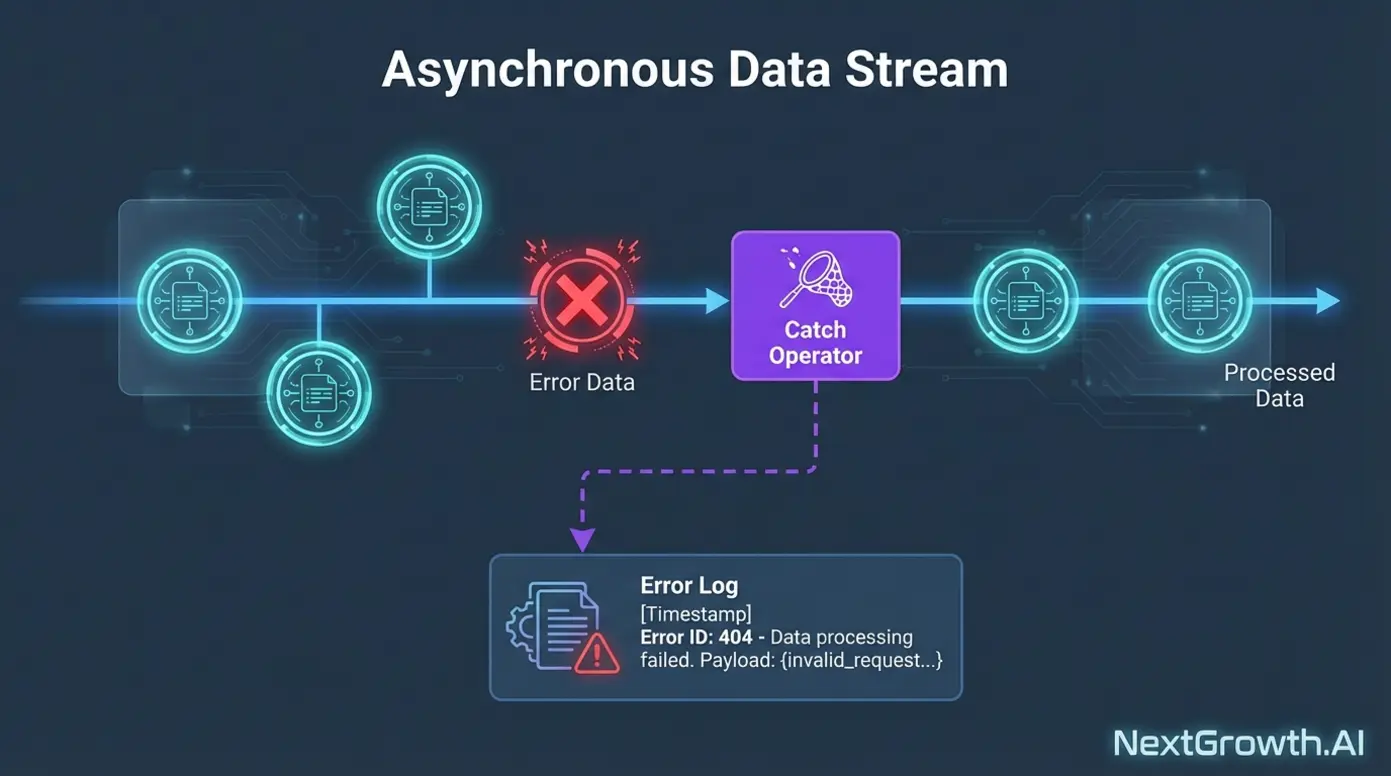
This image perfectly illustrates the concept. An error is isolated and handled, while the main process continues.
Part 2: Implementation Patterns in n8n
Let's translate the theory into execution.
Pattern 1: Tolerating Failure with Continue on Fail
This is the most direct way to prevent a non-critical node from stopping your workflow. You use it when a step adds value but is not required for the workflow's primary objective.
Use Case: A workflow enriches a lead. An optional step tries to find the lead's company logo. If the logo API fails, the lead record is still valuable and the process must continue.
The following video demonstrates exactly how to configure a node to continue processing a batch of items even when one fails, and how to route that specific failure for logging.
Why 99% of AI Automations Fail in Production
This clip from Nate Herk's video shows the practical application of the 'Continue on Error' setting, which is fundamental to tolerating failure.
Watch the sections starting from 'have your nodes continue on an error' (06:12 - 07:52) and the follow-up on routing errored items down a separate branch (08:19 - 09:57). This shows you how to both tolerate the failure and log it.
Pattern 2: Providing Fallbacks for Critical Failures
When a step is critical but has a less-optimal alternative, you design a fallback path. If the primary, high-fidelity process fails, the system "degrades" to the secondary, low-fidelity process.
Use Case: A workflow uses a powerful AI model (e.g., GPT-4) to summarize an article. If the OpenAI API is down, the workflow should fall back to a cheaper, faster model (e.g., a local Llama 3 instance or another provider) or even a simple keyword extraction algorithm. The output is less refined, but the core function (summarization) is still completed.
This pattern is typically implemented using the error output pin on a node or a full Try/Catch block. This article provides a clear, concise explanation.
n8n Workflow Debugging & Advanced Error Handling Guide
The 'n8n Workflow Debugging & Advanced Error Handling Guide' has a specific section on graceful degradation that perfectly describes this fallback pattern.
Read the section 'Advanced Error Recovery Strategies for Production Workflows', focusing specifically on the subsection for 'Graceful degradation'. Note the example of an AI node failure falling back to a default response.
For a video demonstration of this pattern in action, watch the following clip. It shows implementing a fallback to a completely different LLM provider when the primary one fails.
Why 97% of n8n Workflows Fail in Production (And How to Fix It)
The video 'Why 97% of n8n Workflows Fail in Production' by Bart Slodyczka provides an excellent real-world example of creating a fallback path for a critical AI agent.
Watch the segment explaining the 'continue using error output' to build a fallback (08:29 - 09:48). Also, note the use of the 'No Operation' node (09:48 - 10:20) to merge the success and fallback paths back together, a crucial step for continuing the workflow.
Part 3: Practical Task: Build a Resilient Lead Enrichment System
You are tasked with building a workflow that enriches a new lead with a company summary and logo. You must design it to be resilient to API failures.
Scenario: A webhook receives a JSON payload with a company name.{ "companyName": "Microsoft" }
Your Task: Build a single workflow, [SYSTEM] Resilient Lead Enrichment, that performs the following steps and adheres to graceful degradation principles.
Step 1: Set Up Your Tools
- Google Sheets: Create two sheets:
[DATA] Enriched Leads: Columns forCompanyName,Summary,LogoURL,EnrichmentMethod.[LOGS] Enrichment Failures: Columns forTimestamp,CompanyName,FailedStep,ErrorMessage.
- Mock APIs: We will use
httpstat.usto simulate API failures.- Primary AI API (sometimes fails):
https://httpstat.us/200?sleep=1000(success) andhttps://httpstat.us/503(failure). We'll use logic to switch between them. - Fallback Search API (reliable): We will use the free
https://g.tenor.com/v1/searchAPI as a stand-in for a simple, reliable search. You will need a free API key, which you can get from the Google Cloud Console.
- Primary AI API (sometimes fails):
Step 2: Build the Workflow [SYSTEM] Resilient Lead Enrichment
-
Trigger: Use a Webhook node. Set it to respond
Immediatelywith a confirmation message like{"status": "enrichment_queued"}. This reflects the async pattern you learned previously. -
Simulate Failure (Code Node): Add a Code node to randomly decide if our primary AI API will fail.
// Use Math.random() to simulate a 50% failure rate const willFail = Math.random() < 0.5; item.apiUrl = willFail ? 'https://httpstat.us/503' : 'https://httpstat.us/200?sleep=1000'; item.willFail = willFail; // for logging return item; -
Critical Step: Company Summary (Fallback Pattern)
- Add an HTTP Request node to call the primary "AI" API using the
apiUrlfrom the Code node. - Connect the success output (main pin) to a Set node. Set a field
Summaryto a static text like"Generated by Primary AI"andEnrichmentMethodto"Primary_AI". - Connect the error output (bottom pin) to a new branch for the fallback logic.
- Log Failure: Add a Google Sheets node to append a row to
[LOGS] Enrichment Failureswith details (Timestamp,CompanyName,FailedStep= "Primary AI",ErrorMessage). - Fallback Action: Add another HTTP Request node to call the Tenor Search API (our fallback). Search for the company name.
- Set Fallback Data: Add a Set node to set
Summaryto the first result from the Tenor search ({{ $json.body.results[0].content_description }}) andEnrichmentMethodto"Fallback_Search".
- Log Failure: Add a Google Sheets node to append a row to
- Merge Paths: Use a NoOp node (labeled "Merge Summary Paths") to merge the successful path and the fallback path. Now, your workflow has a
Summaryregardless of the primary API's status.
- Add an HTTP Request node to call the primary "AI" API using the
-
Non-Critical Step: Company Logo (Tolerate Failure Pattern)
- After the merge node, add an HTTP Request node to get the logo from Clearbit's free API:
https://logo.clearbit.com/{{ $json.body.companyName }}. - Go to the node's Settings tab. Set Continue On Fail to
true. - Connect the success output to a Set node that sets
LogoURLto the URL you just called. - Connect the error output to a Google Sheets node that logs the failure to
[LOGS] Enrichment Failures(FailedStep= "Logo API"). - Merge Paths: Use another NoOp node (labeled "Merge Logo Paths") to merge the success and error paths from the logo step.
- After the merge node, add an HTTP Request node to get the logo from Clearbit's free API:
-
Final Step: Store Result
- Add a Google Sheets node to append the final, consolidated data (
CompanyName,Summary,LogoURL,EnrichmentMethod) to the[DATA] Enriched Leadssheet.
- Add a Google Sheets node to append the final, consolidated data (
Deliverables
- Workflow JSON: Export your final workflow and provide the JSON code.
- Execution Proof (Screenshots):
- Trigger the webhook twice. Capture screenshots of your Google Sheets after one run where the "Primary AI" succeeded and another where it failed.
- Show the
[DATA] Enriched Leadssheet with two distinct rows (one withPrimary_AImethod, one withFallback_Search). - Show the
[LOGS] Enrichment Failuressheet with entries for both the "Primary AI" failure and a potential "Logo API" failure.
- Architectural Justification (Markdown Text):
- Explain precisely why a fallback pattern was necessary for the company summary.
- Justify why the simpler "tolerate failure" pattern was sufficient for the company logo.
- Describe the business impact of this resilient design compared to a workflow that would simply halt on failure.
Evaluation Criteria
- Pattern Implementation: Have you correctly used an error output pin for the fallback pattern and the
Continue On Failsetting for the tolerance pattern? - Data Integrity: Does the workflow correctly merge paths to ensure a consistent data structure is passed to the final logging step?
- Error Logging: Are failures from both critical and non-critical steps being correctly captured in the log sheet?
- Justification Clarity: Does your explanation demonstrate a deep understanding of when and why to apply each graceful degradation pattern, linking the technical choice to business resilience?
Conclusion
You have now implemented two distinct patterns for graceful degradation, moving your skills firmly into the realm of a systems architect. You've engineered a workflow that doesn't just work under ideal conditions but continues to deliver value even when its dependencies fail.
Key Takeaways:
- Graceful Degradation is a Design Choice: It's a deliberate strategy to contain the blast radius of inevitable failures.
- Use Fallbacks for Critical Steps: If a core function of your workflow has a viable "Plan B," use the error output or a
Try/Catchblock to implement it. - Tolerate Failures for Non-Critical Steps: For optional, "nice-to-have" steps, use
Continue On Failto log the error and proceed without interruption. - Always Merge Paths: After a split for error handling, bring the success and failure paths back together to ensure the rest of your workflow executes consistently.
You have now completed the "Resilient System Patterns" module. You can now design workflows that are not only modular and error-aware but also robust against partial system failure.
In our next module, Advanced Integrations and Data Flow, we will begin applying these resilience patterns to complex, real-world challenges, starting with how to securely manage OAuth2.0 authentication flows—a common point of failure where graceful degradation is essential.