Introduction
In the last lesson, you built a responsive, event-driven Project Status Monitor that provides real-time visibility into task completion. This was a critical step in creating a closed-loop system that informs stakeholders automatically. You've now automated both task creation and status tracking for your onboarding process.
This lesson addresses the final, crucial element for this portfolio project: system resilience. Your objective is to apply automatic retry mechanisms to critical communication steps, such as sending welcome emails.
Transient failures—temporary network hiccups, an email provider's momentary downtime—are not edge cases; they are operational certainties. A production-grade system anticipates and handles them gracefully. Today, you will refactor the client intake workflow to ensure that if a critical communication fails, the system doesn't just give up. It retries. This simple but powerful pattern is a fundamental differentiator between an amateur automation and a professional, reliable system.
1. The Reality of Transient Failures
Before implementing a solution, it's essential to understand the problem. External API calls are the most common failure point in any automation. However, not all failures are equal. A 401 Unauthorized error from a bad API key is a permanent failure that no amount of retrying will fix. But many other failures are transient.
Why Your n8n Automation Workflow Fails (& How to Fix It)
To understand the prevalence and nature of these failures, read the following section from the article 'Why Your n8n Automation Workflow Fails (& How to Fix It)'. It provides context on why building retry mechanisms is a non-negotiable part of professional system design.
Read the section titled 'Tip #2: Build Bulletproof Retry Mechanisms and Fallback Logic', focusing on the introduction and the subsection 'Setting Up Smart Retries'. Pay attention to the statistic that 60-70% of all API call failures are transient.
As the article highlights, a significant portion of errors will resolve themselves if you simply wait and try again. A system that doesn't account for this is brittle and unreliable.
2. Implementing Automatic Retries in n8n
n8n provides a straightforward, built-in mechanism to handle transient failures. For any node that performs an action, especially an external API call, you can configure it to automatically retry upon failure.
This video demonstrates exactly where to find and how to configure this setting.
Why 99% of AI Automations Fail in Production
Watch this brief segment from Nate Herk to see a practical demonstration of enabling the 'Retry on Fail' setting within an n8n node.
Watch from 03:32 to 04:58. Notice that this setting is available on virtually any node, from AI agents to core nodes like HTTP Request and Code. This is a universal n8n feature for building resilience.
The key is to apply this feature strategically to nodes that represent critical, external failure points.
Practical Task: Harden the Client Welcome Email
You will now apply this principle to the Client Onboarding workflow. The goal is to make the welcome email delivery more robust.
Scenario: The workflow is triggered when a new client submits their onboarding form. The system is supposed to send a welcome email via the Gmail API, but the API is temporarily unresponsive. Instead of failing immediately, your workflow must retry sending the email three times, with a 5-second interval between each attempt.
Phase 1: Isolate the Critical Node
- Locate your original
Client Onboarding Systemworkflow, specifically the part that handles the initial form intake and sends the welcome email. If you've integrated this into a larger workflow, you can create a simplified version for this task:Webhook(simulating form submission) ->Set(defining client name/email) ->Gmail(sending the welcome message).
- Identify the
Gmailnode (or whatever node you use for sending email) as the critical communication step. This is the node we will make resilient.
Phase 2: Configure the Retry Mechanism
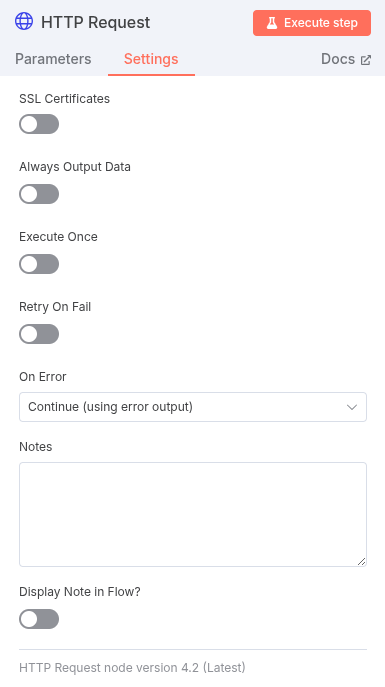
- Click on the
Gmailnode to open its parameters. - Navigate to the Settings tab (the gear icon).
- Enable the Retry on Fail toggle.
- Configure the parameters as follows, based on common best practices:
- Retries:
3 - Wait Time:
5000(milliseconds, i.e., 5 seconds)
- Retries:
- Save the workflow.
Your Gmail node is now configured to withstand temporary service outages. If the first attempt to send the email fails with a transient error (like a 503 Service Unavailable), n8n will wait 5 seconds and try again. It will repeat this up to three times before the execution ultimately fails.
Deliverables
- The complete JSON of your modified workflow containing the configured
Gmailnode.
Evaluation Criteria
- Correct Node Identification: The retry logic is applied to the correct node responsible for external communication.
- Correct Configuration: The
Retry on Failsetting is enabled with exactly3retries and a5000ms wait time. - Workflow Integrity: The rest of the workflow remains logically sound.
3. Advanced Resilience Patterns: A Preview
Built-in retries are your first and most effective line of defense. However, a systems architect also plans for when retries aren't enough. What should happen when a critical action fails even after three attempts?
This is where more advanced patterns come into play. You don't need to implement these now, but as a future architect, you must be aware of them.
- Fallback Logic: If a primary service (like Gmail) fails, the workflow can automatically switch to a secondary service or action. This is achieved using the node's error output.
Why Your n8n Automation Workflow Fails (& How to Fix It)
The same article you read earlier describes this 'Professional Fallback Strategy'. This is the next level of resilience: not just retrying, but having a Plan B.
Read the subsection 'The Professional Fallback Strategy'. Notice how it uses the node's second, red error output to trigger an alternative action (like a Slack alert) and then uses a Merge node to ensure the workflow continues regardless.
- Custom Retry with Exponential Backoff: For very high-stakes or rate-limited APIs, you might need more control than the built-in retry offers. A custom loop can be built to increase the wait time between each retry (e.g., 2s, 4s, 8s...). This prevents overwhelming a struggling service.

These advanced topics are covered in depth in Module 2: Resilient System Patterns, where you will implement Try/Catch blocks, dead-letter queues, and conditional error processing.
Conclusion
You have successfully implemented a fundamental principle of production-ready system design. By adding an automatic retry mechanism, you have transformed a brittle communication step into a resilient one. This single feature dramatically increases the reliability of your client onboarding system and demonstrates a mature approach to engineering.
Key Takeaways:
- Anticipate Failure: Production systems are not about hoping for the best; they are about planning for failure. Transient errors are a statistical certainty.
Retry on Failis Mandatory: For any critical external API call, n8n's built-in retry feature is the standard, first-line defense.- Resilience is Layered: Simple retries are the first layer. Fallbacks, custom logic, and error logging (which we'll cover later) are additional layers that create a truly robust system.
With this lesson, you have completed the technical build of the Client Onboarding Automation System. You have designed its architecture, automated task generation, implemented real-time status monitoring, and now fortified its critical communication channels.
Preview of the Next Module:
Your portfolio now contains a complete, robust, and valuable automation system. The focus now shifts from building the product to selling the service. In the next phase of your training, Module 8: Freelance Business Strategy, you will begin by learning how to craft a specialist positioning statement for your Mostaql profile to attract high-value clients.