Introduction
Welcome to the first lesson of our second module, "Core Decision-Making Tools." In the previous module, we explored the foundations of rational choice, focusing on how cognitive biases like confirmation bias, sunk cost fallacy, and loss aversion can derail our decisions. We saw how these mental shortcuts, part of our fast, intuitive System 1 thinking, can lead us to hold onto losing investments or misjudge risks.
Now, we shift from identifying the problems to implementing solutions. Today's lesson introduces a powerful, systematic tool to engage your deliberate System 2 thinking: the weighted decision matrix. Your goal is to learn how to use a weighted decision matrix to systematically evaluate complex choices with multiple criteria, such as a career change or a large purchase. This framework forces you to break down a complex decision into its components, evaluate them rationally, and arrive at a quantitative, defensible conclusion, helping to override the emotional pulls we've been discussing.
What Is a Decision Matrix?
When you're faced with a complex choice involving multiple options and many factors to consider—like buying a car, choosing a job, or even deciding where to live—it's easy to feel overwhelmed. You might over-focus on one factor (like salary) while neglecting others (like work-life balance), a common issue called "focusing bias."
A decision matrix is a simple table that helps you structure this complexity. It's a grid where you list your options against a set of criteria you care about. To see how this works and why "weighting" is a crucial upgrade, let's watch a short introductory video.
This video from EPM introduces the decision matrix, explains the limitation of a simple matrix, and shows why a weighted matrix is a more powerful tool.
Please watch from the beginning to 05:21. Pay attention to: The difference between a simple and a weighted matrix. The logic for adding a 'weight' column to your criteria.
As the video explained, the key insight is that not all criteria are equally important. A 20% salary increase might be far more important to you than a shorter commute, or vice versa. The weighted decision matrix allows you to bake these personal priorities directly into your analysis.
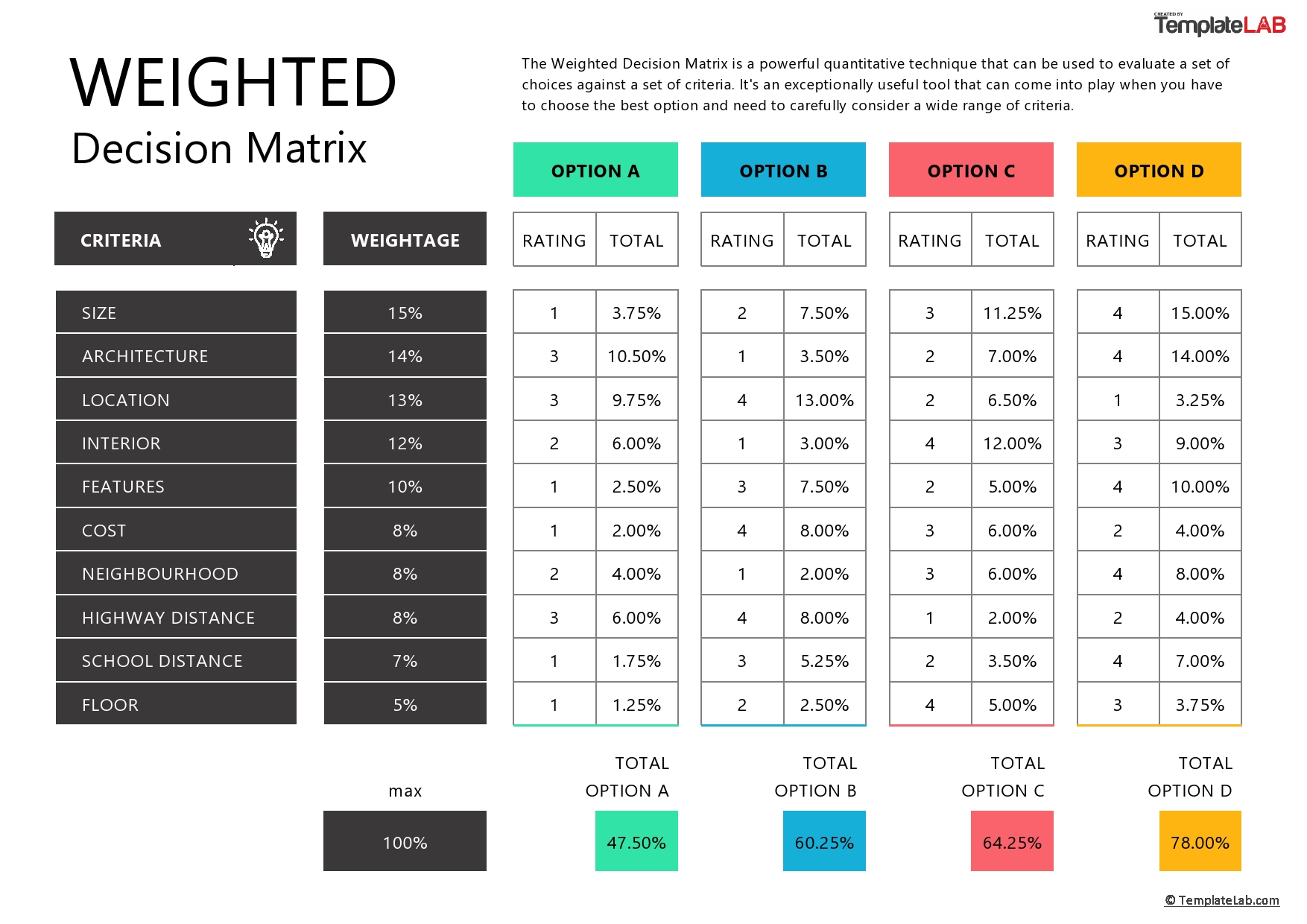
The Psychology: Why a Matrix Works
Using a matrix isn't just about organizing your thoughts; it's an active intervention against cognitive biases. By forcing you to list multiple criteria, it counteracts the focusing bias we mentioned. By making you evaluate each option on all criteria, it prevents you from falling for the first attractive option that comes along.
The author of the following article connects this tool directly to overcoming common mental errors in investing and entrepreneurship.
How the WADM Matrix Can Revolutionize Your Decision-Making ...
In his article 'How the WADM Matrix Can Revolutionize Your Decision-Making Process,' Davide Renna explains how this framework promotes rational thinking.
Read the introduction and the section titled 'Overcoming Cognitive Biases with the WADM Matrix'. Notice how the author frames the matrix as a way to replace emotional influence with a structured, rational system.
The process forces a slow, deliberate evaluation. This is System 2 thinking in action, providing a necessary check on System 1's emotional and intuitive responses.
How to Build and Use a Weighted Decision Matrix
Let's walk through the steps using a practical example that's highly relevant to your goals: deciding on a career change.
The following resource provides a clear, step-by-step walkthrough of building a matrix to decide between two new job offers and staying at your current job.
Weighted Decision Matrix Example - (And How To Make Your Own)
The article 'Weighted Decision Matrix Example – (And How To Make Your Own)' from 5amjoel.com gives a great, practical demonstration.
Read the sections 'Decision Matrix Example – Changing Jobs' and 'How a Weighted Decision Matrix Works'. Follow the process from defining the options to calculating the final score.
Let's break down the process into four clear steps, as outlined in the article:
-
List Your Options and Criteria:
- Options: Be specific. What are the exact choices you are comparing? (e.g., Job Offer A, Job Offer B, Stay at Current Job).
- Criteria: Brainstorm all the factors that matter to you. Don't hold back. Examples for a job change could include: Compensation, Company Culture, Future Growth, Work-Life Balance, Commute Time, Interest in the Work.
-
Assign Weights to Your Criteria:
- This is the most personal step. On a scale (e.g., 1 to 10), how important is each criterion to you? A
10for "Company Culture" and a4for "Future Growth" means you prioritize a healthy work environment over long-term advancement at this moment in your life. Be honest with yourself here.
- This is the most personal step. On a scale (e.g., 1 to 10), how important is each criterion to you? A
-
Rate Each Option Against Each Criterion:
- Go through your matrix cell by cell. On a consistent scale (e.g., 1 to 10), how well does each option satisfy each criterion? For example, for the "Compensation" criterion, the highest-paying job would get the highest rating.
-
Calculate the Final Scores:
- For each cell, multiply the Rating by the Weight to get the weighted score.
- Sum the weighted scores for each option's column. The option with the highest total score is your rational winner.
A Practical Hurdle: Normalizing Different Units
The process seems simple, but a practical challenge arises when your criteria use different units. How do you compare a salary (in dollars), a commute (in minutes), and a location (which you rate qualitatively)? You need to convert them all to a consistent, normalized scale (e.g., 0 to 100).
Given your background in computer science and development, you'll appreciate this more technical, formula-driven approach to normalization. The next video demonstrates how to do this in Excel.
How to Create a Decision Matrix in Excel
In 'How to Create a Decision Matrix in Excel,' Calon Heindel provides a detailed guide on translating raw data into comparable scores.
Watch the section from 03:13 to 07:21. You don't need to memorize the Excel formulas, but focus on the logic of how he converts different types of data (salary, distance, time) into a uniform 0-100 score. Pay special attention to how he handles inverse relationships, where a lower number is better (like commute time).
The key idea is to define your "ideal" for each criterion and score each option relative to that ideal. For something like commute time, where less is better, the formula is inverted to correctly reflect your preference. This level of detail transforms the matrix from a rough guide into a more precise analytical tool.
Putting It to Use
Now that you have the full method, you can start applying it. For your convenience, the author of the 5amjoel article provides a ready-to-use template.
You can find the link to the Google Sheets template in the section "Weighted Decision Matrix Template" in the 5amjoel.com article we looked at earlier. I recommend making a copy for your own use.
Quick Exercise:
Think about a significant purchase you are considering (or have made in the past), for example, a new laptop, a phone, or even a car. On a piece of paper or in a blank text file:
- List at least two options.
- List at least four criteria you would use to evaluate them (e.g., Price, Performance, Battery Life, Design).
- Assign a personal weight (1-10) to each criterion.
You don't need to complete the full matrix, but this initial setup is the most crucial part of the process. It forces you to define what truly matters in the decision.
Conclusion
In this lesson, you have learned how to construct and use a weighted decision matrix to bring structure and objectivity to complex choices.
Key Takeaways:
- A weighted decision matrix is a tool for systematically comparing multiple options against multiple criteria.
- It works by forcing you to:
- Define your options and the criteria for judging them.
- Weight each criterion based on your personal priorities.
- Rate each option against each criterion.
- Calculate a final score to identify the most rational choice.
- This process engages System 2 thinking, helping to mitigate emotional responses and cognitive biases like focusing bias.
- For a robust analysis, you must normalize data from different units (like money, time, or qualitative ratings) into a single, consistent scale.
This matrix is an excellent tool for comparing a set of defined options at a single point in time. However, many decisions also have consequences that unfold over weeks, months, and years. In our next lesson, we will explore the 10/10/10 framework, a complementary tool designed to help you think through the long-term impact of your choices.