Introduction
Welcome back! In the last lesson, you learned how to use pip to install third-party libraries, giving you access to an incredible ecosystem of powerful tools. This was a crucial step in moving from writing standalone scripts to building complex applications by leveraging the work of the global Python community.
Many of these powerful libraries, especially in AI and data science, are designed to operate on collections of data. Before you can use a library like NumPy or pandas to analyze data, you first need to prepare that data—cleaning it, transforming it, and filtering it into the right shape. Today, we'll focus on a powerful and elegant way to do just that.
This lesson addresses the learning outcome: write list comprehensions to create and transform lists concisely. You will learn a "Pythonic" technique that allows you to create new lists from existing ones in a single, readable line of code. Mastering list comprehensions is a hallmark of an effective Python programmer and will be an invaluable tool as you begin working with larger datasets.
From for Loops to Comprehensions
Imagine you have a list of numbers and you want to create a new list containing the square of each number. With your current knowledge, you'd likely use a for loop.
numbers = [1, 2, 3, 4, 5]
squares = []  # 1. Create an empty list
for number in numbers:  # 2. Loop through the source list
    squares.append(number * number)  # 3. Append the transformed item

print(squares)


# Output: [1, 4, 9, 16, 25]
This works perfectly well, but it involves some boilerplate code: initializing an empty list and then explicitly calling .append() in each iteration. Python provides a more concise and often more efficient way to achieve the same result: a list comprehension.
A list comprehension lets you define the contents of a new list in a single, descriptive line.
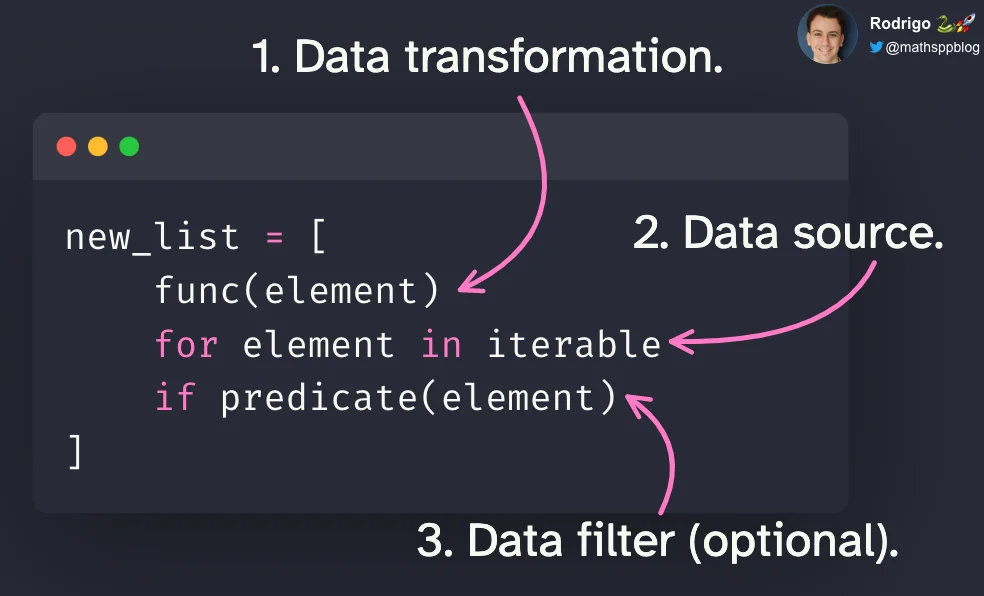
The basic syntax is: [expression for member in iterable]
Let's see how our for loop example looks as a list comprehension:
numbers = [1, 2, 3, 4, 5]
squares = [number * number for number in numbers]

print(squares)


# Output: [1, 4, 9, 16, 25]
Notice how the logic reads almost like a sentence: "create a new list with number * number for each number in numbers."
To see this side-by-side comparison in action, the following video provides a clear walkthrough.
Python Tutorial: Comprehensions - How they work and why you should be using them
The video "Python Tutorial: Comprehensions" by Corey Schafer provides an excellent, step-by-step introduction. We'll start with the most basic form of a comprehension, which simply copies a list.
Watch the video from the beginning until 02:33. Pay close attention to how the structure of the for loop is rearranged to form the list comprehension.
Transforming and Filtering Elements
The real power of list comprehensions comes from their flexibility. You can perform complex transformations on elements and selectively filter which elements to include.
1. Transformation
The expression part of the comprehension can be any valid Python expression. You can call functions, perform arithmetic, or use methods on the elements.
Let's continue with Corey Schafer's tutorial to see how to apply transformations.
Python Tutorial: Comprehensions - How they work and why you should be using them
This segment demonstrates how to transform each element of a list, using the example of squaring numbers.
Watch from 02:20 to 05:10. The video also briefly mentions map and lambda, which are alternative ways to achieve this. While we won't cover them in detail, it's useful to know they exist and that list comprehensions are often considered more readable.
This isn't limited to numbers. You can also transform strings or any other data type.
names = ["ada", "grace", "charles"]
capitalized_names = [name.capitalize() for name in names]
print(capitalized_names)


# Output: ['Ada', 'Grace', 'Charles']
2. Filtering
You can add an if statement to the end of a list comprehension to filter the source iterable, including only the elements that meet a certain condition.
The syntax becomes: [expression for member in iterable if condition]
Let's see how this works.
Python Tutorial: Comprehensions - How they work and why you should be using them
This next clip shows you how to add a conditional to your list comprehension to filter the elements you want to include in the new list.
Watch from 05:10 to 07:29. Notice how the if statement from the traditional for loop is placed at the end of the list comprehension.
Here's a combined example: let's create a list of the squares of only the odd numbers from our original list.
numbers = [1, 2, 3, 4, 5, 6, 7, 8]
squares_of_odds = [n * n for n in numbers if n % 2 != 0]
print(squares_of_odds)


# Output: [1, 9, 25, 49]
Advanced Comprehensions
List comprehensions can handle even more complexity, allowing you to write powerful one-liners.
Nested Loops
You can include multiple for clauses to iterate over nested lists or to create combinations of elements from multiple lists. The loops are nested from left to right.
[expression for outer_loop_var in outer_iterable for inner_loop_var in inner_iterable]
This is useful for tasks like "flattening" a list of lists (a matrix) or creating pairs.
Python Tutorial: Comprehensions - How they work and why you should be using them
The final clip from this video explains how to use nested loops within a single list comprehension. This is a more advanced technique but very powerful.
Watch from 07:29 to 10:22. Focus on how the order of the for loops in the comprehension matches the nesting order in the traditional loop structure.
Conditional Expressions (if-else)
What if you want to transform an element differently based on a condition, rather than filtering it out? For this, you can use a conditional expression (also known as a ternary operator) in the expression part of the comprehension.
The syntax is: [value_if_true if condition else value_if_false for member in iterable]
For example, let's create a list where we label numbers as 'even' or 'odd'.
numbers = [1, 2, 3, 4, 5]
labels = ['even' if n % 2 == 0 else 'odd' for n in numbers]
print(labels)


# Output: ['odd', 'even', 'odd', 'even', 'odd']
Notice the if-else structure is now at the beginning of the comprehension. This is a different pattern from simple filtering.
To explore this and other nuances further, the following article is a great reference.
When to Use a List Comprehension in Python
The article "When to Use a List Comprehension in Python" from Real Python provides a deep dive into advanced conditional logic.
Read the section titled "Filter Values From a List." Focus on the difference between placing the if at the end (for filtering) and using a conditional expression ... if ... else ... at the beginning (for changing values).
Your Turn: Processing a File List
Now it's time to apply what you've learned. Imagine you have a list of filenames from a directory, and you need to process them.
Instructions (10 minutes):
You are given the following list of filenames:
filenames = ["document1.PDF", "image.JPEG", "archive.zip", "report.pdf", "notes.TXT", "data.csv"]
Write three separate list comprehensions to do the following:
- Create a list named
pdf_filesthat contains only the filenames that end with.pdf(case-insensitively). - Create a list named
normalized_filenameswhere all filenames are converted to lowercase. - Combine these ideas: create a list named
clean_reportscontaining only the lowercase filenames of the PDF reports.
Try to solve this on your own before looking at the solution.
Click to see a possible solution
filenames = ["document1.PDF", "image.JPEG", "archive.zip", "report.pdf", "notes.TXT", "data.csv"]


# 1. Create a list of PDF files (case-insensitive)
pdf_files = [fname for fname in filenames if fname.lower().endswith('.pdf')]
print(f"PDF files: {pdf_files}")


# Expected Output: PDF files: ['document1.PDF', 'report.pdf']


# 2. Create a list of all filenames in lowercase
normalized_filenames = [fname.lower() for fname in filenames]
print(f"Normalized filenames: {normalized_filenames}")


# Expected Output: Normalized filenames: ['document1.pdf', 'image.jpeg', 'archive.zip', 'report.pdf', 'notes.txt', 'data.csv']


# 3. Create a list of clean, lowercase PDF filenames
# This can be built upon the logic from the first comprehension.
clean_reports = [fname.lower() for fname in filenames if fname.lower().endswith('.pdf')]
print(f"Clean reports: {clean_reports}")


# Expected Output: Clean reports: ['document1.pdf', 'report.pdf']
Beyond Lists and Knowing the Limits
The concept of comprehensions is a general one in Python. You can use a similar syntax to create sets and dictionaries. This aligns with your goal of becoming a polymath—recognizing a core principle and seeing how it applies in different contexts.
- Set Comprehension: Uses curly braces
{}and results in a set with no duplicate elements.numbers = [1, 2, 2, 3, 3, 3] unique_squares = {n * n for n in numbers} print(unique_squares) # Output: {1, 4, 9} - Dictionary Comprehension: Also uses
{}but requires akey: valuepair in the expression.numbers = [1, 2, 3] square_map = {n: n * n for n in numbers} print(square_map) # Output: {1: 1, 2: 4, 3: 9}
Finally, while comprehensions are powerful, they are not always the best choice. If the logic becomes too complex with multiple nested loops and conditions, a traditional for loop is often more readable. As you build your skills, you will develop an intuition for when a comprehension is elegant and when it is obtuse. Always prioritize clarity.
Conclusion
In this lesson, you've added a powerful and expressive tool to your Python skillset. You now understand how to use list comprehensions to create and transform lists in a way that is concise, readable, and efficient.
Key Takeaways:
- List comprehensions provide a compact alternative to
forloops for creating lists. - The basic syntax is
[expression for member in iterable]. - You can add an
ifclause at the end to filter elements from the source iterable. - You can use a conditional expression (
... if ... else ...) at the beginning to transform elements based on a condition. - The concept extends to set and dictionary comprehensions, demonstrating a general principle in Python.
- Readability is key: for highly complex logic, a standard
forloop might be a better choice.
Preview of the Next Lesson:
You've just learned how to manipulate Python lists efficiently. In the next lesson, we will install and use NumPy, the foundational library for numerical computing in Python. You will learn how to create and manipulate NumPy arrays. You'll find that many NumPy operations feel like a supercharged version of list comprehensions—applying operations across entire arrays at once with incredible speed. Your new skill in thinking about whole-collection transformations will be directly applicable.