Hello! Welcome back to our course on Data Structures and Algorithms in Java.
In the last lesson, we explored the foundational building blocks of the Java Collections Framework: List, Set, and Map. We saw that some implementations, like TreeSet and TreeMap, automatically keep their elements in a sorted order. This likely raised a question: How does Java know how to sort these elements, especially when we use our own custom objects?
Today, we will answer that question directly. This lesson focuses on implementing the Comparable interface and custom Comparators. Mastering these two tools will give you precise control over sorting logic, a skill that is fundamental for solving a vast range of algorithmic problems and a frequent topic in technical interviews.
Natural Ordering with the Comparable Interface
Java classes that have a clear, single, "natural" way of being sorted can implement the java.lang.Comparable interface. Think of numbers (sorted numerically) or strings (sorted lexicographically). These classes already implement Comparable. For our own custom classes, we must do this ourselves.
The Comparable interface has just one method: int compareTo(T other).
The logic of this method, often called its "contract," is as follows:
- It should return a negative integer if the current object (
this) is "less than" theotherobject. - It should return zero if
thisobject is "equal to" theotherobject. - It should return a positive integer if
thisobject is "greater than" theotherobject.
Once a class implements Comparable, you can sort arrays or lists of its objects using Arrays.sort() or Collections.sort() without any extra arguments. It also allows the class to be used as a key in a TreeMap or an element in a TreeSet.
Implementing Comparable
Let's imagine we're building a game and have a Player class. We want their natural sorting order to be based on their score, from lowest to highest.
public class Player implements Comparable<Player> {
    private String name;
    private int score;

    public Player(String name, int score) {
        this.name = name;
        this.score = score;
    }

    public String getName() { return name; }
    public int getScore() { return score; }

    @Override
    public String toString() {
        return name + ": " + score;
    }

    // Implementing the compareTo method for natural ordering (by score)
    @Override
    public int compareTo(Player other) {
        // Ascending order
        return this.score - other.score;
    }
}
The line return this.score - other.score; is a common and concise way to implement compareTo for numeric fields.
- If
this.scoreis less thanother.score, the result is negative. - If they are equal, the result is zero.
- If
this.scoreis greater thanother.score, the result is positive.
This perfectly matches the contract. For non-numeric fields like strings, you can delegate the call, for example: return this.name.compareTo(other.name);.
A quick note on safety: The subtraction trick works well, but for very large integer values, it can lead to overflow. A safer, albeit more verbose, alternative is Integer.compare(this.score, other.score).
To see a detailed walkthrough of this concept, let's watch a video.
Interview Question | Comparable vs Comparator in Java
This video from Telusko clearly explains why Java can't sort custom objects by default and how implementing the Comparable interface provides the necessary logic.
Watch from 02:27 to 08:20. The example uses a Laptop class being sorted by RAM, but the principle is identical to our Player example. Pay close attention to the explanation of the compareTo method's return value (positive, negative, zero) and how it dictates the sorting order.
Custom Sorting with the Comparator Interface
The Comparable interface is great but has a limitation: it only defines one way to sort an object. What if we want to sort our players by name? Or by score in descending order?
For this, we use the java.util.Comparator interface. A Comparator is an external object whose sole purpose is to define a specific sorting logic. It allows for multiple, custom sorting strategies for a single class.
The key method is int compare(T o1, T o2). Its contract is similar to compareTo:
- Return a negative integer if
o1is "less than"o2. - Return zero if
o1is "equal to"o2. - Return a positive integer if
o1is "greater than"o2.
You then pass an instance of your Comparator to the sort method, e.g., Collections.sort(playerList, myComparator);.
Implementing Comparator with Lambda Expressions
Before Java 8, Comparators were often implemented as separate classes or verbose anonymous inner classes. Today, the standard and expected approach, especially in interviews, is to use lambda expressions. Since Comparator is a functional interface (an interface with a single abstract method), it's a perfect fit for this concise syntax.
Let's create a Comparator to sort our Player objects by name:
import java.util.ArrayList;
import java.util.Collections;
import java.util.Comparator;
import java.util.List;

public class SortingExample {
    public static void main(String[] args) {
        List<Player> players = new ArrayList<>();
        players.add(new Player("Alice", 950));
        players.add(new Player("Bob", 1200));
        players.add(new Player("Charlie", 950));

        // Create a Comparator to sort by name using a lambda expression
        Comparator<Player> sortByName = (p1, p2) -> p1.getName().compareTo(p2.getName());

        // Sort the list using the custom comparator
        Collections.sort(players, sortByName);

        System.out.println("Players sorted by name: " + players);
        // Output: Players sorted by name: [Alice: 950, Bob: 1200, Charlie: 950]
    }
}
This is powerful because you can define any number of Comparators for different needs on the fly.
#95 Comparator vs Comparable in Java
Let's watch another great video from Telusko that walks through creating a Comparator for a custom Student class and then refactors it into a concise lambda expression. This demonstrates the modern approach you should use.
First, watch from 07:42 to 11:19, where a Comparator is used to sort Student objects by age. Then, jump to 14:11 - 15:41 to see how this verbose code is beautifully simplified using a lambda expression. This is a very common and powerful technique.
Chaining Comparators for Complex Sorting
A common requirement is to sort by a primary criterion, and then by a secondary criterion if the primary one is tied. For example: "Sort players by score in descending order. If scores are tied, sort by name alphabetically."
You could write this logic inside a single lambda, but Java 8 provides a much more elegant and readable way: chaining comparators with thenComparing.
// Comparator for score in descending order
Comparator<Player> sortByScoreDesc = Comparator.comparingInt(Player::getScore).reversed();

// Comparator for name in ascending order
Comparator<Player> sortByNameAsc = Comparator.comparing(Player::getName);

// Chain them: sort by score descending, then by name ascending
Comparator<Player> compositeSorter = sortByScoreDesc.thenComparing(sortByNameAsc);

// Using it with the previous 'players' list
players.add(new Player("David", 1200));
Collections.sort(players, compositeSorter);

System.out.println("Players sorted by score (desc) then name (asc): " + players);
// Output: [Bob: 1200, David: 1200, Alice: 950, Charlie: 950]
// Note: Bob comes before David, and Alice before Charlie.
This approach is highly declarative, easy to read, and less error-prone. It's a hallmark of modern, high-quality Java code.
Comparable vs. Comparator: A Summary
Let's consolidate the key differences.
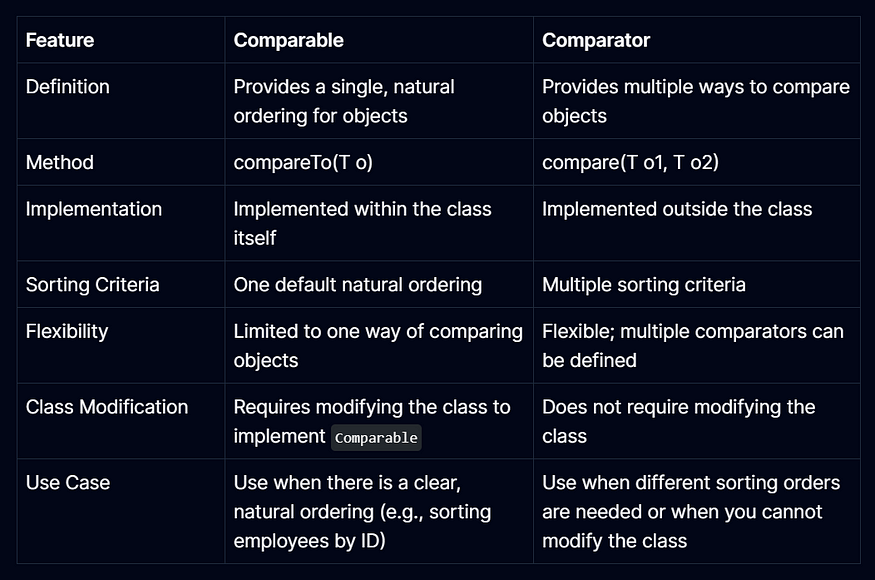
In short:
Comparable: For a single, natural sorting order. The logic is inside the class being sorted.Comparator: For multiple, custom sorting orders. The logic is outside the class. Use it when you need flexibility or cannot modify the source code of the class you want to sort.
Comparable and Comparator in Java Example
For a final text-based summary, this article from DigitalOcean clearly lays out the differences in a simple list format.
Read the final section titled 'Comparable vs Comparator'. It provides a numbered list that concisely reinforces the key distinctions we've discussed.
Test your understanding!
You have a Product class: class Product { String name; double price; int reviewCount; }.
- How would you modify the
Productclass so that its "natural" sorting order is bypricein ascending order? - Write a lambda expression for a
Comparatorthat sorts products by theirreviewCountin descending order. - Write a chained
Comparatorthat sorts products bynamealphabetically, but if two products have the same name, the one with the higherpricecomes first.
Show answer
-
Natural Order (by price): Implement
Comparable<Product>and overridecompareTo.class Product implements Comparable<Product> { // ... fields, constructor, getters ... @Override public int compareTo(Product other) { // Using Double.compare is the safest way for doubles return Double.compare(this.price, other.price); } } -
Comparator for
reviewCount(descending):Comparator<Product> byReviewDesc = (p1, p2) -> Integer.compare(p2.getReviewCount(), p1.getReviewCount()); // Alternative using Comparator helper methods Comparator<Product> byReviewDesc2 = Comparator.comparingInt(Product::getReviewCount).reversed(); -
Chained Comparator (name ascending, then price descending):
Comparator<Product> byName = Comparator.comparing(Product::getName);
Comparator<Product> byPriceDesc = Comparator.comparingDouble(Product::getPrice).reversed();

Comparator<Product> compositeSorter = byName.thenComparing(byPriceDesc);
Conclusion
You now have the tools to define any sorting logic for your objects in Java. This is a crucial skill for ordering data correctly, which is a prerequisite for many advanced algorithms and a common requirement in interview problems.
Key Takeaways:
- Use
Comparableto define a single, natural ordering for a class by implementing thecompareTomethod. - Use
Comparatorto define multiple, external sorting strategies by implementing thecomparemethod. - Prefer lambda expressions and method chaining (
comparing,thenComparing,reversed) for creating modern, concise, and readableComparators. Collections.sort()andArrays.sort()will use thecompareTomethod by default if noComparatoris provided.
Preview of the next lesson: Now that we're getting into problem-solving, speed matters. In competitive programming, reading large inputs efficiently is key. In our next lesson, we will focus on a very practical skill: "Handle fast input/output in Java using BufferedReader and StringBuilder for competitive programming scenarios." This will equip you with the standard tools used to avoid "Time Limit Exceeded" errors on online judges.